bonienl
Community Developer
-
Joined
-
Last visited
Everything posted by bonienl
-
Two interfaces with the same MAC address is a no go and never works.
-
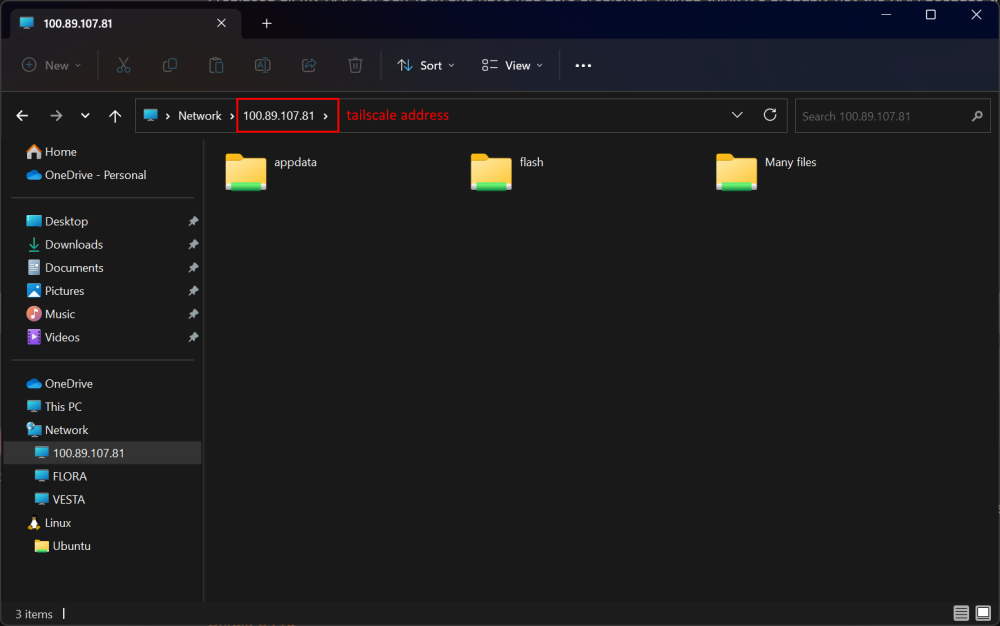
You need to disable "netbios" to make SMB work over tunnel interfaces. The service binding to interfaces reveals the shortcomings of netbios: (1) it does not support IPv6 and (2) it wants to use broadcast addresses. Hence tunnels are excluded from Samba when netbios is enabled to prevent errors. Here is a picture of using SMB over tailscale
-
Your issue is a double IP assignment. Both the "Main" interface and "NIC 2" interface have the same IP address: 10.13.12.50 You need to assign unique addresses, e.g. NIC2 = 10.13.12.51
-
You can use the plugin “Dynamix Factory Reset”
-
These settings actually relate to netbios and are okay to use. You need to enable netbios to make this work. There are a number of downsides using netbios: netbios is not secure netbios does not support ipv6 netbios uses broadcast, this doesn’t work over remote tunnels, like wireguard or tailscale
-
The browser uses the following to determine the number of columns in black/white themes: div.grid{display:grid;grid-template-columns:repeat(auto-fit,minmax(610px,1fr));column-gap:30px} This means 3 columns = 3 x 610 + 2 x 30 = 1890px
-
I made several fixes and improvements for the next release. Perhaps you can try it when it becomes available (soon)
-
IPv6 works a bit different and doesn't like loops (it is doing multicast). As I said, change the bonding mode for testing purposes, it will give you a better view what to look for.
-
We wonder too
-
As a test you can change the bonding mode to "Active-Standby" as see if the NFS service is able to bind to the interface (this is new in 6.12.0) The error message you receive is because both sides of the bond are initially in different states and the bond acts as a layer 2 connection with one or more loops. It could be a timing issue (perhaps configurable), but I am not familiar with Mikrotik.
-
How do you access the GUI, by name or by IP address? Try IP address and see if that makes a difference. I see in your configuration that you use IPv6 link local addresses for the DNS servers. I don't know if that works, the usual approach is to take the regular IPv6 address of your router (or alternatively one of the public IPv6 DNS servers from google or cloudflare)
-
Please let us know what should be removed or altered. Always willing to adjust diagnostics and remove private stuff.
-
You have set up bonding with LACP, but it returns an error. Does your switch support LACP and is it properly configured? Jun 18 01:49:15 Pikachu kernel: br0: received packet on bond0 with own address as source address (addr:5c:ba:2c:25:c4:48, vlan:0) The network error is the reason for not accepting the IPv6 address.
-
If you only complain but don't provide more detailed information (diagnostics), we can't do much. 6.12.0 is a lot strickter and unfortunately people start to discover now incorrect settings from the past. NFS and IPv6 should work. Here is an extract from my log Jun 17 16:50:06 vesta root: Starting NFS server daemons: Jun 17 16:50:06 vesta root: /usr/sbin/exportfs -r Jun 17 16:50:06 vesta root: /usr/sbin/rpc.nfsd -u -s -H 10.0.101.11 -H 2a02:a448:32d5:101:xxxx:xxxx:xxxx:xxxx -H 10.253.0.1 -H 127.0.0.1 -H ::1 8 Jun 17 16:50:07 vesta root: /usr/sbin/rpc.mountd Jun 17 16:50:07 vesta kernel: NFSD: Using UMH upcall client tracking operations. Jun 17 16:50:07 vesta kernel: NFSD: starting 90-second grace period (net f0000000)
-
You have a routing loop. In your network configuration make sure the gateway for br0 has a LOWER metric value then the gateway for br1.
-
Please start a new support ticket. This is a completely different problem you have. Your USB device is corrupted.
-
When you close all tiles in a column, then the column isn't visible and the GUI reduces the number of columns displayed. Use the "Reset" function under Management Tools (wrench icon) to restore original.
-
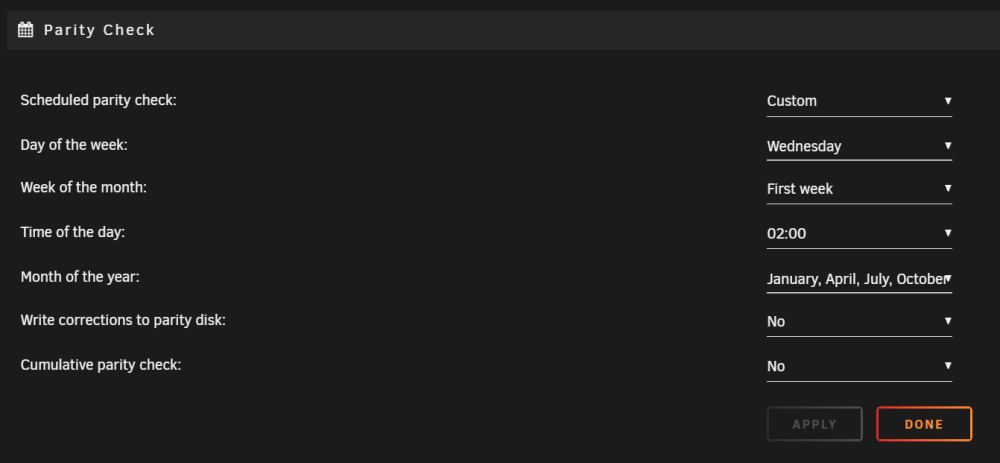
You better use the "custom" setting for this. Here is my setting, which runs a check every four months on the first wednesday of the month (change the months as needed)
-
Not every month has 31 days, those months are skipped. Change "31" to "Last day" and it will do a montly check.
-
Ok. @ljm42 beat me. Please follow his advice and change the PORTSSL value.
-
Please also include the result of # cat /etc/nginx/conf.d/servers.conf
-
A bug of firefox browser, using other browsers like Chrome, Edge, Safari or Brave it displays correctly.
-
The number of support tickets is already quite high, making S3 part of Unraid will see that number going through the roof. Limetech simply doesn’t have the resources to handle that.
-
The capacity is as reported by your BIOS, only a fix in the BIOS of your motherboard can resolve it.
-
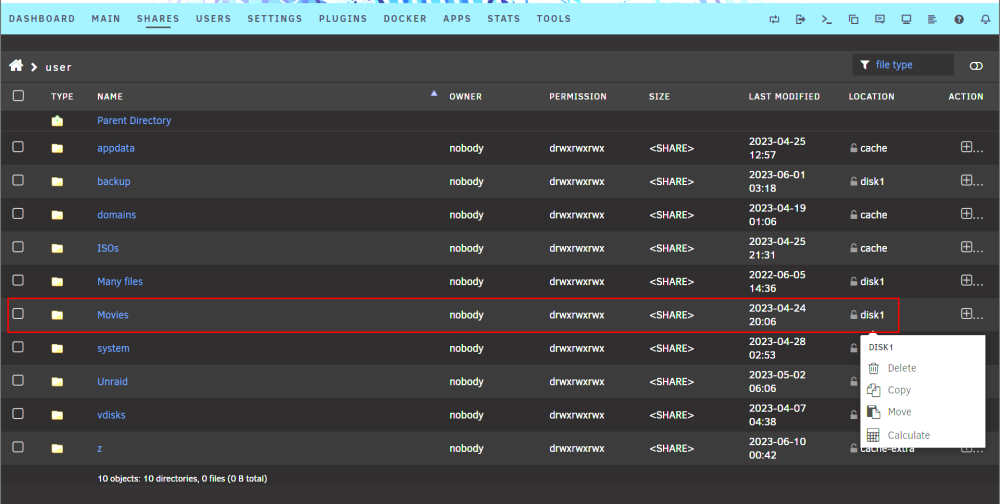
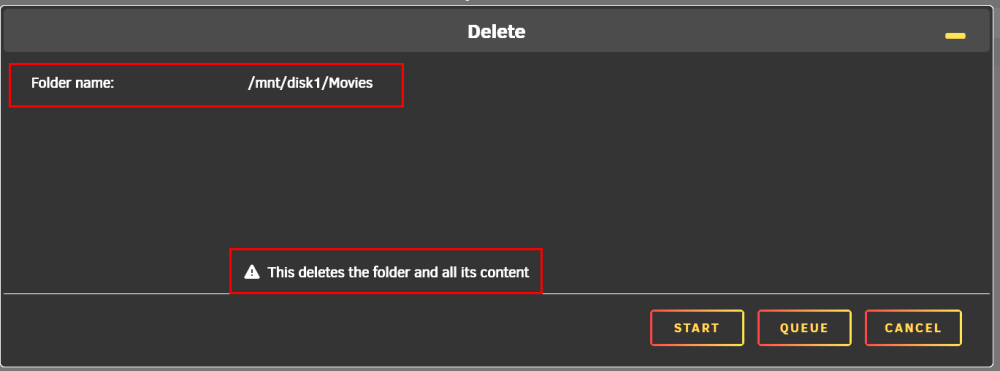
This function operates on the selected folder of the selected disk. Not the entire disk. Example This will delete the folder "Movies" from "disk1"