





jortan
Members
-
Joined
-
Last visited
Everything posted by jortan
-
Thanks for clarifying. No issues using the script myself, but I guess my question would then become "is there any interest in providing this functionality in the unRAID System Devices GUI" - even if this was a separate column of checkboxes for passing through SR-IOV virtual function devices? edit: Then again, maybe this is better suited to a separate SR-IOV plugin that could handle some of the janky requirements for getting VFs enabled in the first place

-
Interesting, this only seems to be required when you first assign a VF to a KVM guest. if the VFs are not bound to vfio and you start a VM that already has the VF assigned, KVM or unRAID seem to bind that specific VF for you: That said it would be really nice if this feature "just worked" for SR-IOV and just seems to be an issue of timing, so presumably not that difficult to fix? I've posted about this in the new vfio-pci thread for 6.9: edit: Added option for passing Virtual Function devices to vfio via unRAID GUI in my post above.

-
I've enabled SR-IOV on a network adapter via modprobe: /boot/config/modprobe.d/mlx4_core.conf options mlx4_core num_vfs=4 This creates four Virtual Function devices that can be assigned to multiple virtual machines for direct hardware access (without requiring a dedicated NIC) This also makes them available to vfio-pci passthrough function: However this fails Loading config from /boot/config/vfio-pci.cfg BIND=0000:03:00.1|15b3:1002 0000:03:00.2|15b3:1002 0000:03:00.3|15b3:1002 0000:03:00.4|15b3:1002 --- Processing 0000:03:00.1 15b3:1002 Error: Device 0000:03:00.1 does not exist, unable to bind device --- Processing 0000:03:00.2 15b3:1002 Error: Device 0000:03:00.2 does not exist, unable to bind device --- Processing 0000:03:00.3 15b3:1002 Error: Device 0000:03:00.3 does not exist, unable to bind device --- Processing 0000:03:00.4 15b3:1002 Error: Device 0000:03:00.4 does not exist, unable to bind device --- vfio-pci binding complete This is entirely expected as the devices didn't exist when vfio-pci.cfg was processed. Is there any interest in making this functionality work for SR-IOV - either by re-attempting the binding after a delay should it fail - or re-attempting failed bindings on array start, etc? Edit: Or a checkbox "Reattempt bindings on array start for SR-IOV" ?

-
Thanks for the heads-up. I have a dual 82599 on the way for my primary unRAID server, so it sounds like that will make things a lot less painful. ps: I think this: should be this? wget 'https://raw.githubusercontent.com/andre-richter/vfio-pci-bind/master/vfio-pci-bind.sh'; mv vfio-pci-bind.sh /boot/config/
-
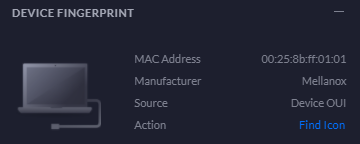
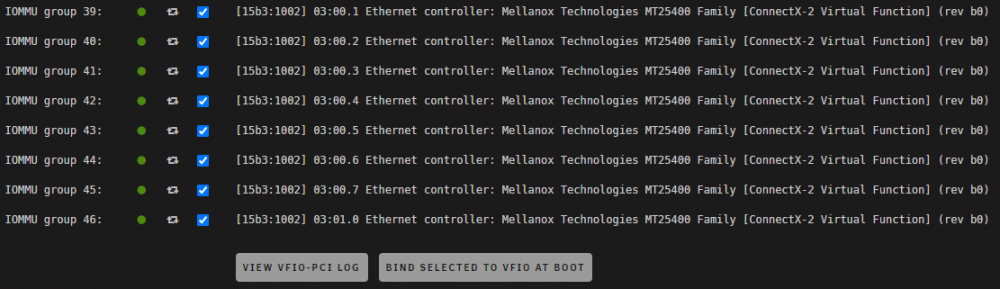
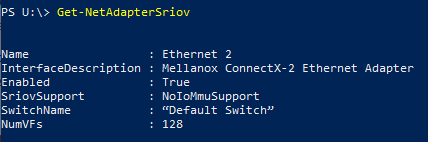
@BVD Thanks for this! Mellanox ConnectX-2 Firmware Upgrade / unRAID config for SR-IOV Don't buy these cards! (see post below). I already had a handful of these so I wanted to make use of them. If you're in the same boat, or you can get them very cheap, then below are my notes for getting them to work. SR-IOV is not supported by these cards as sold and requires reconfiguration/firmware update to a version beyond anything supported by Mellanox. Your mileage may vary. Some of what's below is repeating @BVD's post, but I thought it might be useful to have a set of complete steps to get this working specifically for Mellanox adapters. I believe these should be the same steps for ConnectX-3 cards, they may not need the firmware update though. If you want to upgrade firmware on them, make sure you use fw-ConnectX3-rel.mlx instead! Mellanox firmware updating is a bit janky and Mellanox/nVidia sure as hell don't make it easy to find firmware downloads for unsupported adapters. These are my notes from doing this on a Windows machine for MNPA19-XTR ConnectX-2 adapters. Grab latest firmware fw-ConnectX2-rel-2_10_0720.zip from: https://drive.google.com/open?id=1Vdaup5hDYW9XItEaVqDDeJDMxlk0dp-B (not my link, PM me if it stops working) Extract the zip to a folder, open a command prompt as Administrator, and cd to that folder. mst status This should return something like: MST devices: ------------ mt26448_pciconf0 mt26448_pci_cr0 We're interested in the second device name, mt26448_pci_cr0. If you mess something up, you may be able to recover the card by flashing your firmware backup. You may have to restore your backup firmware to the first device instead of the second device (worked for me) Backup current firmware to backup.bin: mstflint -d mt26448_pci_cr0 ri backup.bin Read the current configuration of the card and store it in backup.ini mstflint -d mt26448_pci_cr0 dc > backup.ini Make a copy of backup.ini called sriov.ini. In the copy, insert this at the bottom of the [HCA] section: num_pfs = 1 total_vfs = 64 sriov_en = true Now create firmware image firmware-sriov.bin based on the latest firmware file + your modified configuration: mlxburn -fw fw-ConnectX2-rel.mlx -conf sriov.ini -wrimage firmware-sriov.bin Write this firmware to the device ID that you identified previously - in my case this is mt26448_pci_cr0 mstflint -d mt26448_pci_cr0 -i firmware-sriov.bin b Reboot You should see FW version 2.10.720 with this command: flint -d mt26448_pci_cr0 query The card should now support SR-IOV (as well as RDMA, RSS, etc) unRAID configuration I couldn't get either of @BVD's methods for enabling VFs to work. As of unRAID 6.9 we can now issue commands to kernel modules via files in /boot/config/modprobe.d In unRAID Tools / System Devices, check the vendor/device ID and confirm the kernel driver used is mlx4_core: lspci -vv -d 15b3:6750 | grep -A 2 'Kernel driver' Kernel driver in use: mlx4_core Kernel modules: mlx4_core Create this file: /boot/config/modprobe.d/mlx4_core.conf with: options mlx4_core num_vfs=8 Reboot. Bind to vfio on startup Option 1 - unRAID GUI In unRAID Tools \ System Devices, select all the "Virtual Function" devices and click Bind Selected to vfio at boot If we do nothing else, this will fail because vfio-pci script is run before device drivers are loaded as noted here Tell unRAID to re-run the vfio-pci script again (but after device drivers have loaded) by calling it in the /boot/config/go file: # Relaunch vfio-pci script to bind virtual function adapters that didn't exist at boot time /usr/local/sbin/vfio-pci >>/var/log/vfio-pci Reboot. If you check Tools \ System Devices \ View vfio logs, you should see the first run where the bindings failed, and then a second run where the bindings succeeded. Option 2 - Manual Check the pcie addresses of the VIrtual Function devices: lspci | grep Mellanox 03:00.0 Ethernet controller: Mellanox Technologies MT26448 [ConnectX EN 10GigE, PCIe 2.0 5GT/s] (rev b0) 03:00.1 Ethernet controller: Mellanox Technologies MT25400 Family [ConnectX-2 Virtual Function] (rev b0) 03:00.2 Ethernet controller: Mellanox Technologies MT25400 Family [ConnectX-2 Virtual Function] (rev b0) 03:00.3 Ethernet controller: Mellanox Technologies MT25400 Family [ConnectX-2 Virtual Function] (rev b0) 03:00.4 Ethernet controller: Mellanox Technologies MT25400 Family [ConnectX-2 Virtual Function] (rev b0) 03:00.5 Ethernet controller: Mellanox Technologies MT25400 Family [ConnectX-2 Virtual Function] (rev b0) 03:00.6 Ethernet controller: Mellanox Technologies MT25400 Family [ConnectX-2 Virtual Function] (rev b0) 03:00.7 Ethernet controller: Mellanox Technologies MT25400 Family [ConnectX-2 Virtual Function] (rev b0) 03:01.0 Ethernet controller: Mellanox Technologies MT25400 Family [ConnectX-2 Virtual Function] (rev b0) Install the script to bind the virtual functions to vfio-pci: wget 'https://raw.githubusercontent.com/andre-richter/vfio-pci-bind/master/vfio-pci-bind.sh'; mv vfio-pci-bind.sh /boot/config/ BVD refers to using "User Scripts" to run the bind commands. There may be a good reason for that, but I ended up just adding these to /boot/config/go sudo bash /boot/config/vfio-pci-bind.sh 15b3:1002 0000:03:00.1 sudo bash /boot/config/vfio-pci-bind.sh 15b3:1002 0000:03:00.2 sudo bash /boot/config/vfio-pci-bind.sh 15b3:1002 0000:03:00.3 sudo bash /boot/config/vfio-pci-bind.sh 15b3:1002 0000:03:00.4 sudo bash /boot/config/vfio-pci-bind.sh 15b3:1002 0000:03:00.5 sudo bash /boot/config/vfio-pci-bind.sh 15b3:1002 0000:03:00.6 sudo bash /boot/config/vfio-pci-bind.sh 15b3:1002 0000:03:00.7 sudo bash /boot/config/vfio-pci-bind.sh 15b3:1002 0000:03:01.1 Permanent MAC addresses Assuming your SR-IOV-enabled network interface is eth0: ip link show dev eth0 13: eth0: <BROADCAST,MULTICAST,SLAVE,UP,LOWER_UP> mtu 1500 qdisc mq master bond0 state UP mode DEFAULT group default qlen 1000 link/ether 00:02:c9:55:ba:e6 brd ff:ff:ff:ff:ff:ff vf 0 link/ether 00:00:00:00:00:00 brd ff:ff:ff:ff:ff:ff, vlan 4095, spoof checking off, link-state auto vf 1 link/ether 00:00:00:00:00:00 brd ff:ff:ff:ff:ff:ff, vlan 4095, spoof checking off, link-state auto vf 2 link/ether 00:00:00:00:00:00 brd ff:ff:ff:ff:ff:ff, vlan 4095, spoof checking off, link-state auto vf 3 link/ether 00:00:00:00:00:00 brd ff:ff:ff:ff:ff:ff, vlan 4095, spoof checking off, link-state auto vf 4 link/ether 00:00:00:00:00:00 brd ff:ff:ff:ff:ff:ff, vlan 4095, spoof checking off, link-state auto vf 5 link/ether 00:00:00:00:00:00 brd ff:ff:ff:ff:ff:ff, vlan 4095, spoof checking off, link-state auto vf 6 link/ether 00:00:00:00:00:00 brd ff:ff:ff:ff:ff:ff, vlan 4095, spoof checking off, link-state auto vf 7 link/ether 00:00:00:00:00:00 brd ff:ff:ff:ff:ff:ff, vlan 4095, spoof checking off, link-state auto If the virtual function has a MAC address of 00:00:00:00:00:00, it will be assigned a random MAC address that will change on subsequent reboots. Add something like this to assign MAC addresses in /boot/config/go ip link set eth0 vf 0 mac 00:25:8b:ff:01:00 ip link set eth0 vf 1 mac 00:25:8b:ff:01:01 ip link set eth0 vf 2 mac 00:25:8b:ff:01:02 ip link set eth0 vf 3 mac 00:25:8b:ff:01:03 ip link set eth0 vf 4 mac 00:25:8b:ff:01:04 ip link set eth0 vf 5 mac 00:25:8b:ff:01:05 ip link set eth0 vf 6 mac 00:25:8b:ff:01:06 ip link set eth0 vf 7 mac 00:25:8b:ff:01:07 As far as I'm aware, it doesn't matter too much what MAC addresses you choose (as long as they don't conflict with other devices on your network). To satisfy my OCD, I looked up Mellanox here, and assigned MACs with one of those prefixes. This way the VMs assigned a virtual function device will show up as a Mellanox adapter to other devices on the network: It seems like Windows 10 / Server 2019 have built-in drivers for Mellanox virtual function devices, though you can install the latest Win-OF (not Win-OF2) drivers. https://www.mellanox.com/products/adapter-software/ethernet/windows/winof-2 ie. current version is 5.50.54000 for Server 2019, or 5.50.53000 for Windows 10/2016/2012R2, etc. As with the updated firmware, these drivers aren't advertised as supporting ConnectX-2 cards, but they work (for now). Your mileage may vary!

-
Tried deleting the connection and reestablishing in Sonarr? Do your plex settings enforce HTTPS connections? Timing out does seem like a networking issue though. From your unRAID terminal, if you run: telnet 192.168.1.7 32400 Do you get "connection established"? edit: what network type/ip address does the Sonarr docker have?
-
I have fio is returning "illegal operation" on a few 6.9 RC2 unraid instances. It looks like this was fixed a few pages back, but I'm only installing/running this for the first time now. Was this recompiled without --disable-native, or is this due to me running RC2? https://bugs.debian.org/cgi-bin/bugreport.cgi?bug=898473#5
-
Lack of sendfile syscall support - I think lancache-bundle on ZFS stopped working when I moved from 6.8.3 to 6.9-rc2. I posted an awful-but-functional workaround script here: Just checked and I seem to be on zfs-2.0.0-1 - this thread makes me nervous as I have everything docker related running on zfs.
-
Cheat codes do not function on dedicated servers, only the non-cheat set of admin commands (kick/ban, etc) re: 2nd boss - Try having one person tank with bronze armor/shield and everyone else shoot fire arrows from a good distance.
-
Hi @ich777 I've been doing a simple "docker restart Valheim" on a schedule to ensure that updates get installed. I'm getting consistent world corruption when this happens. The "kill -2" command previously advised was obtained from the Valheim Discord server support. I'm also seeing this as an option: pkill --signal SIGINT "valheim" https://www.reddit.com/r/valheim/comments/lbkjkd/dedicated_server_restart_gracefully/ Not sure if this might have less chance of causing the world-corruption bug to occur?
-
check your valheim appdata folder: appdata/valheim/.config/unity3d/IronGate/Valheim/worlds The database file is worldname.db There should be a backup called worldname.db.old - you can copy this to worldname.db (with the docker stopped), but you will lose any progress since this backup (check the date stamp on the .old file) If you don't have appdata filesystem snapshots, I recommend taking regular backups - this example script was shared a page or two back:
-
Your database is corrupted (or your game world is less than 30 minutes old?) - Copy the .db.old file over the .db file (or restore from snapshot if you have one) I had my database corrupt this evening as well. edit: info below is redundant thanks to docker changes - Thanks @ich777 PSA: Retarting the Valheim docker does not save/close the database file gracefully. The Valheim server only commits the worldstate to disk every 30 minutes, so you will lose up to this, or possibly corrupt the database. You can confirm this by checking the datestamps on .db file at: appdata/valheim/.config/unity3d/IronGate/Valheim/worlds To restart the server gracefully, create a "User Scripts" entry with the following commands: #!/bin/bash pkill -2 valheim ping localhost -c 3 >nul docker restart Valheim This tells the Valheim server to save/close the DB file before shutting down, and then restarts the whole docker. I run this twice daily as the game is getting constant updates at the moment.
-
I took another look, all I could find is this post: This refers to using SERVERIP:2456 in Steam Server list - this doesn't work, Steam server browser requires port+1 (SERVERIP:2457) Thanks again for the docker, working great over here and much appreciated.
-
If you're using the Steam server browser (recommended) I couldn't get this to work unless I used Port +1 to connect (2457) edit: to clarify, leave the docker defaults, but in the Steam server browser, specify SERVERIP:2457 Thanks for the Valheim docker, @ich777 edit: pretty sure this is going to solve your problem @jvperez - I had to find this info elsewhere.
-
I'm guessing this would require changes to the upstream docker images and probably isn't going to happen. I realise there's not many using ZFS in unraid, but in case anyone else comes across this problem, I've "fixed" it with a disgusting user scripts hack. I have this running in User Scripts every 5 minutes, it will: Check if lancache-bundle docker is running If so, it will check the "sendfile" setting in nginx.conf inside the docker If nginx.conf is set to "sendfile on", it will change this to "sendfile off" and then restart lancache-bundle. lancache-bundle-nginx-fix-for-zfs #!/bin/bash if docker ps | grep -q lancache-bundle then echo "lancache-bundle is running, checking for sendfile setting in nginx.conf" docker cp lancache-bundle:/etc/nginx/nginx.conf /tmp/lancache-bundle-nginx.conf if grep -Pxq '\tsendfile on;' /tmp/lancache-bundle-nginx.conf then echo sendfile is on, fixing nginx.conf sed -i '/\tsendfile on;/c\\tsendfile off;' /tmp/lancache-bundle-nginx.conf echo copying fixed nginx.conf to lancache-bundle docker docker cp /tmp/lancache-bundle-nginx.conf lancache-bundle:/etc/nginx/nginx.conf echo restarting lancache-bundle docker docker restart lancache-bundle else echo sendfile is off, nothing to do. fi else echo "lancache-bundle is not running" fi
-
I have /data/cache pointing to a ZFS pool, which previously worked great. Now I'm getting errors like this: 2021/01/23 01:29:15 [alert] 2410#2410: *66 sendfile() failed (22: Invalid argument), client: 192.168.x.x, server: , request: "GET etc, etc..." TLDR: For lancache/nginx on ZFS, this needs to have a setting changed at /etc/nginx/nginx.conf Instead of sendfile = on It should be sendfile = off. Once I change this and restart the docker, everthing works perfectly again. Is there any way this can be exposed as a docker variable so it will survive container updates?
-
*gulp* 2.4GB memory usage, not sure how this compares to other clients. Takes a couple of seconds if you re-order the main list, but otherwise seems fine so far. ps: linuxserver/qbittorrent:14.3.2.99202101080148-7233-0cbd15890ubuntu18.04.1-ls110 also fixed the "all my torrents are gone" issue with the latest update. >>Transmission moving forward for hardlinking files for sonarr/radarr so my downloads don't duplicate disk space. That's worth investigating... I was under the impression that hardlinking doesn't work in unraid user-shares?
-
I moved to v3 recently - I'm finding Sonarr is having issues with the Wanted | Manual Import feature. Can't see anything in the debug logs that would indicate a problem. Sonarr is able to import files from the same location via its normal download processing (so I'm quite sure this isn't a permissions issue), it's just the Manual Import function that seems to be broken. Anyone else able to confirm this? Never mind, I think Sonarr was just busy with other background tasks.
-
I'm on unRAID 6.8.3 but plugin still shows as version 0.8.2, though that would be explained by plugin notes: 2020.01.09 Rewrote the plugin so it does not need to be updated everytime unRAID is upgraded. It checks if there is already a new build available and installs that Rebooted unRAID today, "zfs version" returns: zfs-0.8.3-1 Was hoping to get persistent l2arc added, which apparently has been merged in to openzfs: https://github.com/openzfs/zfs/pull/9582 though isn't mentioned in recent change logs for openzfs? ps: Big thank you for getting ZFS in to unRAID and the fantastic primer in the first post. Having per-VM and per-docker snapshots has already saved my bacon.
-
Do you want to use external storage as a backup destination? If so, get your external storage mounted in unraid: Then configure "Set backup location:" in VM Backup plugin accordingly. Note the following caveats, you'll need to type the path manually or disable restrictive validation: edit: I haven't actually done this myself, but I can't see why it wouldn't work
-
Really appreciate this script/plugin. I seem to get random snapshot failures - usually only a single VM out of many and not always the same one. Around 50% of backup runs I get no failures at all. That being the case I suspect that if the script were to retry taking the snapshot after a short delay, it would probably work? Not sure if this is related to me using ZFS for VM storage. 2020-05-21 06:02:14 information: able to perform snapshot for disk /mnt/zfspool/vm/vmname/vdisk1.qcow2 on vmname. use_snapshots is 1. vm_state is running. vdisk_type is qcow2 2020-05-21 06:02:15 failure: snapshot command failed on vdisk1.snap for vmname. 2020-05-21 06:02:16 warning: snapshot_fallback is 1. attempting backup for vmname using fallback method. Would it be possible to add some options to retry taking the snapshot before going to fallback method? Retry snapshots - yes/no Number of times to retry - integer Number of seconds between retries - integer Or alternatively make retrying snapshots a default behavior in the script? ps: I've had a few instance where the script left a VM turned off and unable to start. First example: The log indicated that vdisk1 snapshot failed The VM wouldn't turn on as the VM xml for vdisk 1, 2 and 3 were still pointing to .snap files. vdisk1 had an orphaned .snap file (even though it was logged as failing), .snap files for vdisk2 and vdisk3 had already been removed I ended up deleting the .snap file for vdisk1, fixing the XML to point to the .qcow2 files for all three vdisks The vm started up fine (I probably lost changes to vdisk1 between failed snapshot and shutdown, but wasn't too concerned about that) I couldn't see anything in the logs that indicated what went wrong other than the vdisk1 snapshot failure. I did end up with successful (fallback) backups of all three vdisks. Log for that VM on that backup run: 2020-05-20 05:31:01 information: vmname can be found on the system. attempting backup. 2020-05-20 05:31:01 information: creating local vmname.xml to work with during backup. 2020-05-20 05:31:01 information: /mnt/disks/localbackup/vm/vmname exists. continuing. 2020-05-20 05:31:01 information: skip_vm_shutdown is false and use_snapshots is 1. skipping vm shutdown procedure. vmname is running. can_backup_vm set to y. 2020-05-20 05:31:01 information: actually_copy_files is 1. 2020-05-20 05:31:01 information: can_backup_vm flag is y. starting backup of vmname configuration, nvram, and vdisk(s). 2020-05-20 05:31:01 information: copy of vmname.xml to /mnt/disks/localbackup/vm/vmname/20200520_0500_vmname.xml complete. 2020-05-20 05:31:01 information: copy of /etc/libvirt/qemu/nvram/a65cdc4d-0bcb-ef2f-0cd4-21e5bda55dfd_VARS-pure-efi.fd to /mnt/disks/localbackup/vm/vmname/20200520_0500_a65cdc4d-0bcb-ef2f-0cd4-21e5bda55dfd_VARS-pure- efi.fd complete. 2020-05-20 05:31:01 information: able to perform snapshot for disk /mnt/zfspool/vm/vmname/vdisk1.qcow2 on vmname. use_snapshots is 1. vm_state is running. vdisk_type is qcow2 2020-05-20 05:31:01 information: qemu agent found. enabling quiesce on snapshot. 2020-05-20 05:31:18 failure: snapshot command failed on vdisk1.snap for vmname. 2020-05-20 05:31:18 warning: snapshot_fallback is 1. attempting backup for vmname using fallback method. 2020-05-20 05:31:18 information: skip_vm_shutdown is false. beginning vm shutdown procedure. 2020-05-20 05:31:18 infomration: vmname is running. vm desired state is shut off. 2020-05-20 05:31:19 information: performing 20 30 second cycles waiting for vmname to shutdown cleanly. 2020-05-20 05:31:19 information: cycle 1 of 20: waiting 30 seconds before checking if the vm has entered the desired state. 2020-05-20 05:31:49 information: vmname is shut off. vm desired state is shut off. can_backup_vm set to y. 2020-05-20 05:37:38 information: copy of /mnt/zfspool/vm/vmname/vdisk1.qcow2 to /mnt/disks/localbackup/vm/vmname/20200520_0500_vdisk1.qcow2.zst complete. 2020-05-20 05:37:38 information: backup of /mnt/zfspool/vm/vmname/vdisk1.qcow2 vdisk to /mnt/disks/localbackup/vm/vmname/20200520_0500_vdisk1.qcow2.zst complete. 2020-05-20 05:37:38 information: able to perform snapshot for disk /mnt/zfspool/vm/vmname/vdisk2.qcow2 on vmname. use_snapshots is 1. vm_state is running. vdisk_type is qcow2 2020-05-20 05:37:38 information: qemu agent not found. disabling quiesce on snapshot. 2020-05-20 05:37:38 information: snapshot command succeeded on vdisk2.snap for vmname. 2020-05-20 05:38:48 information: copy of /mnt/zfspool/vm/vmname/vdisk2.qcow2 to /mnt/disks/localbackup/vm/vmname/20200520_0500_vdisk2.qcow2.zst complete. 2020-05-20 05:39:03 information: backup of /mnt/zfspool/vm/vmname/vdisk2.qcow2 vdisk to /mnt/disks/localbackup/vm/vmname/20200520_0500_vdisk2.qcow2.zst complete. 2020-05-20 05:39:08 information: commited changes from snapshot for /mnt/zfspool/vm/vmname/vdisk2.qcow2 on vmname. 2020-05-20 05:39:08 information: forcibly removed snapshot /mnt/zfspool/vm/vmname/vdisk2.snap for vmname. 2020-05-20 05:39:08 information: able to perform snapshot for disk /mnt/zfspool/vm/vmname/vdisk3.qcow2 on vmname. use_snapshots is 1. vm_state is running. vdisk_type is qcow2 2020-05-20 05:39:09 information: qemu agent not found. disabling quiesce on snapshot. 2020-05-20 05:39:09 information: snapshot command succeeded on vdisk3.snap for vmname. 2020-05-20 05:47:56 information: copy of /mnt/zfspool/vm/vmname/vdisk3.qcow2 to /mnt/disks/localbackup/vm/vmname/20200520_0500_vdisk3.qcow2.zst complete. 2020-05-20 05:47:56 information: backup of /mnt/zfspool/vm/vmname/vdisk3.qcow2 vdisk to /mnt/disks/localbackup/vm/vmname/20200520_0500_vdisk3.qcow2.zst complete. 2020-05-20 05:48:01 information: commited changes from snapshot for /mnt/zfspool/vm/vmname/vdisk3.qcow2 on vmname. 2020-05-20 05:48:01 information: forcibly removed snapshot /mnt/zfspool/vm/vmname/vdisk3.snap for vmname. 2020-05-20 05:48:01 information: extension for /mnt/user/isos/Windows Server 2019/en_windows_server_2019_x64_dvd_3c2cf1202.iso on vmname was found in vdisks_extensions_to_skip. skipping disk. 2020-05-20 05:48:01 information: extension for /mnt/user/isos/virtio-win-0.1.173-2.iso on vmname was found in vdisks_extensions_to_skip. skipping disk. 2020-05-20 05:48:01 information: the extensions of the vdisks that were backed up are qcow2. 2020-05-20 05:48:01 information: vm_state is shut off. vm_original_state is running. starting vmname. 2020-05-20 05:48:01 information: backup of vmname to /mnt/disks/localbackup/vm/vmname completed. 2020-05-20 05:48:01 information: number of days to keep backups set to indefinitely. 2020-05-20 05:48:01 information: cleaning out backups over 3 in location /mnt/disks/localbackup/vm/vmname/ 2020-05-20 05:48:01 information: removed '/mnt/disks/localbackup/vm/vmname/20200517_0500_vmname.xml' config file. 2020-05-20 05:48:01 information: removed '/mnt/disks/localbackup/vm/vmname/20200517_0500_a65cdc4d-0bcb-ef2f-0cd4-21e5bda55dfd_VARS-pure-efi.fd' nvram file. 2020-05-20 05:49:27 information: removed '/mnt/disks/localbackup/vm/vmname/20200517_0500_vdisk3.qcow2.zst' vdisk image file. 2020-05-20 05:49:27 information: removed '/mnt/disks/localbackup/vm/vmname/20200517_0500_vdisk2.qcow2.zst' vdisk image file. 2020-05-20 05:49:27 information: removed '/mnt/disks/localbackup/vm/vmname/20200517_0500_vdisk1.qcow2.zst' vdisk image file. 2020-05-20 05:49:27 information: did not find any vm log files to remove. 2020-05-20 05:49:27 information: removing local vmname.xml. On another occasion with two vdisk VM: vdisk1 snapshot failed VM backed up using fallback method No orphaned snapshot files left VM XML for vdisk2 was left pointing to .snap file, so VM failed to start I simply updated the XML and the VM started up fine.
-
Not what you want to hear, but dedicated hardware for pfsense? I'm all for the consolidation that unRAID brings, but you want your network/internet to "just work" and ideally not go offline just because you have to bring down your unRAID array for some reason.
-
Really appreciate this script/plugin. [snapshot failures] I've moved this post to the plugin thread as that's what I'm using:
-
I was experience terrible speeds using Syncthing in docker on unRAID... Until I pinned the docker to only use a couple of CPU cores (switch Basic View to Advanced in the docker's "edit" screen) I'm now seeing bursts up to 20-30MB/sec where previously I never saw anything higher than 2-3MB/sec. I can only assume this was a CPU scheduling issue (ie. is the syncthing docker waiting for all cores to be available for some reason?) edit: I may have spoken to soon - occasionally I'm seeing up to 20MB/sec, but this mostly settles back to <2MB/sec after a while. Very frustrating!
-
I use pfSense on dedicated hardware and didn't want to have DNS resolution for my whole network reliant on lancache docker, or anything else running on unRAID. You can achieve this and still use lancache-bundle by overriding the DNS Resolver for specific hosts here: pfSense | Services | DNS Resolver Assuming your lancache-bundle docker is using 192.168.1.202 as in the docker example, add this to "Custom Options": # Configuration for arenanet local-data: "assetcdn.101.arenanetworks.com. A 192.168.1.202" local-data: "assetcdn.102.arenanetworks.com. A 192.168.1.202" local-data: "assetcdn.103.arenanetworks.com. A 192.168.1.202" local-data: "live.patcher.bladeandsoul.com. A 192.168.1.202" # Configuration for blizzard local-data: "dist.blizzard.com. A 192.168.1.202" local-data: "dist.blizzard.com.edgesuite.net. A 192.168.1.202" local-data: "llnw.blizzard.com. A 192.168.1.202" local-data: "edgecast.blizzard.com. A 192.168.1.202" local-data: "blizzard.vo.llnwd.net. A 192.168.1.202" local-data: "blzddist1-a.akamaihd.net. A 192.168.1.202" local-data: "blzddist2-a.akamaihd.net. A 192.168.1.202" local-data: "blzddist3-a.akamaihd.net. A 192.168.1.202" local-data: "blzddist4-a.akamaihd.net. A 192.168.1.202" local-data: "level3.blizzard.com. A 192.168.1.202" local-data: "nydus.battle.net. A 192.168.1.202" local-data: "edge.blizzard.top.comcast.net. A 192.168.1.202" local-data: "cdn.blizzard.com. A 192.168.1.202" local-zone: "cdn.blizzard.com." redirect local-data: "cdn.blizzard.com. A 192.168.1.202" # Configuration for bsg local-data: "cdn-11.eft-store.com. A 192.168.1.202" local-data: "cl-453343cd.gcdn.co. A 192.168.1.202" # Configuration for cityofheroes local-data: "cdn.homecomingservers.com. A 192.168.1.202" local-data: "nsa.tools. A 192.168.1.202" # Configuration for daybreak local-data: "pls.patch.daybreakgames.com. A 192.168.1.202" # Configuration for epicgames local-data: "epicgames-download1.akamaized.net. A 192.168.1.202" local-data: "download.epicgames.com. A 192.168.1.202" local-data: "download2.epicgames.com. A 192.168.1.202" local-data: "download3.epicgames.com. A 192.168.1.202" local-data: "download4.epicgames.com. A 192.168.1.202" # Configuration for frontier local-data: "cdn.zaonce.net. A 192.168.1.202" # Configuration for hirez local-data: "hirez.http.internapcdn.net. A 192.168.1.202" # Configuration for neverwinter local-data: "level3.nwhttppatch.crypticstudios.com. A 192.168.1.202" # Configuration for nexusmods local-data: "filedelivery.nexusmods.com. A 192.168.1.202" # Configuration for nintendo local-data: "ccs.cdn.wup.shop.nintendo.com. A 192.168.1.202" local-data: "ccs.cdn.wup.shop.nintendo.net.edgesuite.net. A 192.168.1.202" local-data: "geisha-wup.cdn.nintendo.net. A 192.168.1.202" local-data: "geisha-wup.cdn.nintendo.net.edgekey.net. A 192.168.1.202" local-data: "idbe-wup.cdn.nintendo.net. A 192.168.1.202" local-data: "idbe-wup.cdn.nintendo.net.edgekey.net. A 192.168.1.202" local-data: "ecs-lp1.hac.shop.nintendo.net. A 192.168.1.202" local-data: "receive-lp1.dg.srv.nintendo.net. A 192.168.1.202" local-zone: "wup.shop.nintendo.net." redirect local-data: "wup.shop.nintendo.net. A 192.168.1.202" local-zone: "wup.eshop.nintendo.net." redirect local-data: "wup.eshop.nintendo.net. A 192.168.1.202" local-zone: "hac.lp1.d4c.nintendo.net." redirect local-data: "hac.lp1.d4c.nintendo.net. A 192.168.1.202" local-zone: "hac.lp1.eshop.nintendo.net." redirect local-data: "hac.lp1.eshop.nintendo.net. A 192.168.1.202" # Configuration for origin local-data: "origin-a.akamaihd.net. A 192.168.1.202" local-data: "lvlt.cdn.ea.com. A 192.168.1.202" # Configuration for renegadex local-data: "rxp-lv.cncirc.net. A 192.168.1.202" local-data: "cronub.fairplayinc.uk. A 192.168.1.202" local-data: "amirror.tyrant.gg. A 192.168.1.202" local-data: "mirror.usa.tyrant.gg. A 192.168.1.202" local-data: "renx.b-cdn.net. A 192.168.1.202" # Configuration for riot local-data: "l3cdn.riotgames.com. A 192.168.1.202" local-data: "worldwide.l3cdn.riotgames.com. A 192.168.1.202" local-data: "riotgamespatcher-a.akamaihd.net. A 192.168.1.202" local-data: "riotgamespatcher-a.akamaihd.net.edgesuite.net. A 192.168.1.202" local-zone: "dyn.riotcdn.net." redirect local-data: "dyn.riotcdn.net. A 192.168.1.202" # Configuration for rockstar local-data: "patches.rockstargames.com. A 192.168.1.202" # Configuration for sony local-data: "gs2.ww.prod.dl.playstation.net. A 192.168.1.202" local-data: "gs2.sonycoment.loris-e.llnwd.net. A 192.168.1.202" # Configuration for steam local-zone: "content.steampowered.com." redirect local-data: "content.steampowered.com. A 192.168.1.202" local-data: "content1.steampowered.com. A 192.168.1.202" local-data: "content2.steampowered.com. A 192.168.1.202" local-data: "content3.steampowered.com. A 192.168.1.202" local-data: "content4.steampowered.com. A 192.168.1.202" local-data: "content5.steampowered.com. A 192.168.1.202" local-data: "content6.steampowered.com. A 192.168.1.202" local-data: "content7.steampowered.com. A 192.168.1.202" local-data: "content8.steampowered.com. A 192.168.1.202" local-data: "cs.steampowered.com. A 192.168.1.202" local-data: "steamcontent.com. A 192.168.1.202" local-data: "client-download.steampowered.com. A 192.168.1.202" local-zone: "hsar.steampowered.com.edgesuite.net." redirect local-data: "hsar.steampowered.com.edgesuite.net. A 192.168.1.202" local-zone: "akamai.steamstatic.com." redirect local-data: "akamai.steamstatic.com. A 192.168.1.202" local-data: "content-origin.steampowered.com. A 192.168.1.202" local-data: "clientconfig.akamai.steamtransparent.com. A 192.168.1.202" local-data: "steampipe.akamaized.net. A 192.168.1.202" local-data: "edgecast.steamstatic.com. A 192.168.1.202" local-data: "steam.apac.qtlglb.com.mwcloudcdn.com. A 192.168.1.202" local-zone: "cs.steampowered.com." redirect local-data: "cs.steampowered.com. A 192.168.1.202" local-zone: "cm.steampowered.com." redirect local-data: "cm.steampowered.com. A 192.168.1.202" local-zone: "edgecast.steamstatic.com." redirect local-data: "edgecast.steamstatic.com. A 192.168.1.202" local-zone: "steamcontent.com." redirect local-data: "steamcontent.com. A 192.168.1.202" local-data: "cdn1-sea1.valve.net. A 192.168.1.202" local-data: "cdn2-sea1.valve.net. A 192.168.1.202" local-zone: "steam-content-dnld-1.apac-1-cdn.cqloud.com." redirect local-data: "steam-content-dnld-1.apac-1-cdn.cqloud.com. A 192.168.1.202" local-zone: "steam-content-dnld-1.eu-c1-cdn.cqloud.com." redirect local-data: "steam-content-dnld-1.eu-c1-cdn.cqloud.com. A 192.168.1.202" local-data: "steam.apac.qtlglb.com. A 192.168.1.202" local-data: "edge.steam-dns.top.comcast.net. A 192.168.1.202" local-data: "edge.steam-dns-2.top.comcast.net. A 192.168.1.202" local-data: "steam.naeu.qtlglb.com. A 192.168.1.202" local-data: "steampipe-kr.akamaized.net. A 192.168.1.202" local-data: "steam.ix.asn.au. A 192.168.1.202" local-data: "steam.eca.qtlglb.com. A 192.168.1.202" local-data: "steam.cdn.on.net. A 192.168.1.202" local-data: "update5.dota2.wmsj.cn. A 192.168.1.202" local-data: "update2.dota2.wmsj.cn. A 192.168.1.202" local-data: "update6.dota2.wmsj.cn. A 192.168.1.202" local-data: "update3.dota2.wmsj.cn. A 192.168.1.202" local-data: "update1.dota2.wmsj.cn. A 192.168.1.202" local-data: "update4.dota2.wmsj.cn. A 192.168.1.202" local-data: "update5.csgo.wmsj.cn. A 192.168.1.202" local-data: "update2.csgo.wmsj.cn. A 192.168.1.202" local-data: "update4.csgo.wmsj.cn. A 192.168.1.202" local-data: "update3.csgo.wmsj.cn. A 192.168.1.202" local-data: "update6.csgo.wmsj.cn. A 192.168.1.202" local-data: "update1.csgo.wmsj.cn. A 192.168.1.202" local-data: "st.dl.bscstorage.net. A 192.168.1.202" local-data: "cdn.mileweb.cs.steampowered.com.8686c.com. A 192.168.1.202" # Configuration for teso local-data: "live.patcher.elderscrollsonline.com. A 192.168.1.202" # Configuration for twitch local-data: "d3rmjivj4k4f0t.cloudfront.net. A 192.168.1.202" local-data: "addons.forgesvc.net. A 192.168.1.202" local-data: "media.forgecdn.net. A 192.168.1.202" local-data: "files.forgecdn.net. A 192.168.1.202" # Configuration for uplay local-zone: "cdn.ubi.com." redirect local-data: "cdn.ubi.com. A 192.168.1.202" # Configuration for warframe local-data: "content.warframe.com. A 192.168.1.202" # Configuration for wargaming # Configuration for xboxlive local-data: "assets1.xboxlive.com. A 192.168.1.202" local-data: "assets2.xboxlive.com. A 192.168.1.202" local-data: "dlassets.xboxlive.com. A 192.168.1.202" local-data: "xboxone.loris.llnwd.net. A 192.168.1.202" local-zone: "xboxone.loris.llnwd.net." redirect local-data: "xboxone.loris.llnwd.net. A 192.168.1.202" local-data: "xboxone.vo.llnwd.net. A 192.168.1.202" local-data: "xbox-mbr.xboxlive.com. A 192.168.1.202" local-data: "assets1.xboxlive.com.nsatc.net. A 192.168.1.202" # Configuration for windowsupdates local-zone: "windowsupdate.com." redirect local-data: "windowsupdate.com. A 192.168.1.202" local-data: "windowsupdate.com. A 192.168.1.202" local-zone: "dl.delivery.mp.microsoft.com." redirect local-data: "dl.delivery.mp.microsoft.com. A 192.168.1.202" local-data: "dl.delivery.mp.microsoft.com. A 192.168.1.202" local-zone: "update.microsoft.com." redirect local-data: "update.microsoft.com. A 192.168.1.202" local-zone: "do.dsp.mp.microsoft.com." redirect local-data: "do.dsp.mp.microsoft.com. A 192.168.1.202" local-zone: "microsoft.com.edgesuite.net." redirect local-data: "microsoft.com.edgesuite.net. A 192.168.1.202" local-data: "amupdatedl.microsoft.com. A 192.168.1.202" local-data: "amupdatedl2.microsoft.com. A 192.168.1.202" local-data: "amupdatedl3.microsoft.com. A 192.168.1.202" local-data: "amupdatedl4.microsoft.com. A 192.168.1.202" local-data: "amupdatedl5.microsoft.com. A 192.168.1.202" edit: If you do this, make sure your lancache-docker isn't using your pfSense for the UPSTREAM_DNS resolver! Use a public DNS resolver like 9.9.9.9 or 1.1.1.1 You can generate your own list using this: https://github.com/zeropingheroes/lancache-dns-pfsense If you do this and get "error: local-data in redirect zone must reside at top of zone" when loading into pfesense, just remove the entry it's complaining about as there is a parent domain redirect entry which makes it unnecessary anyway.




