






craigr
Members
-
Joined
-
Last visited
Everything posted by craigr
-
If someone could please provide instructions on just this step for setting up WireGaurd for PIA I would be most appreciative. I think I may need to do this through the counsel? I'm just not sure what file contains the parameter. I went through many files in the config directory with nano and didn't see it anywhere. Thanks, craigr
-
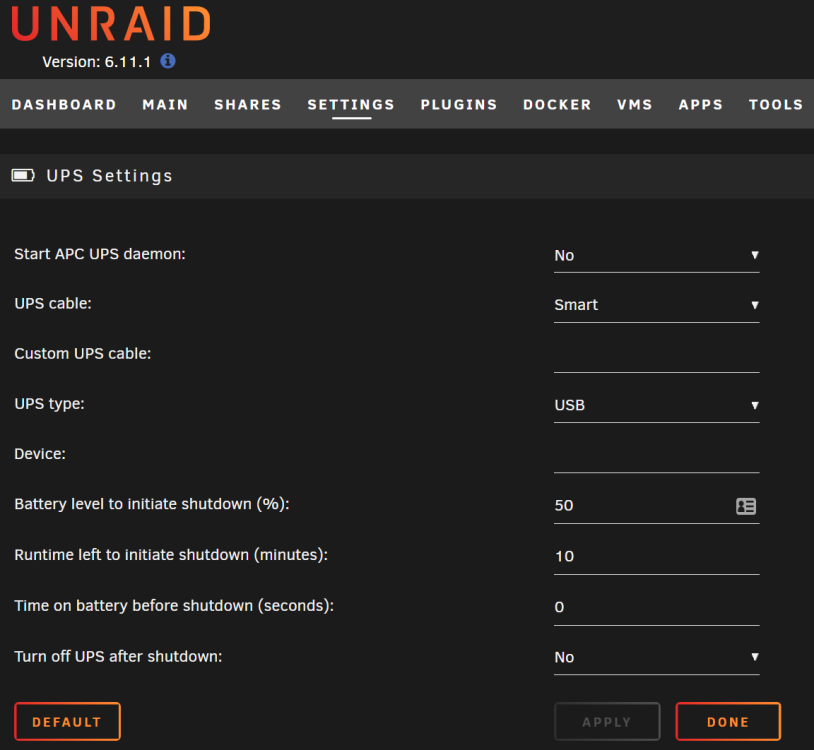
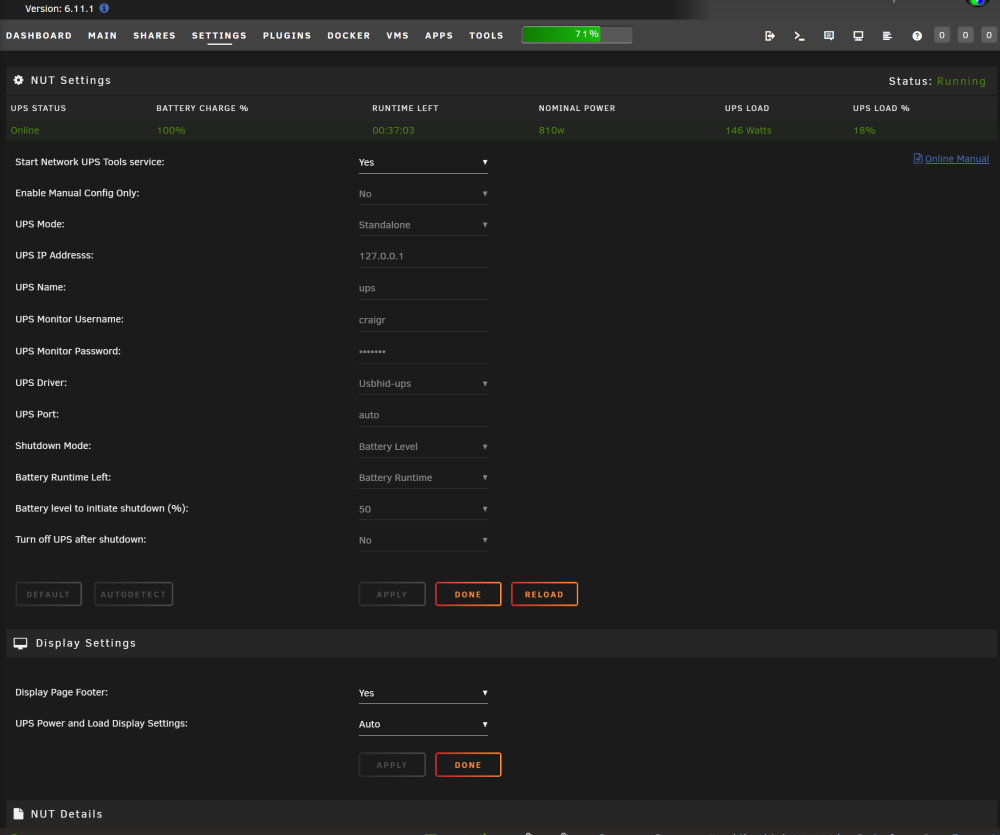
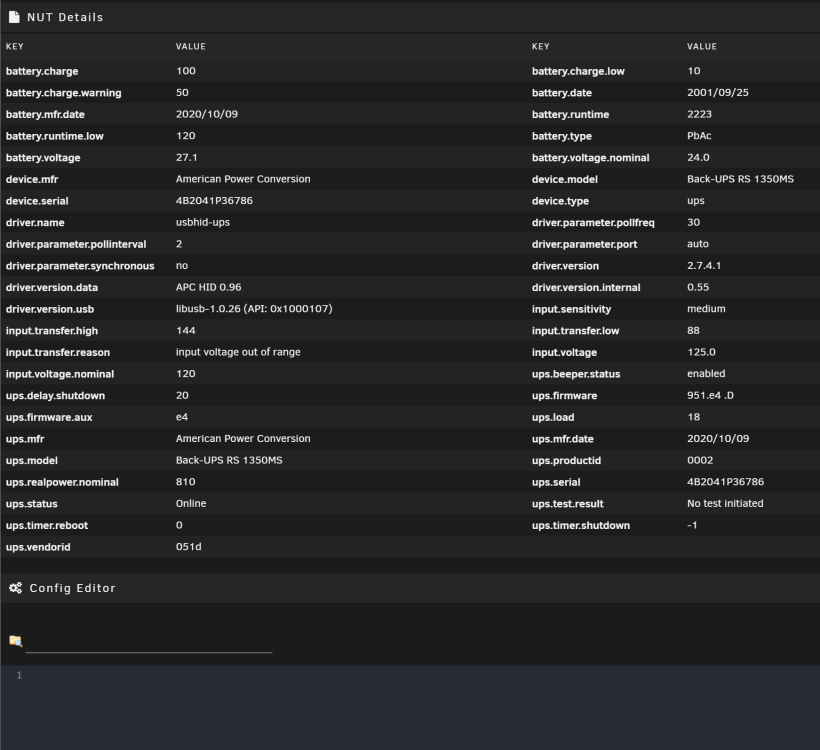
Depending on your UPS and whether or not it's buggy with unRAID you have two options to monitor power and shutdown unRAID. This first is built in; Settings > UPS Settings: That worked for me until I upgraded my UPS and unRAID thought the UPS was disconnecting multiple times each day. I then switch to the app call NUT which you may download and install through community applications. It has more capabilities and has worked much better for me: Both are pretty easy to setup and use. Enjoy and let me know!
-
I cannot get WireGuard working with PIA. I have followed the FAQ and never had trouble getting anything else to work with this docker. The one line in the FAQ that puzzles me a bit is this one: I don't have anything in the docker that says "--cap-add=NET_ADMIN". I have this, but I am not sure this is what the FAQ refers to: This is the only think I think it can be because I have followed the rest to the letter. This is all that is in my wg0.conf file. [Interface] Address = 10.24.146.122 PrivateKey = kGZ/uf0H5v7drJOsaCNPxo+hERNkfIh7cyUcDpNQdGg= PostUp = '/root/wireguardup.sh' PostDown = '/root/wireguarddown.sh' [Peer] PublicKey = OOy/RLnU33EAXZkQWfTrOA7CgmK88HUjgPm2Ky5pKFw= AllowedIPs = 0.0.0.0/0 Endpoint = nl-amsterdam.privacy.network 1337 There is no list of endpoints in my supervisord.log. Here is the supervisord.log. It seems to be telling me it can't resolve nl-amsterdam.privacy.network 1337. Created by... ___. .__ .__ \_ |__ |__| ____ | |__ ____ ___ ___ | __ \| |/ \| | \_/ __ \\ \/ / | \_\ \ | | \ Y \ ___/ > < |___ /__|___| /___| /\___ >__/\_ \ \/ \/ \/ \/ \/ https://hub.docker.com/u/binhex/ 2022-10-19 00:03:32.359749 [info] Host is running unRAID 2022-10-19 00:03:32.376784 [info] System information Linux b997ff38d197 5.19.14-Unraid #1 SMP PREEMPT_DYNAMIC Thu Oct 6 09:15:00 PDT 2022 x86_64 GNU/Linux 2022-10-19 00:03:32.397742 [info] OS_ARCH defined as 'x86-64' 2022-10-19 00:03:32.417220 [info] PUID defined as '99' 2022-10-19 00:03:32.548834 [info] PGID defined as '100' 2022-10-19 00:03:32.757009 [info] UMASK defined as '000' 2022-10-19 00:03:32.780403 [info] Permissions already set for '/config' 2022-10-19 00:03:32.813122 [info] Deleting files in /tmp (non recursive)... 2022-10-19 00:03:32.834943 [info] VPN_ENABLED defined as 'yes' 2022-10-19 00:03:32.852974 [info] VPN_CLIENT defined as 'wireguard' 2022-10-19 00:03:32.870207 [info] VPN_PROV defined as 'pia' 2022-10-19 00:03:33.173614 [info] WireGuard config file (conf extension) is located at /config/wireguard/wg0.conf 2022-10-19 00:03:33.200710 [info] VPN_REMOTE_SERVER defined as 'nl-amsterdam.privacy.network 1337' 2022-10-19 00:03:33.243004 [info] VPN_REMOTE_PORT defined as '1337' 2022-10-19 00:03:33.258570 [info] VPN_DEVICE_TYPE defined as 'wg0' 2022-10-19 00:03:33.274097 [info] VPN_REMOTE_PROTOCOL defined as 'udp' 2022-10-19 00:03:33.291612 [info] LAN_NETWORK defined as '192.168.1.0/24' 2022-10-19 00:03:33.309441 [info] NAME_SERVERS defined as '1.1.1.1,1.0.0.1' 2022-10-19 00:03:33.326958 [info] VPN_USER defined as 'xxxxxxxxxx' 2022-10-19 00:03:33.344674 [info] VPN_PASS defined as 'xxxxxxxxxx' 2022-10-19 00:03:33.362778 [info] STRICT_PORT_FORWARD defined as 'yes' 2022-10-19 00:03:33.380827 [info] ENABLE_PRIVOXY defined as 'no' 2022-10-19 00:03:33.400403 [info] VPN_INPUT_PORTS not defined (via -e VPN_INPUT_PORTS), skipping allow for custom incoming ports 2022-10-19 00:03:33.419120 [info] VPN_OUTPUT_PORTS not defined (via -e VPN_OUTPUT_PORTS), skipping allow for custom outgoing ports 2022-10-19 00:03:33.436771 [info] DELUGE_DAEMON_LOG_LEVEL not defined,(via -e DELUGE_DAEMON_LOG_LEVEL), defaulting to 'info' 2022-10-19 00:03:33.454386 [info] DELUGE_WEB_LOG_LEVEL not defined,(via -e DELUGE_WEB_LOG_LEVEL), defaulting to 'info' 2022-10-19 00:03:33.473525 [info] Starting Supervisor... 2022-10-19 00:03:33,725 INFO Included extra file "/etc/supervisor/conf.d/delugevpn.conf" during parsing 2022-10-19 00:03:33,725 INFO Set uid to user 0 succeeded 2022-10-19 00:03:33,728 INFO supervisord started with pid 7 2022-10-19 00:03:34,731 INFO spawned: 'start-script' with pid 168 2022-10-19 00:03:34,733 INFO spawned: 'watchdog-script' with pid 169 2022-10-19 00:03:34,733 INFO reaped unknown pid 8 (exit status 0) 2022-10-19 00:03:34,742 DEBG 'start-script' stdout output: [info] VPN is enabled, beginning configuration of VPN 2022-10-19 00:03:34,742 INFO success: start-script entered RUNNING state, process has stayed up for > than 0 seconds (startsecs) 2022-10-19 00:03:34,742 INFO success: watchdog-script entered RUNNING state, process has stayed up for > than 0 seconds (startsecs) 2022-10-19 00:03:34,747 DEBG 'start-script' stdout output: [info] Adding 1.1.1.1 to /etc/resolv.conf 2022-10-19 00:03:34,751 DEBG 'start-script' stdout output: [info] Adding 1.0.0.1 to /etc/resolv.conf 2022-10-19 00:04:30,124 DEBG 'start-script' stdout output: [crit] 'nl-amsterdam.privacy.network 1337' cannot be resolved, possible DNS issues, exiting... 2022-10-19 00:04:30,124 DEBG fd 8 closed, stopped monitoring <POutputDispatcher at 23200439382896 for <Subprocess at 23200439382800 with name start-script in state RUNNING> (stdout)> 2022-10-19 00:04:30,125 DEBG fd 10 closed, stopped monitoring <POutputDispatcher at 23200438224880 for <Subprocess at 23200439382800 with name start-script in state RUNNING> (stderr)> 2022-10-19 00:04:30,125 INFO exited: start-script (exit status 1; not expected) 2022-10-19 00:04:30,125 DEBG received SIGCHLD indicating a child quit Thanks for any help! craigr


-
I had my doubts that these would be any better than what I already had. I haven't done any intensive testing, and also the CRC checksum errors would come and go randomly anyway*. However, these new cables are much more robust in every way. The terminators fit much more securely including the SATA ends despite the old ones being latching. The cabling itself is MUCH more ridged and heavier as well. Hopefully my CRC errors are gone for good! Time will tell! Also, turns out these have Amphenol terminators or were made by Amphenol even though they are Supermicro branded. Now to get the matching SATA to SATA cables so my system looks clean again 😁 Thanks for your clarification on these. *Last parity check with old cables, my drive 14 was throwing gobs of CRC checksums, drives 12 and 2 were throwing some as well. I wiggled the old cables around and got actual read errors on disc 14 (unRAID log not on SMART) so I rebooted and rearranged the old cables. Zero CRC errors for the parity check after that. The old cables just didn't seat well and or had very poor shielding. But again, the errors were intermittent so hopefully this is finally behind me with the new cables. craigr
-
That's much lower than I would expect! Awesome! Do you have a UPS? What does it say you are using in the unRAID info bar (or whatever it's called) on the bottom of the web GUI? Below power usage is with opnSense downloading at 300 MB/s (not a typo) and NZBGet is unpacking a 10GB file. Nice build. I'd like more cores, but I haven't been willing to jump to two CPU's due to power consumption, but your server doesn't use much more than mine at idle. Granted, I'm running opnSense and that can be CPU intensive. Also, 20x spinners and 5x SSD's adds up to when they are active. I could do without all the RGB s*it, but to each his own 😜 craigr

-
Doh! I need to go to bed. I missed the detailed spec page. I had been looking at another cable on their site and when I clicked detailed specs there was no info. I assumed there wouldn't be for this cable too. THANK YOU!
-
I don't understand Supermicro's terminology on this cable (part # CBL-SAST-0616). Could someone please tell me if this cable will work to connect my HBA SFF8643 to SATA hard drives? https://store.supermicro.com/supermicro-minisas-hd-to-4x-sata-50-50cm-cable-cbl-sast-0616.html I've been using cheap breakout cables and am getting CRC checksum errors on multiple drives. Moving the cables around helps, but the CRC errors always come back unpredictably. I have older Norco SS-500 PODS that are getting long in the tooth as well. I may try changing the filter capacitors on the PCB's first as I would not be surprised if they are shot by now. Thanks, craigr
-
I can't get the VM to start. No errors, just sits on TianoCore. I'll have to play more when I have time. Thanks for this feature. craigr
-
Yes. They did not work even after editing the header out. The two Nvidia cards I've had are however rather unusual; Inno3D GTX1050Ti single slot and Inno3D GTX1650 single slot. Perhaps that's why the available vbios' didn't work, I don't know. Once I pulled the vbios off my actual cards everything was perfect.
-
I upgraded last night from 6.10.3 and everything is working perfectly for me! I had tried 6.11.0 but had to fall back due to NTLMv1 authentication and an odd issue with binhexdelugevpn. Both are fixed in this version. Fantastic guys!
-
How on earth did you guys pull this off? Thank you!
-
All right, I guess I am hosed than. I'll have to drop the DUNE's. What about "server min protocol = LANMAN1" ? Or would it possibly work if my DUNE's support SMB1 to simply remove the "server min protocol = NT1" line? Thanks again,
-
Wait what! How may I enable SMBv1 than? Could you please explain? I tried server min protocol = SMB1 but than I couldn't see my shares on anything including PC's and my Windows VM.
-
Thanks. Yeah, the primary playback in the theater and living room for some time has been Nvidia Shield running Kodi. I switched for UHD playback way back when. Kodi is great in the theater because there is also 2.40 skins available and I have a 2.40 screen. Bedroom has just hung back with a DUNE player though, and when I went to watch my bedtime stories 😇 it couldn't find the server. Had to get out of bed and try to figure it out. craigr
-
limetech himself had me set it there the first time unRAID stopped working with SMB 1.0. FWIW I noticed it on my DUNE players, but my (well everyone's) OPPO 203 and 205 players are on SMB 1.0 as well. There may be heavy pushback from the group that primarily uses them. I'm not thrilled either as I use these for ISO playback of audio and some video discs. Not sure you can do anything if Linux has dropped support though. craigr
-
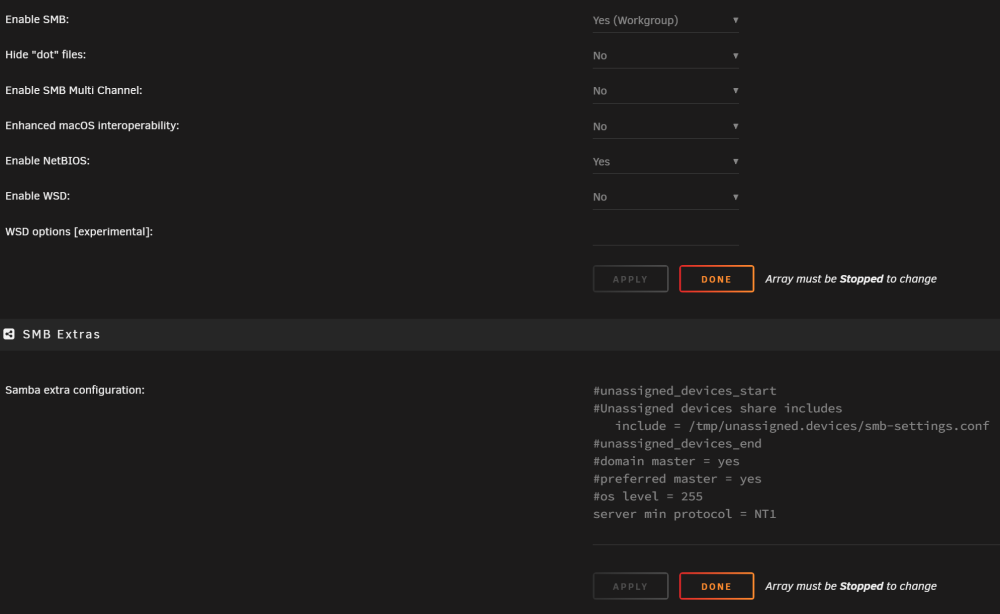
Well, my devices that use SMB 1.0 are no longer able to connect. I'm currently setup like this which had been working: #unassigned_devices_start #Unassigned devices share includes include = /tmp/unassigned.devices/smb-settings.conf #unassigned_devices_end #domain master = yes #preferred master = yes #os level = 255 server min protocol = NT1 Any help getting it back up would be great. Also, I have NetBIOS is enabled. I never disabled WSD before, but tried that with no change. Reverted back to 6.10.3 and all works fine again. craigr Thanks, craigr
-
Upgraded from 6.10.3 without issue. All VM's and dockers working as normal. Removed NP before upgrading. Thanks, craigr
-
Updated from 6.10.2 without issue.
-
Yeah, changed slots back on serial and video card without issue. That was never the problem.
-
Strike the above post. I seem to have broken the VM again and fixing it again. I re-added my Windows 11 OS Install ISO and VirtIO Drivers ISO from the template and then the Windows 11 would not boot consistently again 🤬. So I recreated the experimental Windows 11 VM on my NVMe again and as soon as I did that my existing VM on the NVMe started booting properly again! It seems the act of simply making a new template on the VM fixes the problem! I now have proper booting and my Windows 11 OS Install ISO and VirtIO Drivers ISO in place. I do not have <boot order='1'/> and I do have back <boot dev='hd'/> When I used the template to add back the Windows 11 OS Install ISO and VirtIO Drivers ISO discs the template created a boot order equals two for the VirtIO Drivers ISO and no boot order equals one for the SSD. I tried adding boot order for the NVMe and removing the boot order line for the VirtIO, but it didn't help. Only creating the new experimental template fir Windows 11 on the NVMe and then manually editing the template to add the ISO's back (without the boot order equals two) got everything square. Oh well, whatever, it works now 🥃🥃🥃 Here is my final XML: <?xml version='1.0' encoding='UTF-8'?> <domain type='kvm' id='1'> <name>Win11 Workstation VM</name> <uuid>2c4db39b-fc53-1762-d1ba-9c768e033e45</uuid> <description>WIN11VM</description> <metadata> <vmtemplate xmlns="unraid" name="Windows 11" icon="windows11.png" os="windowstpm"/> </metadata> <memory unit='KiB'>33554432</memory> <currentMemory unit='KiB'>33554432</currentMemory> <memoryBacking> <nosharepages/> </memoryBacking> <vcpu placement='static'>8</vcpu> <cputune> <vcpupin vcpu='0' cpuset='4'/> <vcpupin vcpu='1' cpuset='12'/> <vcpupin vcpu='2' cpuset='5'/> <vcpupin vcpu='3' cpuset='13'/> <vcpupin vcpu='4' cpuset='6'/> <vcpupin vcpu='5' cpuset='14'/> <vcpupin vcpu='6' cpuset='7'/> <vcpupin vcpu='7' cpuset='15'/> </cputune> <resource> <partition>/machine</partition> </resource> <os> <type arch='x86_64' machine='pc-i440fx-6.2'>hvm</type> <loader readonly='yes' type='pflash'>/usr/share/qemu/ovmf-x64/OVMF_CODE-pure-efi-tpm.fd</loader> <nvram>/etc/libvirt/qemu/nvram/2c4db39b-fc53-1762-d1ba-9c768e033e45_VARS-pure-efi-tpm.fd</nvram> <boot dev='hd'/> </os> <features> <acpi/> <apic/> <hyperv mode='custom'> <relaxed state='on'/> <vapic state='on'/> <spinlocks state='on' retries='8191'/> <vendor_id state='on' value='none'/> </hyperv> </features> <cpu mode='host-passthrough' check='none' migratable='on'> <topology sockets='1' dies='1' cores='4' threads='2'/> <cache mode='passthrough'/> </cpu> <clock offset='localtime'> <timer name='hypervclock' present='yes'/> <timer name='hpet' present='no'/> </clock> <on_poweroff>destroy</on_poweroff> <on_reboot>restart</on_reboot> <on_crash>restart</on_crash> <devices> <emulator>/usr/local/sbin/qemu</emulator> <disk type='file' device='cdrom'> <driver name='qemu' type='raw'/> <source file='/mnt/pool/ISOs/Win11_English_x64v1.iso' index='2'/> <backingStore/> <target dev='hda' bus='ide'/> <readonly/> <alias name='ide0-0-0'/> <address type='drive' controller='0' bus='0' target='0' unit='0'/> </disk> <disk type='file' device='cdrom'> <driver name='qemu' type='raw'/> <source file='/mnt/pool/ISOs/virtio-win-0.1.217-1.iso' index='1'/> <backingStore/> <target dev='hdb' bus='ide'/> <readonly/> <alias name='ide0-0-1'/> <address type='drive' controller='0' bus='0' target='0' unit='1'/> </disk> <controller type='pci' index='0' model='pci-root'> <alias name='pci.0'/> </controller> <controller type='ide' index='0'> <alias name='ide'/> <address type='pci' domain='0x0000' bus='0x00' slot='0x01' function='0x1'/> </controller> <controller type='sata' index='0'> <alias name='sata0'/> <address type='pci' domain='0x0000' bus='0x00' slot='0x03' function='0x0'/> </controller> <controller type='virtio-serial' index='0'> <alias name='virtio-serial0'/> <address type='pci' domain='0x0000' bus='0x00' slot='0x05' function='0x0'/> </controller> <controller type='usb' index='0' model='qemu-xhci' ports='15'> <alias name='usb'/> <address type='pci' domain='0x0000' bus='0x00' slot='0x07' function='0x0'/> </controller> <interface type='bridge'> <mac address='52:54:~~~~~~'/> <source bridge='br0'/> <target dev='vnet0'/> <model type='virtio'/> <alias name='net0'/> <address type='pci' domain='0x0000' bus='0x00' slot='0x02' function='0x0'/> </interface> <serial type='pty'> <source path='/dev/pts/0'/> <target type='isa-serial' port='0'> <model name='isa-serial'/> </target> <alias name='serial0'/> </serial> <console type='pty' tty='/dev/pts/0'> <source path='/dev/pts/0'/> <target type='serial' port='0'/> <alias name='serial0'/> </console> <channel type='unix'> <source mode='bind' path='/var/lib/libvirt/qemu/channel/target/domain-1-Win11 Workstation VM/org.qemu.guest_agent.0'/> <target type='virtio' name='org.qemu.guest_agent.0' state='connected'/> <alias name='channel0'/> <address type='virtio-serial' controller='0' bus='0' port='1'/> </channel> <input type='mouse' bus='ps2'> <alias name='input0'/> </input> <input type='keyboard' bus='ps2'> <alias name='input1'/> </input> <tpm model='tpm-tis'> <backend type='emulator' version='2.0' persistent_state='yes'/> <alias name='tpm0'/> </tpm> <sound model='ich9'> <alias name='sound0'/> <address type='pci' domain='0x0000' bus='0x00' slot='0x08' function='0x0'/> </sound> <audio id='1' type='none'/> <hostdev mode='subsystem' type='pci' managed='yes'> <driver name='vfio'/> <source> <address domain='0x0000' bus='0x01' slot='0x00' function='0x0'/> </source> <alias name='hostdev0'/> <rom file='/mnt/pool/vdisks/vbios/My_Inno3D.GTX1650.4096.(version_90.17.3D.00.95).rom'/> <address type='pci' domain='0x0000' bus='0x00' slot='0x04' function='0x0' multifunction='on'/> </hostdev> <hostdev mode='subsystem' type='pci' managed='yes'> <driver name='vfio'/> <source> <address domain='0x0000' bus='0x01' slot='0x00' function='0x1'/> </source> <alias name='hostdev1'/> <address type='pci' domain='0x0000' bus='0x00' slot='0x04' function='0x1'/> </hostdev> <hostdev mode='subsystem' type='pci' managed='yes'> <driver name='vfio'/> <source> <address domain='0x0000' bus='0x00' slot='0x1f' function='0x3'/> </source> <alias name='hostdev2'/> <address type='pci' domain='0x0000' bus='0x00' slot='0x09' function='0x0'/> </hostdev> <hostdev mode='subsystem' type='pci' managed='yes'> <driver name='vfio'/> <source> <address domain='0x0000' bus='0x00' slot='0x14' function='0x0'/> </source> <alias name='hostdev3'/> <address type='pci' domain='0x0000' bus='0x00' slot='0x0a' function='0x0'/> </hostdev> <hostdev mode='subsystem' type='pci' managed='yes'> <driver name='vfio'/> <source> <address domain='0x0000' bus='0x00' slot='0x1f' function='0x5'/> </source> <alias name='hostdev4'/> <address type='pci' domain='0x0000' bus='0x00' slot='0x0b' function='0x0'/> </hostdev> <hostdev mode='subsystem' type='pci' managed='yes'> <driver name='vfio'/> <source> <address domain='0x0000' bus='0x08' slot='0x00' function='0x0'/> </source> <alias name='hostdev5'/> <address type='pci' domain='0x0000' bus='0x00' slot='0x0c' function='0x0'/> </hostdev> <memballoon model='none'/> </devices> <seclabel type='dynamic' model='dac' relabel='yes'> <label>+0:+100</label> <imagelabel>+0:+100</imagelabel> </seclabel> </domain>
-
With trepidation I say that I think I fixed it. I did several things, but what I think got it working (and I don't know why) is switching the slot for my serial controller with the slot for my NVidia graphics card. So, I started with this in my Windows 11 template: <controller type='virtio-serial' index='0'> <address type='pci' domain='0x0000' bus='0x00' slot='0x04' function='0x0'/> </controller> <hostdev mode='subsystem' type='pci' managed='yes'> <driver name='vfio'/> <source> <address domain='0x0000' bus='0x01' slot='0x00' function='0x0'/> </source> <rom file='/mnt/pool/vdisks/vbios/My_Inno3D.GTX1650.4096.(version_90.17.3D.00.95).rom'/> <address type='pci' domain='0x0000' bus='0x00' slot='0x05' function='0x0'/> </hostdev> <hostdev mode='subsystem' type='pci' managed='yes'> <driver name='vfio'/> <source> <address domain='0x0000' bus='0x01' slot='0x00' function='0x1'/> </source> <address type='pci' domain='0x0000' bus='0x00' slot='0x06' function='0x0'/> </hostdev> And ended with this: <controller type='virtio-serial' index='0'> <alias name='virtio-serial0'/> <address type='pci' domain='0x0000' bus='0x00' slot='0x05' function='0x0'/> </controller> <hostdev mode='subsystem' type='pci' managed='yes'> <driver name='vfio'/> <source> <address domain='0x0000' bus='0x01' slot='0x00' function='0x0'/> </source> <alias name='hostdev0'/> <rom file='/mnt/pool/vdisks/vbios/My_Inno3D.GTX1650.4096.(version_90.17.3D.00.95).rom'/> <address type='pci' domain='0x0000' bus='0x00' slot='0x04' function='0x0' multifunction='on'/> </hostdev> <hostdev mode='subsystem' type='pci' managed='yes'> <driver name='vfio'/> <source> <address domain='0x0000' bus='0x01' slot='0x00' function='0x1'/> </source> <alias name='hostdev1'/> <address type='pci' domain='0x0000' bus='0x00' slot='0x04' function='0x1'/> </hostdev> Two things gave me the idea to try this. Firstly, ever since upgrading from Windows 10 to Windows 11 and creating the new Windows 11 VM template; if I edited the template such that the NVidia was working as a multifunction device on the same slot (video and sound), the VM would not boot and just hand on the BIOS screen. No idea why. Also to experiment, I created another brand-new Windows 11 VM template that would have overwritten my existing NVMe Windows 11 install, but I did not start the experimental VM so that it wouldn't overwrite. I examined and compared the templates. This experimental template gave my NVidia video card slot 4 so I decided to give the NVidia card slot 4 in my existing template (I then had to move the serial slot and just put it on 5). Other things I tried but do not think worked at all include: 1) Entering the OVFM BIOS and removing all boot options except the NVMe. This I tried first and it did not work. Also, when I would reboot the Windows 11 VM the settings would always revert back even after saving (no idea why) and the VM would not boot. 2) I also removed my Windows 11 OS Install ISO and VirtIO Drivers ISO from the template. I tried booting several times and this did not seem to work. Finally, I changed the slots between the serial and video/sound cards and that seems to have done the trick. I have rebooted unRAID several times and Windows 11 has started automatically every time without hanging and I have rebooted, stopped, started Windows 11 and it has started every time. So, I am hopefully not jinxing myself by saying I think it's fixed (knock loudly on wood).
-
Talk about 'use it or lose it.' I forgot all about the system configuration it's been so long since I last needed it. Thanks again.
-
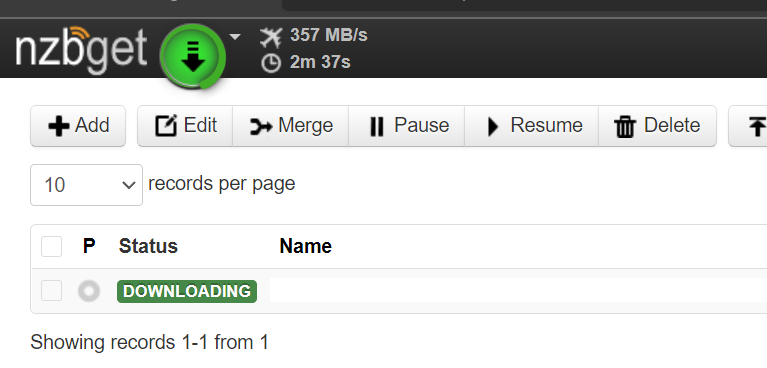
Yee-Haw!!!! I love OPNsense!!! Thanks again! Takes much longer to decompress files than it does to download them 😁. If you would have told me even five years ago, I'd have home internet this fast I would certainly not believed it. 65GB file downloaded in under three minutes.
-
The new creator actually worked for me for the first time ever a few weeks ago. I've always had to just do it manually. If I ever have the issue again I'll try the renaming trick, but the problem seems to be solved now.
-
I've been using the same Sandisk Cruzer Fit's in two servers for over a decade now. Low profile and no problems. I've built unRAID servers for many friends too and use them or the FIT Plus every time. I ALWAYS buy my flash drives directly through Samsung's web site or from Amazon when Amazon is the seller because Amazon is authorized by Samsung. No third-party sellers EVER! Way, way, waaaaay too many counterfeits. Right now, only the 64GB Sandisk Cruzer Fit is sold directly by Amazon as the seller; makes me very suspicious of the smaller ones: https://www.amazon.com/SanDisk-64GB-Cruzer-Flash-Drive/dp/B07MDXBTL1/ I am pretty sure the drive is discontinued now. The Fit Plus is my other go-to drive, have it in quite a few other servers: https://www.samsung.com/us/computing/memory-storage/usb-flash-drives/usb-3-1-flash-drive-fit-plus-32gb-muf-32ab-am/ https://www.amazon.com/dp/B07D7P4SY4/




