





TUMS
Members
-
Joined
Everything posted by TUMS
-
So I upgraded to 2.0.3 and everything was going OK and I could download for like a day and now its stopped working. The torrents act like they want to start but they never do. I can see the swarms and everything but I cant ever connect to them. There are no errors in my log file so i'm kind of at a loss at what to do. Anyone have any ideas on what to do about this it would be great. I havent tried uninstalling/reinstalling yet. EDIT: This was a permissions problem since I upgraded my cache pool to raid 1. I nuked the docker and started over, nothings wrong with v203...
-
What do I have to do to change the vpn port? I have reason to believe I am being throttled by my isp and want to try switching away from port 1198. I tried downloading the crt & pem file for the port I wanted and adding to the openvpn folder but i'm getting errors in deluge log. https://helpdesk.privateinternetaccess.com/hc/en-us/articles/225274288-Which-encryption-auth-settings-should-I-use-for-ports-on-your-gateways- Thank you!Server 1 - DDR4 128GB REG ECC 2400mhz Server 2 - DDR3 32GB ECC UDIMM 1600mhzYes that's why I mentioned you can adjust fan thresholds..... You don't have to go swapping fans that's just silly.If you're going to have a lot of drives you need a lot of cooling. That's why those server cases are like that. Most of the noise can be adjusted as long you have PWM fans and ipmi on your board, or at least a bios that you can control fan speed with. Still I wouldn't want my server rack in the same room with me.Minimum of 31 is 31%. So 2400 rpms seems reasonable. What are the other values set to? They are what is going to determine fan speed above that. Here's a screen cap of my values. I reset my server and now fan speeds are back to 3200-3500 with a fan speed minimum of 31. I'm wondering why rpm went down to 2400 before.
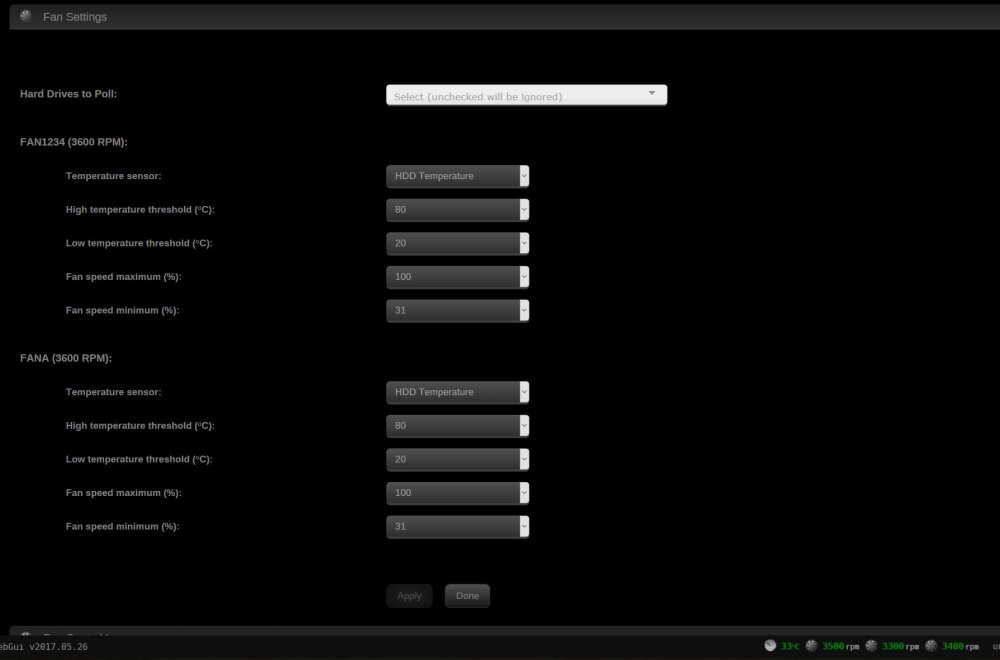 So I installed the ipmi plugin the other day. Everything seemed to be working good. Set fan speed minimum to 31. My fans were all humming away at 3400-3500rpm. I come back today and my fans are all back down to 2400rpm and my HDD temps are pretty high. Somethings not right. Any ideas? thanks. My board is X10SLH-F.Thanks for taking the time to look at my diagnostics John. Hopefully it will just go away. The server is running fine so it's probably nothing to worry about.Here's the diagnostics file. Thank you! tower-diagnostics-20170201-1553.zipI just started getting these the other day in my log file. Otherwise system seems to be functioning fine. Anyone have any clues as to what this is? Do you guys think this is anything to worry about? Actually I just introduced a new drive (hgst he8) into my array the other day and that was about the time I started seeing these warnings in my log. Thank you! Feb 1 06:03:06 Tower avahi-daemon[11104]: avahi_normalize_name() failed. Feb 1 06:03:09 Tower avahi-daemon[11104]: avahi_normalize_name() failed. Feb 1 06:03:09 Tower avahi-daemon[11104]: avahi_normalize_name() failed. Feb 1 06:03:11 Tower avahi-daemon[11104]: avahi_normalize_name() failed. Feb 1 06:03:11 Tower avahi-daemon[11104]: avahi_normalize_name() failed. Feb 1 06:03:11 Tower avahi-daemon[11104]: avahi_normalize_name() failed. Feb 1 06:03:11 Tower avahi-daemon[11104]: avahi_normalize_name() failed. Feb 1 06:03:11 Tower avahi-daemon[11104]: avahi_normalize_name() failed. Feb 1 06:03:19 Tower avahi-daemon[11104]: avahi_normalize_name() failed. Feb 1 06:03:19 Tower avahi-daemon[11104]: avahi_normalize_name() failed. Feb 1 06:03:19 Tower avahi-daemon[11104]: avahi_normalize_name() failed. Feb 1 06:03:19 Tower avahi-daemon[11104]: avahi_normalize_name() failed. Feb 1 06:03:19 Tower avahi-daemon[11104]: avahi_normalize_name() failed. Feb 1 06:03:23 Tower avahi-daemon[11104]: avahi_normalize_name() failed. Feb 1 06:03:23 Tower avahi-daemon[11104]: avahi_normalize_name() failed. Feb 1 06:03:23 Tower avahi-daemon[11104]: avahi_normalize_name() failed. Feb 1 06:03:23 Tower avahi-daemon[11104]: avahi_normalize_name() failed. Feb 1 07:15:46 Tower avahi-daemon[11104]: avahi_normalize_name() failed. Feb 1 07:15:46 Tower avahi-daemon[11104]: avahi_normalize_name() failed. Feb 1 07:15:46 Tower avahi-daemon[11104]: avahi_normalize_name() failed. Feb 1 07:15:47 Tower avahi-daemon[11104]: avahi_normalize_name() failed. Feb 1 07:15:47 Tower avahi-daemon[11104]: avahi_normalize_name() failed. Feb 1 07:15:47 Tower avahi-daemon[11104]: avahi_normalize_name() failed. Feb 1 07:15:47 Tower avahi-daemon[11104]: avahi_normalize_name() failed. Feb 1 07:15:47 Tower avahi-daemon[11104]: avahi_normalize_name() failed. Feb 1 07:15:47 Tower avahi-daemon[11104]: avahi_normalize_name() failed. Feb 1 07:15:47 Tower avahi-daemon[11104]: avahi_normalize_name() failed. Feb 1 07:15:47 Tower avahi-daemon[11104]: avahi_normalize_name() failed. Feb 1 07:15:47 Tower avahi-daemon[11104]: avahi_normalize_name() failed.you have to look under the iPhone apps category. thanks I found it, under iphone apps/utilitiesIs this available for Ipad? I can't seem to find it on the appstore.Last checked on Wed 11 May 2016 05:39:02 AM MST (two days ago), finding 0 errors. Duration: 18 hours, 53 minutes, 30 seconds. Average speed: 117.7 MB/sec I've got mostly all 8TB & 4TB wd reds, dual parity. My smallest HDD is 4TB.Thanks garycase, agree totally. I just don't want to throw away perfectly good drives when I don't have to for a few bad sectors. Sometimes it's hard to tell how long a drive is going to last if all that's showing bad in smart is reallocated sectors. I've had drives with 50+ reallocated sectors (in desktop pc's) and they still operated just fine for months/years afterwords. One nice thing about having a backup server, takes a little bit of the pressure off. You can afford to take a few more risks than you would otherwise.what is the point in leaving a dead drive in the array. Once you get any write errors to a drive unRAID will stop writing to it so no point in keeping it in the array. You also increase the chance of encountering a multiple drive failure scenario which will lead to data loss. . I meant keeping it in till it dies. As in reallocated sectors could go into the 100's and you'd still keep running with it. my experience is that if the reallocated sectors keeps growing then the drive is likely to fail. There is nothing intrinsically wrong with having a significant number of reallocated sectors as long as the number stays relatively stable. It is regular increases which are a sign of trouble. As has been mentioned of far more importance is the value for pending sectors as any non-zero value means you may not be able to recover a different disk that fails without some level of data corruption Thanks. I'd probably be tempted to run it up into the 100's (reallocated sectors) if I had dual parity. I mean if I can get a few more months out of the drive then hell, why not. Especially if I had a backup server. Without that I wouldn't try it. Also depends if the drive is still under warranty or not, if it is, probably best to get it replaced sooner rather than later.what is the point in leaving a dead drive in the array. Once you get any write errors to a drive unRAID will stop writing to it so no point in keeping it in the array. You also increase the chance of encountering a multiple drive failure scenario which will lead to data loss. I meant keeping it in till it dies. As in reallocated sectors could go into the 100's and you'd still keep running with it.What's wrong with leaving a drive in the array until it's totally dead? Dual parity support might make this safer no? Reading the freenas zfs forum that's what a lot of those users do. Or is this tactic not really advisable with unraid?I'm getting the same thing happening. Once with a Hitachi drive and now with a WD red. These are being precleared from an IBM 1015. Afaik this timeout signal 9 killed log message shows right before post-read starts. Guess i'll have to try my onboard intel ports next time.I'm having the same issue.... See post #3 if it's still not working then attach supervisord.log That did it. Somehow I missed this. Thanks binhex!I'm having the same issue....sas2flsh -list and sas2flsh -o -listall You can try both of these commands. OK. It showed up. I used the Dell 6gbpsas and that' what is reported as the vendor/product ID. It does not say anywhere that it is an (IT). Guess the next step is to try it in a box. Thank you! If you boot into unraid with it installed you should be able to go to tools->system log. Then scroll down and look for LSISAS2008. It should list wether it's in IT mode or not.sas2flsh -list and sas2flsh -o -listall You can try both of these commands.Sorry but I can't answer your question. Maybe someone else can help answer since I've never flashed a Dell Perc 310. I would try using Fireballs H310 instructions here http://lime-technology.com/forum/index.php?topic=12767.msg259006#msg259006 and try using the bottom pcie slot.I don't do anything special. I've never seen the message. What I do is follow BetaQuasi's instructions here (he has the same motherboard btw). https://lime-technology.com/forum/index.php?topic=26774.0 I download his boot file (https://www.dropbox.com/s/ezeqcbu2tlfub6a/M1015_X9SCM_BOOT_P17.zip), unzip, add it all to the root directory of my bootable usb, then I go to the Avago website and download the latest 9211-8i P20 firmware, add it to the usb drive replacing the older firmware that's on the usb. I don't flash a bios on any of my cards, only firmware.



