ken-ji
Members
-
Joined
-
Last visited
Everything posted by ken-ji
-
Sorry guys, Dropbox is going to impose really arbitrary limitations (from my point of view) on the Linux OS and filesystem (EXT4 only) soon or already is. I haven't gotten around to checking but I think this docker is not going to work anymore and moving forward you'll need to use Dropbox in a VM (ugh) or use rclone (I'm leaning on this) @Squid Maybe its time to flag this docker?
-
I wonder if the limitation you are seeing is caused by having "two" subnets with the same addressing range but different gateways to work around docker not even allowing the docker network to be defined in more than one NIC. Is that it @bonienl?
-
This is weird. Other than the proxynet bridge, did you create any other bridges by cli? because the bridges in your network interfaces (from the diags) named br-* do not line up with those the docker is reporting... only docker networks of type bridge can be seen with the ifconfig -a Maybe @bonienl has some idea...
-
I don't see anything wrong. except there are 4 docker custom networks defined. docker0 and three br-* networks. Can you run docker network list on the terminal?
-
Post you diagnostics file. I'm guessing there's something wrong in your config that's causing the docker to treat the br0 network as a custom definition and possibly purging it. You might also want to provide the screenshot of your docker network settings 'Settings | Docker'
-
Auto start is exactly what it says - the docker will auto start on array start. What you want is to add --restart unless-stopped to the Extra Parameters option
-
👍Don't know why, but my eyes don't feel strained staring at white pages... Dark pages just make me groan in frustration...
-
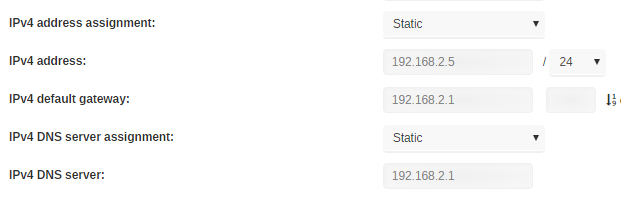
You might also want to try turning off DHCP (set IPv4 address assignment to Static) and fill in the blanks. And like @bonienl thinks, you probably have VLANs bridged together thanks to the CISCO switches. If pfsense has a log for the DHCP requests, you will see the unRAID MAC address (as well as other devices) on all the other VLANs.
-
Yeah. Hit Ctrl+C or Ctrl+D to stop it.
-
Right sorry about that. from your desktop please ping the unraid server also run traceroute (tracert) to the unraid server tracert 192.168.10.100 tracert 8.8.8.8 as well as show the routing table route print Same with the laptop I'm curious as to what route does the desktop take to connect to unraid that's different from the laptop. usually you get this (from unRAID), root@Tower:~# traceroute 8.8.8.8 traceroute to 8.8.8.8 (8.8.8.8), 30 hops max, 60 byte packets 1 router.lan (192.168.71.1) 0.462 ms 0.405 ms 0.443 ms 2 112.205.224.1.pldt.net (112.205.224.1) 3.293 ms 2.894 ms 3.014 ms ... 22 google-public-dns-a.google.com (8.8.8.8) 28.890 ms 28.639 ms 28.307 ms root@Tower:~# route Kernel IP routing table Destination Gateway Genmask Flags Metric Ref Use Iface default router.lan 0.0.0.0 UG 0 0 0 br0 172.17.0.0 0.0.0.0 255.255.0.0 U 0 0 0 docker0 192.168.71.0 0.0.0.0 255.255.255.0 U 0 0 0 br0 this simply shows that unRAID is supposed to talk to the subnet directly using the br0 interface, and everything else via the gateway. This is how routes are typically setup. A device with connectivity to some site-site VPNs (I don't give the entire network access to the VPN, but make the clients use a different interface/IP) has # route Kernel IP routing table Destination Gateway Genmask Flags Metric Ref Use Iface default 192.168.2.1 0.0.0.0 UG 0 0 0 br0 172.17.0.0 0.0.0.0 255.255.0.0 U 0 0 0 docker0 192.168.2.0 0.0.0.0 255.255.255.0 U 0 0 0 br0 192.168.3.0 192.168.2.4 255.255.255.0 UG 0 0 0 br0 192.168.5.0 192.168.2.81 255.255.255.128 UG 0 0 0 br0 192.168.5.128 192.168.2.4 255.255.255.128 UG 0 0 0 br0 192.168.122.0 0.0.0.0 255.255.255.0 U 0 0 0 virbr0
-
This definitely means you have an issue with how the SG300-28 is working with the LAN / vs VLANs are the ports tagged properly? is the native VLAN, the LAN? run this from your desktop and from unRAID. (use unRAID ip / desktop ip respectively) ping -n 20 192.168.10.x tracert 192.168.10.x tracert 8.8.8.8 tracert 192.168.20.15
-
This rule should not be necessary at all. Can you describe / diagram your network setup? Its kinda weird that you need to talk to the gateway to reach your LAN subnet.
-
Odd. if the docker can be seen from the router with the IP 192.168.4.4, can you ping the docker then? I'm rather stumped as to why networking isn't working as its usually plug and play... Does the Access control page allow you to set rules between 192.168.4.1 and 192.168.4.4? Do you have SSH access to your router? maybe you can try pinging and what not from there...
-
This likely means this router itself might be misconfigured with regards to VLAN configurations. when unRAID had and ip on the VLAN interface, was the router and unRAID able to ping each other using the VLAN IPs? I double checked your previous posts and I realized, that you defined a LAN2 (br2) for the vlan, but what are the member interfaces for this LAN2 interfaces? just port 3? and we discussed that you have a switch on port 3, before the unRAID server. Did you configure that switch properly? by configuring the VLAN4 to be tagged on the relevant interfaces of the switch?
-
Not sure why you can't ping/connect to the gateway yet. but you should not assign an IP to the VLAN interface of unRAID then go back to the docker settings, and reconfigure the network for the vlan (you need to stop the docker service to do this) this way all docker/unraid traffic will be via the router. check your router and make sure that the vlan interface is correctly defined. and try to ping from there to a docker container
-
ok. that's one really bare docker. I'll try to spin it up and have a look later...
-
ping -c 4 192.168.4.1 and also grab the output of ip addr
-
Open the console of the docker from the WebUI try pinging the router ip from there. also check the IP of the docker from there with ip addr if the ping is successful, then check your router rules as it might not be routing properly
-
Tried this already. with a fixed IP and/or fixed mac address. In fact, changing the docker IP and/or mac address doesn't make it drop the link, but a server restart does. Read about this is and read the fine print - anything with xattr support should still work, and AFAIK, XFS has xattr at least....
-
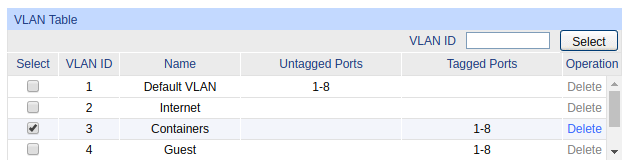
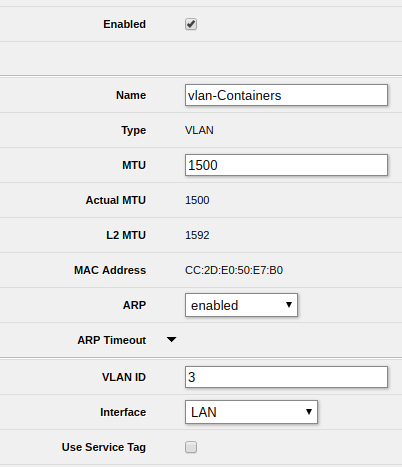
It looks correct, but make sure to set the SG108E to understand that there is VLAN4 and that it should be tagged on the pertinent interfaces, You have to understand the key parts of the terminology. a network packet can have two states untagged and tagged untagged means its a standard packet in a standard network tagged means there is extra headers labeling the packet. this label tells switches (and devices) that are aware that it belongs to an alternate network (VLAN). now switches that get a tagged packet check if they know the tag and decide based on settings. security minded switches drop unknown tags (or tags that are in the wrong place) the packet is then sent out associated ports it is left alone if the port says that the VLAN is tagged on the port the tag is stripped if the port says the VLAN is untagged on the port when a deivce gets the packet, the network stack then checks if the tag is configured or not (subinterfaces ie br0.1) and if it is, it strips the tag and presents it on the subinterface - a packet with VLAN4 tag is received on br0.4; otherwise the packet is ignored. the inverse happens when you send a packet.- the device generates traffic on br0.4 and the network stack tags it and sends it out of br0, which the switch gets and presents to the associated ports as before I'm using a mikrotik router, so I define the VLAN subinterface: and assign it a subnet 10.0.3.1/24 My VLAN table on my switch TP-Link SG2008 is like this: And the docker network:

-
@SSD His hotswap mod took out the front fan... So all he has left is the little side fan, and the PSU right now... His pics showed the little fan there and spinning @BillR Make sure to close the case and properly monitor the temps, your disks might just overheat under load.
-
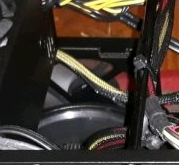
there should be a 80mm fan besides the cpu on the right-side (case facing you) for either exhaust or intake. its there in pic. but it might be not up to task.
-
I'm sorry for quick finger pointing... I double checked all my year plus old notifications and yeah, all the stock notfications do include the server name.... ?
-
@jonathanm I stopped using email after switching to pushover - was getting too many notices - all my devices email alerted... all my browsers and android devices were doing pushover... But yes, I gave each server an email address. Now I got curious and took a quick look - and I stand corrected. Its the fault of the plugins/webui as they don't pass the hostname to the notify script (which in hind sight should probably prefix the hostname to the subject anyway) So @Squid and @bonienl please fix the notify call.
-
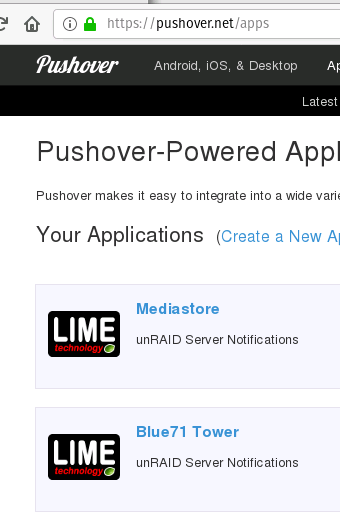
@Zandor300 This is not an FCP issue. Go back to your Pushover API page and make one application for each of your unRAID servers. then edit the config on each unRAID server to use the the correct application token kinda like mine is setup