




.jpg.adf8def3431e0aa8e590900f82752d7a.jpg)

wgstarks
Members
-
Joined
-
Last visited
Everything posted by wgstarks
-
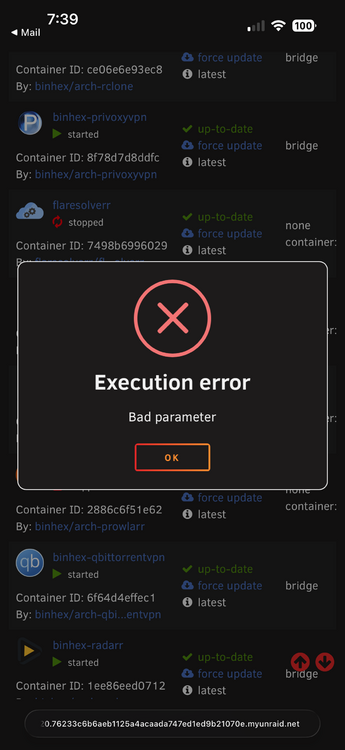
Updated from 7.2.6. All dockers routed through binhex-privoxyvpn continue to fail to start with a bad parameter error as in 7.2.5 and 7.2.6. This was reported in the release notes. The setup menu after boot offering to install all the apps I need was a surprise. Not sure exactly what it wanted to do since the page was too large for my iPhone display and not scrollable. I had to just close the window. Doesn’t look like I’m missing any apps though.
-
Not sure what the docker team has to do with the app developer? I think these comments should be directed at the Calibre devs. https://calibre-ebook.com/
-
This is an issue. You have port 8688 mapped to port 8080. You’ll need to delete this port mapping in the docker configuration and then create a new port mapping by clicking “Addanother path, port, label, variable or device” near the bottom of the page. Select “port” at the top of the window, “name” can be whatever you like, “container port” will be 8688, “host port” will be 8688, “default value” can be 8688 or leave blank, “connection type” will be TCP, “description” is whatever you want to put. Click the “add” button and then the “apply” button.
-
No. The words docker run are a link to instructions for getting this text.
-
This doesn’t show the port mappings but I suspect that if you follow the instructions that I linked previously it’ll correct your issue. If not please attach your docker run command to your next post. As always, be sure to redact users/passwords.
-
Are you able to access the login page and using the credentials shown in the log- ******** Information ******** To control qBittorrent, access the WebUI at: http://localhost:8687 The WebUI administrator username is: admin The WebUI administrator password was not set. A temporary password is provided for this session: TTxF4NqkV I also see that you are using a custom port for the webUI. See https://github.com/binhex/documentation/blob/master/docker/faq/qbittorrentvpn.md and scroll down to Q4 to be sure it is configured correctly. I don't think you provided your docker run command so I can't tell.
-
Just realized that the affected dockers are all the members of my VPN network provided by PrivoxyVPN.
-
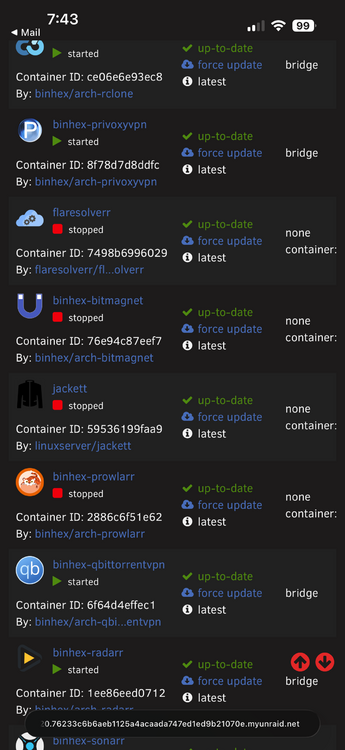
With some of my dockers I get an invalid port warning when/if the docker is restarted. All I have to do is re-apply the existing settings and I get a successful start. I don’t recall all the dockers this applies to but qbit and prowler are included. This started with 7.2.5 and continues with 7.2.6. Edit: Just tested again. This error only seems to happen when docker is cycled (server reboot, array stop/start, etc). Not seeing it when restarting individual dockers or even with stop all start all. Qbitvpn wasn’t one of the affected dockers in my test. Diagnostic attached if you’re interested. I know there was a breaking change in 7.2.5 that applied to dockers with custom MAC addresses. Maybe this is somehow related? brunnhilde-diagnostics-20260512-0746.zip
-
See https://github.com/binhex/documentation/blob/master/docker/faq/vpn.md Scroll down to Q11.
-
You are still using an endpoint that doesn’t support port forwarding. All you need to do is edit the ovpn file using a text editor to change the endpoint to one from the list I provided earlier.
-
From your log- 2026-05-11 16:21:34,652 DEBG 'start-script' stdout output: [info] PIA endpoint 'al.privacy.network' is NOT in the list of endpoints that support port forwarding shown below:- 2026-05-11 16:21:37,448 DEBG 'start-script' stdout output: [info] List of PIA endpoints that support port forwarding:- 2026-05-11 16:21:37,449 DEBG 'start-script' stdout output: [info] srilanka.privacy.network [info] gt-guatemala-pf.privacy.network [info] uy-uruguay-pf.privacy.network [info] ca-toronto.privacy.network [info] cyprus.privacy.network [info] np-nepal-pf.privacy.network [info] monaco.privacy.network [info] austria.privacy.network [info] cambodia.privacy.network [info] sanjose.privacy.network [info] fi-2.privacy.network [info] in.privacy.network [info] man.privacy.network [info] ba.privacy.network [info] yerevan.privacy.network [info] ca-ontario-so.privacy.network [info] ec-ecuador-pf.privacy.network [info] bangladesh.privacy.network [info] uk-2.privacy.network [info] de-germany-so.privacy.network [info] vietnam.privacy.network [info] kazakhstan.privacy.network [info] liechtenstein.privacy.network [info] macau.privacy.network [info] hk.privacy.network [info] ca-vancouver.privacy.network [info] lu.privacy.network [info] ca-montreal.privacy.network [info] morocco.privacy.network [info] kr-south-korea-pf.privacy.network [info] venezuela.privacy.network [info] malta.privacy.network [info] bo-bolivia-pf.privacy.network [info] ca-ontario.privacy.network [info] bahamas.privacy.network [info] panama.privacy.network [info] santiago.privacy.network [info] pe-peru-pf.privacy.network [info] montenegro.privacy.network [info] mongolia.privacy.network [info] nl-amsterdam.privacy.network [info] ua.privacy.network [info] nl-netherlands-so.privacy.network [info] ad.privacy.network [info] albania.pvt.site [info] algeria.pvt.site [info] argentina.pvt.site [info] au-adelaide.pvt.site [info] au-brisbane.pvt.site [info] au-melbourne.pvt.site [info] au-perth.pvt.site [info] au-sydney.pvt.site [info] belgium.pvt.site [info] brazil.pvt.site [info] bulgaria.pvt.site [info] china.pvt.site [info] colombia.pvt.site [info] croatia.pvt.site [info] czech-republic.pvt.site [info] de-berlin.pvt.site [info] de-frankfurt.pvt.site [info] denmark.pvt.site [info] egypt.pvt.site [info] es-madrid.pvt.site [info] es-valencia.pvt.site [info] estonia.pvt.site [info] fi-helsinki.pvt.site [info] france.pvt.site [info] georgia.pvt.site [info] greece.pvt.site [info] greenland.pvt.site [info] hungary.pvt.site [info] iceland.pvt.site [info] indonesia.pvt.site [info] ireland.pvt.site [info] israel.pvt.site [info] it-milano.pvt.site [info] jp-tokyo.pvt.site [info] latvia.pvt.site [info] lithuania.pvt.site 2026-05-11 16:21:37,449 DEBG 'start-script' stdout output: [info] malaysia.pvt.site [info] mexico.pvt.site [info] moldova.pvt.site [info] new-zealand.pvt.site [info] nigeria.pvt.site [info] north-macedonia.pvt.site [info] norway.pvt.site [info] philippines.pvt.site [info] poland.pvt.site [info] portugal.pvt.site [info] qatar.pvt.site [info] romania.pvt.site [info] saudi-arabia.pvt.site [info] se-stockholm.pvt.site [info] serbia.pvt.site [info] singapore.pvt.site [info] slovakia.pvt.site [info] slovenia.pvt.site [info] south-africa.pvt.site [info] switzerland.pvt.site [info] taiwan.pvt.site [info] turkey.pvt.site [info] uk-london.pvt.site [info] uk-manchester.pvt.site [info] uk-southampton.pvt.site [info] united-arab-emirates.pvt.site [info] Script finished to assign incoming port You’ll need to edit your endpoint in the ovpn file to match one from the list and restart the container.
-
No, but there is an issue with 7.2.5+ that sometimes prevents dockers from starting. You’ll need to attach your entire supervisord log and docker run command to your next post if you want assistance with this issue. Be sure to redact any users/passwords.
-
I also don't see the section for removing torrents with 0 seeders.
-
I notice your classifier.yml doesn't have a banned section. Do I need to update mine? classifier.yml
-
Actually that may not be totally accurate. That was the size of the postgres folder. I think it’s just data in there but may not be. I have it limited to just movies and tv. Wish I could tweak it some more.
-
Had to move the db back to array. The size had gotten up to >300GB and it was taking over my m.2 cache drive.
-
I haven’t had any issues.
-
Updated from 7.2.5. Still getting the false “Bad Parameter” errors with some dockers. Had to re-apply the docker configuration to get them to start.
-
You need to add the Tailscale network to the LAN_NETWORK setting. Comma separated. The UI can only be accessed from networks defined in that setting.
-
@tnig Your log shows a successful start followed by a manual shutdown. Are you attempting to access the GUI from another machine on the same LAN network?
-
There have been multiple reports of this issue with multiple dockers after the 7.2.5 release. In my case I just have to change any setting and revert the change and apply the same settings I started with. Some people have reported that they actually had a port set to 0000 and they had to change it to the correct setting.
-
Attach your entire supervisord log and docker run command to your next post. Be sure to redact any users/passwords.I know 45 Drives started taking orders for the X15 on Starwars Day. Has anyone heard anything about when they’ll start shipping?Depends on your use case. It can improve speeds for network file transfers so if you often transfer large files and have to sit and wait for the transfers to complete there would be advantages there. If transfers are automated and run in the background then maybe no advantage. I’m sure there are other uses as well. Remember that if you’re just using a single disk cache the files on that disk aren’t protected.


