






S80_UK
Members
-
Joined
-
Last visited
-
Smooth update for me on main, backup and test servers, all from 7.1.4. Unraid has come a long way since version 4.7 when I started this journey... ☺️
-
Nice! I run an M1001 (display upgraded to 32x256) and also an M2000 (firmware upgraded to that in the M1001 for better Chinese character support). It's still a great solution despite being almost 20 years old. They also work with regular DLNA servers, but I find the Daapd/OwnTone gives a better user experience in general.
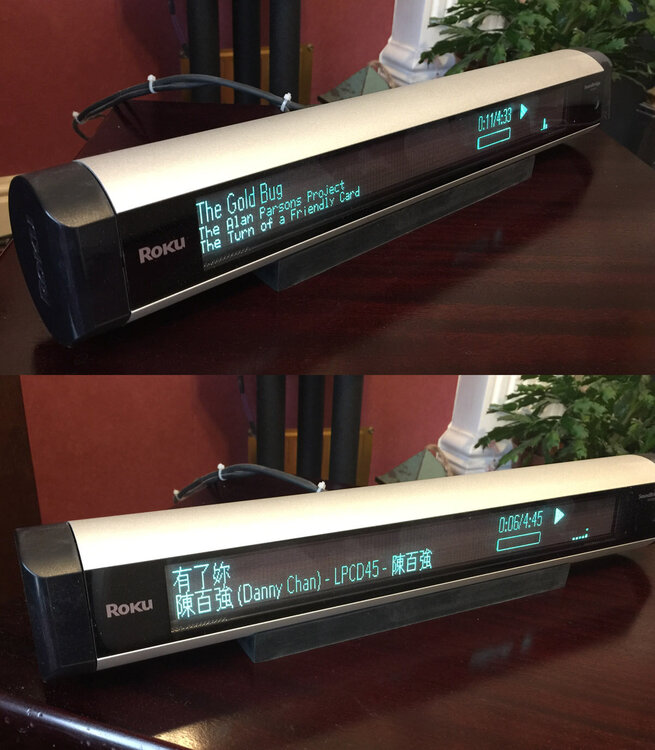
-
Just a note to say Thank You! I was trying to get owntone to work after it split from daapd, but couldn't see my way past some strange errors. (I am mostly a hardware guy, so playing around with docker settings is a little outside my comfort zone.) So I just reinstalled from Community Applications having seen your post, pointed it at my library, and it just works! Both I and my aging Roku SoundBridge players are very grateful.
-
I had the same error, but because my backup server does not have any cache or ZFS pool. Under Unraid 6, there was simply no cache assigned. Under Unraid 7 the array would not start. I had to explicitly set the pool setting to 0 slots. Then I could start the array. Subsequent restarts were then also fine.
-
I started on 4.7. It just worked, and it worked very well as a basic NAS, but there were no plugins, no docker, no apps, and a relatively basic web interface. There were a few extensions to add additional functionality to the UI. I got my first license in early 2011. I am still using that USB stick with the current release, although I currently have four licenses in total.
-
Just to feedback... I also hit the update requiring 6.11.9 issue. I decided to treat this as a special case and went ahead with the 6.12.0-RC2 update anyway. When the system rebooted I did not go to the dashboard (since the prior version of the plugin might give issues) but I went and updated the plugin before then doing anything else. That went smoothly and the plugin's data and settings were preserved. Then when I went to the dashboard later, everything worked as it should. I was able to rearrange the tiles as desired after unlocking them. So, thanks for your work on a timely fix to a minor compatibility issue.
-
Same for me (I use Brave as my browser mostly). Mostly I was thrown by the unexpected need to use email address instead of user name and only fully realised that after doing a password reset anyway. Had me scratching my head for a few minutes. I don't use MyServers, so I was unaffected by that side (not sure whether I would have been or not...)
-
The Feb 14th update is working for me. I did have to wait a few seconds for Real-Time stats to appear, and a minute of so for the Last Day option to start showing data, but that seems reasonable. No reboot was needed. No reboot was required. Thank you for your attention on this issue.
-
I was reading the above and wondered about the power factor too. Is this using the same power supply as the Threadripper build? If it's not, then it might just be that the power factor is different in the new build and the Tasmota device (not sure what that is btw) is reading VA rather than true power in Watts. Some power supplies only manage decent power factor at reasonable loads, and at light loads the readings might be quite misleading. Using a kill-a-watt kind of device that can read both Watts and VA might help clarify what's going on.
-
Updated two servers, no issues at present. Thank you.
-
Updated both main and backup servers from 6.11.1 to 6.11.2 without issue. Thank you.
-
@Johnyb62 - Replying here since I just saw your post on the Parity Check Tuning thread. Providing your system's diagnostics could help, as requested above. But possible causes include... not enough RAM faulty memory (try several passes of Memtest86) possibly overclocked CPU or RAM (easily done if it's a Ryzen CPU since DOCP/XMP defaults are often a CPU memory controller overclock) possibly a power supply issue. A reliable system should not have problems running parity checks without interruption.
-
This is simple (or confusing, depending on relevant knowledge and experience). (so not how much this will help...) APC and CyberPower use VA ratings for their UPS product naming, not real power in Watts. VA is a measure of the voltage and current capability multiplied together without any regard for the phase relationship between the voltage and current as consumed by the attached load. Depending on the power factor of the load, the current and voltage may be significantly out of phase, and this will mean a lower "real" power is available to the load under such conditions. The "real" power is measured as the product of the voltage and its in-phase current at each point where the voltage is measured. This will always be a lower number than the VA rating (since power factor cannot be greater than 1). (The VA number is sometimes known as the "apparent power".) The UPS has to be designed around the VA rating, since the electronics within need to be able to support both the voltage and current requirements of the load whether they are in phase or not. So for a UPS rated 1500 VA, the maximum load in watts is a lower figure, and the manufacturers are working with a power factor of 0.6 to quote a supported load of 1000 watts for the nominal power figure. In modern PC power supplies, the power factor approaches 1 as the load increases above 20% or so of the power supply's rating. In standby conditions (below 10 watts or so), it is not unusual for the power factor to drop massively, to maybe 0.2 or even 0.1. Note that some plug in power meters (Kill-a-watt style and similar) can read VA and Watts and sometimes Power Factor as separate readings. For domestic users, the electricity meters are normally reading only the real power consumed (the lower figure), not the VA figure and so you will generally only pay for the actual power usage. I found this which is not maths heavy (compared to the Wikipedia articles on the same)... https://www.arrow.com/en/research-and-events/articles/real-vs-reactive-power
-
I started, also on 4.7, a couple of months before you (my post in your thread - ) Happy Birthday, LimeTech and Unraid. Long may it continue.
-
OK - that's good news. Thanks for the feedback. But I would still recommend an increase as and when you're able to. Linux uses any unused RAM for caching disk accesses, so you'll most likely find things will run more smoothly with 4GB or 8GB.



