





pengrus
Members
-
Joined
-
Last visited
Everything posted by pengrus
-
Hi, This container intermittently just starts refusing connections for me after anywhere from five to 45 minutes of uptime. It sometimes comes back with no intervention, but If I let it go on long enough, NPM itself stops responding too. A restart starts serving files again, but always stops. Obviously, this is no good for prod or WAF. Container is on the custom br0 network, in my normal subnet, as are the Wordpress and Nextcloud and everything else I'm trying to use this for. Any ideas? Logs? Unraid's native logs say nothing, and neither do the proxy_access or _error logs except when it isn't down. Thanks! -P
-
Is any of the mover code open source? Is this entirely an mdadm (or whichever driver it calls) limitation/issue?
-
Try it with firefox, typically it tells you more. Are you using the weird Limetech-gets-you-a-LE-cert thing? You might need to reprovision those, silent flash scrambles happen, one of my backup servers has been offline for two weeks because network.cfg was garbled, wasn't caught by CHKDSK or whatever. But I'd back down all the way to local http first. Since you can't hit the GUI, move /boot/config/network.cfg and network-rules.cfg to .old or whatever and reboot. It should come up with the default settings (DHCP etc). Then add back the features you want one-by-one and see if and where it stops you. 2c -P
-
What applications have access, just those three? What are their permissions inside the database? Log in as root and then please post the output of: SELECT user,host FROM mysql.user; And then: SHOW GRANTS FOR <username>@<host>; Do this for each user. Do you have any logs? From MariaDB or the applications? Please attach them to your reply if so.
-
Why yes! I was just trying to fix this, and I think I found the answer. The container is trying to use NUMA for resource allocation with the host, but is being gated by the default security profile. To fix: Edit the container, enable advanced view, and add: --cap-add=sys_nice --cap-add=sys_nice to Extra Parameters. Apply and profit. The seccomp workaround is messy, it disables all the normal security for the container. The call to mbind is now already gated by CAP_SYS_NICE, but if you want to use it you'll have to tune the security profile for the container. Hope it helps! -P
-
Thanks to @JorgeB for pointing me to the controller. For those that might have one still chugging away, what looks like is happening is that under load the Marvell-based (AOC-SASLP-MV-8 in this case) controller will freak out over IRQ16 (or 13, sometimes) and crash the server. The disk being rebuilt wasn't even on the controller, but you need all the disks to participate so... Anyway, so I went and found a different post (also featuring @JorgeB and @saarg in starring roles) that recommended disabling IOMMU by appending "iommu=pt" to syslinux.cfg. And now my drive is rebuilt. I have some more LSIs on order to replace so I can have IOMMU back, but this works for now! Thanks again. -P
-
Jon is of course correct, but it also looks like you're using a reverse proxy (.151) that isn't proxying the php socket for Colossus (.201) properly. Please do what Jon says, you've got a bananas amount of hardware errors, but when that's fixed, take a look at the proxy. I have a (mostly) working config for Nginx that I can provide, but ideally Limetech would provide configs for major web servers (sigh)... Have you run memtest (w/SMP enabled)? -P
-
Well, it's definitely mvsas...how do I fix that?? root@Archive:~# cat /proc/interrupts CPU0 CPU1 CPU2 CPU3 CPU4 CPU5 CPU6 CPU7 0: 11987036 0 0 0 0 0 0 0 IO-APIC 2-edge timer 1: 0 4 0 0 0 0 0 0 IO-APIC 1-edge i8042 8: 0 0 4 0 0 0 0 0 IO-APIC 8-edge rtc0 9: 0 0 0 0 0 0 0 0 IO-APIC 9-fasteoi acpi 12: 6 0 0 0 0 0 0 0 IO-APIC 12-edge i8042 16: 0 0 0 0 142514 0 0 0 IO-APIC 16-fasteoi mvsas 18: 0 0 0 4 0 0 0 0 IO-APIC 18-fasteoi i801_smbus 19: 0 0 0 0 0 77385 0 0 IO-APIC 19-fasteoi ata_piix, ata_piix 21: 0 0 0 0 0 0 72 0 IO-APIC 21-fasteoi ehci_hcd:usb1 23: 0 0 0 0 0 0 0 2654154 IO-APIC 23-fasteoi ehci_hcd:usb2 24: 7115066 0 0 0 0 0 0 0 HPET-MSI 3-edge hpet3 25: 0 6391924 0 0 0 0 0 0 HPET-MSI 4-edge hpet4 26: 0 0 6033243 0 0 0 0 0 HPET-MSI 5-edge hpet5 27: 0 0 0 5389967 0 0 0 0 HPET-MSI 6-edge hpet6 28: 0 0 0 0 4701097 0 0 0 HPET-MSI 7-edge hpet7 29: 0 0 0 0 0 0 0 0 DMAR-MSI 0-edge dmar0 30: 0 0 0 0 0 0 0 0 PCI-MSI 49152-edge PCIe PME, aerdrv 31: 0 0 0 0 0 0 0 0 PCI-MSI 81920-edge PCIe PME, aerdrv 32: 0 0 0 0 0 0 0 0 PCI-MSI 458752-edge PCIe PME 33: 0 0 0 0 0 0 0 0 PCI-MSI 466944-edge PCIe PME 34: 0 0 0 0 0 0 0 0 PCI-MSI 468992-edge PCIe PME 35: 0 0 0 0 0 555414 0 0 PCI-MSI 2097152-edge eth0-rx-0 36: 0 0 0 0 0 0 209403 0 PCI-MSI 2097153-edge eth0-tx-0 37: 0 0 0 0 0 0 0 2 PCI-MSI 2097154-edge eth0 38: 0 0 0 0 0 0 0 86345 PCI-MSI 524288-edge mpt2sas0-msix0 NMI: 0 0 0 0 0 0 0 0 Non-maskable interrupts LOC: 181 190 187 184 181 5772395 5427425 8262557 Local timer interrupts SPU: 0 0 0 0 0 0 0 0 Spurious interrupts PMI: 0 0 0 0 0 0 0 0 Performance monitoring interrupts IWI: 1070909 857156 782246 731932 645449 944730 664880 1390869 IRQ work interrupts RTR: 0 0 0 0 0 0 0 0 APIC ICR read retries RES: 74066 29253 25872 22715 22290 30056 26554 29858 Rescheduling interrupts CAL: 266472 84006 63573 55369 70468 22849 16713 11208 Function call interrupts TLB: 2859 3516 3542 3300 3399 3428 3186 2658 TLB shootdowns TRM: 0 0 0 0 0 0 0 0 Thermal event interrupts THR: 0 0 0 0 0 0 0 0 Threshold APIC interrupts DFR: 0 0 0 0 0 0 0 0 Deferred Error APIC interrupts MCE: 0 0 0 0 0 0 0 0 Machine check exceptions MCP: 217 218 218 218 218 218 218 218 Machine check polls ERR: 0 MIS: 0 PIN: 0 0 0 0 0 0 0 0 Posted-interrupt notification event NPI: 0 0 0 0 0 0 0 0 Nested posted-interrupt event PIW: 0 0 0 0 0 0 0 0 Posted-interrupt wakeup event Thanks! -P
-
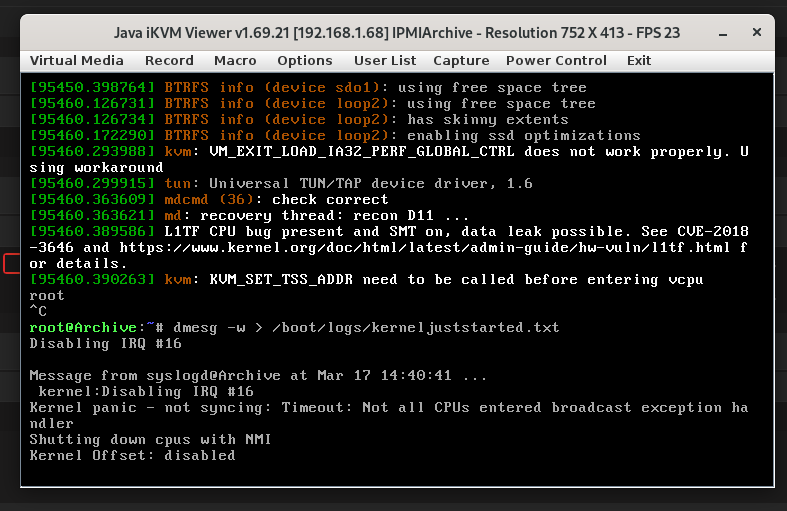
Hi! My backup server threw a 2TB disk (Enterprise of course, still have 10-year-old WD20EARS in this thing no problem), so I replaced with a 4TB Seagate. But every time I try to start the array and rebuild the data, it gets to some random point and dies, crashing the server and requiring a hard reboot. The new drive is fine as far as I can tell, no SMART errors. Memtest ran for a day with no errors. I've attached diagnostics from before array start and after the crash, and tails of syslog and the kernel, though it appears nothing is valuable there. I've also attached a screenshot of the error that finally crashes the server (loudly today with the beeping). I have searched and found other threads mentioning something similar, but there haven't been any real fixable causes discovered, hope someone out there can help! Thank you. -P archive-diagnostics-20220316-1144.zip archive-diagnostics-20220317-1748.zip juststarted.txt kerneljuststarted.txt
-
Disclaimer: I am just trying to brainstorm with you on how to fix it, cause that's what I would want in your shoes. I am by no means anything approaching an expert. I would try dumping the DBs, create a testing VM, and seeing if it imports. If so, just spin up another instance and mysqldump back.
-
Have you tried starting with the --tc-heuristic-recover switch? At this point, I'm about ready to migrate everything back to MySQL, all of this weird behavior in the past few months is concerning at best. Looks like there's an "official" docker from Bungy, relevant XML here.
-
@saarg, What a very strange way to say "Hey buddy, this forum is for UnRAID support, head over to linuxserver.io for other platforms, or join our Discord at https://discord.gg/YWrKVTn." Which @trurl had basically already said. We all understand that while UnRAID is closed source, these addons are open. And we are grateful. But a huge selling point of the platform is its "supportive community." I have received a great deal of support myself, including from you if memory serves. But that comment is just rude. Maybe they had two browser tabs open searching for help and came to this forum accidentally. Maybe whatever. Point is, if we could keep this forum civil and kind and not have it devolve into neckbeardy "you didn't exactly follow the rules 20 pages ago and didn't ask your question how I want so pack sand and figure it out n00b," I think it would be great. I fully anticipate that I may be wrong and perhaps you didn't mean it the way I took it (if so I apologize in advance), but I just dropped back in to see if anyone had any help for the issue I and others are having (which apparently no one does), and I see this and it's just unhelpful. Felt like I should say something about that. Thank you for coming to my TED Talk. -P
-
Hi, At some point coincident with the latest update to the MariaDB container, I've had an issue where the container will not allow multiple clients to connect to the Kodi databases. I've attached the log, but basically if one client is accessing the database, it will refuse to let another connect until I restart the container. I've made no configuration changes other than attempting the downgrade/upgrade to latest procedure on page 17. Any ideas? Thanks! -P marialog.txt
-
Sorry, just scrolling through and found this, is it still available? If not, could you tell me what RAM you're using in there? I'm having trouble finding DIMMs that are compatible with that board. Thanks! -P
-
Got it. Yes, there absolutely could be an issue with the container's network access, but I've pinholed the TCP and UDP for 7777, 7778, and 27015 both ways, it should be fine, and other bridged dockers are fine. Yes, Ark requires a username, had to set up a separate account for that with SteamGuard disabled. Ok, so I removed both dockers, as well as their folders from my appdata and redownloaded Ark-SE. Here is the error I'm getting now, did my best to snippet: ---Prepare Server--- ---Server ready--- ---Start Server--- /opt/scripts/start-server.sh: line 61: cd: /serverdata/serverfiles/ShooterGame/Binaries/Linux: No such file or directory /opt/scripts/start-server.sh: line 62: ./ShooterGameServer: No such file or directory ---Setting umask to 000--- ---Update SteamCMD--- WARNING: setlocale('en_US.UTF-8') failed, using locale: 'C'. International characters may not work. Redirecting stderr to '/serverdata/Steam/logs/stderr.txt' [ 0%] Checking for available updates... [----] Verifying installation... Steam Console Client (c) Valve Corporation -- type 'quit' to exit -- Loading Steam API...OK. Logging in user 'thepengrusservers' to Steam Public ... WARNING: setlocale('en_US.UTF-8') failed, using locale: 'C'. International characters may not work. Redirecting stderr to '/serverdata/Steam/logs/stderr.txt' [ 0%] Checking for available updates... [----] Verifying installation... Steam Console Client (c) Valve Corporation -- type 'quit' to exit -- Loading Steam API...OK. Logging in user '****' to Steam Public ... Logged in OK Waiting for user info...OK ---Update Server--- WARNING: setlocale('en_US.UTF-8') failed, using locale: 'C'. International characters may not work. Redirecting stderr to '/serverdata/Steam/logs/stderr.txt' [ 0%] Checking for available updates... [----] Verifying installation... Steam Console Client (c) Valve Corporation -- type 'quit' to exit -- Loading Steam API...OK. Logging in user '****' to Steam Public ... Logged in OK Waiting for user info...OK ERROR! Failed to install app '376030' (No subscription) ---Prepare Server--- ---Server ready--- ---Start Server--- /opt/scripts/start-server.sh: line 61: cd: /serverdata/serverfiles/ShooterGame/Binaries/Linux: No such file or directory /opt/scripts/start-server.sh: line 62: ./ShooterGameServer: No such file or directory It definitely looks like the container can't get out to the network, and/or Ark isn't getting installed for some reason? Thanks! --P
-
Hi! I'm having the "unable to query server for invite" problem again. I think it may have started when I tried to install your CS:GO docker and didn't realize the ports were the same, but I can't be sure. I also tried editing the steamcmd folder for Ark to a new one, but that hasn't worked. The server shows up in steam if I favorite it, but no other way, and it says the version is 298.41, while my clients are all on 301. There appear to be update-related errors in the logs: ---Setting umask to 000--- SteamCMD not found! steamcmd.sh linux32/steamcmd linux32/steamerrorreporter linux32/libstdc++.so.6 linux32/crashhandler.so ---Update SteamCMD--- Redirecting stderr to '/serverdata/Steam/logs/stderr.txt' ILocalize::AddFile() failed to load file "public/steambootstrapper_english.txt". [ 0%] Checking for available update... [----] Downloading update (0 of 50328 KB)... [ 0%] Downloading update (810 of 50328 KB)... ~~~~ [ 99%] Downloading update (50328 of 50328 KB)... [100%] Download Complete. [----] Applying update... [----] Extracting package... [----] Extracting package... [----] Extracting package... [----] Extracting package... [----] Installing update... [----] Installing update... [----] Installing update... [----] Installing update... [----] Installing update... [----] Installing update... [----] Installing update... [----] Installing update... [----] Cleaning up... [----] Update complete, launching... WARNING: setlocale('en_US.UTF-8') failed, using locale: 'C'. International characters may not work. Redirecting stderr to '/serverdata/Steam/logs/stderr.txt' [ 0%] Checking for available updates... [----] Verifying installation... [ 0%] Downloading update... [ 0%] Checking for available updates... [----] Download complete. [----] Extracting package... [----] Extracting package... [----] Extracting package... [----] Extracting package... [----] Installing update... [----] Installing update... [----] Installing update... [----] Installing update... [----] Installing update... [----] Installing update... [----] Installing update... [----] Installing update... [----] Cleaning up... [----] Update complete, launching Steamcmd... WARNING: setlocale('en_US.UTF-8') failed, using locale: 'C'. International characters may not work. Redirecting stderr to '/serverdata/Steam/logs/stderr.txt' [ 0%] Checking for available updates... [----] Verifying installation... Steam Console Client (c) Valve Corporation -- type 'quit' to exit -- Loading Steam API...OK. Logging in user '****' to Steam Public ... Logged in OK Waiting for user info...OK ---Update Server--- ---Validating installation--- WARNING: setlocale('en_US.UTF-8') failed, using locale: 'C'. International characters may not work. Redirecting stderr to '/serverdata/Steam/logs/stderr.txt' [ 0%] Checking for available updates... [----] Verifying installation... Steam Console Client (c) Valve Corporation -- type 'quit' to exit -- Loading Steam API...OK. Logging in user '****' to Steam Public ... Logged in OK Waiting for user info...OK Update state (0x0) : Timed out waiting for update to start, bailing. Error! App '376030' state is 0x204 after update job. ---Prepare Server--- ---Server ready--- ---Start Server--- [S_API FAIL] SteamAPI_Init() failed; SteamAPI_IsSteamRunning() failed. Setting breakpad minidump AppID = 346110 Any ideas? Thanks for all the help, and the great dockers! --P
-
Nailed it, my friend. I'd actually made my own container a few months ago and could never get it to work for the same reason. Forwarded the ports this afternoon, and we're good to go. Thanks very much for the assistance! I would like to mention though, to no one in particular, that this practice of requiring WAN access is just not very nice. I paid the $60 or whatever, I should be able to play this on my own LAN without giving whoever any information about how/when/etc I play. Not to mention the security implications... </rant>
-
Well, I'm trying to play on my LAN. Internal to my network. The Ark server sits on my unRAID, and I have a Windows and a Linux client to play on that instance. So I'm not sure unofficial servers is right for me, I'm just trying to play internal to my 192.168.1.x. I keep looking for it in the "LAN" section of the Ark browser and it can't find it. When I set the IP address as a favorite, it gives me the unable to query server for invite thing. Again, I didn't open any ports because I am not trying to play from the WAN, just internal to my house. Will this function in a LAN scenario or do I need to make it public-facing?
-
Mostly no. I can specify the server IP in steam's server dialog and it appears. When I try to play, it says it's "unable to query the server for invite". I cannot find the server through Steam's browser or the browser within Ark. I'm using your template basically unchanged, 7777 and 7778, as well as 27015 are specified. Any other things I should check?
-
Ok, wasn't sure I could do this without providing Steam a u/p, I'll reconfigure when I get everything up and running. I'm not forwarding anything, just trying to run everything on the LAN. I searched in LAN, and added by IP address in favorites. Thanks!
-
Hi! Thanks for all these game containers. I'm trying to run an Ark server, installed your Docker, disabled steamguard and entered my username/password. Everything seemed to install fine, but the log shows: Update state (0x5) validating, progress: 99.13 (8450729018 / 8525214156) Success! App '376030' fully installed. ---Prepare Server--- ---Server ready--- ---Start Server--- [S_API FAIL] SteamAPI_Init() failed; SteamAPI_IsSteamRunning() failed. And the server doesn't show up on my network. Please let me know what other info you might need. Thanks! -P
-
Hello all, When you run the extended tests, are the results written to disk anywhere? I can run the tests successfully on my production server, but when I try to read the results it crashes my browser. This obviously bodes ill for the results, but I'd still like to see them so I can correct them! Thanks -P
-
I also have been having a great deal of difficulty with this plugin. After it ran a clear-only, no pre/post read for 12 hours, it was only 25% into an 8TB seagate archive. On top of the slowness, it basically rendered the array unusable. None of the pages would load or would load very slowly, sshing in to the console tok forever, and the machine couldn't keep up with my typing, etc. Reads and writes to the array were glacial. If I stop the preclear, everything goes back to normal. I believe I have the latest version, I downloaded it yesterday. The drive in question is connected to the motherboard, but there are other drives connected through a SASLP. Diagnostics attached below, thanks much for any help you can suggest! tower-diagnostics-20171216-1127.zip
-
So I have a question. I have a diverse mix of drives, 160GB, 320GB, 1TB (all 2.5"), 2TB, 3TB and 4TB (3.5"). Obviously, the slowest drives are the smallest. So what would be the best policy to tune my parity check speed? This utility, though awesome (thanks Pauven!) doesn't even get past my 160GB drives, which is probably why my tuning has resulted in parity checks upwards of 15 hours! it is certainly true that your speed is limited by the slowest drive, but that only holds while the slowest drive is being checked! My supposition is this: I assume that, barring any extreme circumstances, one should tune one's parity check to the values that are most beneficial for the drive(s) one spends the largest(?) amount of the parity check on. But I have 6 2TB drives, should I tune for those, or the 4 3TB drives (12 is 12 is 12, so to speak)? And then, supposing there is actually an answer to that question, is there a better way than trial and error to tune this array? Can I use options to this script to tune for that? Just throwing it out there. EDIT: this is actually several questions... TIA, P
-
RobJ, Thanks very much for the insight! Yeah, this drive is a little wonky, I'd only had it for a few months, running in my MBP, and all of a sudden it started taking FOREVER to read. I was watching a movie with XBMC and it stuttered every few seconds. I couldn't agree more on not using it in the array, I was just hoping that the combined stress level of preclearing and the drive's own mechanisms for fixing its problems would make it useful for something besides a coaster. (now there's an idea, old drives encased in lexan for drink coasters? who doesn't need a frosty adult beverage whilst constructing the perfect parity-protected server?!) I'm running the fsck now, but I do have a few more questions. If the kernel detected a lost packet, why did the 3TB drive (md12) not redball? As you see from the dates, this was a couple of days ago, and the array still showed all green after the issue. What could, and I know this is probably all guesswork, cause the 1TB drive to "fail" in this manner? And thirdly, I'd like to second the respectful request to Joe L. to take a look at the preclear script. These don't look like 'PASS'es to me! Don't get me wrong here, I, like probably everyone else on this forum am indebted to Joe multiple times over for his advice and unmenu and everything else. Just a question/bug(maybe). Thanks! Pengrus p.s. Oh, i forgot one more...is there any way to tell what "command c21f9f00" is?

