





isvein
Members
-
Joined
-
Last visited
Everything posted by isvein
-
Then I will try to use my current proxynetwork, just will make it more easy I guess since I use NPM already
-
Nice The new one does what I missed from the old one, the ability to start/stop the entire folder with one button!
-
Do the NEED to be on their own network or can I put them all in my proxy network?
-
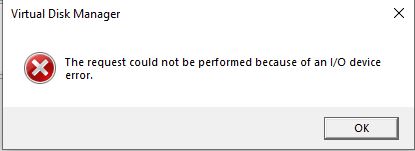
Hello I wanted to check here if anyone has any idea what is going on or if I just have been unlucky. I bought an WD Ultrastar 20TB because they are very reasonable prized. I know data center drives can have problems in a pc/home server because of sata-power pin3, but I bought the one with legacy pin3 config, "Legacy Pin 3 config – no Power Disable support" and SE (no self encrypt support, SED) and still I have problemes Unraid cant see the disk at all. I tried the disk on my w10 desktop too, with an molex to sata as I heard this bypass the pin3 problem, and my desktop bios/efi dont see the drive, but windows do, it shows up as an 18TB as expected, but when I try to initialize I get an i/o error. The sata cable I used here is new and I know it works. The molex/sata adapter I used for years with no problems.
-
Not that I don't trust you, but where was it confirmed? 🙂
-
Makes sense. So ntfs on an fileio gives more overhead than ntfs on an block device it seems then if the speed test is to be trusted.
-
So I tried an FileIO disk on my zfs-mirror pool just for fun to check the speed vs just use the pool over smb: FileIO Read 240MB, Write 121MB SMB: Read 229, Write 293 Is the iscsi fileIO overhead that big or is it something else? Also have an single 8TB hdd setup as block storage and there I get the expected speed of Read/Write 135MB All is over an 2.5gbit direct connection.
-
Have I understood it correctly that znapzend is zfs-replication build into an "easier" syntax and with build in scheduling and stuff?
-
Well, that makes sense and was the reason I thought too. Some say it's because if arc uses too much ram and it overflows, things will crash, but I thought it has more to do with the casual unraid user may not have a ton of ram.
-
Why is the zfs-arc limited to 1/8 of ram as default? 🙂
-
Is that disk activity an plugin? 😮
-
I tested on 6.12.3 now, sat drives spin down to 30min (just not to need to wait for hours) and kept away from the "main" page and they did indeed spin down. My arrays are 10 of 11 drives are zfs. But once I clicked on "Main", they all spun up again as expected pr info from @Iker (all zfs drives, the xfs one keeps off as also expected)
-
Hello This seems to be a thing, problem many has noticed, but I could not find a bug report on it yet (maybe I did not look deep enough) I first came across the problem on Reddit and then found out I had the same situation. It looks to be related to docker, because if I/we shut down docker or does not run any dockers, nothing is written. I cant say for sure if this happened with zfs before 6.12.3, but people on reddit seems to have noticed this on 6.12.3 and not before. There is also the thing that zfs drives in array does not spin down if you have them on a timer, but this seems to be linked to ZFS-Master plugin IF you have the "Main" tab open as the plugin then reads the snapshot data and that wakes up the drive. But this does not explain the writes. I have tried to isolate it to a specific docker, with no luck. The writes also happens on zfs drives on the array, not only zfs-pools. Anyone else know more about this? oneroom-diagnostics-20230719-2154.zip
-
Know this is an old thing, but it would be nice if the VPN Manager under Settings also supported OpenVPN and not just Wireguard
-
thanks! I think I got confused and though of each container as an peer, but I think I get how it works now
-
One way to do it is to use a site like ipleak.net and/or dnsleaktest.com
-
So the DNS should always be set as extra parameter on each docker and NOT under the tunnel dns settings?
-
Just delete the docker folder after stopping docker and created a new image Then used the Appstore to just redownload all previous installed dockers with latest saved config, since no important data is saved in the docker images
-
I dont remember how many datasets, switched back to btrfs image for the docker. But I have 24 dockers and it was way more datasets, maybe double
-
So it's more of a bug than a feature then, thanks 🙂
-
(not sure if this is the right forum) Hello Im just curious, when using docker folder (not image) under zfs, it creates a lot of datasets and it seems to automatic take snapshots ether when dockers update or gets added, why does this happen? Is it by design? It looks to be more datasets than I have containers.
-
Im getting this message now when I try to move data from my last xfs drive (the last one does not have much free space) to zfs drives. Tried different things but same happens Disk9 is xfs and disk8 is zfs Edit: Hmmm looks like this may be because of something else, but not sure why

-
So this plugin wont add much on zfs formatted array drives as it has the scrub and checksum already? and if a drive goes down, we always have good old parity as usual
-
I wonder the same thing, but for an ZFS formatted array
-
That makes sense, but can unbalanse put data into shares on another disk? I thought it just copied or moved folders from root of one disk to root of another, since this works just fine on say xfs disks.


