





-Daedalus
Members
-
Joined
-
Last visited
Everything posted by -Daedalus
-
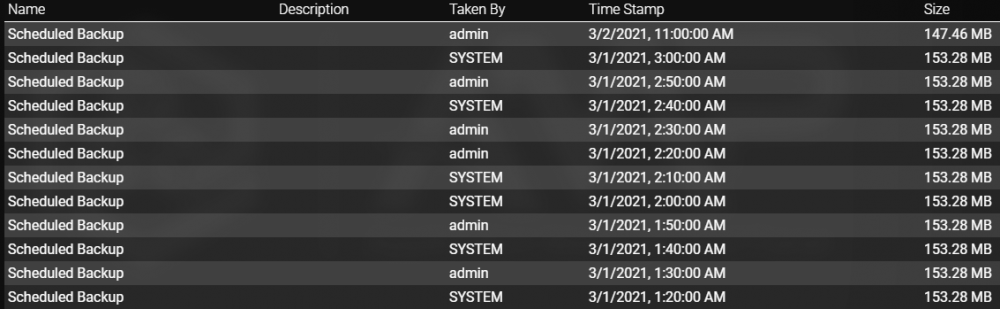
Second issue for you Cornelious: I really love the idea of sticky backups. To test this, I created a trigger to run a backup every 10 minutes from within the Minecraft instance under "Schedule". I limited the backups to 12 under "Configuration > Backup limits" (the size options were left extremely large so as not to be a factor) I let the game run to create a couple of automatic backups I created a manual backup called "STARRED" with a description, and Sticky = On. Any ideas as to why my sticky backup is still getting deleted? I would think it should keep it at the bottom, and cycle through the 11 remaining backups every 10 minutes. Might it have something to do with some backups being created by "admin" and some by "SYSTEM"?

-
That was it! Thank you, it wasn't immediately obvious that "instance" and "application" are treated differently.
-
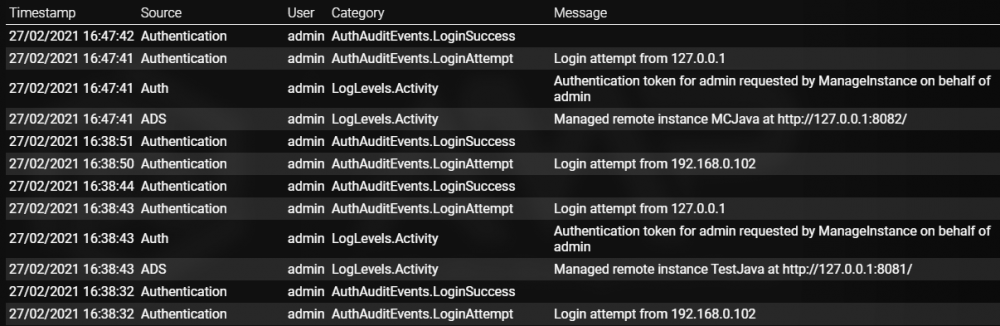
Hi! I'm using your container (thank you!) pretty successfully, except for one weird issue: The main instances page doesn't seem to be able to send start/stop commands to the individual instancs. (other commands seem to work though: I can change port bindings, for example) I had a Minecraft instance set to autostart after 10 seconds. This status is reflected in the main menu, but if I actually open the instance, it's still off. Likewise if I manually start/stop from the main page - when I manage the instance to check, its status hasn't changed. I don't see anything much in the log, at least no obvious failures: I have this setup on a custom network, with a static IP, if that makes any difference. (networking is not my strong suit). Anything else I can check, or any ideas on where to look?
-
+1 If it would cause too much problems, maybe each disk could be assigned an alias, keeping the original /mnt/disk mountpoint, and giving an option in the UI for displaying mountpoint name or alias.
-
Valid points all. I hadn't considered the fact that no-one has written a plug-in for it yet. That likely does say something to all this. And you're right; I hadn't considered that some people use disk shares/mappings either. I guess we're at the same point: Feature request made, wait and see.
-
I have to disagree. unRAID is being billed as an appliance that gives you enterprise features for less money, and does lots of things without requiring as much user knowledge as a home-spun setup using a more common distro. If you're saying a regular user should be totally ok with using the terminal zero a drive with dd, then you're kind of missing the point. I could actually see this saving time, in the sense that a user kicks off the drain operation, then comes back a day or two later, can restart the array at a more convenient time, and yank the drive. How I'd see it happening is more like: User selects drive to drain Data is evacuated to other drives Drive is zero'd out System leaves pending operation to remove drive from config on next array stop Notification is left for user of pending array operations User stops array Config is changed such that drive is removed User starts array So this has gone from requiring several integrations in the UI, potentially installing a new plugin, as well as terminal commands (that have to be left running for ages, mind), to 2 clicks on a default unRAID install. Look, at the end of the day Linux gurus are always going to scoff at the noobs, but if it's a storage appliance first, and one that sells itself on flexibility at that (different size/types of drives, etc.) then removing a drive is what I would call a fundamental - and likely expected from a new user's point of view - operation.
-
-
-
+1 My eyesight isn't great, and I also hate that colour combo.
-
-
Thank you @testdasi for all the info, good to know. I might play around with a RAID5 pool when 6.9 goes to stable then.
-
Isn't BTRFS RAID 5/6 still a no-no?
-
My bad, didn't realise I needed to do that that way. Thanks!
-
Thank you!! Edit: Should have checked dependencies. It apparently needs librsync as well: https://github.com/rdiff-backup/rdiff-backup
-
Any chance of getting rdiff-backup included?
-
Thanks for the offer! I actually figured out pretty quickly after posting that they weren't PNGs. I should have guessed they'd be vector. I just fullscreened and zoomed on the two images I needed and mucked something up in Paint. Inelegant, but it does the job.
-
I just picked up a 2U case for a second server the other day, and I was looking to make a custom image for it. It's very simple: It's a mix of the 2u-hdds and 2u-vents. I went looking for the images so I could copypasta something together, but... I couldn't find them. Where do they actually live?
-
Now that I understand what's being asked, I'd also like it. It makes a lot of sense. +1
-
In theory, absolutely. But I've found that USB sticks, when left in all the time, run extremely hot. I use USB sticks in work for a document backup, writing maybe 20-50MB a day (so significantly more than unRAID, yes) and I've gone through three in the past year. Every time I take one out of the dock, it's too hot to hold for the first couple of seconds. I know it's more USB 3.0, but it's very difficult to find high quality 2.0 drives these days. A relatively small concern, I suppose, but I would be a nice option to have none-the-less.
-
That's actually a cool idea. +1 if possible.
-
Updated to 6.8.1 from 6.7.2 with no problems that I can tell.
-
Moved away from Server 2012 R2 (and FlexRAID) to unRAID a few years ago. Overall, really happy with the move. Keep up the fantastic work guys!
-
If you click and hold on any of the headers within a panel, you can re-order them. (So you can have 'Docker Containers' below 'Virtual Machines', or 'Server' below 'Processor' for example) So far as I know, you can't move panels as a whole around however.
-
+1 Would absolutely love to see this. I imagine it won't show up until 6.8 or later, registering interest none-the-less.
-
That was a mighty fast reply! You're right, of course. I was initially going to say that setting a daily move through cron would mean that the mover would run during a parity check (for some reason I assumed the "don't move during parity" option was only for the x% move), but on reflection, that would be nonsensical. Dumb-ass satisfied. Carry on.



