






NAS-Man
Members
-
Joined
-
Last visited
Everything posted by NAS-Man
-
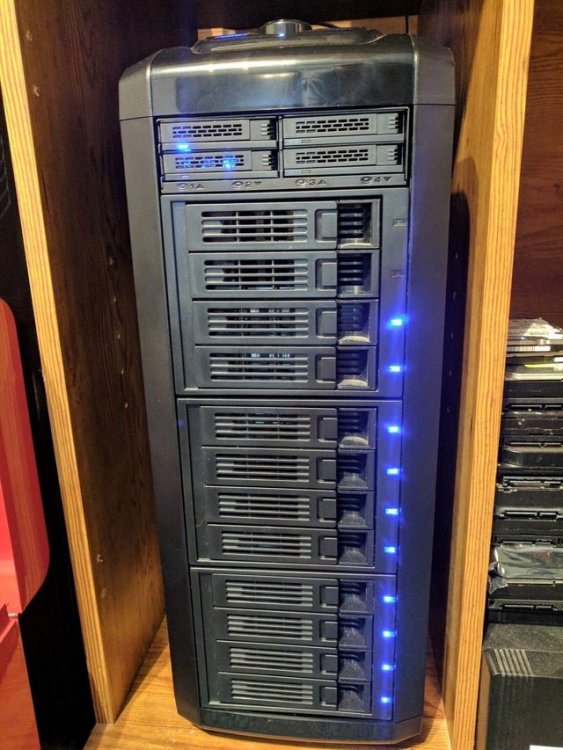
Zalman MS800 Please:
-
Yes, thank you it is back working.
-
There was another update, updated & still broken.
-
Latest update broke hydra2 Removed, did fresh install with appdata hydra2 wiped, hydra2 loaded then did a restore backup from file & it's broke again same error: -------------------------------------------------------------------- SQL State : 42S02 Error Code : 42102 Message : Table "SEARCHRESULT" not found; SQL statement: ALTER TABLE SEARCHRESULT ADD indexerSearchEntity INTEGER [42102-199] Location : migration/V1.21__LINK_SEARCHENTITY_TO_INDEXERSEARCHENTITY.sql (/app/hydra2/file:/app/hydra2/lib/core-2.7.1-exec.jar!/BOOT-INF/classes!/migration/V1.21__LINK_SEARCHENTITY_TO_INDEXERSEARCHENTITY.sql) Line : 1 Statement : ALTER TABLE SEARCHRESULT ADD indexerSearchEntity INTEGER at org.flywaydb.core.internal.sqlscript.DefaultSqlScriptExecutor.handleException(DefaultSqlScriptExecutor.java:253) at org.flywaydb.core.internal.sqlscript.DefaultSqlScriptExecutor.executeStatement(DefaultSqlScriptExecutor.java:202) at org.flywaydb.core.internal.sqlscript.DefaultSqlScriptExecutor.execute(DefaultSqlScriptExecutor.java:125) at org.flywaydb.core.internal.resolver.sql.SqlMigrationExecutor.execute(SqlMigrationExecutor.java:77) at org.flywaydb.core.internal.command.DbMigrate.doMigrateGroup(DbMigrate.java:367) at org.flywaydb.core.internal.command.DbMigrate.access$200(DbMigrate.java:54) at org.flywaydb.core.internal.command.DbMigrate$3.call(DbMigrate.java:284) at org.flywaydb.core.internal.jdbc.TransactionTemplate.execute(TransactionTemplate.java:74) at org.flywaydb.core.internal.command.DbMigrate.applyMigrations(DbMigrate.java:281) at org.flywaydb.core.internal.command.DbMigrate.migrateGroup(DbMigrate.java:246) at org.flywaydb.core.internal.command.DbMigrate.access$100(DbMigrate.java:54) at org.flywaydb.core.internal.command.DbMigrate$2.call(DbMigrate.java:164) at org.flywaydb.core.internal.command.DbMigrate$2.call(DbMigrate.java:161) at org.flywaydb.core.internal.database.base.Connection$1.call(Connection.java:147) at org.flywaydb.core.internal.jdbc.TransactionTemplate.execute(TransactionTemplate.java:74) Caused by: org.h2.jdbc.JdbcSQLSyntaxErrorException: Table "SEARCHRESULT" not found; SQL statement: ALTER TABLE SEARCHRESULT ADD indexerSearchEntity INTEGER [42102-199] at org.h2.message.DbException.getJdbcSQLException(DbException.java:451) at org.h2.message.DbException.getJdbcSQLException(DbException.java:427) at org.h2.message.DbException.get(DbException.java:205) at org.h2.message.DbException.get(DbException.java:181) at org.h2.command.ddl.AlterTableAlterColumn.update(AlterTableAlterColumn.java:114) at org.h2.command.CommandContainer.update(CommandContainer.java:133) at org.h2.command.Command.executeUpdate(Command.java:267) at org.h2.jdbc.JdbcStatement.executeInternal(JdbcStatement.java:233) at org.h2.jdbc.JdbcStatement.execute(JdbcStatement.java:205) at com.zaxxer.hikari.pool.ProxyStatement.execute(ProxyStatement.java:95) at com.zaxxer.hikari.pool.HikariProxyStatement.execute(HikariProxyStatement.java) at org.flywaydb.core.internal.jdbc.JdbcTemplate.executeStatement(JdbcTemplate.java:235) at org.flywaydb.core.internal.sqlscript.StandardSqlStatement.execute(StandardSqlStatement.java:42) at org.flywaydb.core.internal.sqlscript.DefaultSqlScriptExecutor.executeStatement(DefaultSqlScriptExecutor.java:189) at org.flywaydb.core.internal.sqlscript.DefaultSqlScriptExecutor.execute(DefaultSqlScriptExecutor.java:125)
-
Yes, using an actual bios dump from my video card with header removed. Same bios being used in Windows 10 vm that works just fine. Yes the Windows 10 vm is not running if you are thinking that.
-
I tried it on my Threadripper with GTX 2060 and it does not work either, same problem. I have tried several linux distros in vm on Unraid that have not worked for me also.
-
+1 for me
-
There is not that many cases with 5.25's made in 2019 now the trend in cases has changed. Server chasis seem to be most viable option now unless you find used older cases. I looked and all I can find thst is available new with 9 5.25's is ATX Full Tower No mid-tower at all: SilverStone Temjin Series TJ11B-W Black Aluminum ATX Full Tower Computer Case & ZZA CSAZ-GT 1 Black SECC ATX Full Tower Computer Case.
-
These cards are meant for a server chasis which have high air flow not desktop style cases if that is what you are using so you will want to add a fan on the 9207-8i heatsink or a fan in the case that blows across the heatsink. I used the Noctua NF-A4x10 FLX, Premium Quiet Fan, 3-Pin (40x10mm, Brown) which is a 6yr warranty high quality fan to keep mine cool and it works great.
-
I have the LSI 9207-8i and it works great, just be careful lots of counterfits on ebay. My first one I bought new from another seller ended up being a counterfit, so I now prefer oem server pulls. I can confirm legit cards from un: findingdeals on ebay listing: LSI SAS 9207-8i Storage controller - 8 Channel SATA 6Gb/s OEM this is where i got mine and I just looked he still has more. I'm sure you know you will also need SAS SFF-8087 36Pin to 4 SATA 7Pin HDD forward breakout cables.
-
I am using pfsense with a vpn. Can I do custom : br0 and assign an ip on the duckdns docker so I can add a pfsesne lan rule to bypass vpn and use my wan address? On bridge It updates my vpn address to duckdns.org. I tried this and I get something went wrong in duckdns container log and it does not show ip in PORT MAPPINGS (APP TO HOST) under dockers in Unraid. So I probably answered my own question. So how do you bypass vpn when I want to keep Unraid and everything else behind the vpn?
-
+1 Please
-
It has to be you linuxserver because nothing with unraid has changed or been updated and this issue just started.
-
linuxserver.io I am having this same problem only with your dockers. Keeps saying there is update on all the linuxserver.io dockers I have and when I update 0kb pulled because they are up to date. It keeps doing it over and over. I tried to see if I could install a linuxserver.io docker that I don't have installed already and installs just fine. Dockers from others are not having this problem. What could be causing this?
-
Thanks, yes I am guilty of copying & pasting. It's the easiest & quickest way to add a script. Did not know that would break it, but now I know. I would have copied to folder but my smb sharing has not been working in unraid for a while now. The only way I can transfer to unraid at this point is through usb drive through unassigned devices & krusader.
-
No longer works
-
Started having this same exact problem today for the first time, one problem after another lately.
-
I love Unraid, Happy Birthday!
-
I I am having the same problem on two drives, sdb & sdi. I have twelve matching Seagate 4tb drives. Will not enable on the two out of twelve. I tried on two different motherboards sata ports and on LSI 9207-8i card with same results, won't enable. I just purchase another matching drive to replace one to see if the problem persists or not. I will report back. But in the meantime any helpful suggestions would be greatly appreciated. Thanks
-
So I just built an entirely new server with brand new beefy hardware only reusing my original Hard drives, cache drive & Unraid usb drive. I went from older quad core xenon with 16gb ddr dual channel memory to a new x399 Threadripper 2920x 12 core with 32gb quad channel ddr4. I also added Quadro p2000 & LSI 9207-8I HBA card and plex is still unresponsive when mover is running. There is definetely something wrong with the I/O in unraid at this point. I'm not bashing Unraid in any way, I love Unraid it is great. I am just hoping seeing that many poeple having same problem that this will be figured out and fixed in the near future.
-
Unraid 6.7.2 with plugin set to low priority and idle same problem.
-
/dev/sde: setting drive write-caching to 1 (on) write-caching = 0 (off) Above is what I get when I try: hdparm -W 1 /dev/sde Does not work for me.
-
Unraid 6.7.1 stable I'm having the same issue of plex stream(s) stops when mover is running. If you try to start stream when mover is running, plex spinning circle is all you will get until mover is done.


