






david279
Members
-
Joined
-
Last visited
Everything posted by david279
-
Use this app https://github.com/CHEF-KOCH/MSI-utility Run it as administrator
-
SSH into the hack vm and run the shutdown command works well.
-
Try booting from a install USB Sent from my SM-G955U using Tapatalk
-
K10temp is the CPU temperatures for ryzen Sent from my SM-G955U using Tapatalk
-
Type it87 and hit detect Sent from my SM-G955U using Tapatalk
-
In system temp plugin try typing in it87 in the available driver and loading it and see what comes up?
-
Check your clover install...espeically if you recently updated it. https://www.tonymacx86.com/threads/solved-clover-update-r4586-disables-os-boot-black-screen.256050/
-
Just updated clover on my Hack VM just waiting on the nvidia drivers before i update to mojave. Been running 10.13.6 with no issues changed qemu to 3.0 feels about the same.
-
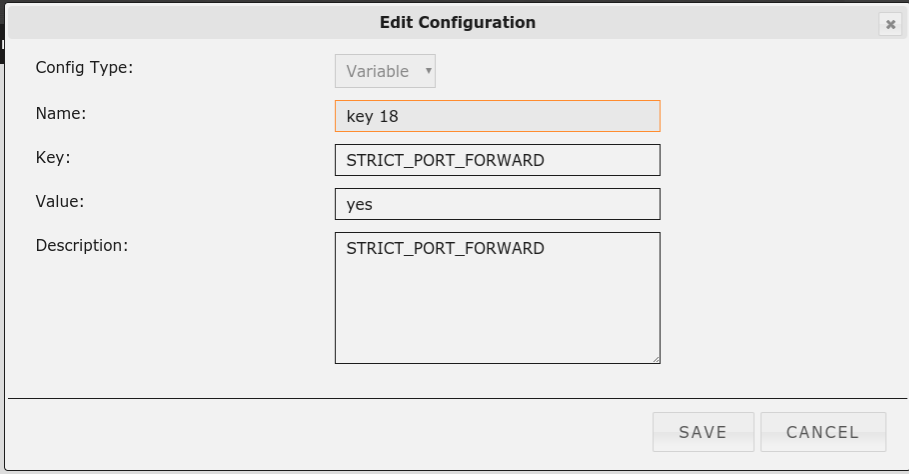
edit the docker and add it like this
-
I added it manually. add path...
-
I didn't have it either. I just added it manually.
-
I get this warning message in the unRAID GUI system log when i use the terminal. Tested it from a windows VM and a Chrome os device running chrome 69. Sep 8 12:52:56 Tower nginx: 2018/09/08 12:52:56 [error] 12988#12988: *46432 open() "/usr/local/emhttp/webterminal/auth_token.js" failed (2: No such file or directory), client: 172.27.224.2, server: , request: "GET /webterminal/auth_token.js HTTP/1.1", host: "192.168.X.X", referrer: "http://192.168.X.X/webterminal/" tower-diagnostics-20180908-1255.zip
-
Your xml only list cpus 11,4,13. So its only gonna use those cpus. You need to add 3,5 and 12.
-
post the xml of your VM also run msconfig;boot;advanced options to see if its using the correct amount of cores in Windows.
-
Check 6 boxes instead of 3 [emoji848] Sent from my SM-G955U using Tapatalk
-
Is your new isp blocking port 80 or 443? Sent from my SM-G955U using Tapatalk
-
I had a bunch of disconnections after the last update so i just redid the entire docker and all is good now. I had setup the docker almost a year and a half ago with no issues so i don't know what was going in the update. I also switch to the swiss server if it helps. I was on France.
-
If your looking in krusader your looking at the file system of krusaders docker image. Open the terminal in the web GUI and look in /mnt that way. You need to setup the host paths of unRAID to see them in krusader. Sent from my SM-G955U using Tapatalk
-
Make sure the CPU mode is set like this Sent from my SM-G955U using Tapatalk
-
You don't have to use the osk key. Just add FakeSMC.kext to your clover install. I run a Hackintosh VM and I use a r7 2700x. Sent from my SM-G955U using Tapatalk
-
zfs set sharesmb=on "poolname" to share using samba. Your not going to be able to do much of anything in the GUI. Sent from my SM-G955U using Tapatalk
-
First make sure it's there at /. Use terminal to make sure it's there. Set the mountpoint using zfs cmdline. Sent from my SM-G955U using Tapatalk
-
Doesn't zfs place the pools at "/" when at they are mounted? /Tank, /rpool etc. Sent from my SM-G955U using Tapatalk
-
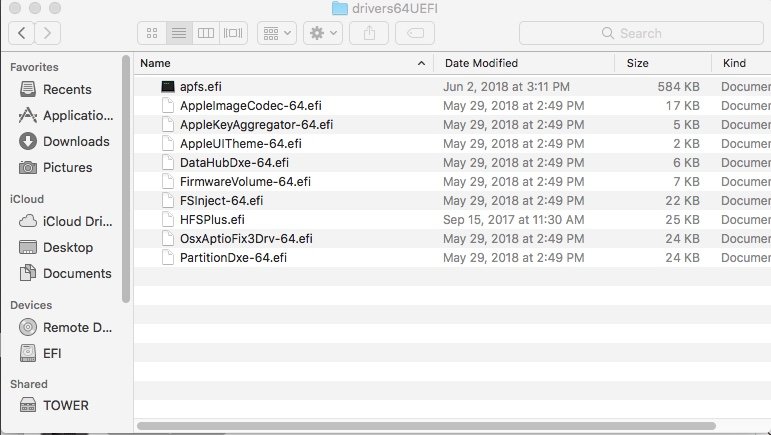
This is mine. Looks like the VboxHfs-64.efi and HFSPlus.efi maybe conflicting with each other.
-
Take a look at this post. https://www.tonymacx86.com/threads/no-hdd-shown-in-boot-manager.253445/


