plantsandbinary
Members
-
Joined
Everything posted by plantsandbinary
-
Any reason why it needs to bind so often? Client crashed randomly whilst deleting a 10GB file. Here's the log: Couldn't access the web UI at all after this: Just getting an infinite loading circle when trying to load the frontend.
-
Hey we discussed earlier how the container does a check to see if the port is forwarded and if not, it resets the connection and attempts to update the port again. The thing is, the port isn't being set correctly the first time around, which means every time I restart the container or need to reboot my server. I have to wait 30 minutes before the container actually bothers to check if the port forward worked and when it realises it hasn't (because the open port re-assignment didn't happen properly on container boot) it resets and correctly assigns the port with a new IP again, only after the check after 30 mins. This causes me a lot of problems. It gets me temp banned from multiple trackers due to: "You are seeding/connected from too many IP addresses" This is because the container starts with an IP from PIA and the port doesn't get assigned properly. So it starts seeding with a closed port from IP address (A). 30 minutes later when the port check fails, it resets the connection and properly assigns the port with a new IP address (B). This however gets me temp banned from some of the trackers I seed on because my IP address changed and my previous session is still valid. Can you please just update this container or fix the port assignment issue during boot so it assigns/forwards the port correctly the first time around without needing a check after 30 mins and possible reset. You can keep the part of the script that does the check later too in case something happens. But the container really seriously needs to assign/forward the port the right way the first time. I really hate to ask @binhex but at this stage it's really not functioning as it should. I haven't set any settings differently or messed with any files or anything either. I forgot to mention that the line is uncommentated out by default when your container is installed and commenting it out does not make the port get assigned properly the first time the container starts. So it really doesn't seem to matter if it is or isn't commented out.
-
Have you actually tried doing this? Commenting out this line makes the container fail to load for me. It's rebinding the port correctly, but as I said before it takes anywhere between 15 and 30 minutes to do so after running which makes the container and portforwarding look broken upon first glance.
-
@FlippinTurt thank you mate, yours works fine! I've moved over to your container now and I suggest everyone else do the same.
-
Let me be the first to say thank you for taking over the other container. DoH is an incredibly important feature for me. My blocking is not working whilst using PIA VPN. I have this VPN running on all of my devices. On Windows you can set a custom DNS within the tunnel software like so. My PiHole is running at 192.168.1.51 The problem is, this results in a DNS not resolved error when using my VPN. If I set the Custom DNS to 191.168.1.1 it works and I can see the traffic in my PiHole, but the problem is that it's very slow. Sites load very, very slowly and blocked sites are not blocked completely. They still load but without any images or themes/formatting, so they load only as a basic HTML page that looks like a total mess. Here's the PIA DNS Settings window: I've set up my ASUS AX88U router like this: Here's my DNS settings page on the PiHole: Once again thank you so much for making this container. It was sad to see the old one go so out of date.
-
Thanks for the reply. Here's my rtorrent.rc file: # This is an example resource file for rTorrent. Copy to # ~/.rtorrent.rc and enable/modify the options as needed. Remember to # uncomment the options you wish to enable. # Maximum number of simultaneous downloads and uploads slots (global slots!) (`max_downloads_global`, `max_uploads_global`) # #throttle.max_downloads.global.set = 300 #throttle.max_uploads.global.set = 300 # Global upload and download rate in KiB. "0" for unlimited. # #throttle.global_down.max_rate.set_kb = 0 #throttle.global_up.max_rate.set_kb = 0 # Maximum number of simultaneous downloads and uploads slots per torrent (`max_uploads`) Default: `50` for both # #throttle.max_downloads.set = 50 #throttle.max_uploads.set = 8 # Maximum and minimum number of peers to connect to per torrent. # #throttle.min_peers.normal.set = 100 #throttle.max_peers.normal.set = 200 # Same as above but for seeding completed torrents (-1 = same as downloading) # #throttle.min_peers.seed.set = 10 #throttle.max_peers.seed.set = 50 # Maximum number of connections rtorrent can accept/make (`sockets`) # #network.max_open_sockets.set = 1200 # Maximum number of open files rtorrent can keep open (you have to modify the system wide settings with ulimit!) (`set_max_open_files`) # #network.max_open_files.set = 600 # Default directory to save the downloaded torrents. # execute = {/bin/bash,-c,mkdir -p /data/incomplete} directory.default.set = /data/incomplete/ # Default session directory. Make sure you don't run multiple instance # of rtorrent using the same session directory. Perhaps using a # relative path? # execute = {/bin/bash,-c,mkdir -p /config/rtorrent/session} session.path.set = /config/rtorrent/session/ # Watch a directory for new torrents, and stop those that have been # deleted. # #schedule2 = watch_directory,5,5,load.start=./watch/*.torrent #schedule2 = untied_directory,5,5,stop_untied= # Close torrents when diskspace is low. # #schedule2 = low_diskspace,5,60,close_low_diskspace=100M # The ip address reported to the tracker. # #network.local_address.set = 127.0.0.1 #network.local_address.set = rakshasa.no # The ip address the listening socket and outgoing connections is # bound to. # #network.bind_address.set = 127.0.0.1 #network.bind_address.set = rakshasa.no # Port range to use for listening. # network.port_range.set = 55180-55180 # Start opening ports at a random position within the port range. # network.port_random.set = no # Disable check for SSL cert for tracker # network.http.ssl_verify_peer.set = 0 # Check hash for finished torrents. Might be useful until the bug is # fixed that causes lack of diskspace not to be properly reported. # #pieces.hash.on_completion.set = no # Set whether the client should try to connect to UDP trackers. # trackers.use_udp.set = yes # Set the maximum permitted single file size in a torrent. # Note if you do not set this and attempt to start a torrent that # contains a file larger than 512 GB (default) then the torrent will # not start. # #system.file.max_size.set = 1024G # Alternative calls to bind and ip that should handle dynamic ip's. # #schedule2 = ip_tick,0,1800,ip=rakshasa #schedule2 = bind_tick,0,1800,bind=rakshasa # Encryption options, set to none (default) or any combination of the following: # allow_incoming, try_outgoing, require, require_RC4, enable_retry, prefer_plaintext # # allow_incoming - Allow incoming encrypted connections from other peers # try_outgoing - Attempt to set up encryption when initiating a connection # require - Require encryption, and reject to peers who don't support it # require_RC4 - Require RC4 encryption specifically # enable_retry - If a peer is rejected for not supporting the encryption we need, retry the handshake # prefer_plaintext - Prefer plaintext encryption # protocol.encryption.set = allow_incoming,try_outgoing,enable_retry # Enable DHT support for trackerless torrents or when all trackers are down. # May be set to "disable" (completely disable DHT), "off" (do not start DHT), # "auto" (start and stop DHT as needed), or "on" (start DHT immediately). # The default is "off". For DHT to work, a session directory must be defined. # dht.mode.set = auto # UDP port to use for DHT. # dht.port.set = 6426 # Enable peer exchange (for torrents not marked private) # protocol.pex.set = yes # Set downlad list layout style. ("full", "compact") # #ui.torrent_list.layout.set = "full" # SCGI Connectivity (for alternative rtorrent interfaces, XMLRPC) # # Use a IP socket with scgi_port, or a Unix socket with scgi_local. # schedule can be used to set permissions on the unix socket. # scgi_port = 0.0.0.0:5000 #scgi_local = /home/user/rtorrent/rpc.socket #schedule = scgi_permission,0,0,"execute.nothrow=chmod,\"g+w,o=\",/home/user/rtorrent/rpc.socket" # Initialise ruTorrent plugins (required for rss and scheduler plugins) on startup # (normally triggered by a browser opening the web ui). # # The command below in practice does NOT always trigger (possible race condition?) and thus # the same command has been added to the script /home/nobody/initplugins.sh in order to # attempt to ensure all plugins are initialised. # # NOTE - Do not double quote or curly brackets env var for 'WEBUI_USER' # execute = {/bin/bash,-c,/usr/bin/sleep 10s && /usr/bin/php /usr/share/webapps/rutorrent/php/initplugins.php $WEBUI_USER &} I've tested another 4 something times restarting the container, after setting a 30 minute timer on my mobile phone. I don't get an open port until roughly 30 minutes after starting or restarting the container. The main tracker I am using reports that the port I selected in the rtorrent.rc file is what is being used and for that port it's closed. Similarly, the websites I use to check also give the same error. As I said, after the automatic restart when the port check fails in the script, it works 100% of the time. So far this happens the same way every single time. 30 minutes of rtorrent using the config file port, and then afterwards the port is reassigned and works immediately and is immediately updated on the tracker page. Please let me know if you need any other files.
-
Ok I am 100% convinced that even using a port forward enabled endpoint. This script does not always do the port forwarding. My main tracker that I use is still reporting after multiple restarts of the container that rutorrent is instead using the port that is set in rtorrent.rc... which I was told above is not important if I am using PIA. This means that the port is not being reassigned correctly. EDIT: and here I have proof that it is not always working for some reason: 2021-01-02 19:12:00,242 DEBG 'start-script' stdout output: [info] Port forwarding is enabled [info] Checking endpoint 'ee.privacy.network' is port forward enabled... 2021-01-02 19:12:00,596 DEBG 'start-script' stdout output: [info] PIA endpoint 'ee.privacy.network' is in the list of endpoints that support port forwarding ... 2021-01-02 19:12:02,546 DEBG 'start-script' stdout output: [info] Successfully assigned and bound incoming port '56158' ... 2021-01-02 19:12:02,946 DEBG 'watchdog-script' stdout output: [info] rTorrent incoming port 49160 and VPN incoming port 56158 different, marking for reconfigure 2021-01-02 19:12:02,950 DEBG 'watchdog-script' stdout output: [info] Attempting to start irssi... Normally it should read this (when it does port forward correctly and I can test and see that it has, the below is just an example of the missing line where the assignment is actually done): 2021-01-02 19:12:02,946 DEBG 'watchdog-script' stdout output: [info] rTorrent incoming port 49160 and VPN incoming port 56158 different, marking for reconfigure 2021-01-02 19:12:02,946 DEBG 'watchdog-script' stdout output: 56158-56158 2021-01-02 19:12:02,950 DEBG 'watchdog-script' stdout output: [info] Attempting to start irssi... I've seen it do the above once or twice, but I don't know why it doesn't ALWAYS do it. That middle line is the most important, because that's the actual port being changed by the script from whatever is in rtorrent.rc to whatever has been randomly forwarded by PIA. Half the time I don't see that though in the log. Most of the time the log simply says: 'marking for reconfigure' but it doesn't actually do it... Here's a full log with private data removed: https://cryptobin.co/25a9h7o0 Password is: unraidforum Here's the .ovpn options minus the cert and other private stuff client dev tun proto udp remote ee.privacy.network 1198 resolv-retry infinite nobind persist-key persist-tun cipher aes-128-gcm ncp-disable tls-client remote-cert-tls server auth-user-pass credentials.conf compress verb 1 reneg-sec 0 Final EDIT: So it seems for some reason you have it set up to do the actual forwarding something like 30 minutes after connecting. Check the below times. I just checked my log again and sure enough it does actually try to forward and even check if this is the case, but only after 30 minutes? Why is this the case? Look at the times below. 1. The container finishes running at 20:04:55,010 2. 15 minutes later the port is for some reason reassigned again at 20:19:47,485 3. A further 15 minutes later at 20:35:23,295 the script checks if the port is open and was forwarded correctly, in my case below it fails. 2021-01-02 20:04:55,002 DEBG 'watchdog-script' stdout output: [info] Privoxy process started [info] Waiting for Privoxy process to start listening on port 8118... 2021-01-02 20:04:55,010 DEBG 'watchdog-script' stdout output: [info] Privoxy process listening on port 8118 2021-01-02 20:19:47,485 DEBG 'start-script' stdout output: [info] Successfully assigned and bound incoming port '27772' 2021-01-02 20:34:47,603 DEBG 'start-script' stdout output: [info] Successfully assigned and bound incoming port '27772' 2021-01-02 20:35:21,709 DEBG 'watchdog-script' stdout output: 0 2021-01-02 20:35:23,295 DEBG 'watchdog-script' stdout output: [warn] Incoming port site 'https://portchecker.co/' failed to web scrape, marking as failed 2021-01-02 20:35:24,452 DEBG 'watchdog-script' stdout output: 0 2021-01-02 20:35:24,452 DEBG 'watchdog-script' stdout output: 0 2021-01-02 20:35:25,808 DEBG 'watchdog-script' stdout output: [info] rtorrent incoming port closed, marking for reconfigure 2021-01-02 20:35:51,042 DEBG 'start-script' stdout output: [info] Sending SIGTERM (-15) to 'openvpn' due to port closed... 2021-01-02 20:35:51,057 DEBG 'start-script' stdout output: Sat Jan 2 20:35:51 2021 event_wait : Interrupted system call (code=4) 2021-01-02 20:35:51,065 DEBG 'start-script' stdout output: Sat Jan 2 20:35:51 2021 /usr/bin/ip addr del dev tun0 10.20.112.79/24 2021-01-02 20:35:51,082 DEBG 'start-script' stdout output: Sat Jan 2 20:35:51 2021 /root/openvpndown.sh tun0 1500 1553 10.20.112.79 255.255.255.0 init 2021-01-02 20:35:51,087 DEBG 'start-script' stdout output: Sat Jan 2 20:35:51 2021 SIGTERM[hard,] received, process exiting 2021-01-02 20:35:51,088 DEBG 'start-script' stdout output: [info] Script finished to assign incoming port 2021-01-02 20:35:51,095 DEBG 'start-script' stdout output: [info] Starting OpenVPN (non daemonised)... Now here is where things get interesting. THIS TIME, it does the port reconfigure. 2021-01-02 20:36:07,942 DEBG 'start-script' stdout output: [info] Successfully assigned and bound incoming port '34643' 2021-01-02 20:36:28,648 DEBG 'watchdog-script' stdout output: [info] rTorrent incoming port 27772 and VPN incoming port 34643 different, marking for reconfigure 2021-01-02 20:36:29,036 DEBG 'watchdog-script' stdout output: 34643-34643 2021-01-02 20:36:29,036 DEBG 'watchdog-script' stdout output: 34643-34643 2021-01-02 20:36:29,443 DEBG 'watchdog-script' stdout output: 34643 2021-01-02 20:36:30,244 DEBG 'watchdog-script' stdout output: 0 2021-01-02 20:36:30,669 DEBG 'watchdog-script' stdout output: 0 2021-01-02 20:36:30,685 DEBG 'watchdog-script' stdout output: [info] Initialising ruTorrent plugins (checking rTorrent is running)... 2021-01-02 20:36:30,693 DEBG 'watchdog-script' stdout output: [info] rTorrent running [info] Initialising ruTorrent plugins (checking nginx is running)... 2021-01-02 20:36:30,700 DEBG 'watchdog-script' stdout output: [info] nginx running [info] Initialising ruTorrent plugins... 2021-01-02 20:36:31,125 DEBG 'watchdog-script' stdout output: [info] ruTorrent plugins initialised 2021-01-02 20:36:31,125 DEBG 'watchdog-script' stdout output: [info] ruTorrent plugins initialised There is clearly something up with this script. I assume there's a reason why you wait 15-30 minutes to do the check, I guess because that's how long it takes to show up publicly on one of those sites, or for some anti API flooding reason? Either way, the reason that the open port check fails is because it doesn't seem to actually reconfigure automatically unless you let the script restart itself after waiting 30 minutes for the check. So you've got the working reconfigure job only set to run AFTER a restart of the container when the open port check fails (which it always fails because it never re-assigns the right way the first time around). So yeah after the seemingly pointless 30 minute wait and failure to reconfigure the first time. When it ultimately always reboots and does it properly, it works. As shown in the below image where I am now fully connectable. So the port in rtorrent.rc DOES matter. However, it must be reassigned by the script to work and this does not happen when the container is started or restarted. Only after the open port check fails and it restarts on its own.

-
@binhex I'm trying to use an ip address instead of a domain with PIA. This is because using a domain means that my IP will be different every single time, even if I only use the one country specific .ovpn file. For security I guess this might be good but it causes problems with other use cases which I will explain below. So when I generated my .ovpn file from PIA I chose IP. However, your script doesn't have this IP address in the list as listed to be port forwarded. Even though it should support port forwarding. So I am getting this: 2021-01-02 18:51:11,452 DEBG 'start-script' stdout output: [info] Successfully retrieved external IP address 188.126.xxx.xxx 2021-01-02 18:51:11,454 DEBG 'start-script' stdout output: [info] Script started to assign incoming port 2021-01-02 18:51:11,455 DEBG 'start-script' stdout output: [info] Port forwarding is enabled [info] Checking endpoint '188.126.xxx.xxx' is port forward enabled... 2021-01-02 18:51:11,813 DEBG 'start-script' stdout output: [warn] PIA endpoint '188.126.xxx.xxx' is not in the list of endpoints that support port forwarding, DL/UL speeds maybe slow [info] Please consider switching to one of the endpoints shown below ... 2021-01-02 18:51:13,753 DEBG 'start-script' stdout output: [info] Successfully assigned and bound incoming port '47283' 2021-01-02 18:51:42,881 DEBG 'watchdog-script' stdout output: [info] rTorrent incoming port 59851 and VPN incoming port 47283 different, marking for reconfigure I checked my ports and as far as I can see, they are now closed when using an IP. The reason why I do this is because one of the trackers I use has a stupid rule that you must download the .torrent from the exact same IP as the one in which your client is installed and using. It's a dumb rule to be honest but I haven't had any problems in the past using manual port forwarding with Mullvad and yet another custom generated .ovpn file. Just thought I'd let you know in case you wanted to edit the script to maybe print out whether or not the port was forwarded successfully even if the user is using an IP and not a domain to connect to (and that IP isn't in the list of what-ever those that are port forwarded). Maybe get it to check both? Perhaps it would be even easier to just get it to attempt port forwarding even if the IP/domain isn't in the list. That way I can use an IP without it even needing to check if it is supported. Just a heads up. EDIT: I figured out how to use the Privoxy built into the container to deal with this dynamic IP via PIA dns issue. So that fixed that problem, but I still have the issue where the port is not always forwarded and updated automatically by the script, even when using a port forwarded enabled endpoint.
-
no longer relevant
-
Thanks for replying at such a time. So firstly, happy new years! I read that, so my local router setting is pointless. I'll disable that. My question then. So I am to assume that the rtorrent.rc file setting is completely pointless (at least for me running PIA)? Also, then I guess I am also to assume that I should ignore that "open port" plugin that rutorrent shows being closed? If this is the case, please let me know. Then I'll leave the rtorrent.rc port set to whatever if it makes no difference. I've checked on the canyouseeme.org and yougetsignal.com and they both show the port is open. Download speed is still pretty finicky but that could just be a coincidence. However, both sites show the port is a TCP port. Though my .ovpn config is using UDP only. Why is that?
-
I just swapped to PIA. Is this necessary to enable port forwarding on my ruTorrent container? Currently I'm just using a generated .ovpn file from their site which I can create from my account page. I really need port forwarding working but the way that it is set up at the moment it seems you're only able to get a random one from within their Windows client... So how do we do this using the container? @binhex EDIT: Ok so I've read your FAQ on Github and the last 10 pages of posts. So far I get this in my log: 2020-12-31 21:52:38,738 DEBG 'start-script' stdout output: [info] Script started to assign incoming port 2020-12-31 21:52:38,738 DEBG 'start-script' stdout output: [info] Port forwarding is enabled I'm using a brand new PIA account. Windows client is set to Wireguard and Request Port Forwarding is set to: YES (on Windows client). PIA password and username are set in container options. STRICT_PORT_FORWARDING=yes I am also using an endpoint that allows port forwarding. I've got an .ovpn file in the openvpn folder that I generated from my PIA account page using GCM cipher etc. as you said it may provide better performance. Here's a copy of that with cert and country.IP etc. removed: client dev tun proto udp remote xxxxxx.privacy.network 1198 resolv-retry infinite nobind persist-key cipher aes-128-gcm ncp-disable tls-client remote-cert-tls server auth-user-pass credentials.conf compress verb 1 <crl-verify> -----BEGIN X509 CRL----- xxxxxxxxxxxxx -----END X509 CRL----- </crl-verify> <ca> -----BEGIN CERTIFICATE----- xxxxxxxxxxxxx -----END CERTIFICATE----- </ca> disable-occ My main question is. How do I tell what port is being forwarded by the container? Also, will this port always be the same? Finally, and maybe most importantly. What do I do with the rtorrent.rc file which states what port I am trying to use? I mean if the forwarded port is chosen randomly or something with your script Binhex, how do I know what port to set the container to use in the rtorrent.rc/ruTorrent Settings -> Connections tab? When I was using Mullvad the port I chose to be opened via Wireguard was permanent, PIA seems to do this totally differently though. Anyway so what port should I set in the rtorrent.rc file and then port forward in my router. I would rather use Wireguard too for better performance but my server isn't exactly weak or anything. So if that's possible, I'd love some info on doing that. Though it seems PIA doesn't have some Wireguard config generator or anything. Thanks EDIT 2: I just saw this in the log: 2020-12-31 22:03:48,536 DEBG 'start-script' stdout output: [info] Successfully assigned and bound incoming port '51083' 2020-12-31 22:03:48,850 DEBG 'watchdog-script' stdout output: [info] rTorrent listening interface IP 0.0.0.0 and VPN provider IP 10.x.xxx.95 different, marking for reconfigure 2020-12-31 22:03:48,857 DEBG 'watchdog-script' stdout output: [info] irssi not running 2020-12-31 22:03:48,864 DEBG 'watchdog-script' stdout output: [info] rTorrent not running 2020-12-31 22:03:48,865 DEBG 'watchdog-script' stdout output: [info] rTorrent incoming port 49160 and VPN incoming port 51083 different, marking for reconfigure So this time it bound 51083 as the incoming port, and last time it seems to have been 48225. In the ruTorrent settings I have: Settings -> Connection -> Port, set to 55180-55180. I don't understand what the script is trying to do, how does it handle the rtorrent.rc port setting and how can I anticipate what port is going to be assigned upon a container restart so I know what to forward in my router so I am not always having to change that in my router settings. Is there at least some logic or port range or something I can anticipate so I don't always have to change things in my router (I have an ASUS AX88U)? Could you please make this a bit more clearer in your Github FAQ.
-
Can we please get an option to auto-update docker apps after a few days (like say 7) like we do for plugins please? Was surprised to not find that option.
-
My entire rTorrent has stopped working for some reason whilst downloading a large 1.6TB torrent. My first drive filled up and most of my docker images crash when that happens. So I turned off all containers and moved files to the next drive. Figured there would be no problems so I restarted the container. Now I get this in the log. 2020-10-30 06:23:05,894 DEBG 'rutorrent-script' stderr output: [NOTICE] [pool www] 'user' directive is ignored when FPM is not running as root [NOTICE] [pool www] 'group' directive is ignored when FPM is not running as root 2020-10-30 06:23:05,903 DEBG 'rutorrent-script' stdout output: [info] starting nginx... 2020-10-30 06:23:16,542 DEBG 'watchdog-script' stdout output: [warn] Wait for rTorrent process to start aborted, too many retries 2020-10-30 06:23:16,543 DEBG 'watchdog-script' stdout output: [warn] Failed to start rTorrent, skipping initialisation of ruTorrent Plugins... 2020-10-30 06:33:23,916 DEBG 'watchdog-script' stdout output: [info] rTorrent listening interface IP 0.0.0.0 and VPN provider IP 10.14.0.3 different, marking for reconfigure 2020-10-30 06:33:24,772 DEBG 'watchdog-script' stdout output: 0 2020-10-30 06:33:25,099 DEBG 'watchdog-script' stderr output: INFO: Bad data packets written to '/tmp/xmlrpc2scgi-99.xml' 2020-10-30 06:33:25,100 DEBG 'watchdog-script' stdout output: ERROR While calling network.local_address.set('', '216.239.32.10\n216.239.34.10\n216.239.36.10\n216.239.38.10'): <Fault -503: 'Could not set local address: Name or service not known.'> I've even rebooted my server. It was running for 415 days without issues and I must have updated this container maybe 3 or 4 times during that time because I like to update only after a good period of time.
-
Just ran this. It doesn't work. 4 hours wasted and it didn't move a single file. God knows what it did except create a lot of read/writes. My first drive is still completely full though...
-
Yes thanks it seems to work fine and persist across reboots. Thanks a ton for the super fast reply btw. If something breaks in the future I'll go back to the default resolution but for now it seems very stable.
-
I think I managed to figure it out. Just rebooting the container once after installing it fixed it. I also briefly changed from 1920x1080 back to 1280x720 and then back to 1920x1080 because on my huge monitor 720p looks horrid.
-
Nevermind, rebooting the container once after installing fixed my issue for some reason.
-
Why am I now getting "Not Available" under Version: when looking at the docker container among the other containers I use? Has this project been deleted or something?
-
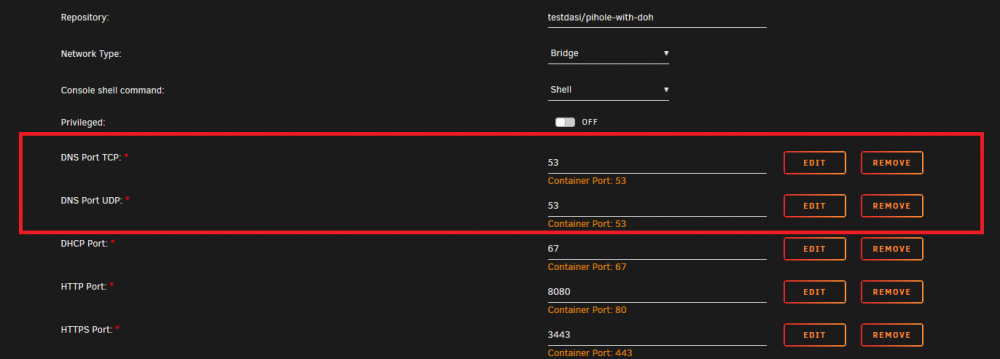
Same issue. Looks great but unfortunately I can't free up port 80 or port 443 because I am using them with LetsEncrypt. The other PiHole container works fine though without any conflicts right from the beginning. EDIT: I changed to use port 8080 and 3443 for this container but I am still getting an error that a port is in use. Also, shouldn't both these ports be different in the default config? Either way, I'm getting a server error and the container won't even start. EDIT FINAL: Well I worked out that it has to be set at its own I.P. address like OP said. I read that but didn't really get it because it looked like it was just an option in the container config at the bottom. So setting it to "Custom: br0" and giving it its own I.P. address solved the problem completely using default settings. After adding lists it works great. Though it did crash when I attempted to update 65 lists at the same time. It seemed to add the lists successfully but when updating them it crashed. So rebooting caused them to all be updated before the PiHole container finished starting. Big thanks to the OP. I've been looking for something with HTTPS over DNS for ages.

-
Oh well it doesn't matter. Different strokes for different folks hahaha. This container works fine with other providers like Mullvad (which imo is the best provider you could ask for). You just need to drop the config file into the directory, restart the docker container and away you go. It's literally that easy.
-
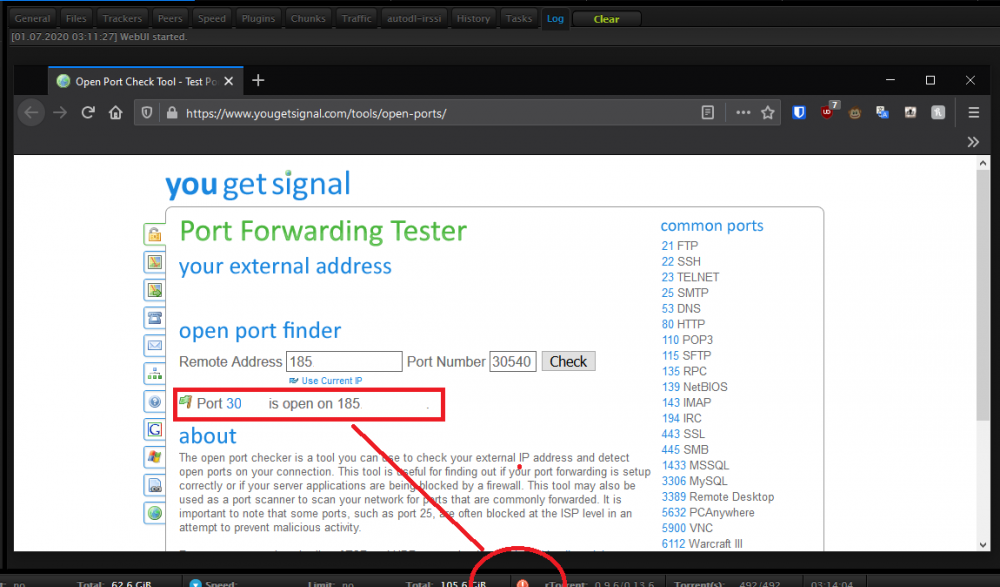
I'm tellin' ya. That thing does not work. 3 sites all tell me it's open. I have never, ever seen a green tick on that thing. Plus I am able to download and upload at line speed. Might want to check it again, but I don't think it's worth the hassle.
-
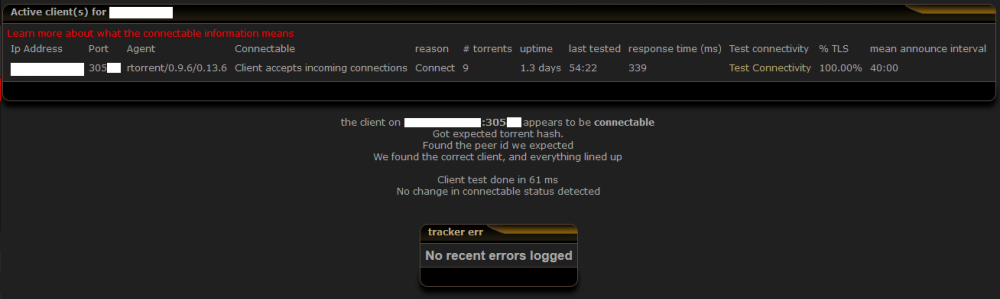
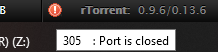
but you just said to me earlier this plugin/indicator has been broken for years. The best way to check if you are connectable is to use a tracker that can test for you or some kind of torrent-vpn checker that can test if your port is open or not, at least that's what I use to confirm it. EDIT: Here's what I mean. ruTorrent shows closed, but the tracker says I am connectable and my port is open. I haven't trusted that ruTorrent plugin for years.
-
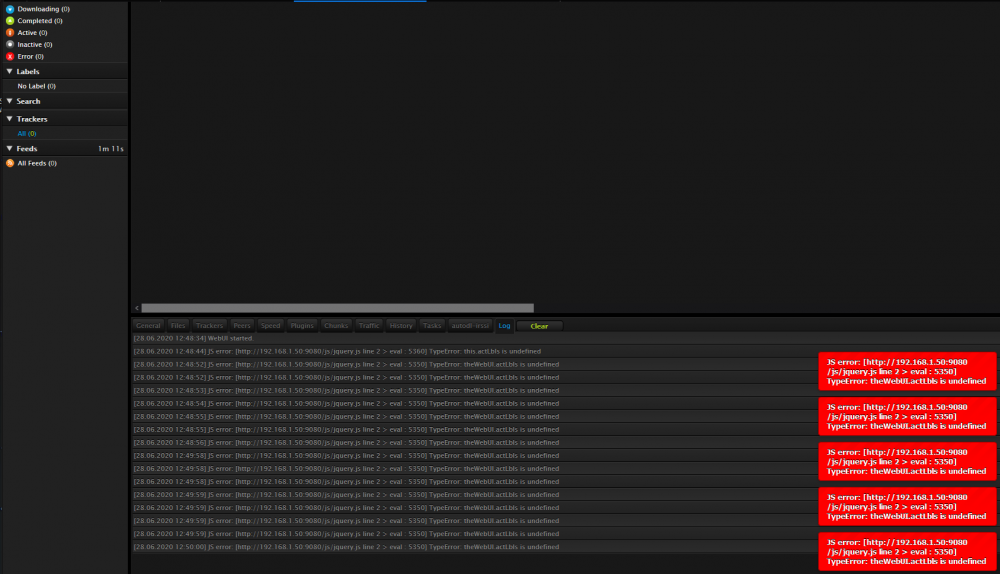
Just updated and now getting this... [28.06.2020 12:46:56] JS error: [http://192.168.1.50:9080/js/jquery.js line 2 > eval : 5360] TypeError: this.actLbls is undefined Literally all 600-something of my torrents have disappeared too and I can't click on anything on the UI without getting this error. EDIT: Going to settings still works. > General > Change theme to standard. Now I can see my torrents again. EDIT2: Back to Oblivion Theme, now it works. EDIT3: Rebooted docker container, same error, and same above fix worked. So it's an error thrown at runtime.
-
As per the pictures. Anyone know what is suddenly causing these issues? I haven't changed any user settings, any general settings, network settings or done any OS update or installed any new plugins and this just started happening out of the blue.
-
No I meant other clients could not see me as connectable. I fixed it, it was a problem with my .ovpn config file But yeah that plugin has been broken for years.