





bastl
Members
-
Joined
-
Last visited
Everything posted by bastl
-
@CobaltAUS Thanks for the info. I only have the client_body_buffer_size in that config at the top. Not sure if I changed something in the past. I'am kinda sure I didn't.
-
@CobaltAUS Where exactly you changed it in the let's encrypt docker? I can't find any setting in /config/nginx/proxy.conf inside the docker releated to max_body_size
-
In general it's a small hidden file. You shouldn't see it either on Windows or MacOS if you doesn't have "show hidden files" enabled. Maybe there is a option on MacOS to prevent it to create these files. What are the downsides of this? I don't know. I'am not using that OS 🤨
-
Exactly
-
That file is a proprietary Mac/OSX system file that holds attributes / meta-data about the folder it resides in. I don't know if it's possible to stop apple devices to create these files.
-
One option would be to setup a scheduled user script to delete this files. #!/bin/bash echo "Searching for (and deleting) .DS_Store Files" echo "This may take a awhile" find /mnt/user -maxdepth 9999 -noleaf -type f -name ".DS_Store" -exec rm "{}" \;
-
@Adriano Frare Can you unpack the backup zip without errors? All you need is the config folder where are your settings are stored. Unraid itself you can download from Limetech, create the thumb drive and copy over the config folder.
-
most of the time is a sign the USB disk is broken. You still can read files most of the time, but writing to it or even formating it will always fail.
-
If you have a mirrored cache with 2 SSDs you will be save if one drive fails. On an unassigned device this isn't the case. There is no option yet to mirror devices in an RAID using unassigned devices. If you only use 1 cache device you also don't have any safety. If the drive fails, your data is gone. Having a VM on the array with a parity of one or 2 drives you won't have the performanceas on a single drive, also to be mentioned, the array doesn't support SSDs. You can use them in an array, but TRIM won't work and the drives will get slow relativly quick if you have lots of r/w operations on it. There are a couple options to backup your VMs. There are scripts available you can use to backup the vdisks and the xml of the VMs on a scheduled plan or you use a BTRFS formatted drive hosting the vdisks and use the BTRFS snapshot feature to "backup" your vdisks.
-
You can give a VM a dedicated SSD via passthrough so it can utilize the whole disk. No other VM/docker is able to use it than, also unraid can't use it. This is one option, if you want a VM with a "real" harddrive/ssd. The question is, is a VM working with a OS already installed on that SSD before? For example let me explain my switch to unraid. I'am using a 16core AMD TR4 chip and had a Win10 installed on an NVME drive. After stumblin across Unraid and playin around with it, the first try passing through that NVME to Windows VM workted perfectly fine. Drives recognized and windows booted from it. In an worst case scenario where unraid won't boot up, I still can boot directly from that NVME and have my main system. I never did that with a "real" Linux install, passing that drive to a VM. You might run in some driver issues. Other option is to have a vdisk sitting on the SSD used by the VM. Doesn't really matter if the SSD is used as a cache drive or a unassigned device, the performance is almost the same as in a real system. Keep in mind if it sits on a cache drive, copying files to unraid and having a VM running at the same time are multiple operations at the same time and can slow down the r/w performance in parallel operations.
-
@golli53 My mistake. I thought it worked this way in the past 🤨 Tried it right now and the stopping of the array triggered a shutdown of my VMs. My libvirt.img is sitting on the array. I changed this a couple weeks ago. I will try this during this weekend with the libvirt.img on the cache device. But I'am relative sure I could stop the array without shuting down the VMs in the past.
-
Why not running your VMs from the cache drive? In this case your independant from the activity of the array and if the cache is a ssd you will highly benefit of it's speed. Other option would be to use a extra unassigned device for your VMs. In such a configuration you don't have to shut down your VMs. You only loose the connection to the data on the array if you have to restart the array for whatever reason.
-
@Toobie YES. If you wanna edit this way. Thats the file. If you do it with the console into the docker itself it should be /config/nginx/nginx.conf
-
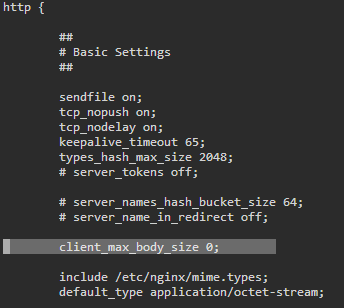
@Toobie check /config/nginx/nginx.conf if there is a following line in the http section. I think on default it's set to 1MB and I changed it to 0
-
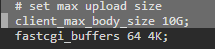
@Toobie I remember there was also a option in the admin panel of nextcloud in the settings somewhere, where you could define the max upload size. Can't find it anymore 🤨
-
Should be below the security header section somewhere
-
This happened before for people updating within the docker container with an older docker tag. Maybe search this thread back a bit for that error you will find some people reporting it like the following
-
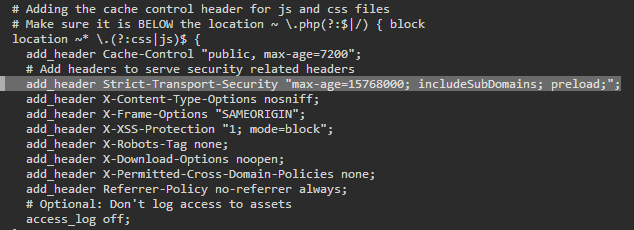
You have to add-it/uncomment it in the default site-config. nano /config/nginx/site-confs/default Mine looks like the following. You should find the section if you scroll down a bit. Not sure if I added the line or if you only have to uncomment it.
-
Deleting "/config/www/nextcloud/apps/viewer/cypress" and "/config/www/nextcloud/apps/viewer/cypress.json" as mentioned on github fixed it for me. https://github.com/nextcloud/server/issues/16229 Made a backup of the folder and the json file, just in case.
-
@Niklas for "files_rightclick" I did the same. Removing and reinstalling fixed it, but the mentioned "viewer" addon is marked as official app and can only be stopped and not uninstalled.
-
I got the same error after the latest 16.0.2 update. It also shows it's on 16.0.2 and an update to 16.0.2 is available. The files it complains about are the following: The following list covers which files have failed the integrity check. Please read the previous linked documentation to learn more about the errors and how to fix them. Results ======= - viewer - EXTRA_FILE - cypress/fixtures/video.mkv - cypress/fixtures/video.webm - cypress/fixtures/image-small.png - cypress/fixtures/image3.jpg - cypress/fixtures/video.ogv - cypress/fixtures/video2.mp4 - cypress/fixtures/image1.jpg - cypress/fixtures/image2.jpg - cypress/fixtures/image.png - cypress/fixtures/image.bmp - cypress/fixtures/video1.mp4 - cypress/fixtures/image.gif - cypress/fixtures/image4.jpg - cypress/fixtures/image.svg - cypress/integration/video.mkv.spec.js - cypress/integration/image.gif.spec.js - cypress/integration/video.ogv.spec.js - cypress/integration/videos.spec.js - cypress/integration/image.svg.spec.js - cypress/integration/image-small.png.spec.js - cypress/integration/video.mp4.spec.js - cypress/integration/images.spec.js - cypress/integration/video.webm.spec.js - cypress/integration/image.png.spec.js - cypress/integration/files.spec.js - cypress/start.sh - cypress/plugins/index.js - cypress/support/commands.js - cypress/support/index.js - cypress/utils/index.js - cypress/stop.sh - cypress.json - files_rightclick - EXTRA_FILE - README.md None of the 2 addons (rightclick, pictureviewer) where marked with updates or with incompatible versions before the update. Never had an issue upgrading Nextcloud before. @bobokun What files are causing the issue for you? Any idea how to fix this?
-
@LumberJackGeek He is referring to the following VM settings: If you setup both the same value (default) means the VM on startup gets the full amount of assigned RAM. If you setup the initial value lower, the VM will only use that initial amount of RAM and will use up to the max amount if needed. In this case for Unraid there is more RAM available for other use. Be careful not to overprovision all of your VMs.

-
Even Windows isn't smart enough to handle the multi-Numa-node design. I remember watching Wendell in one of his videos showing that W10 in a VM on TR4 with extra Numa configuration runs way faster in multiple software and close to bare metal linux performance, than bare metal windows on the same system. I hope for the Ryzen 3000 series Microsoft is doin their homework.
-
What if the "domain" share isn't on the encrypted array? @SpaceInvaderOne Most users have their domain share on the cache drive which I guess for most isn't encrypted.
-
@ToXIc Should be fixed with the MSI_FIX https://wiki.unraid.net/index.php/UnRAID_6/VM_Guest_Support#Enable_MSI_for_Interrupts_to_Fix_HDMI_Audio_Support

