





comet424
Members
-
Joined
-
Last visited
Everything posted by comet424
-
hi i have question on using the AMD gpu driver the radeon top how do you use it? i watched space invaders video to setup tdarr with a nvida card... but i dont have one got my a hd7950 amd card ... so i went to the app store and downloaded the only radeon driver "radeon top" but when i goto plug ins its not clickable.. what am i supposed to do to get the AMD drivers to work in unraid to link it to tdarr
-
so im new to this minecraft server stuff... i got it installed and i can connect to it... id like to take one of windows minecraft maps and put it on the server... i did an export of the world. but i have no idea how you transfer it from windows to the server.. so then itd load up....how do i do that?
-
ill try to change password in the gui when i type IP address like 192.168.0.3 as it wont allow me to log in "tower" say... ill try to make a new simple password... as i have it set not to auto save login i dunno.. just weird how it knows 192.168.0.3 is ok but "tower" is not ok and unraid wouldnt let me in but ill try changing password and reboot to see if it retains password.. why isnt the password retained when you ssh in?
-
ok i was wondering its only seemed to be happening recently and on all of my unraids if i access 192.168.0.x if it needs a login it works fine.. or just auto logins in but if i go by name of the server name i constantly get asked Login and password... even though a server has no password its asking me a password.. if i ssh and change password "passwd" i still cant log into gui but i also notice the password for root reverts back to the password that was set in the gui.. so the "passwd" is only temporary if i do a "reboot" from the command line unraid reboots.. i still cant log into the gui i can ssh.. but only ssh with the old password it doesnt retain the new password.. i finding this on all 5 unraids i have on different network ips too.. i cant use "tower" etc without a login and password.. even when a server has no password.. i seeing it in the latest update of unraid.. i didnt see this issue a couple upgrades back is there something i need to fix? i even tried rebooting pfsense all my switchs computers etc still doesnt matter could there be something on my usb a file on all my usbs thats causing this issue too? i even tried deleting webroswer cache and different browsers and all the same i still get the login if i go by "tower" and passwords will not save if i change it and do a reboot even if i make it blank using passwd.. gui asks for a password and enter isnt good enough.. and i only have 1 user on some of the servers "root"
-
@Raki72 im having similar issues but been having issues i think i configured right but i not 100% sure i dont like the documentation on the unraid template page could be better explained i have mine set up as custom:br ip 192.168.0.33 and the lancache and dns bind ip to 192.168.0.33 and i set the dns upstream to 192.168.0.1 i find it flaky and the discord help wasnt much help either so its hit and miss as i wanted 2 cache servers.. or VPN users and non VPN users to access same server but seems to be a very much headache to access one and seems very slow to use.. as downloading stops and starts but if u were to not use a lancache server then the downloading is non stop say with epic... but its hard to talk to the programmer and discord hasnt helped much... so if you bypass lancache i can download at 400-500k speed if i use the lancaceh its down to under 200... fluxuates under in the 50 -100k i have a 5mbps you probably dont notice with people with better internet then mine.. but thats what i noticing
-
ah ok ya thanks... i when i re booted it fixed itself i not 100% sure if its back plain or power supply .. told my sister when i see her to just give me the computer since shes a few hours away i cant just fix it easily... may just find a computer case and skip the hot swap.. and go straight to just mount the hard drives in the case.. no need for 4 bay hot swap
-
shares are back after a reboot.. the download_drive does say 31 sector count smart shows 197Current pending sector0x0032200200000Old ageAlwaysNever30 and says overall health Smart Passed but i going to try to get her some new hard drives... probably needs a new case or power supply.. and now cases harder to come by 4 bay
-
ya i just made the drive today i couldnt fix the old drive and my sister wasnt around to unplug it.. so in the 4 bay server there was a empty 2TB drive i added the drive i switched drives as the download_Drive and i also rebooted... it was downloading i did some testing was working... then i checked a couple hours later or so and thats when it i checked logs saying read only and the shares showing no shares which it should be be there and the showing in unassigned devices.. happens right after reboot... SMART isnt working its showing blank info when i either click "sde" or "download_drive" so ill give the computer another rebooted so if it was sdc at bootup and array starting then disconnected and reconnected would that be a backplain or power issue? or could be both.... going to reboot it.. starts off with 1 issue then 2nd hard drive having this issue.. just waiting for the 3rd thing to go lol
-
so something going wrong with her server. the download drive went into read only... the shares page says no exportable shares... but the array shows one drive shows files before i do a reboot.. i downloaed the diagnostics... i dont wanna reboot.. but does it say the array is in trouble.. it has to be either power supply or back plain of the board... cuz it was just idling and stuff.. was re setting it up.. think its time to change case and not use it till i fix it i think so it has to be power supply or backplaine as it not hard drive.. if its affecting the other hard drive... but maybe you understand the error codes better then me so i know what i need to do mitchsserver-diagnostics-20220703-1620.zip

-
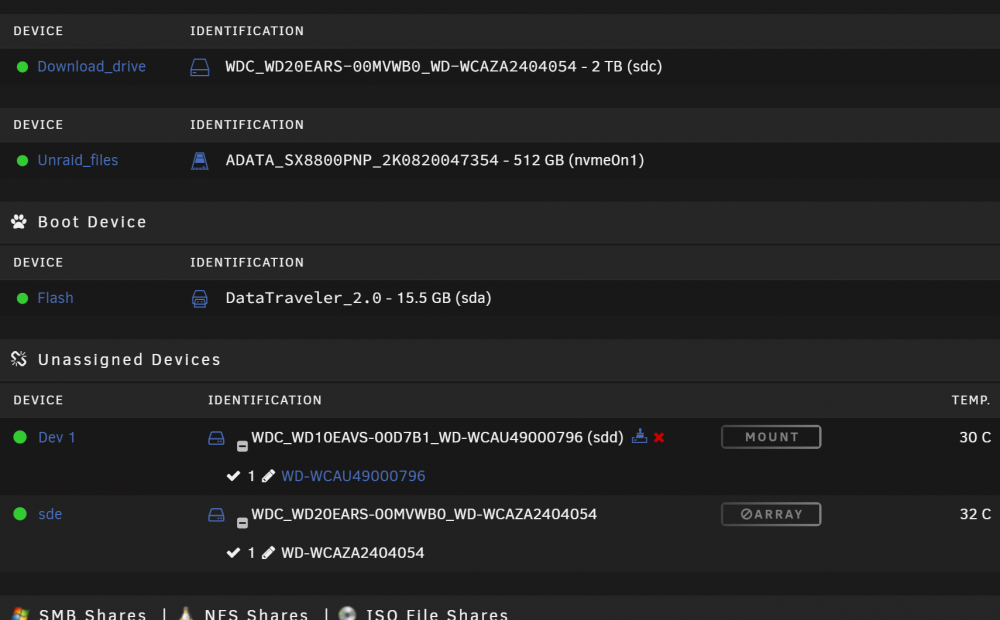
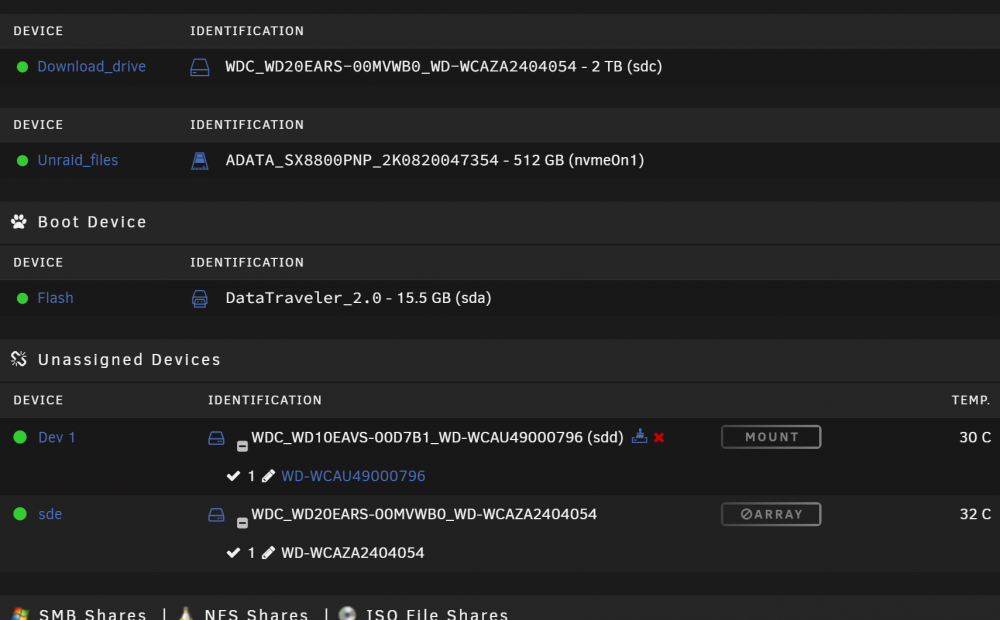
how is it possible 1 drive can be in a cache pool and in unassigned drives at the same time? shouldnt it be hiding from it as my other cache pools dont show up
-
oh ok ya the drive was working or was currently working.. but when i was using krusader to copy off the drive to the array.. krusader was spitting back there was an error didnt say .. and i have had errors ususally i fix it running new permissions and that fixes things... cuz i was still able to download to the drive.. as i was able to move some files off the drive some i couldnt... and when i went to reboot it.. thats when it was unmountable.. but i also ment since i was using the server.. and the server didnt spit out error sayin download drive has gone corrupt... ud only ever know if you regullary check system logs or when ur moving files... other then that ud never know and ud keep copying.... but i going to have my sister swap the drive when she gets home this way ill know if the drive is failing or if its the slot in the 4 hotswap bay
-
ah ok and how ofte does a whole btrfs go down... so then i should be safe then using btrfs on my main server.. 76tb 7 data disks 1 party set to btrfs.. as i mentioned i have set all my unraids to btrfs as what i read btrfs is more supperior ... so if 1 drive btrfs fails on 2 cache drive the fs does the other one compensate? which raid is it i remember reading if you have 2 disks mirrored or something and if the 1 drive fails the 2nd one dies too.. and i dont think it was stripe maybe its mirror? when you write to disk one and it corrupts and it mirrors the corrupt to disk 2 making both drives fs go down
-
on top of what i said above.. i dont understand why the cache drive i using is also in the un assigned drives? its part of the array the one that says mount is the bad drive the ata5 issues is that normal for the pool drives to show up in the unassigned devices section?
-
ah ok.. so if you have say 5 disks and a parity and btrfs fs corrupts on disk2.. doesnt the parity fix that fs corruption? or does it corrupt everything.. reason i wondering if i should go to xfs instead of btrfs for all my arrays? i noticed if you do 2 drives for a pool you cant do xfs it only allows btrfs... and so i just checked my sisters server.. she not home to pull the drive or swap it but i did a reboot and its showsing UNC errors etc.. is this also still saying its a power/connector or is it saying a drive is failing.... i re set up my sisters download drive pool with a spare drive that she had in her 4 bay server.. so its using that.. not issues for that .. and is there a plugin to tell ya that a FS has corrupted from the system logs? i find the notifications doesnt seem to show when FS corrupts on the sys logs are saying ata5 failure be nice to know its happening that i wouldnt keep writting to it etc.. and i bet if i hadnt rebooted the unraid since the download drive was mounted i guess if i had know htere was a drive failure i could have ran a btrfs repair and it would have fixed things since i was able to use it at the time here some of the errors it just repeats so if you have 2 ssds say for a cache pool and you can only do btrfs.. and if one of the ssds fs corrupts does the 2nd ssd fs also corrupt. Jul 3 13:31:48 mitchsserver kernel: ACPI: Early table checksum verification disabled Jul 3 13:31:48 mitchsserver kernel: floppy0: no floppy controllers found Jul 3 13:31:48 mitchsserver kernel: ata5.00: exception Emask 0x50 SAct 0x2000 SErr 0x30802 action 0xe frozen Jul 3 13:31:48 mitchsserver kernel: ata5.00: failed command: READ FPDMA QUEUED Jul 3 13:31:48 mitchsserver kernel: ata5: hard resetting link Jul 3 13:31:48 mitchsserver kernel: ata5: softreset failed (device not ready) Jul 3 13:31:48 mitchsserver kernel: ata5: hard resetting link Jul 3 13:31:48 mitchsserver kernel: blk_update_request: I/O error, dev sdc, sector 3907026080 op 0x0:(READ) flags 0x80700 phys_seg 1 prio class 0 Jul 3 13:31:48 mitchsserver kernel: ata5.00: exception Emask 0x0 SAct 0x40000000 SErr 0x0 action 0x0 Jul 3 13:31:48 mitchsserver kernel: ata5.00: failed command: READ FPDMA QUEUED Jul 3 13:31:48 mitchsserver kernel: ata5.00: error: { UNC } Jul 3 13:31:48 mitchsserver kernel: blk_update_request: I/O error, dev sdc, sector 144 op 0x0:(READ) flags 0x80700 phys_seg 13 prio class 0 Jul 3 13:31:48 mitchsserver kernel: ata5.00: exception Emask 0x0 SAct 0x40 SErr 0x0 action 0x0 Jul 3 13:31:48 mitchsserver kernel: ata5.00: failed command: READ FPDMA QUEUED Jul 3 13:31:48 mitchsserver kernel: ata5.00: error: { UNC } Jul 3 13:31:48 mitchsserver kernel: blk_update_request: I/O error, dev sdc, sector 144 op 0x0:(READ) flags 0x0 phys_seg 1 prio class 0 Jul 3 13:31:48 mitchsserver kernel: Buffer I/O error on dev sdc, logical block 18, async page read Jul 3 13:31:48 mitchsserver kernel: ata5.00: exception Emask 0x0 SAct 0x20000 SErr 0x0 action 0x0 Jul 3 13:31:48 mitchsserver kernel: ata5.00: failed command: READ FPDMA QUEUED Jul 3 13:31:48 mitchsserver kernel: ata5.00: error: { UNC } Jul 3 13:31:48 mitchsserver kernel: blk_update_request: I/O error, dev sdc, sector 144 op 0x0:(READ) flags 0x0 phys_seg 1 prio class 0 Jul 3 13:31:48 mitchsserver kernel: Buffer I/O error on dev sdc, logical block 18, async page read Jul 3 13:31:48 mitchsserver kernel: ata5.00: exception Emask 0x0 SAct 0x1 SErr 0x0 action 0x0 Jul 3 13:31:48 mitchsserver kernel: ata5.00: failed command: READ FPDMA QUEUED Jul 3 13:31:48 mitchsserver kernel: ata5.00: error: { UNC } Jul 3 13:31:48 mitchsserver kernel: blk_update_request: I/O error, dev sdc, sector 144 op 0x0:(READ) flags 0x0 phys_seg 1 prio class 0 Jul 3 13:31:48 mitchsserver kernel: Buffer I/O error on dev sdc, logical block 18, async page read Jul 3 13:31:48 mitchsserver kernel: ata5.00: exception Emask 0x0 SAct 0x20000000 SErr 0x0 action 0x0 Jul 3 13:31:48 mitchsserver kernel: ata5.00: failed command: READ FPDMA QUEUED Jul 3 13:31:48 mitchsserver kernel: ata5.00: error: { UNC } Jul 3 13:31:48 mitchsserver kernel: blk_update_request: I/O error, dev sdc, sector 144 op 0x0:(READ) flags 0x80700 phys_seg 5 prio class 0 Jul 3 13:31:48 mitchsserver kernel: ata5.00: exception Emask 0x0 SAct 0x2 SErr 0x0 action 0x0 Jul 3 13:31:48 mitchsserver kernel: ata5.00: failed command: READ FPDMA QUEUED Jul 3 13:31:48 mitchsserver kernel: ata5.00: error: { UNC } Jul 3 13:31:48 mitchsserver kernel: blk_update_request: I/O error, dev sdc, sector 144 op 0x0:(READ) flags 0x0 phys_seg 1 prio class 0 Jul 3 13:31:48 mitchsserver kernel: Buffer I/O error on dev sdc1, logical block 10, async page read Jul 3 13:31:48 mitchsserver kernel: ata5.00: exception Emask 0x0 SAct 0x2000000 SErr 0x0 action 0x0 Jul 3 13:31:48 mitchsserver kernel: ata5.00: failed command: READ FPDMA QUEUED Jul 3 13:31:48 mitchsserver kernel: ata5.00: error: { UNC } Jul 3 13:31:48 mitchsserver kernel: blk_update_request: I/O error, dev sdc, sector 144 op 0x0:(READ) flags 0x0 phys_seg 1 prio class 0 Jul 3 13:31:48 mitchsserver kernel: Buffer I/O error on dev sdc1, logical block 10, async page read Jul 3 13:31:48 mitchsserver kernel: ata5.00: exception Emask 0x0 SAct 0x10 SErr 0x0 action 0x0 Jul 3 13:31:48 mitchsserver kernel: ata5.00: failed command: READ FPDMA QUEUED Jul 3 13:31:48 mitchsserver kernel: ata5.00: error: { UNC } Jul 3 13:31:48 mitchsserver kernel: blk_update_request: I/O error, dev sdc, sector 144 op 0x0:(READ) flags 0x0 phys_seg 1 prio class 0 Jul 3 13:31:48 mitchsserver kernel: Buffer I/O error on dev sdc1, logical block 10, async page read Jul 3 13:31:51 mitchsserver kernel: ata5.00: exception Emask 0x50 SAct 0x100000 SErr 0x30802 action 0xe frozen Jul 3 13:31:51 mitchsserver kernel: ata5.00: failed command: READ FPDMA QUEUED Jul 3 13:31:51 mitchsserver kernel: ata5: hard resetting link Jul 3 13:31:59 mitchsserver kernel: blk_update_request: I/O error, dev sdc, sector 136 op 0x0:(READ) flags 0x80700 phys_seg 13 prio class 0 Jul 3 13:32:02 mitchsserver kernel: ata5.00: exception Emask 0x0 SAct 0x400000 SErr 0x0 action 0x0 Jul 3 13:32:02 mitchsserver kernel: ata5.00: failed command: READ FPDMA QUEUED Jul 3 13:32:02 mitchsserver kernel: ata5.00: error: { UNC } Jul 3 13:32:02 mitchsserver kernel: blk_update_request: I/O error, dev sdc, sector 144 op 0x0:(READ) flags 0x0 phys_seg 1 prio class 0 Jul 3 13:32:02 mitchsserver kernel: Buffer I/O error on dev sdc, logical block 18, async page read Jul 3 13:32:05 mitchsserver kernel: ata5.00: exception Emask 0x0 SAct 0x40000000 SErr 0x0 action 0x0 Jul 3 13:32:05 mitchsserver kernel: ata5.00: failed command: READ FPDMA QUEUED Jul 3 13:32:05 mitchsserver kernel: ata5.00: error: { UNC } Jul 3 13:32:05 mitchsserver kernel: blk_update_request: I/O error, dev sdc, sector 144 op 0x0:(READ) flags 0x0 phys_seg 1 prio class 0 Jul 3 13:32:05 mitchsserver kernel: Buffer I/O error on dev sdc, logical block 18, async page read Jul 3 13:32:08 mitchsserver kernel: ata5.00: exception Emask 0x0 SAct 0x100 SErr 0x0 action 0x0 Jul 3 13:32:08 mitchsserver kernel: ata5.00: failed command: READ FPDMA QUEUED Jul 3 13:32:08 mitchsserver kernel: ata5.00: error: { UNC } Jul 3 13:32:08 mitchsserver kernel: blk_update_request: I/O error, dev sdc, sector 144 op 0x0:(READ) flags 0x0 phys_seg 1 prio class 0 Jul 3 13:32:08 mitchsserver kernel: Buffer I/O error on dev sdc, logical block 18, async page read Jul 3 13:32:10 mitchsserver kernel: ata5.00: exception Emask 0x0 SAct 0x8000000 SErr 0x0 action 0x0 Jul 3 13:32:10 mitchsserver kernel: ata5.00: failed command: READ FPDMA QUEUED Jul 3 13:32:10 mitchsserver kernel: ata5.00: error: { UNC } Jul 3 13:32:10 mitchsserver kernel: blk_update_request: I/O error, dev sdc, sector 144 op 0x0:(READ) flags 0x80700 phys_seg 4 prio class 0 Jul 3 13:32:13 mitchsserver kernel: ata5.00: exception Emask 0x0 SAct 0x80000000 SErr 0x0 action 0x0 Jul 3 13:32:13 mitchsserver kernel: ata5.00: failed command: READ FPDMA QUEUED Jul 3 13:32:13 mitchsserver kernel: ata5.00: error: { UNC } Jul 3 13:32:13 mitchsserver kernel: blk_update_request: I/O error, dev sdc, sector 144 op 0x0:(READ) flags 0x0 phys_seg 1 prio class 0 Jul 3 13:32:13 mitchsserver kernel: Buffer I/O error on dev sdc1, logical block 10, async page read Jul 3 13:32:16 mitchsserver kernel: ata5.00: exception Emask 0x0 SAct 0x400000 SErr 0x0 action 0x0 Jul 3 13:32:16 mitchsserver kernel: ata5.00: failed command: READ FPDMA QUEUED Jul 3 13:32:16 mitchsserver kernel: ata5.00: error: { UNC } Jul 3 13:32:16 mitchsserver kernel: blk_update_request: I/O error, dev sdc, sector 144 op 0x0:(READ) flags 0x0 phys_seg 1 prio class 0 Jul 3 13:32:16 mitchsserver kernel: Buffer I/O error on dev sdc1, logical block 10, async page read Jul 3 13:32:19 mitchsserver kernel: ata5.00: exception Emask 0x0 SAct 0x800 SErr 0x0 action 0x0 Jul 3 13:32:19 mitchsserver kernel: ata5.00: failed command: READ FPDMA QUEUED Jul 3 13:32:19 mitchsserver kernel: ata5.00: error: { UNC } Jul 3 13:32:19 mitchsserver kernel: blk_update_request: I/O error, dev sdc, sector 144 op 0x0:(READ) flags 0x0 phys_seg 1 prio class 0 Jul 3 13:32:19 mitchsserver kernel: Buffer I/O error on dev sdc1, logical block 10, async page read Jul 3 13:32:22 mitchsserver kernel: ata5.00: exception Emask 0x0 SAct 0x8 SErr 0x0 action 0x0 Jul 3 13:32:22 mitchsserver kernel: ata5.00: failed command: READ FPDMA QUEUED Jul 3 13:32:22 mitchsserver kernel: ata5.00: error: { UNC } Jul 3 13:32:22 mitchsserver kernel: blk_update_request: I/O error, dev sdc, sector 144 op 0x0:(READ) flags 0x80700 phys_seg 12 prio class 0 Jul 3 13:32:25 mitchsserver kernel: ata5.00: exception Emask 0x0 SAct 0x20 SErr 0x0 action 0x0 Jul 3 13:32:25 mitchsserver kernel: ata5.00: failed command: READ FPDMA QUEUED Jul 3 13:32:25 mitchsserver kernel: ata5.00: error: { UNC } Jul 3 13:32:25 mitchsserver kernel: blk_update_request: I/O error, dev sdc, sector 144 op 0x0:(READ) flags 0x0 phys_seg 1 prio class 0 Jul 3 13:32:25 mitchsserver kernel: Buffer I/O error on dev sdc, logical block 18, async page read Jul 3 13:32:28 mitchsserver kernel: ata5.00: exception Emask 0x0 SAct 0x8 SErr 0x0 action 0x0 Jul 3 13:32:28 mitchsserver kernel: ata5.00: failed command: READ FPDMA QUEUED Jul 3 13:32:28 mitchsserver kernel: ata5.00: error: { UNC } Jul 3 13:32:28 mitchsserver kernel: blk_update_request: I/O error, dev sdc, sector 144 op 0x0:(READ) flags 0x0 phys_seg 1 prio class 0 Jul 3 13:32:28 mitchsserver kernel: Buffer I/O error on dev sdc, logical block 18, async page read Jul 3 13:32:30 mitchsserver kernel: ata5.00: exception Emask 0x0 SAct 0x100000 SErr 0x0 action 0x0 Jul 3 13:32:30 mitchsserver kernel: ata5.00: failed command: READ FPDMA QUEUED Jul 3 13:32:30 mitchsserver kernel: ata5.00: error: { UNC } Jul 3 13:32:30 mitchsserver kernel: blk_update_request: I/O error, dev sdc, sector 144 op 0x0:(READ) flags 0x0 phys_seg 1 prio class 0 Jul 3 13:32:30 mitchsserver kernel: Buffer I/O error on dev sdc, logical block 18, async page read Jul 3 13:32:30 mitchsserver mcelog: ERROR: AMD Processor family 23: mcelog does not support this processor. Please use the edac_mce_amd module instead.
-
oh so a superblock is like a backup of a file or something that a super backup does.. does this also happen possible for the array too? right now its a 8tb set to btrfs... can it fall to this same scenario that the download pool happened and should i switch to xfs or shove a 8tb drive in for parity and than that solves it?
-
ya i got some backups... ya didnt help this time.. what is a backup super? since it said to use it in the error above as i thought root was the highest? so i got a spare drive in the 4 bay case... i added the drive as a cache pool.. reason is my sister not home to swap drives in hot swap so i set it to a xfs file system... so hopefully its more flexable it doesnt happen again.. but be nice like i mentioned if they did offer a notification for these type of errors that doesnt show up in the regular notification options
-
guessing its fatal nothing recover.. those command lines dont work after multiple reboots and no ata issues now.. so guess the fs is gone.. well i gave it a shot
-
sorry my bad... here is option 2.. and it askes for maybe a backup super? root@mitchsserver:~# btrfs restore -v /dev/sdd1 /mnt/user/restore parent transid verify failed on 1543279591424 wanted 136563 found 130890 parent transid verify failed on 1543279591424 wanted 136563 found 130890 parent transid verify failed on 1543279591424 wanted 136563 found 130890 Ignoring transid failure ERROR: root [1 0] level 1 does not match 0 Couldn't read tree root Could not open root, trying backup super parent transid verify failed on 1543279591424 wanted 136563 found 130890 parent transid verify failed on 1543279591424 wanted 136563 found 130890 parent transid verify failed on 1543279591424 wanted 136563 found 130890 Ignoring transid failure ERROR: root [1 0] level 1 does not match 0 Couldn't read tree root Could not open root, trying backup super parent transid verify failed on 1543279591424 wanted 136563 found 130890 parent transid verify failed on 1543279591424 wanted 136563 found 130890 parent transid verify failed on 1543279591424 wanted 136563 found 130890 Ignoring transid failure ERROR: root [1 0] level 1 does not match 0 Couldn't read tree root Could not open root, trying backup super root@mitchsserver:~# btrfs restore -vi /dev/sdd1 /mnt/user/restore parent transid verify failed on 1543279591424 wanted 136563 found 130890 parent transid verify failed on 1543279591424 wanted 136563 found 130890 parent transid verify failed on 1543279591424 wanted 136563 found 130890 Ignoring transid failure ERROR: root [1 0] level 1 does not match 0 Couldn't read tree root Could not open root, trying backup super parent transid verify failed on 1543279591424 wanted 136563 found 130890 parent transid verify failed on 1543279591424 wanted 136563 found 130890 parent transid verify failed on 1543279591424 wanted 136563 found 130890 Ignoring transid failure ERROR: root [1 0] level 1 does not match 0 Couldn't read tree root Could not open root, trying backup super parent transid verify failed on 1543279591424 wanted 136563 found 130890 parent transid verify failed on 1543279591424 wanted 136563 found 130890 parent transid verify failed on 1543279591424 wanted 136563 found 130890 Ignoring transid failure ERROR: root [1 0] level 1 does not match 0 Couldn't read tree root Could not open root, trying backup super root@mitchsserver:~# i did a reboot.. and the power errors arent there... so i re tried the commands still get this above error.. guess it just cant be fixed... so what actually is a superblock and a superblock generation? and is there anyway to notify me either through email text or browswer... for when a btrfs failure like this happens i know i have notifications set but i usually get the green ok.. or a issues in the fix common... so i i didnt know errors were happening so if xfs is better.. does that mean i need to change all my servers from btrfs to xfs? or just cache.. i went the btrfs as the google searches says its better.. plus also about bit rot.... been running unraid setups 4 yrs now on btrfs.. only had it fail twice 2 yrs ago when i recreated this thread and just couple days ago on 2 different comps.. so i was told in discord... its better for cache 1 disk use xfs 2 disks use btrfs.. and that my arrays are fine using btrfs.. is that cuz i using parity drives? well least this server doesnt have one.. i just have a 1 drive and is btrfs.. so i guessing thats bad idea too ya no ecc ram in this server.. this server been running a year no issues i figured it was stable ... its just a gaming motherboard micro itx in a small form factor 4 bay hot swap case... i just didnt want bit rot as u learn online they tell ya u dont want.. but then a cache pool isnt going to rot right as it wont stay on there long enough... how come they dont have ntfs as a cache pool file system.. is that not reliable too.. and here i thought the btrfs was the best... always learning and still know nothing lol
-
ah ok ya that restore doesnt work least it doesnt work now i rebooted again and says er:~# mount -o degraded,rescue=all,ro /dev/sde1 /mnt/user/restore mount: /mnt/user/restore: wrong fs type, bad option, bad superblock on /dev/sde1, missing codepage or helper program, or other error. root@mitchsserver:~# ^C root@mitchsserver:~# i have a folder. called restore.. but why is the wrong fs type? or is it saying it could be any of these.. someone from the discord thinks maybe its a superblock? ok so ata5 means drive i guess so 4 hard drives an 1 nvme.. ok so what does a btrfs is a COW if write barries are not being honored and some writes are lost.... what does all that mean?... so if its a power/connection problem that could me power from the power supply? or power from the backplaine? could it be if sister accidently slides out the hot swap and shoves back in? wish i had diagnostics before reboot probably really would helped... ugh but i dont know if she did that.. i just guessing what could gone wrong oh since those errors are coming now after a reboot.. that means its a power/connection problem now thats accurring then.... as it came up after a reboot so couldnt been an accidently pull hot swap... and whats the best recommendations for a forgiving filesystem? i thought the btrfs was forgiving as unraid only offered the xfs vs btrfs as i read dont use resif file system... sometimes i get confused which one to choose... is it best not to use btrfs.... or use btrfs with 2 drives... and which raid setting is it. i read it somewhere... if you have 2 hard drives or SSDS mirrored or so if the Drive 1 corrupts Drive 2 also corrupts.... always wanting to learn and improve my setups best i can ..... ill get my sister to swap the hard drive into a different bay see if that fixes it.. and maybe then i can try the mounting.. probably the Fs type error is from the ata5 power/connection issue ill give it a try today maybe its also time to change the whole case too
-
@JorgeB so does that mean its un mountable? as the commands to for a mount in read only does nothing... does it say from that ata info if its the hard drive? it passes smart .. is it cuz im running btrfs? what link resets can lead to lost writes.. so whats common issue? those errors.. can it be unraid memory problem.. is it say "ata5" cable number 5? although its a 4 bay hotswap.. maybe backplain? i guess i should have taken a sys log before i rebooted... it was up for 12 days... would been better? is it better to switch to XFS or would this happen to XFS or switch to NTFS as just a download pool drive as i learned from the discord... that you unraid recommends using XFS for a single drive not the BTRFS they default.. something with errors btrfs causes for cache pools. i dunno 😞 maybe time to replace the 4 bay server maybe?
-
the problem with that is ya works to an extent... but when i work the bar... i have files that are updated... so if i were to plug in the in and mount it to auto run it would over write so how i do it i have 3 hard drives 2 i use 1 for back up labeled "music drive" "1" "2" "3" and after the bar or so i then plug the hard drive into server... and then i use krusader to copy back any changes to the one folder .. and if i were to use the auto scripting it would over write thge files on the drive ... so ud have to constantly disable it i do use the auto running script... problem also is once u reboot the server and the drives attached u mount them auto sync. like my script works for copying i just find if the drive not in and script does mkdir /unassigned drives/music drive 1/music it makes a drive even though the drive isnt plugged in krusader sees all the files but really they not there but i may re try the auto mount script.. i do use it for when i swap my sisters files she lives a few hours away so she has me backup her files and meet her once a week.. so she shoves a ssd in and it auto copies from a specific folder... so i really like the automount script for that.... figured an if statement was easy but i guess not lol
-
i got some help to boot into "maintance mode" but they asked me to scrub drive but since it wont mount it wont let me scrub. but there was a btrfs check i ran it and the log it gave is parent transid verify failed on 1543279591424 wanted 136563 found 130890 parent transid verify failed on 1543279591424 wanted 136563 found 130890 parent transid verify failed on 1543279591424 wanted 136563 found 130890 Ignoring transid failure ERROR: root [1 0] level 1 does not match 0 Couldn't read tree root ERROR: cannot open file system Opening filesystem to check...
-
hi i had btrfs file system not work again.. its been 2 yrs since i last posted but my download drive i use a spinner as a cache pool to download and uses btrfs... i was trying to move files off it.. and it was failing.. i rebooted and its unmounted... here is the logs Jul 2 12:18:42 mitchsserver kernel: ACPI: Early table checksum verification disabled Jul 2 12:18:42 mitchsserver kernel: floppy0: no floppy controllers found Jul 2 12:18:42 mitchsserver kernel: ata5.00: exception Emask 0x50 SAct 0x1000000 SErr 0x30802 action 0xe frozen Jul 2 12:18:42 mitchsserver kernel: ata5.00: failed command: READ FPDMA QUEUED Jul 2 12:18:42 mitchsserver kernel: ata5: hard resetting link Jul 2 12:18:42 mitchsserver kernel: ata5: hard resetting link Jul 2 12:18:42 mitchsserver kernel: blk_update_request: I/O error, dev sdd, sector 4160 op 0x0:(READ) flags 0x80700 phys_seg 1 prio class 0 Jul 2 12:18:43 mitchsserver mcelog: ERROR: AMD Processor family 23: mcelog does not support this processor. Please use the edac_mce_amd module instead. Jul 2 12:19:15 mitchsserver kernel: BTRFS error (device sde1): parent transid verify failed on 1543279591424 wanted 136563 found 130890 Jul 2 12:19:15 mitchsserver kernel: BTRFS error (device sde1): parent transid verify failed on 1543279591424 wanted 136563 found 130890 Jul 2 12:19:15 mitchsserver kernel: BTRFS warning (device sde1): couldn't read tree root Jul 2 12:19:15 mitchsserver kernel: BTRFS error (device sde1): open_ctree failed Jul 2 12:19:15 mitchsserver root: mount: /mnt/download_drive: wrong fs type, bad option, bad superblock on /dev/sde1, missing codepage or helper program, or other error. Jul 2 12:19:15 mitchsserver emhttpd: /mnt/download_drive mount error: No file system Jul 2 12:19:26 mitchsserver rc.docker: transmission: Error response from daemon: error while creating mount source path '/mnt/user/Transmission/completed': mkdir /mnt/user/Transmission: no medium found Jul 2 12:19:26 mitchsserver rc.docker: Error: failed to start containers: transmission Jul 2 12:29:03 mitchsserver root: Fix Common Problems: Warning: unRaids built in FTP server is currently disabled, but users are defined Jul 2 12:36:19 mitchsserver kernel: BTRFS error (device sde1): parent transid verify failed on 1543279591424 wanted 136563 found 130890 Jul 2 12:36:19 mitchsserver kernel: BTRFS error (device sde1): parent transid verify failed on 1543279591424 wanted 136563 found 130890 Jul 2 12:36:19 mitchsserver kernel: BTRFS warning (device sde1): couldn't read tree root Jul 2 12:36:19 mitchsserver kernel: BTRFS error (device sde1): open_ctree failed Jul 2 12:36:43 mitchsserver kernel: BTRFS warning (device sde1): 'usebackuproot' is deprecated, use 'rescue=usebackuproot' instead Jul 2 12:36:43 mitchsserver kernel: BTRFS error (device sde1): parent transid verify failed on 1543279591424 wanted 136563 found 130890 Jul 2 12:36:43 mitchsserver kernel: BTRFS error (device sde1): parent transid verify failed on 1543279591424 wanted 136563 found 130890 Jul 2 12:36:43 mitchsserver kernel: BTRFS warning (device sde1): couldn't read tree root Jul 2 12:36:43 mitchsserver kernel: BTRFS error (device sde1): chunk 1664330235904 has missing dev extent, have 0 expect 1 Jul 2 12:36:43 mitchsserver kernel: BTRFS error (device sde1): failed to verify dev extents against chunks: -117 Jul 2 12:36:43 mitchsserver kernel: BTRFS error (device sde1): open_ctree failed Jul 2 12:37:09 mitchsserver kernel: BTRFS error (device sde1): parent transid verify failed on 1543279591424 wanted 136563 found 130890 Jul 2 12:37:09 mitchsserver kernel: BTRFS error (device sde1): parent transid verify failed on 1543279591424 wanted 136563 found 130890 Jul 2 12:37:09 mitchsserver kernel: BTRFS warning (device sde1): couldn't read tree root Jul 2 12:37:09 mitchsserver kernel: BTRFS error (device sde1): open_ctree failed Jul 2 12:39:09 mitchsserver kernel: BTRFS error (device sde1): parent transid verify failed on 1543279591424 wanted 136563 found 130890 Jul 2 12:39:09 mitchsserver kernel: BTRFS error (device sde1): parent transid verify failed on 1543279591424 wanted 136563 found 130890 Jul 2 12:39:09 mitchsserver kernel: BTRFS warning (device sde1): couldn't read tree root Jul 2 12:39:09 mitchsserver kernel: BTRFS error (device sde1): open_ctree failed Jul 2 12:42:38 mitchsserver kernel: sd 1:0:0:0: [sdb] Synchronize Cache(10) failed: Result: hostbyte=0x04 driverbyte=DRIVER_OK Jul 2 12:42:38 mitchsserver kernel: sd 1:0:0:0: [sdb] Start/Stop Unit failed: Result: hostbyte=0x04 driverbyte=DRIVER_OK Jul 2 12:46:37 mitchsserver kernel: BTRFS error (device sde1): parent transid verify failed on 1543279591424 wanted 136563 found 130890 Jul 2 12:46:37 mitchsserver kernel: BTRFS error (device sde1): parent transid verify failed on 1543279591424 wanted 136563 found 130890 Jul 2 12:46:37 mitchsserver kernel: BTRFS warning (device sde1): couldn't read tree root Jul 2 12:46:37 mitchsserver kernel: BTRFS error (device sde1): open_ctree failed i tried these commands as the link i got provided in here was upadated for 6.10 but i get these other errors it wont work now root@mitchsserver:~# btrfs fi show /dev/sde1 Label: none uuid: 547e712d-e478-48a9-a84a-30ed71534b0d Total devices 1 FS bytes used 530.19GiB devid 1 size 931.51GiB used 572.02GiB path /dev/sde1 root@mitchsserver:~# mkdir /temp root@mitchsserver:~# mount -o rescue=all,ro /dev/sde1 /temp mount: /temp: wrong fs type, bad option, bad superblock on /dev/sde1, missing codepage or helper program, or other error. root@mitchsserver:~# mount -o usebackuproot,ro /dev/sde1 /temp mount: /temp: wrong fs type, bad option, bad superblock on /dev/sde1, missing codepage or helper program, or other error. root@mitchsserver:~# mount -o degraded,rescue=all,ro /dev/sde1 /temp mount: /temp: wrong fs type, bad option, bad superblock on /dev/sde1, missing codepage or helper program, or other error. root@mitchsserver:~# ls /dev/sde1 /dev/sde1 so not sure how do i get it back... not sure whats going on or why this stuff happens/ better to have ntfs cache pool maybe? should i be using like an ssd instead of a spinner to download? as i use it to keep array offline or should i use 2 disks for cache pool for downloads? or error happen on both? i do the same setup on a few unraids 1 drive to dump any downloads from server windows etc.. but i use a spinner and 1 drive so not sure what the best is to do it mitchsserver-diagnostics-20220702-1255.zip
-
how do i write an if statement to check if a drive is existant or not.. i use a scrip to copy music to a hard drive.. but if the hard drive isnt plugged in i get the error.. but i guess it makes a directory in the unnassigned drives.. as Krusader sees the Drives even though they dont exists.. i guess makes a temp folder or so so unraid thinks the drive is there and it isnt.. so id like a IF statement if Drive is there copy files if not exit if
-
@itimpi so would mover be consider something you wouldnt bother using then if ur moving the files of appdata system docker vms from the cache to the array and then back again if it does alot of checks when would you use it? i never really had money for a cache drive to copy files from network to a cache drive and then over night copies to the array.. does mover work faster for regular files.. and really slow for appdata like plex being huge... or is it equally slow? ill take a look about the dynamic file manager.. but dont you need the "checks" for appdata docker system... or when do you need "checks" and when dont you need "checks" and id even like to see so SSD to SSD say your SSD is named "unraid_files" and everything is linked to that pool name when you add a new ssd.. it be nice to have the option of 1. install New SSD 2. App that Will Transfer the "unraid_files" pool to the new SSD (either move or copy, give the option) 3. App would re label the old broken(or upgrade) SSD if can to "old_unraid_files" 3. App would re label the "new SSD" to "unraid_files" 4. boom your done and your back in business and you dont need to worry about linking to a different pool if you happen to have scripts or what not that points to the old pool name.. or having to delete old pool name then label the new pool the same pool you had. this way you could do it in 1 app and it be all automated.. like mover u press the move button and u wait till its done. its a thought... but ill take a look at that dynamic file manager.. but maybe the developers could look at the option of transfer from old ssd to a new ssd and keep the same pool name.. but skip the "check" or whatever its really doing that makes it godly slow.. and nothing against the program.. as i probbably dont utlize unraid to its full potenial .. but love the program so just a thought


