





Frank1940
Members
-
Joined
-
Last visited
Everything posted by Frank1940
-
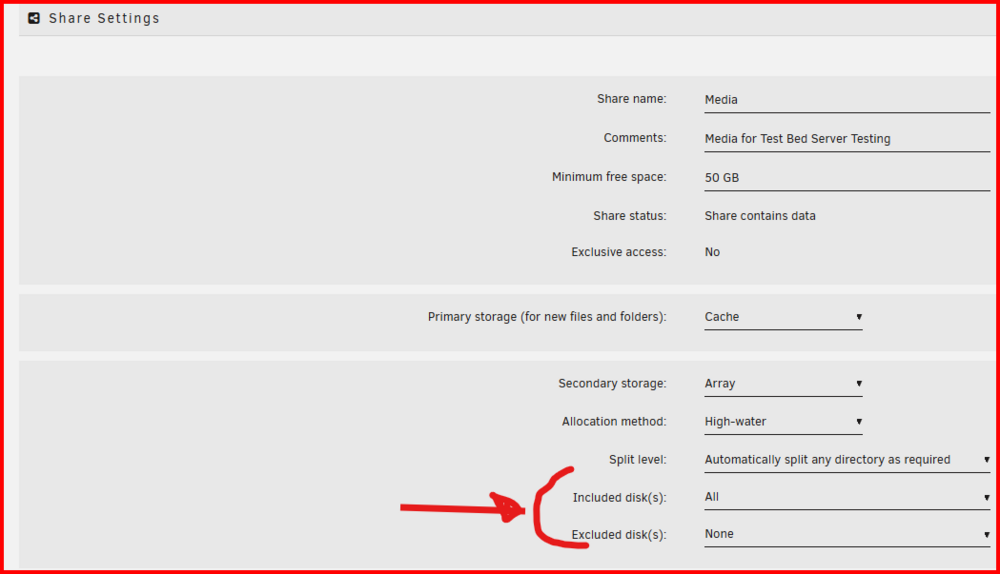
Apply "include" to those "small" shares. If you want them on a single disk, then set the share to use only that disk. (I am assuming that they are already as you want them.) Then assign 'big' share using the "exclude" parameter. Personally, I would avoid the split level setting if possible. It is very convoluted and difficult to set up correctly. Regardless of which method you use, you do have to keep an eye on what is happening with disk space with using either split level or "include" as these settings can cause disk-full write errors when the disk becomes full. Perhaps I should point out that when using this option, you are applying it to each share individually. If you set do only one share to use only Disk 1 and and you don't apply restrictions on any of the other shares, they are free to use disk 1 to store files!
-
Click on the SAHRES tab. Click on the share you want to setup: Modify one of these settings to set things as to where you want all new files to be stored. As I recall, update an existing file will not change its location. You would have to manually move files if you want that. EDIT: thinking about it, exclude might be better than include. That way any new disks added to the array could be used. With include, you have to remember to add the new disk to the setting!
-
You probably have enough space on the other drives of your system to "move" the data onto them. There is an Unbalance plugin that which (I believe) will then move files back from those drives back to Disk 11. (I might be more tempted to just leave them there if there is enough free space on those first ten drives.)
-
There should have been at least one power cable included with the power supply that had one or more MOLEX connectors on it. (It might also have a mix of MOLEX and SATA power connectors on it.) If you plug the MOLEX connector on the adapter into one of MOLEX connectors on that cable you would have four SATA connectors for plugging into disk drives. (One big advantage of using the MOLEX-to-SATA adapter is that there is no 3.3V on the MOLEX plug so no taping of pin3 required!)
-
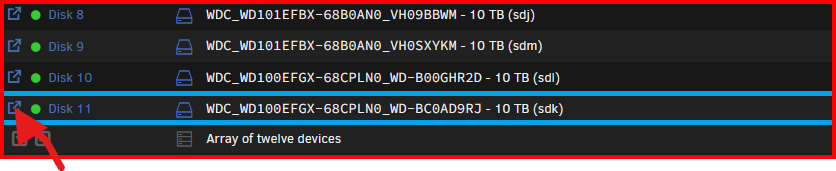
Click here and see what is on the disk: That open up the Dynamix File Manager which will allow you to examine the disk's content and you should certainly be able to determine if there 8.8TB or only 256KB stored on it. There is a 'CALCULATE' button which will show info on each Share (or directory) stored on that disk.
-
STOP right now!!!! Any formatting of a disk in the array will update parity and, as you may realize, a format operation will will cause the disk to appear empty! You will lose that 8.83TB of information stored on it. As an result of the parity being updated, a rebuilt of the disk will result in (essentially) a newly formatted disk. You have to empty the disk first of all files. Then you can reformat the disk. Look here for a way to change the format of a disk. https://forums.unraid.net/topic/127551-linux-community-to-remove-reiserfs-from-the-kernel-in-2025/#findComment-1569190 EDIT: You must be on Unraid version 7.0 or later to use this mover functionality.
-
Like this: https://www.amazon.com/Monoprice-108794-24-Inch-15-Pin-Female/dp/B009GULFJ0/ref=sr_1_6 I hate to say this but I seem to recall that this has resulted in hardware being destroyed by using the wrong power cable. Most times, you must obtain any additional power cords from the PS manufacturer for that exact model of PS.
-
Was this a power cable that you plugged directly into a socket on the power supply? Most of us don't like to use these SATA power expansion adapters. The SATA power plug is not really designed to handle the current draw when four drives spin up. If you must use a power expansion adapter, use a MOLEX-to-SATA one.
-
Many times, this condition is caused by a process having a one or more files open and not releasing the file. To test for this, have the array running and 'STOP" the array using the button on the MAIN tab. Time how long it takes the array to stop. There is a timer ("Shutdown time-out (seconds):") under 'Disk Settings' on the SETTINGS tab after which the array forced into shutting down. This will always result in an unclean shutdown and parity check on restart. If the array fails to stop you will have to figure what is holding the file open. (Docker containers are always a good starting point...)
-
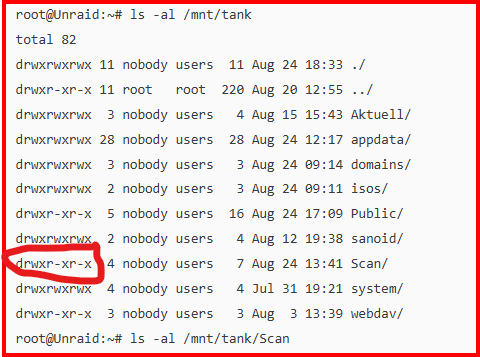
You don't have write permission here: This is a standard problem with most Linux distributions. They no longer permit write permissions for group and other by default. Unraid requires -rw-rw-rw- permmissions for files and drwxrwxrwx for directories for SMB and NFS file sharing to work properly for all users (which include 'Guest' user!). See here for Docker containers. https://forums.unraid.net/topic/188600-share-permissions-changed-to-owner-99/#comment-1540351
-
Now for a few more ls -al /mnt/tank ls -al /mnt/tank/Scan ls -al /mnt/tank/Scan/ Note the last two differ only by the trailing slash....
-
Post up the output of ls -al /mnt
-
Post up the diagnostics file for this server in a new post in this thread.
-
See this post: https://forums.unraid.net/topic/170027-smb-windows-settings-available-through-power-shell-and-linux-samba-tools-informational-posting/#findComment-1545332 Run smbstatus and see what Share access users are logged in. I can see that 'administrator' has read/write privileges but I can't see what other users have. I would also wonder about using "administrator" as a 'user name' as it could be a reserved name on some systems. BTW, the share, appdata, is normally not shared out via smb as it is the location where Docker containers store their system files files for their own internal use. Getting in there and doing file management has the potential to really screw things if you don't what you are doing. Plus, some of the files and directories don't the proper permissions for normal SMB access. IF a Docker container is generating user files for some specific purpose, it should be writing those files to the array and using PUID and GUID with a UMASK to generate files in a User Share with proper credentials and permissions. See here for more information: https://forums.unraid.net/topic/188600-share-permissions-changed-to-owner-99/#findComment-1540351
-
Read this post here: https://forums.unraid.net/topic/188600-share-permissions-changed-to-owner-99/#comment-1540351 IF you need more of an explanation of how Unraid permissions work, read this thread: https://forums.unraid.net/topic/191221-some-musings-on-smb-and-samba-and-unraid-and-windows/ EDIT: If this didn't work or help you figure out how to fix things, then ask your questions in the support thread for the Docker container.
-
Read this post and the next two: https://forums.unraid.net/topic/191221-some-musings-on-smb-and-samba-and-unraid-and-windows/#findComment-1561581 There have been some online information where an Windows update was changing network type from 'Private' to 'Public'...
-
Keep in mind the environmental effects of temperature. If you can verify fans are operating correctly. Make sure that dust and dirt are not clogging vents and heat sinks.
-
If you want some tools for looking at the Samba configuration. See this post: https://forums.unraid.net/topic/170027-smb-windows-settings-available-through-power-shell-and-linux-samba-tools-informational-posting/#findComment-1545332 That thread also contains some tools for looking at the Windows client configuration...
-
Problem is that the diagnostics file is a snapshot of the system at the time when you call for it to be run. It can never be generated after the crash has occurred. Normally, Unraid stores the syslog in RAM with the rest of the OS files. Thus it is lost when you reboot the server. What the syslog server does a real-time copy every entry that is written to the syslog to 'hard' storage. Sometimes, it will point to what is causing the problem. Some times, it provides no clue but even this is a help in telling us where to look next for the cause. I seem to recall that there is a switch somewhere that will write copy the entire syslog to flash as a part of the 'normal' shutdown process but, by definition, a crash is not a normal shutdown! The syslog file generated by the syslog server is not included as a part of diagnostics. Probably, it does not always always exist and does not have a fixed file location. (BTW, you don't want to activate the mirror to flash option when you don't have a problem as it can result in 1000's of writes to your flash drive. And flash drives do have a limited number of write-cycles before failure!)
-
I would suggest that you set up the syslog server and post up the syslog from after the next crash. Post it in a new post in this thread so that we know you have added additional information. (Do NOT edit your original post to add it!!!!)
-
Remember that in the safe mode, Cache Directories is NOT installed! Oh, you can disable it rather than uninstalling it to see if it is an issue.
-
Look at this Uncast video about setting up Tailscale on Unraid. There is information beginning at about 26 minutes about subnet routing networking. You have to make sure that the subnet that you are advertising will never be the same as the subnet you have the client running on. ((You have to be really careful about Laptops that are used on both home and the road!) https://www.youtube.com/watch?v=WkCqAuGhWb8 (I have just started playing around with Tailscale in the past month so I have just reached that point where I am really dangerous...)
-
It has been years since I even looked at the setup for this plugin. I just had a look at it and now I find that I have it disabled! I can not remember why I did that. So I am not going to be much help in to you...
-
I have a vague memory that the file format of the history file was changed many years ago and there was a problem with items of the old format being mixed in with the new format that would create a problem with symptoms like you are seeing. But I can't recall the fix...
-
There is the Dynamix Cache Directories plugin. However, it is quite old without a lot of active support and (as I Remember from many years ago) has a problem with large numbers of files/directories when there is not enough RAM to support everything being in the available RAM at the same time. It ended up doing constant flushing of the RAM of old data to add new data being read off the array disks. It could end up with almost continuous disk activity as the complete data of data required was never in RAM at one time. I use the plugin but I only cache my Media files which about 5000 total items. The RAM required is small enough to fit everything in the available RAM and not be flushed.




