





MyKroFt
Members
-
Joined
-
Last visited
Everything posted by MyKroFt
-
puttygen /boot/config/plugins/ssh/mykroft/.ssh/id_rsa -o /boot/config/plugins/ssh/mykroft/.ssh/id_rsa.ppk getting error: puttygen: error loading `/boot/config/plugins/ssh/mykroft/.ssh/id_rsa': unrecognised key type I did use ssh-keygen -t rsa -f /boot/config/plugins/ssh/<USERNAME>/.ssh/id_rsa to generate key any suggestions?
-
For some reason all of a sudden my Medusa will not completly start up Log shows the following 2019-06-16 01:15:32 INFO MAIN :: [0c0a735] Broken providers found: [u'torrent9', u'newpct', u'tntvillage'] 2019-06-16 01:15:41 INFO MAIN :: [0c0a735] 12345: Unable to find the show in the database 2019-06-16 01:15:41 INFO MAIN :: [0c0a735] 320558: Unable to find IMDb info in the database: Marvel's Inhumans 2019-06-16 01:15:41 INFO MAIN :: [0c0a735] Starting Medusa [master] using u'/config/config.ini' 2019-06-16 01:15:41 INFO TORNADO :: [0c0a735] Starting Medusa on http://0.0.0.0:8081/ 2019-06-16 01:15:41 INFO MAIN :: [0c0a735] Updating exception_cache and exception_season_cache 2019-06-16 01:15:41 INFO MAIN :: [0c0a735] Finished processing 3101 scene exceptions. 2019-06-16 01:15:41 INFO MAIN :: [0c0a735] Building internal name cache for all shows 2019-06-16 01:15:42 INFO CHECKVERSION :: [0c0a735] Checking for updates using Docker Updater and it sits on the CHECKVERSION line forever with never completly loading up any suggestions on what to look for? Thanks
-
does this docker have the tools to setup DOH? Ex: https://docs.pi-hole.net/guides/dns-over-https/ I could add manually, but then changes would be lost anytime the docker container gets updated.... Thanks Myk
-
you have a path to custom stop/start scripts - am assuming that is a way to only shutdown certain dockers via script. what about a before/after - that can be run and let the backup program manage stopping/starting the dockers itself if I am reading correctly what the custom stop/start are to be used for?
-
Is there a possibility to add a before/after path to custom script option?
-
Any consideration on this? Thanks Myk
-
As always, thanks for your addons, makes management 1000% better..... Request: Backup - detect extra docker networks and backup their info Restore - recreate extra docker networks before restore I had just corrupted my cache drive some how and did a restore (went well) - but some dockers were not working, took me a bit to figure out they were on a custom network for my reverse proxies stuff. Had to manually create network, edit each docker to change to network to something else and back to custom network so it would re save and restart docker to use custom network (just restarting would not make it use custom network). Thanks for the consideration of this request. Myk
-
Am really trying here :( /banging head on desk changed the offending line to: server_name bitwarden.*; and now I am getting timeouts :( current conf file # make sure that your dns has a cname set for bitwarden server { listen 80; server_name bitwarden.*; return 301 https://$server_name$request_uri; } server { listen 443 ssl http2; server_name bitwarden.*; include /config/nginx/ssl.conf; set $upstream_bitwarden bitwarden; include /config/nginx/proxy.conf; resolver 127.0.0.11 valid=30s; location / { proxy_pass http://$upstream_bitwarden:8343; proxy_set_header Host $host; proxy_set_header X-Real-IP $remote_addr; proxy_set_header X-Forwarded-For $proxy_add_x_forwarded_for; proxy_set_header X-Forwarded-Proto $scheme; } location /notifications/hub { proxy_pass http://$upstream_bitwarden:3012; proxy_set_header Upgrade $http_upgrade; proxy_set_header Connection "upgrade"; } location /notifications/hub/negotiate { proxy_pass http://$upstream_bitwarden:8343; } }
-
this is what I am trying to use already from the blog post, but am getting bad gateway # make sure that your dns has a cname set for bitwarden server { listen 80; server_name bw.*; return 301 https://$server_name$request_uri; } server { listen 443 ssl http2; server_name bitwarden.*; include /config/nginx/ssl.conf; set $upstream_bitwarden bitwarden; include /config/nginx/proxy.conf; resolver 127.0.0.11 valid=30s; location / { proxy_pass http://$upstream_bitwarden:8343; proxy_set_header Host $host; proxy_set_header X-Real-IP $remote_addr; proxy_set_header X-Forwarded-For $proxy_add_x_forwarded_for; proxy_set_header X-Forwarded-Proto $scheme; } location /notifications/hub { proxy_pass http://$upstream_bitwarden:3012; proxy_set_header Upgrade $http_upgrade; proxy_set_header Connection "upgrade"; } location /notifications/hub/negotiate { proxy_pass http://$upstream_bitwarden:8343; } }
-
ok, being dumb here, have searched and tried configs for over 1 hr now... does anyone have a working bitwarden config for subdomain w/docker on a seperate proxeynet my others work just fine, but this one is making me pull out what hair i have left help pls Myk
-
current version of unraid (rc2) and docker container, I can only access the unraid base ip, I can no longer access anything else on the local lan because of the missing routing information
-
ya its set to bond0, but i can not ping anthing on my local 192.168.0.0 lan anymore and cant pull up any web interface it was working just fine until the rc1 update the above methed gives me a 172.x.x.x ip address, instead of the old 192.168.0x i used to get
-
this lets me connect, but i can not access anything on my network. my interface is bond0, and unless its host, i cant connect to webui
-
getting same, forced update of container, same error, container starts, but service in container fails with error below Error: service failed to start due to unresolved dependencies: set(['user']) service failed to start due to unresolved dependencies: set(['iptables_openvpn']) Service deferred error: IPTablesServiceBase: failed to run iptables-restore [status=2]: ['iptables-restore v1.6.0: Bad IP address ""', '', 'Error occurred at line: 146', "Try `iptables-restore -h' or 'iptables-restore --help' for more information."]: internet/defer:323,sagent/ipts:122,sagent/ipts:49,util/mycprof:11,<string>:1,sagent/sagent_entry:14,sagent/sagent_entry:11,util/daemon:28,util/daemon:69,application/app:423,scripts/_twistd_unix:202,application/app:445,application/app:348,internet/base:1166,internet/base:1178,internet/epollreactor:194,python/log:85,python/log:70,python/context:59,python/context:37,internet/epollreactor:223,internet/posixbase:191,internet/process:260,internet/process:762,internet/process:775,internet/_baseprocess:60,svc/pp:117,svc/svcnotify:32,internet/defer:238,internet/defer:307,internet/defer:323,sagent/ipts:122,sagent/ipts:49,util/error:61,util/error:44 service failed to start due to unresolved dependencies: set(['user', 'iptables_live', 'iptables_openvpn']) service failed to start due to unresolved dependencies: set(['iptables_live', 'iptables_openvpn'])
-
Plugin: Dynamix Stop Shell Feature Request: can you also check for 'screen' and/or 'tmux' running as well and kill them also. sometimes I have a tmux running and forget about it, one example is I have a log vewer setup, and it keeps some docker log files open which will keep the cache drive from being umounted and hang the array shutdown. Thanks for the consideration Myk
-
I dont see a new version, just check plugins page and latest version is 2018.10.03?
-
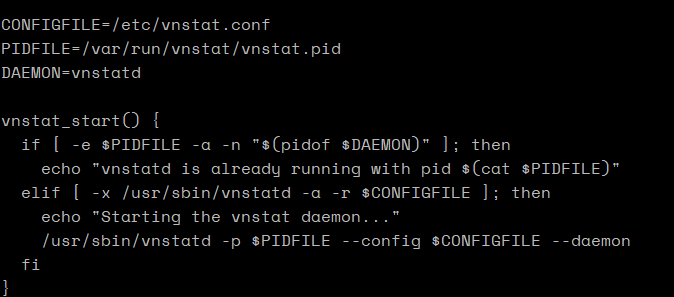
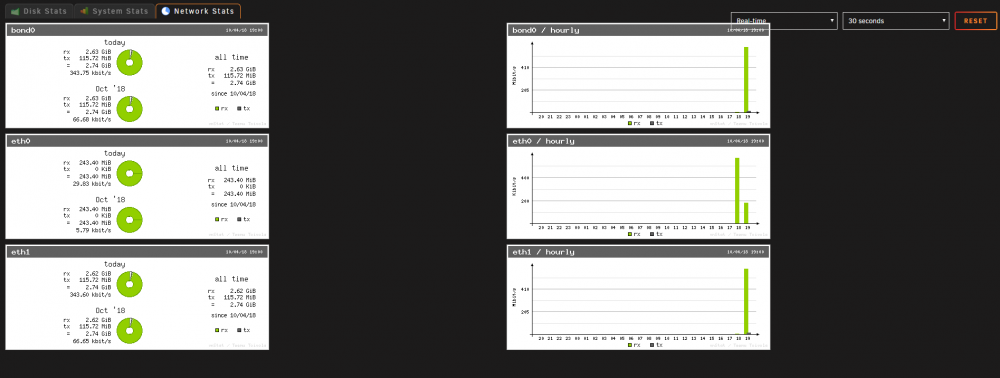
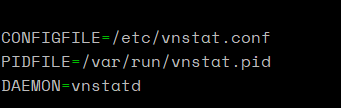
ok, got it working what I did was: changed PIDFILE=/var/run/vnstat/vnstat.pid and in the start line added -p $PIDFILE rest was untouched and this is what I get i have to Shift Reload Page to get the graphs to update, leaving to another menu and coming back, it does not update
-
pidfile in rc.vnstat is telling the pid is supposed to be found
-
ok, will do Thanks for the direction
-
PM sent Thanks Myk
-
trying this again as you requested. There is nothing in the deleted log section, no errors listed in syslog when I deleted a folder with aprox 20 files via a samba share, diags attached again vlog.zip
-
I finally deleted it as I could not get it to work anymore. I even removed it, made sure the smb-extra.conf had its config removed, rebooted, reinstalled, enabled, deleted some test files via windows share on desktop and they never show up. No errors listed in the log file only thing there is Sep 9 23:45:25 Tower root: plugin: creating: /boot/config/plugins/recycle.bin/recycle.bin-2018.03.21.tgz - downloading from URL https://github.com/dlandon/recycle.bin/raw/master/recycle.bin-2018.03.21.tgz Sep 9 23:45:26 Tower root: plugin: checking: /boot/config/plugins/recycle.bin/recycle.bin-2018.03.21.tgz - MD5 Sep 9 23:45:26 Tower root: plugin: running: anonymous Sep 9 23:45:26 Tower root: plugin: creating: /boot/config/plugins/recycle.bin/recycle.bin.cfg - from INLINE content Sep 9 23:45:26 Tower root: plugin: creating: /boot/config/plugins/recycle.bin/config/smb-extra.conf - from INLINE content Sep 9 23:45:26 Tower root: plugin: running: anonymous Sep 9 23:45:26 Tower root: plugin: creating: /tmp/recycle.bin/stop_recycle.bin - from INLINE content Sep 9 23:45:26 Tower root: plugin: setting: /tmp/recycle.bin/stop_recycle.bin - mode to 0770 Sep 9 23:46:11 Tower ool www[15674]: /usr/local/emhttp/plugins/recycle.bin/scripts/rc.recycle.bin 'update' Sep 9 23:46:11 Tower Recycle Bin: Stopping Recycle Bin Sep 9 23:46:11 Tower Recycle Bin: Recycle Bin is not running Sep 9 23:46:11 Tower Recycle Bin: Starting Recycle Bin
-
I switched to Resilo-sync to do the torrent files sync
-
I will try it again Dont know what to do with [...] in the server section, so I am going to remove it
-
Does anyone have a letsencrypt subdomain.conf file for this container? My version is coming up with bad gateway, I am still learning proxies Thanks Myk




