





caplam
Members
-
Joined
-
Last visited
Everything posted by caplam
-
just here to drop a thanks i was using the script since a long time. Today i noticed it was not working anymore (in fact it was an old version 1.4) and probably for months. So the plugin is very welcome.
-
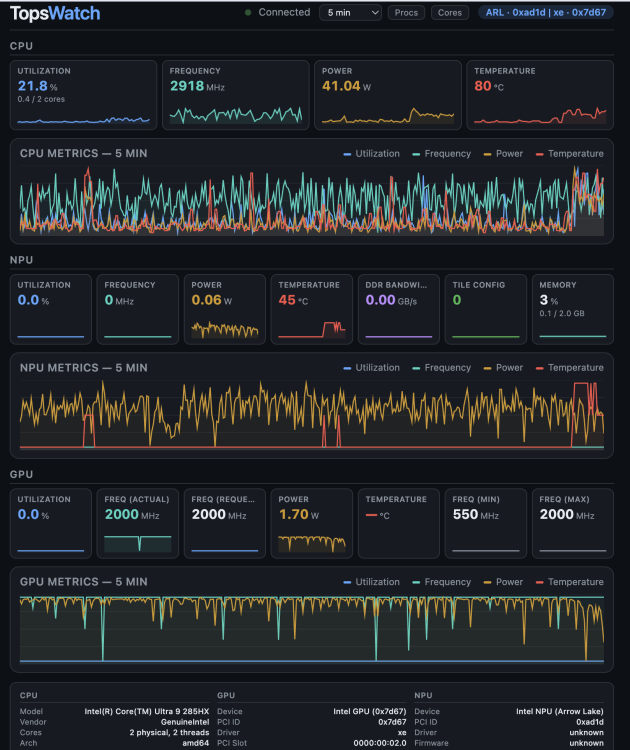
@SimonF i think i asked you a few months ago about xe driver. At this time if i remember correctly it was not available because of unraid kernel (before V7). I didn't have time to look at it since. But i have a new server (running in proxmox) with intel gear which has integrated gpu+npu.cpu. I tried to use it for local inference without great success. Anyway i found a repo about a tool to monitor intel gpu with xe driver (also i915) details of compatible hardware are on the repo. I compiled it ti run it in a docker container and it seems to be working great. Maybe you can do something with it. the repo is Topswatch
-
i am making progress. I use openarc and have loaded a qwen3 model using igpu from my core ultra. I use openwebui as gui. As i begin with ai i can see that i have a ton to learn to make a better usage (how to choose a model, system prompt, skills, agent, knowledge base,....) but it looks promising. There is valuable information on openwebui communities. You should try openarc and explore their github. Another option would be to go with openvino model server but i find their documentation quite confusing, even the name of the different components are confusing
-
can't answer as i lack some details about your setup but i'd look at network source in the vm settings. For example if you are using bridging for your unraid network interface, you would want to have br0 as your network source in your vm settings.
-
i plan to buy a B70 too. But for the moment i try to build an ai stack with the igpu and the npu of my core ultra 285HX. I tried several solutions with ipex-llm, ollama-intel. But it's very limited ipex-llm is no more under dev; ollama-intel seems to be compiled with an old version of ollama and is not able to load recent models. This week i found Openarc. Looks very promising but for me it's a steep learning curve. It's based on openvino and models from huggingface. So far the container runs and i've been able to connect openwebui. The drivers are correctly loaded and the available devices are correctly reported (CPU,iGPU,NPU) But i have not been able to download a model. Apparently you need to install huggingface-cli tool to manage models. I'm still looking for better alternatives to run local ai on intel hardware.
-
I don't expose unraid itself of course. Unraid and other management interfaces are behind a vpn whenever i need access outside of my lan. I expose things like plex, jellyfin, nextcloud, immich,.... and for those when compatible i use authentik for managing user authentication. All those services are in a dmz behind a reverse proxy sitting on my opnsense router. If you decide to host those services for your family members they need to be exposed because if not what is the utility of a nextcloud instance accessible only inside your lan ? Of course i have still work to do enforce better security (for example some of my older containers may not use docker secrets). I have also have to review my docker networks to ensure they are bound to only the interface i want. My post was more about that subject. Things you can't control despite doing things right when you setup an exposed service. Vulnerabilities can be introduced by the image and the way way it's built. And if i understood correctly you can build an image locally (without modifying the dockerfile) and it will be more up to date than the one on the public registry. From what i've read so far you would need to clone the repo of the app and replace the image in your compose file with build. That each time you execute compose up the image is built locally with the most up to date base image and dependency packages. But i need to read more about the subject and also figure out which vulnerabilities are the most dangerous; because some require access to the host others don't,...
-
you can't have that. Docker returns only running containers because to be attached to a network a container needs to be running.
-
Unraid is a great way to start with docker containers. It's easy as with some plugins unraid can take care of backup and updates automatically. But some apps require the use of several services with dependencies and unraid alone is not sufficient to manage updates. You can manage that with compose plugin and watchtower and some docker labels When you have many services running it 's not so efficient. To enhance my experience i started to use portainer but the way it manages compose files is a pain (at least for me) I recently discovered dockhand and arcane. They are both apps for managing containers, stacks and images. And you can define where you want your compose files to reside. My preference is for dockhand for the gui but it's a pain when you need to control stacks on another host through the hawser agent: for example you define a stack on the dockhand host and the compose file resides here until it's deployment. Then it's created on the remote host or the existing compose file on the remote host is updated. That makes it impossible to simply run a docker command on the remote host in a container that need an init for example. With arcane it's better handled but imho dockhand has the best gui. Both these 2 apps have vulnerability scanning of images which is great but wtf the number of vuln found in most of the images i run. I have to say that lsio images are those with the fewest vulns. I'm still in the process of understanding the way those vulns impact the security of my homelab but for now it's quite scary as i publish many of the services i use for my family members. So for now i'm in the process of trying to improve my security posture. Until now i've always used prebuilt images. I'm curious to know if many of you build their own images and if so how do you implemented it in your homelab. How do you build new image for an app according to the result of a scan ? What do you have to modify in a compose file to use ownbuilt images instead of prebuilt ? How to manage dependencies ? Can all these steps be automated ? I hope to have some hints to move forward.
-
you can use vlan in unraid and don't have an address on br0.x interface. You simply have to define ip assignment to none for the sub interface. But i guess in that case containers in that vlan can't use a bridge. I use it to define macvlan network. One thing that came into my mind is that by default docker listen to all host interfaces so if you define a bridge in a vlan interface and you expose a port in a docker on another bridge you have to restrict listening interface when you define the bridge. It's done with the "com.docker.network.bridge.host_binding_ipv4" option in the bridge ipam driver. custom networks bridge have the advantage of simplifying communication between containers. If you have several containers running in the same custom network they can communicate with each others by their name. For example if you have a server that need a database you can define the database host as postgres:5432 You can define firewall rules for your containers see docker docs (iptables).
-
thanks. I'll do that but i need time to evaluate because i have so much containers and docker networks. I got it working before i saw your answer. When i tried with eth0 as network source and e1000 for network type it worked. It's strange; when i install the same vm in proxmox it's ok with virtio network.
-
Hello, I struggle with networking particularly for vm. At a time macvlan and bridging were causing issues. So I disabled bridging. (Bonding is also disabled). I htink it was around unraid 6.8 In this config all was good for my vm and my dockers. I have one active vm (several others are down but are ok if enable them) I wanted to create a new vm but I’m unable to have it obtaining an ip. If setting a static ip it doesn't work either. When I create a vm I’m offered the choice of vibr0 or eth0 ( I have also eth0.x as I have enabled vlans) None of these options are ok. So I looked at the xml config of working vm and for the network I have that: <interface type='direct' trustGuestRxFilters='yes'> <mac address='52:54:00:11:1d:57'/> <source dev='vhost0' mode='bridge'/> <target dev='macvtap0'/> <model type='virtio-net'/> <alias name='net0'/> <address type='pci' domain='0x0000' bus='0x01' slot='0x00' function='0x0'/> </interface> All my vm have the same network controller definition. Only mac_address and target dev differ. Note that the source dev is vhost0 in xml but in gui it’s vibr0. What network source should i use for my new vm? What is the correct xml definition for the network interface.
-
Hello, I have a ssd pool with 2 ssd for docker and vms. This pool holds also my nextcloud data. I want to install one (even several as i will configure a distributed setup) vm for security onion. I have room for a basic vm but security onion is quite storage hungry. Inside this vm the storage space is managed with lvm; and there is mainly 2 partititions "/" and "/nsm" What i plan to do is to allocate space for creating the vm on the ssd mirror pool and a second space which i'll mount to "/nsm" partition. For that second space i need to add a pool. I'm a newcomer to zfs but want to try it. I'll dedicate a small sas das i have (8bays). And to populate that das i have 6 sas hdd and 2 sas ssd. All professionnal grade. Considering the main use of that pool will be to be mounted in the vm as /nsm partition; and that partition holds pcap files, zeek files and elastic search files, i'm looking for the best layout possible given the hardware i have. For that particular usage ram is not a problem (i have 200G free fro now). i should not need l2arc. At first i was thinking about a raidz2 pool with 6 hdd (4Tb per unit) and a mirror of 2 ssd (800G per unit) as special vdev for small files and metadata. I'd like to know if there are better options.
-
interesting topic. I don't have need for bcache for the array. I'm happy with it as it is. Despite of the downsides the versatility it provides in the ability to mix disks is what made me choose unraid in the first place. But i have a need for a vm to have a large and fast volume. Too large to hold it on a ssd and too fast to rely only on hdd. It doesn't need to on the array. How could i setup such a volume ? I was thinking about lvm volume with bcache or another type of cache (completly outside of the array). The glitch is i have room for another hdd but not for a ssd. Could i use a vdisk on a existing ssd to act as cache for a lvm volume on a new hdd?
-
i rebooted the backup server (192.168.2.52) and it's now working. I found examples in the forum of the same symptom.
-
I can also add that using pcie x16 slot doesn't doesn't desactivate 1 nvme and yes 9300-8e is running fine in the ms01 (but take care of airflow) Perhaps you should correct you posts. It might lead to unaware users plugging the wrong ssd. in the wrong slot. edit: your photo shows a U.2 nvme ssd. This is the good ssd but be careful on the switch position if you change it for a nvme m.2. This has nothing to do with a sata ssd.
-
Hello, For almost 2 years I've been using luckybackup to backup some shares from one unraid server to another. Today my backup server doesn't accept connection from my main server. The config didn't change. The ssh key from main server is in the authorized key on backup server and didn't change. I wonder if there has been a recent change in ssh on unraid. Here is my log: Jan 7 17:55:52 hades sshd-session[355622]: Postponed keyboard-interactive for root from 192.168.2.50 port 53748 ssh2 [preauth] Jan 7 17:55:52 hades unix_chkpwd[355625]: password check failed for user (root) Jan 7 17:55:52 hades sshd-session[355624]: pam_unix(sshd:auth): authentication failure; logname= uid=0 euid=0 tty=ssh ruser= rhost=192.168.2.50 user=root Jan 7 17:55:54 hades sshd-session[355622]: error: PAM: Authentication failure for root from 192.168.2.50 Jan 7 17:55:54 hades sshd-session[355622]: Failed keyboard-interactive/pam for root from 192.168.2.50 port 53748 ssh2 Jan 7 17:55:54 hades sshd-session[355622]: Postponed keyboard-interactive for root from 192.168.2.50 port 53748 ssh2 [preauth] Jan 7 17:55:54 hades unix_chkpwd[355688]: password check failed for user (root) Jan 7 17:55:54 hades sshd-session[355687]: pam_unix(sshd:auth): authentication failure; logname= uid=0 euid=0 tty=ssh ruser= rhost=192.168.2.50 user=root Jan 7 17:5 it's almost as if backup server wants only password and not key.
-
you have to declare networks in your compose file In the example below i use 2 networks for the immich server eth0.30 is macvlan network in my dmz vlan immich is a bridge network only immich server is in the eth0.30 network. All the other containers are in immich network. you also have to declare the type of network at the end of the file at the same level as services. In my case networks are created outside of the compose file hence the external: true statement. But you can't manage them inside the file. I advise you to read docker networking docs. services: immich-server: container_name: immich_server image: ghcr.io/immich-app/immich-server:${IMMICH_VERSION:-release} # extends: # file: hwaccel.transcoding.yml # service: cpu # set to one of [nvenc, quicksync, rkmpp, vaapi, vaapi-wsl] for accelerated transcoding volumes: - ${UPLOAD_LOCATION}:/usr/src/app/upload - /etc/localtime:/etc/localtime:ro - ${EXTERNAL_PATH}:/usr/src/app/external # env_file: # - .env ports: - 192.168.30.10:2283:2283 # expose: # - "2283" depends_on: - redis - database restart: always healthcheck: disable: false networks: eth0.30: ipv4_address: 192.168.30.10 immich: networks: eth0.30: external: true name: eth0.30 immich: external: true
-
You are wrong on ports available and their usage. Ms01 doesn't have a sata port. The adapter is for U.2 nvme ssd. And on the ms01 there is a switch near the first m.2 connector. This switch is for using either U.2 with the adapter or m.2 nvme without the adapter. You can't use both at the same time. And if you plug a m.2 ssd with the switch in U.2 position you will most likely fry your ssd. On mine i setup a cache pool with the ssd in Pcie4.0 x4 and pcie 3.0 x4 slots. This pool holds my vms and appdata. I setup another pool with the ssd in the last slot which hold data to be transferred to array. Finally i plugged a sas hba in the pcie slot and connected a sas das. disks in das are my array disks. But this can't work as is, you have to help with the airflow or it will overheat. What i did is to seat the ms01 on a 120mm fan with rubber feet to cool ssds and put a 80mm (or 120mm) on top to help the airflow in the hba zone. Hba like lsi are made to run in servers which have a high airflow. Without this the hba will most likely overheat and fry. If i remember the vrm are close to this zone and won't appreciate too. There are some threads on sth forums about the ms01 heating problem and hardware compatibility.
-
I have 2 unraid servers each with a sas das. I plan to add a 3rd server but as energy consumption and space matter ( i only have a small space in my basement to put my gear) i ordered a mini workstation. It will be well equipped with ssd and ram but lack of hdd. So i plan to add a sas das. It came to my attention that i could use an external thunderbolt to pcie chassis (like the sonnet echo express III, 3x pcie3.0 x8 slots) and throw in a lsi hba. The workstation will have 2 usb4 port (afaik usb4 is compatible with thunderbolt 3). When i look at sonnet compatibility list only arecca and sonnet adapters are listed. Are lsi hba in it mode compatible with this? On sonnet site they claim drivers are available on linux since kernel 5.0. edit : if such a config is working would it be possible to passthrough a vm individual disks or you have to pas the whole controller?
-
it would be simpler to put eth1&2 on a untagged port. If you have several interfaces unraid don't need to be vlan aware. You can use one interface with sub interfaces in each desired vlan (that's what i do) or several interfaces, each one in the desired vlan.
-
RIP Ronald. My sincere condolences to his family and friends.
-
Not possible. Docker can't talk to dhcp server. You have 2 choices with docker on macvlan network. 1- you assign manually an address 2- you let docker assign an address but you have to make sure the range of docker network and your lan network don't overlap. In your case you didn't assign a dhcp pool to your docker custom network. You have to assign manually an address to your container. docker dhcp pool and pfsense dhcp pool are completly independant.
-
I setup an oidc provider to login in unraid. I can't believe i had not seen that before. My unraid server is 7.1.4 I used authentik (for now version 2025.8.3) as provider (runs in a compose stack on unraid). Here are my comments: according to the doc you need to fill in the issuer url without a trailing slash. In my case that was not working without when you type the uri in authentik the docs says: http://YOUR_UNRAID_IP/graphql/api/auth/oidc/callback But if you run unraid on a non standard port you have to include it. On port 80 i run authentik so the result is weird. when you log out of unraid you stay logged in authentik. Many apps implementing oidc provide a choice when logging out to log out from the app or from auth provider too when you try to log in with an unauthorized user ( in my case i use group membership as condition) you have a screen indicating "authentication failed" but when you try to login again with an authorized user you can't as you are still logged in authentik but with an unauthorized account. You then have to logout from authentik. That means open a new tab on authentik and log out from authentik. It's not a big deal but it's not very convenient. For authorizing a user i prefer to use a group membership. It's not documented in unraid doc but you can find info on that as jellyfin oauth2 use the same thing. Basically you have to create a user group in authentik and put in all the users you want to authorize. Then you have to create a scope mapping : name: group membership slug: groups expression: return [group.name for group in user.ak_groups.all()] description : see which group the user belong to Then you edit authentik provider and in advanced protocol settings you had the group membership to the already selected scopes. If i understood correctly all authorized users are logged in as root user in unraid. I upgraded my backup server to 7.2 RC1 i will try on this one to see there is the same behavior. I wonder if i could use the same authentik provider for my second server. That could work, i would have just to add the callback uri of the second server to the provider in authentik. Anyway this is a great step forward.😃 edit: doesn't work with one provider for 2 servers.
-
easiest way is probably to use appdata backup plugin. It has special features for plex containers. It will stop the container before backup to ensure a consistent state. You can also try to repair your database. You will find tutorials for that. For example: repair a corrupt plex database ## Step 1: Back Up Your Data Before making any changes, it's crucial to back up your existing Plex database. 1. **Stop the Plex Media Server**: - Make sure the Plex server is not running to avoid further corruption. 2. **Locate the Database**: - The database file is typically located in: - **Windows**: `C:\Users\<YourUsername>\AppData\Local\Plex Media Server\Plug-in Support\Databases\` - **macOS**: `~/Library/Application Support/Plex Media Server/Plug-in Support/Databases/` - **Linux**: `/var/lib/plexmediaserver/Library/Application Support/Plex Media Server/Plug-in Support/Databases/` 3. **Backup the Database**: - Copy the entire **Databases** folder to a safe location. --- ## Step 2: Repair the Database ### Using SQLite Tools 1. **Install SQLite**: - Download and install SQLite tools if you don't have them. 2. **Open Command Line**: - Open your command-line interface (Terminal on macOS/Linux or Command Prompt on Windows). 3. **Navigate to Database Location**: - Use the `cd` command to change to the database directory. 4. **Run SQLite Commands**: - Open your Plex database file with SQLite: sqlite3 "Plex Media.db" - Execute the following commands to check and repair the database: ```sql PRAGMA integrity_check; ``` - If errors are reported, you can try: ```sql .dump ``` - This will dump the database contents. - Exit SQLite with: ```sql .exit ``` 5. **Create a New Database**: - Start a new SQLite database and import the dumped SQL: ```bash sqlite3 "NewPlexMedia.db" ``` - Then paste the output you got from the `.dump` command. --- ## Step 3: Replace the Old Database - Rename your existing database file (e.g., `Plex Media.db.bak`). - Rename the new database (`NewPlexMedia.db`) to `Plex Media.db`. - Ensure file permissions are set correctly. --- ## Step 4: Restart Plex Server - Start the Plex Media Server again and check if the issues are resolved.
-
I have an opnsense 25.7.3 and unraid 7.1.4. I have no ipvlan docker. I have containers with custom bridge network and also macvlan. I have no connection problem for my containers but i never test from inside the container a ping to the router. They are supposed to communicate between them in their own network or to the outside on the mapped ports. A ping doesn't seem to be relevant. Ping is layer 3 thing and doesn't use a port. I tested with to 2 containers: one with macvlan network ping is ok and one with bridge network ping to opnsense is also ok. But on both case traceroute doesn't work. So i don't even know if it's relevant in your case. If so you could provide more details: have you enabled host access on custom networks? in opnsense is the network lan or vlan ? By default inter vlan is blocked. what mode is your ipvlan network L2 or L3 ? what is your network address ? what is the result of docker network inspect br0 ? When you switch from ipvlan to macvlan in unraid you have to check if your ipvlan network still exists. You can't have overlapping networks. When using a macvlan docker address is assigned manually or by docker daemon. Whatever network driver your container uses it can't speak to a dhcp server. You have to check your container doesn't use a duplicate address. I seriously doubt opnsense has an issue at least on pinging local networks. Docker networking is very complicated. Unraid tries to make it simple but the truth is most people (including myself) use their containers as if they are like any other device on the network.

