Arbadacarba
Members
-
Joined
-
Last visited
Everything posted by Arbadacarba
-
I went looking for this request... I use a VM with a bootable CD/iso to perform disk task on client hard drive and would like to be able to more easily mount a unassigned drive and select the boot drive. Right now I have to go in and make changes to the xml Every Time. I love that this workflow is even possible, but would really like to see it performed more cleanly. Arbad
-
Having Done a little further experimentation... The behavior I'm seeing is EXACTLY right... I was thinking along the frequencies that intel lists for this chip, but not realizing those are SINGLE core boost frequencies. I'm seeing ALL cores hit 4.8Ghz until the package temp hits 80 degrees and then they back off (4.6 or so) until it stays below 80. Thanks
-
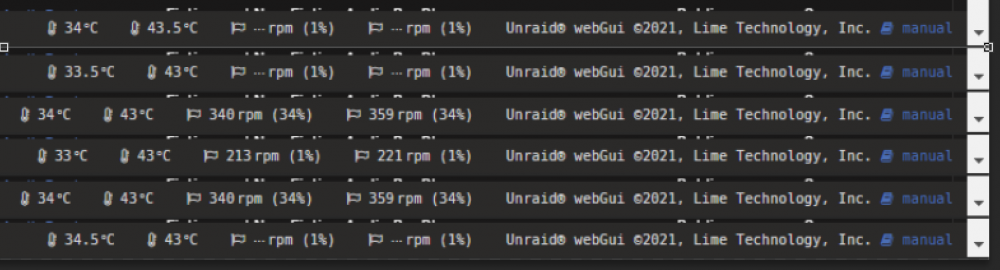
Is there any way to change the display at the bottom of the GUI to either ALWAYS diplay the decimal point or to NEVER display it? The constant shuffling of the line at the bottom back and forth is disconcerting.
-
I assumed it would... I've built this system around an air cooled quiet solution. I'm in the industry but I really haven't built a computer other than my servers (built and rebuilt really) since the AMD Athlon. I've been using Laptops for about 20 years. Maybe I just watch too many Linus videos. I'm really just screwing around with the new build on the principle that I have the skills and the equipment so lets lap the IHS and Heatsink to try to get a TINY gain and slow my cooling system down even more. No real reason. Just practicing arcane skills. The whole rig is meticulously cable managed and there is not a window in sight. Thanks
-
For reasons of my own insanity, I want to get temperature readings on me server before and after I make soe risky and likely pointless modifications. I looked and looked for some way to stress test the CPU and get a temperature reading. Eventually realizing I may have that already in this plugin. Is there a way, or does it already, keep ap log of the results? Like running Temperature and frequency? So far I've played with taking screen shots while running the atomic burn tool, but I'm not seeing the numbers I expected. My system is NOT overclocked, and my 10850K is maintaining 4800MHz on all cores at about 72 degrees... Surely I'm doing something wrong for i not to be running hotter. Arbadacarba
-
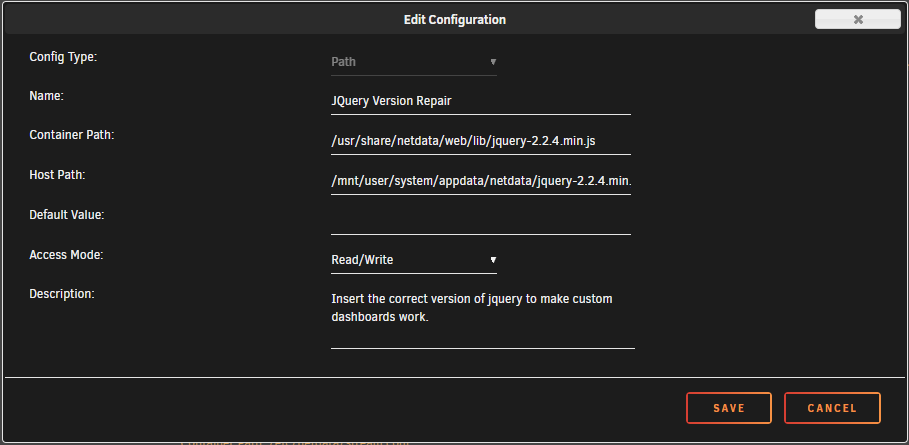
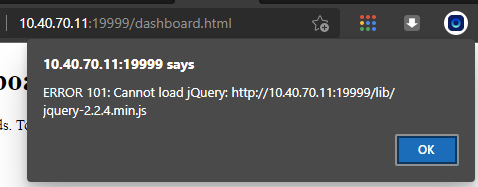
Error 101: Cannot Load JQuery I found the cause and a solution: The version of jquery on the netdata docker is 3.6.0 and while it seams like a newer version should work....it doesn't. So I created a path that adds 2.2.4 to the folder from another netdata install (installed on my pfsense box)
-
I'm trying to set up some custom dashboards and getting this when I go to the default address... I looked through the forum but didn't see anything... Any thoughts? Thanks
-
I had copied just the key file... I had installed from the USB Creator onto a new USB drive and registered the trial... Then installed my most important VM's and such. Then rebooted and was the victim of my own "cleverness". Rebooting with the trial key (which needs an internet connection to verify its validity and then start the array), on a system that houses it's own router in a VM, (which requires the Array to be started to run even though it's not, itself on the Array) might have been a poor choice. I wonder... Was it the existing Appdata, System, and Domain folders that made it look like it had recovered? I might have jumped the gun and made an assumption. My appologies if so. My real goal here is to get rid of the Cruft, that I have created over the past year of customizations to the Go file etc. for my old system. Of course mixed into all of this is troubleshooting a few little hardware conflicts on the new system. Thanks for the response
-
I just performed a MAJOR update on my server hardware, new CPU, Mainboard, and smaller NIC. I spent HOURS getting it up and running to the point where it could serve the house as router (pfSense) and Media Streamer. Along with creating Users, Naming Shares, configuring Drive Mapping and installing some of my most used pluggins and creating my Hardware Centric Gaming VM. (You know, the important stuff) And then I moved the key over to my new thumbdrive... I assume it pulled my backup from "My Servers"? Did I miss a warning? It restore a backup of my flash drive destroying all my hard work and making the whole thing unusable... Very frustrating.
-
This would be interesting... I'm not sure how usefull it would be but it would definitely be interesting. The server I'm building has 7 fans in it, all pwm and all controlled in BIOS to set the speed based on CPU or mainboard temps... It would be interesting to see the dynamic responses to the work the server is doing... And if you paid attention you could adjust your fan curves to control cooling.
-
In a previous build I had run through the installation of "Dynamix Auto Fan Control" and "Dynamix System Temperature" and run Sensors-detect and inserted the modprobe lines into the go file: # modprobe for each sensor modprobe coretemp modprobe f71882fg modprobe lm78 modprobe nct7802 modprobe i2c-i801 # Copy the sensor.conf file for use cp boot/custom/scripts/sensors.conf /etc/sensors.d In the end I had listings on the Dashboard for 9 fans with speeds for 5 of them... I have 5 fans in the system so all seemed right in the world. * Please note I'm pulling the process from memory... So I could have missed a step. I have since completely rebuilt the server, new build of the OS, but the fans are still plugged into the same spots and it's the same motherboard (EVGA Z170 Classified K). Now I see only 3 fans, and when I run sensors-detect I see no mention of nct7802... Does anyone have any insight as to where me other 2 fans went? Or why it's not reporting any empty slots? on the Dashboard? I'm planning to use the final header on the mainboard for an additional set of fans, but would like to see the speeds they are actually running at. Thanks
-
Living out in the country, where I have 2 internet connections because they are either unreliable, or brutally restricted: I can't use the remote access, because both of my providers are double NAT'd and unable/unwilling to pass ports through. If only there was some system in place like what is used by Teamviewer that connects my server to the Unraid system to allow me to follow it back in. I don't know nearly enough to know if that is a huge deal, or if it is a huge security issue... Just thought I'd put it out there.
-
It's absolutely true that the file is not there... the trouble is I can't find any reference to virtio-win-0.1.160-1.iso.. Nothing should be asking for it. The VM's are all using 0.1.190. I'm a little confused... You're right I had not bound it to the VFIO before... I believe that was prior to the newest unraid version, with its easier binding, and I was manually attaching it to the VM in the xml file... I notice the system reports unknown header type as soon Is I log into the gui as opposed to waiting until after I try to run the VM... Not sure what else to try... Not sure what to do next to troubleshoot it. Arbadacarba

-
Great podcast: I would not have guessed the topic of a server OS would make for such good listening, but it does the way you have done it. I do have a question that arose from the discussion of VFIO allow unsafe interrupts: I have a NVMe disk that looks to be misbehaving in the same way as you describe for video cards... I tried the VFIO allow unsafe interrupts switch but got no joy. NVMe Passthrough Problem (Samsung EVO 980 Pro) - VM Engine (KVM) - Unraid
-
Libvert Log: 2021-07-01 02:08:42.220+0000: 6700: info : libvirt version: 6.5.0 2021-07-01 02:08:42.220+0000: 6700: info : hostname: Jupiter 2021-07-01 02:08:42.220+0000: 6700: warning : networkNetworkObjTaint:5292 : Network name='default' uuid=03992cfe-2f56-45e7-a079-c12c04bf2bfe is tainted: hook-script 2021-07-01 02:08:42.440+0000: 6790: error : virPCIGetHeaderType:2818 : internal error: Unknown PCI header type '127' for device '0000:03:00.0' 2021-07-01 02:08:43.010+0000: 6700: warning : qemuDomainObjTaint:6075 : Domain id=1 name='pfSense - Cerberus' uuid=021a25c9-9a65-6a21-4bf6-dddf2baf2a4f is tainted: high-privileges 2021-07-01 02:08:43.010+0000: 6700: warning : qemuDomainObjTaint:6075 : Domain id=1 name='pfSense - Cerberus' uuid=021a25c9-9a65-6a21-4bf6-dddf2baf2a4f is tainted: host-cpu 2021-07-01 02:10:30.473+0000: 6688: error : virPCIGetHeaderType:2818 : internal error: Unknown PCI header type '127' for device '0000:03:00.0' 2021-07-01 02:10:30.485+0000: 6688: warning : virHostdevReAttachUSBDevices:1815 : Unable to find device 000.000 in list of active USB devices 2021-07-01 02:10:30.485+0000: 6688: warning : virHostdevReAttachUSBDevices:1815 : Unable to find device 000.000 in list of active USB devices 2021-07-01 02:15:16.456+0000: 6687: error : virFileIsSharedFixFUSE:3384 : unable to canonicalize /mnt/user/Software/virtio-win-0.1.160-1.iso: No such file or directory 2021-07-01 02:15:16.456+0000: 6687: error : qemuOpenFileAs:3175 : Failed to open file '/mnt/user/Software/virtio-win-0.1.160-1.iso': No such file or directory 2021-07-01 02:15:16.485+0000: 6688: error : virFileIsSharedFixFUSE:3384 : unable to canonicalize /mnt/user/Software/- ISOs/virtio-win-0.1.160-1.iso: No such file or directory 2021-07-01 02:15:16.485+0000: 6688: error : qemuOpenFileAs:3175 : Failed to open file '/mnt/user/Software/- ISOs/virtio-win-0.1.160-1.iso': No such file or directory
-
So I've tried with "VFIO allow unsafe interrupts:" set to yes but am getting the same results. I swapped out the 660p for the 980 Pro - There is a Server 2019 Install on the 980 Pro... Checked that it was set to passthrough in the Unassigned Devices config Page and bound to VFIO in System Devices. Same Error on startup of VM If I edit the Windows VM it displays the drive as available and checked. Here's the link to the Article about the same issue on a RedHat forum: 1542494 – VMs with NVMe devices passed through sometimes fail to be launched (redhat.com) https://bugzilla.redhat.com/show_bug.cgi?id=1542494 Any thoughts? I'm kind of stuck with this drive now. Arbadacarba
-
Yes, I am and that could be contributing to the problem... I'll have another 980 Pro this weekend and will try it again.
-
Could this be related to the "VFIO allow unsafe interrupts:" setting? I was listening to the Podcast today and it struck me... I was not restarting the VM... But just trying to launch it after boot... Could it have something to do with the host OS mounting the drive before restarting it for the VM?
-
Seems to be good... The site shows me connecting through the vpn location. Seems to be working. The Goal is that while I want to lock the Torrent Server out of the more expensive internet connection, I want the unraid server itself to be able to get updates through whatever internet connection is working. Thanks for all the help.
-
Zeroing out the LOCAL_NETWORK variable has it working correctly I think... I was just unsure if that made sense or if there could be other problems caused by that change.
-
Does it make sense that I would need to clear the LOCAL_NETWORK: variable? I tried assigning the IP address and could not get into the WebUI. Thanks
-
I'm trying to figure out how to get ALL transmission traffic to go through one of my internet connections rather than another. One way I do that using Policy Based Routing is that I differentiate by IP address... So that some of my VM's can only communicate through the slower but cheaper (unlimited) ISP. Is it possible to make Transmission use a different IP address than the rest of the Unraid Server? Or, Barring that is there a single outgoing port that is used? or even a range of ports? This is counter to the VPN goal isn't it? Slightly confused I know, but any insight would be appreciated. Arbadacarba
-
Gave up and went back to the 660P Defeated
-
that's what I got when the 660P was working correctly... I've tried blocking it out by binding it to vfio... but that gives the same error followed by the difference in System Devices after I attempt to launch a VM. I've tried creating a new VM and attaching it to a VM running Acronis that I use to clone drives and which is the one that I attached the 660P to in order to clone it before I started the swap. For clarity the only VM running from the start is my pfsense router which is not configured to use the NVMe. Thanks for the input though
-
Running Windows 10 on a passed through 512GB Intel 660P NVME drive on an EVGA Classified K Z170 board I have the opportunity to swap the 660P for a 1TB Samsung EVO 980 Pro. I know my existing board won't take full advantage of this drive but the extra size and a little future proofing never hurt… (except when it does) Unraid lets me reconfigure the VM but when I start it I get: internal error: Unknown PCI header type '127' for device '0000:03:00.0' And after that happens I don't see the drive anywhere accessible to unraid. If I reboot the machine I can see the drive in Unassigned devices and even access it… and when I look at the System Devices Page I see: But as soon as I try to launch the VM I get the error and the detail page changes to: !!! Unknown header type 7f … I spent a bitt looking around and I see lots of references to similar problems with passing GPU's through, but very little about NVMe drives. I did find this page and it seems to be about the same thing but it goes a bit over my head: 1542494 – VMs with NVMe devices passed through sometimes fail to be launched (redhat.com) Any help would be appreciated… Should I cut my losses and reinstall the 660P? Thank you I'll have to pull this drive and reinstall the 660p tonight, but I'll check back here in case anyone has any ideas or needs different info. jupiter-syslog-20210308-2108.zip syslog-10.40.70.11.zip