





sota
Members
-
Joined
Everything posted by sota
-
Also, something else just struck me. Since i'm using Windows 10 still, I realized Defender could be getting in the way of performance, if it's trying to intercept activity and analyse it. Turning it off seems like a good idea, but then I remembered they added Ransomware protection not too long ago; preventing a bad actor from screwing up the plots sounds like a good idea. So my 40w light bulb idea/question would be... can the plots be on a read-only location?
-
i'm on 1.1.5 right now. I see 1.1.6 came out 5/20. I guess after these last 3 plots finish I can install that version.
-
My bigger problem right now is, I think I know why sync is horridly slow. it has a ton of peers connected, but only one has a height value specified, and is the only one i'm getting data from.
-
Interesting. I threw a spare/backup server I have here (HP DL380G6 dual X5570 processors, 144GB ram, 2x72GB (boot), 6x146GB SAS 15k DP (RAID0), 8x300GB SAS 15k DP (RAID0) online a couple days ago, and my plot speeds aren't nearly that good. I got 7 plots done in about 24 hours. 3 plots on the 6x array, and 4 plots on the 8x array, all in parallel. It's also syncing with mainnet as well, so I don't know if that's causing problems. My performance is frankly, pathetic, given the iron thrown at it. It has me somewhat depressed. I've been seeing noises on reddit that, breaking plots up to individual drives nets better performance, so i'm considering moving all my completed plots off those drives (was going to anyways, have a stack of 4TB disks here waiting) and breaking the arrays apart, into individual disks or in the case of the 146s, RAID0 pairs to get the space needed to plot. I should be able to do 11 plots in parallel then. Oh, and the box is running Windows 10.
-
I wish I was getting 15k Blocks/hr.
-
can confirm @itimpi's statements. have had a heart attack or 2 when I accidentally left too many things plugged in, rebooted, and the array refuses to start. post-boot connection the system doesn't give a damn really.
-
you're a good man, charlie brown.
-
You know the next question will be... how to run more than 1 command at start up? Might as well get that out of the way now. I don't need it, but i'm sure now that it's an option the kid will ask "hey dad, can you do X,Y,Z every time the server starts?"
-
hopefully they've also kicked out all of the bugs 6.9.0 and 6.9.1 have had. and people wonder why i'm still on 6.7.2.
-
ah.... I don't expose myself, I mean my flash, via SMB.
-
@jamerperson open the unraid terminal cmd: cd /boot/config (my flash drive is mounted as /boot. seems other installs could be /flash, so YMMV.) cmd: nano go go to the first blank line, and type/paste: curl -o '/usr/bin/runc' -L 'https://github.com/binhex/arch-packages/raw/master/static/x86-64/runc' && chmod +x '/usr/bin/runc' type <ctrl+o> type <y> to save type <ctrl+x> to exit close the console.
-
anyone know if I can switch from the brettm357 docker to the linuxserver.io flavor, and keep all my config settings? I'd like to be able to "lock" in the version I have without fear of it accidentally upgrading if I fat/ham/booze finger the update button(s).
-
@CS01-HSNICE! I was about to ask about having a share for a disk show up that doesn't exist (disk is unplugged), and was tossing weird error in the syslog Mar 16 17:20:23 Cube kernel: Buffer I/O error on dev sdm, logical block 0, async page read Mar 16 17:21:30 Cube kernel: Buffer I/O error on dev sdm, logical block 0, async page read Mar 16 17:22:38 Cube kernel: Buffer I/O error on dev sdm, logical block 0, async page read but based on your post I found the errant disk listed in the smb-settings.conf file, and removed it. looks like the noise to the log has ceased. I knew a reboot would fix it, but that brings its own perils
-
I'd appreciate any updates on this if you ever move forward. I'm going to want to bring online several more cameras (8+ total), and activating motion detection on all of them for shinobi would be almost required to keep data storage to a manageable level. knowing what GPU would be needed to handle that kind of load would be beneficial.
-
can I lock this container to an older version, 5.14.23, in the same way as linuxserver.is build can be? namely, change repository field to: brettm357/unifi-controller:5.14.23-ls73 or something equivalent?
-
have you gotten the ssacli to work under unRAID's flavor or linux? be nice to not have to boot into another OS ro deal with these issues.
-
I'm running into excessive memory usage again. eb 5 15:10:13 Cube kernel: Task in /docker/973fc918d6f3ca143c8c5bb531b666066c0b41cef6cde6296e630d4c68ebf763 killed as a result of limit of /docker/973fc918d6f3ca143c8c5bb531b666066c0b41cef6cde6296e630d4c68ebf763 Feb 5 15:10:13 Cube kernel: memory: usage 8388608kB, limit 8388608kB, failcnt 157206156 Feb 5 15:10:13 Cube kernel: memory+swap: usage 8388608kB, limit 16777216kB, failcnt 0 Feb 5 15:10:13 Cube kernel: kmem: usage 102184kB, limit 9007199254740988kB, failcnt 0 Feb 5 15:10:13 Cube kernel: Memory cgroup stats for /docker/973fc918d6f3ca143c8c5bb531b666066c0b41cef6cde6296e630d4c68ebf763: cache:22676KB rss:8263024KB rss_huge:2912256KB shmem:3408KB mapped_file:396KB dirty:0KB writeback:2112KB swap:0KB inactive_anon:1584KB active_anon:8264524KB inactive_file:17288KB active_file:1420KB unevictable:0KB Feb 5 15:10:13 Cube kernel: Tasks state (memory values in pages): Feb 5 15:10:13 Cube kernel: [ pid ] uid tgid total_vm rss pgtables_bytes swapents oom_score_adj name Feb 5 15:10:13 Cube kernel: [ 39251] 0 39251 394 1 45056 0 0 start.sh Feb 5 15:10:13 Cube kernel: [ 39348] 100 39348 122168 47390 499712 0 0 mysqld Feb 5 15:10:13 Cube kernel: [ 39894] 0 39894 55941 6802 1245184 0 0 node Feb 5 15:10:13 Cube kernel: [ 39933] 0 39933 345587 29628 3170304 0 0 node /opt/shino Feb 5 15:10:13 Cube kernel: [ 39940] 0 39940 57366 6237 1622016 0 0 node /opt/shino Feb 5 15:10:13 Cube kernel: [ 32967] 0 32967 52263 2786 892928 0 0 node Feb 5 15:10:13 Cube kernel: [ 33078] 0 33078 576946 364428 3301376 0 0 ffmpeg Feb 5 15:10:13 Cube kernel: [ 65072] 0 65072 52301 2886 888832 0 0 node Feb 5 15:10:13 Cube kernel: [ 65160] 0 65160 15112 1290 139264 0 0 ffmpeg Feb 5 15:10:13 Cube kernel: [ 6989] 0 6989 52303 2784 901120 0 0 node Feb 5 15:10:13 Cube kernel: [ 7005] 0 7005 52249 2869 880640 0 0 node Feb 5 15:10:13 Cube kernel: [ 7160] 0 7160 15121 1853 151552 0 0 ffmpeg Feb 5 15:10:13 Cube kernel: [ 7199] 0 7199 599354 400451 3563520 0 0 ffmpeg Feb 5 15:10:13 Cube kernel: [ 7430] 0 7430 52302 2736 872448 0 0 node Feb 5 15:10:13 Cube kernel: [ 7625] 0 7625 15122 832 147456 0 0 ffmpeg Feb 5 15:10:13 Cube kernel: [ 27318] 0 27318 47413 1116 483328 0 0 node Feb 5 15:10:13 Cube kernel: [ 27326] 0 27326 77773 62416 655360 0 0 ffmpeg Feb 5 15:10:13 Cube kernel: [ 45713] 0 45713 52260 2610 884736 0 0 node Feb 5 15:10:13 Cube kernel: [ 45815] 0 45815 15128 1836 151552 0 0 ffmpeg Feb 5 15:10:13 Cube kernel: [ 63470] 0 63470 52241 2586 888832 0 0 node Feb 5 15:10:13 Cube kernel: [ 63691] 0 63691 601871 387489 3514368 0 0 ffmpeg Feb 5 15:10:13 Cube kernel: [ 19495] 0 19495 52189 2588 872448 0 0 node Feb 5 15:10:13 Cube kernel: [ 19510] 0 19510 593045 393270 3555328 0 0 ffmpeg Feb 5 15:10:13 Cube kernel: [ 15708] 0 15708 52226 2595 876544 0 0 node Feb 5 15:10:13 Cube kernel: [ 15912] 0 15912 531656 320391 2957312 0 0 ffmpeg Feb 5 15:10:13 Cube kernel: Memory cgroup out of memory: Kill process 7199 (ffmpeg) score 191 or sacrifice child Feb 5 15:10:13 Cube kernel: Killed process 7199 (ffmpeg) total-vm:2397416kB, anon-rss:1601800kB, file-rss:0kB, shmem-rss:4kB Feb 5 15:10:13 Cube kernel: oom_reaper: reaped process 7199 (ffmpeg), now anon-rss:0kB, file-rss:0kB, shmem-rss:0kB
-
Ok. Not ready to go to 6.9 yet so I'll live with it.
-
I can try that. It'll be at least 16+ hours before I can do a reboot though, so i'm not ignoring you. eta: also I maybe should have mentioned (the whole lack of coffee thing), I'm in the process of doing a full array backup to cold storage, so there's a lot of disk swapping going on, and a specific VM is stopped/started each time.
-
Any thoughts on why the preclear icon at the bottom will show the temperature for an UD, but not in the listing above? Also Read/Write never populate (not sure if related, but thought I should mention.) Diagnostics attached. If you need anything else, just ask, and please provide instructions as if I'm a complete moron, or haven't had any coffee in days. Thanks! cube-diagnostics-20210130-1323.zip
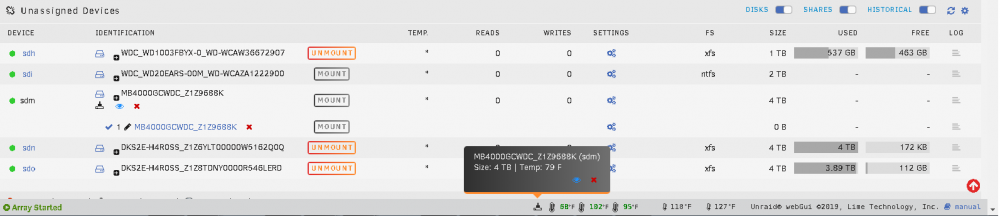
-
I think I saw it in this thread, but i'll be damned if I can find it; I have the appearing/disappearing preclear finished status below an empty drive. What was the fix for that? nevermind. Just noticed I was on v.2020.12.31 for UD. updated to v2021.01.16b. seems to have stopped doing the thing.
-
For those that have used these, are they viable for being able to run at least 1 VM and/or a couple containers? I'm thinking specifically SageTV as one of the containers.
-
your before by-id doesn't have as many disks showing. I wanted to see if the wwn entries received unique numbers. I had a case where identical disks (but with different serial #s obviously) would have the same wwn entry, and prevent both disks from being mounted correctly. pretty confident it was a firmware reporting problem.
-
Huh. So I restarted that container; no effect; still has only 3 help menus, and lots of commands don't work. Might just try and copy the other container to this one's folder, and see what happens.



