





sota
Members
-
Joined
Everything posted by sota
-
Does this actually work for anyone else? I've yet to get it to for me.
-
a-periodic check in: 1.349GiB/4GiB no reboots since, whenever.
-
I set mine to 4GB a while ago. I just checked... just under 1GB in use.
-
Here's a wild one... To go along with the multiple pools idea, make it so that I can add/drop a pool in/out of the system and import/export its configuration, WITHOUT it damaging the state of the parity drive associated with it. Why would I want this? Cold storage backup of the main array/pool. I can duplicate the contents of the main array to the backup one, then pull the disks and put them in storage. Not only will I have a data file backup, but a parity drive to go with it to help protect/guard against bit-rot or other possible problems when drives have been off for a while (stiction *might* still be a thing.)
-
My only comment is, a locally executed infection on the unRAID box that has gained root access, can easily be "intelligent" enough to un-tag a read-only file. In terms of stopping an infection, it's more of a "speed bump" for the future. For your other points I agree it can have benefits. I "segregated" my network access to my storage array, to pretty much everything in the primary shares is "read only" (at the share level), and only expose 1 or 2 scratch/work/temp folders on the network as R+W or FULL, and then manually move the data locally onto the array. Now, as i've said before, I use my array as a WORM device essentially, so that works for me. I hope people don't think that any form of bit-rot functionality baked in to unRAID in the future, is an excuse to become lax on external backups. You know what i'd like to see, and this is a pretty funky idea... the ability to create a party disk of N number of disks that are off-line, without having all the disks spun up at the same time. You'd (ab)use the parity disk pretty heavily on creation, but it'd be a one-time or extremely infrequent event occurring.
-
P series in HBA mode isn't all that great. there are issues (see my sig.) Get an H220 or H240 controller to replace it. (also see my sig.) they're inexpensive and will serve you better.
-
you're not in NJ are you? and if you're thinking something's amiss with the hardware, strip it all the way down to single processor, single memory chip, no expansion boards, single power supply, no drives plugged in. I had mine delivered with a pair of memory sticks that turned out to be faulty, but because it's ECC memory the system was quietly dealing with the problem. Took a bit to figure it out. Product ID 669257-B21 System ROM P73 05/24/2019 System ROM Date 05/24/2019 Backup System ROM P73 08/02/2014 iLO Firmware Version 2.70 May 07 2019 Smart HBA H240 Firmware Version 7.00
-
I made a bootable USB stick out of the ISO. there's even an HP branded tool/software to it. I'll grant you it was a bit disappointing when HP stuffed everything behind a paywall basically, but you can find stuff if you look for it. I didn't have as much apparent difficulty you seem to be having, getting the H240 to work properly. Looking at my archives, it's possible I used P19473_001_spp-2019.09.0-SPP2019090.2019-0905.39.iso instead, but I thought I only used that to get the updated BIOS/Firmware for the server, iLO, and potentially the controller. It's been a while since i did this, and the memory wasn't retained.
-
I used 864794_001_spp-2016.04.0-SPP2016040.2016_0317.20.iso to switch to HBA mode. if you're still having problems getting it done, try and find that. also, see my sig.
-
given the size of drives available today, if you're needing 30 drives in an array, I think you need to take a hard look at how much crap you have.
-
also what parity write strategy are you using? RMW or Turbo Write? the former would definitely be ugly.
-
I think we'd both like to change the time as well.
-
I was *JUST* about to open a thread about this myself. In my case it's the weekly notification" Unraid Status: 16-03-2020 12:20 AM Notice [CUBE] - array health report [PASS] Array has 8 disks (including parity & cache) Note the time? I have my systems setup so I get emails, and those emails are forwarded to my cell phone via texts. Oh Dark Thirty text ping noises are getting annoying
-
that worked. thanks.
-
Mine's still on 2.4, and there's no marking that an update is available.
-
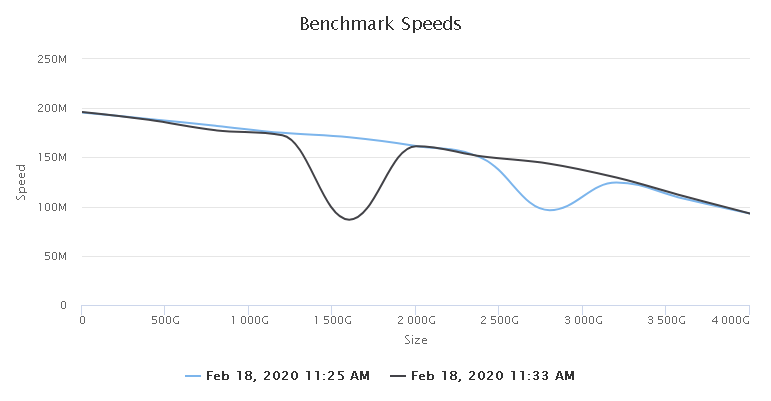
I have a weird one. Drive ID: sdk Vendor: SEAGATE Model: DKS2E Serial Number: Z1Z6Y0KM0000R5191JBJ Revision: 0 Capacity: 4TB Logical/Physical Sector Size: 512/512 Two different runs, both times it "glitched". Disk wasn't even assigned to anything or partitioned at the time.
-
HPE H240. Can be had for a low price, and works well.
-
I think a lot of these are interesting ideas, but I can reasons why limetech might not want to do it. Perhaps an automated backup of the USB stick to some designated place, with the ability of a virgin stick to quickly recover itself and reset the license key, might solve most concerns? I know I personally try and run a flash backup once a month or so, or whenever I make any Big Changes(tm), and restore it to a spare stick that's kept with my cold storage backup, but maybe have that function also store a copy onto /appdata, in addition to forcing the download of the ZIP file? I'm wondering where the concern is coming from also. Are people burning out sticks at a rapid rate all of the sudden?
-
I hear ya on 100+TB, but see the link in my sig. My method will scale up to theoretically an infinite size for cold storage.
-
What does the actual label on the disk say? HUS724040ALS640? or HUS72404CLAR4000? I've got a bad feeling you have "branded" and firmware locked disks.
-
https://www.technipages.com/google-chrome-bypass-your-connection-is-not-private-message You can thank our Google Overloads for thinking they know better than we do, and causing problems like this. Note: I'm still on Version 79.0.3945.117 (Official Build) (64-bit) and still have the ability to allow/bypass "insecure" sites.
-
That, and if it's so important you're willing to throw a 3rd party drive in the system, isn't it important enough to have a backup?
-
also try: scsi_ready -v /dev/sg9 it should come back with: test unit ready cdb: 00 00 00 00 00 00 ready If not, the drive isn't playing nice with something, or has other issues.
-
not exactly sure why you're bothering with the -v flag, as it won't do anything. also, did you try the command again a couple minutes later?
-
ErrorWarningSystemArrayLogin DOWNLOAD Feb 18 15:44:36 preclear_disk_Z1Z6Y0KM0000R5191JBJ_10484: Command: /usr/local/emhttp/plugins/preclear.disk/script/preclear_disk.sh --cycles 1 --skip-preread --skip-postread --no-prompt /dev/sdk Feb 18 15:44:36 preclear_disk_Z1Z6Y0KM0000R5191JBJ_10484: Preclear Disk Version: 1.0.12 Feb 18 15:44:39 preclear_disk_Z1Z6Y0KM0000R5191JBJ_10484: S.M.A.R.T. info type: -d scsi Feb 18 15:44:39 preclear_disk_Z1Z6Y0KM0000R5191JBJ_10484: Disk size: 4000787030016 Feb 18 15:44:39 preclear_disk_Z1Z6Y0KM0000R5191JBJ_10484: Disk blocks: 7814037168 Feb 18 15:44:39 preclear_disk_Z1Z6Y0KM0000R5191JBJ_10484: Blocks (512 bytes): 7814037168 Feb 18 15:44:39 preclear_disk_Z1Z6Y0KM0000R5191JBJ_10484: Block size: 512 Feb 18 15:44:39 preclear_disk_Z1Z6Y0KM0000R5191JBJ_10484: Start sector: 0 Feb 18 15:44:39 preclear_disk_Z1Z6Y0KM0000R5191JBJ_10484: readlink: missing operand Feb 18 15:44:39 preclear_disk_Z1Z6Y0KM0000R5191JBJ_10484: Try 'readlink --help' for more information. Feb 18 15:44:39 preclear_disk_Z1Z6Y0KM0000R5191JBJ_10484: readlink: missing operand Feb 18 15:44:39 preclear_disk_Z1Z6Y0KM0000R5191JBJ_10484: Try 'readlink --help' for more information. Feb 18 15:44:41 preclear_disk_Z1Z6Y0KM0000R5191JBJ_10484: Zeroing: emptying the MBR. Feb 18 15:44:41 preclear_disk_Z1Z6Y0KM0000R5191JBJ_10484: Zeroing: dd if=/dev/zero of=/dev/sdk bs=2097152 seek=2097152 count=4000784932864 conv=notrunc iflag=count_bytes,nocache,fullblock oflag=seek_bytes Feb 18 15:44:41 preclear_disk_Z1Z6Y0KM0000R5191JBJ_10484: Zeroing: dd pid [11998] Feb 18 16:22:10 preclear_disk_Z1Z6Y0KM0000R5191JBJ_10484: Zeroing: progress - 10% zeroed Feb 18 17:02:06 preclear_disk_Z1Z6Y0KM0000R5191JBJ_10484: Zeroing: progress - 20% zeroed Feb 18 17:43:04 preclear_disk_Z1Z6Y0KM0000R5191JBJ_10484: Zeroing: progress - 30% zeroed Feb 18 18:26:33 preclear_disk_Z1Z6Y0KM0000R5191JBJ_10484: Zeroing: progress - 40% zeroed Feb 18 19:11:22 preclear_disk_Z1Z6Y0KM0000R5191JBJ_10484: Zeroing: progress - 50% zeroed Feb 18 19:58:19 preclear_disk_Z1Z6Y0KM0000R5191JBJ_10484: Zeroing: progress - 60% zeroed Feb 18 20:30:21 preclear_disk_Z1Z6Y0KM0000R5191JBJ_10484: dd[11998]: Pausing (sync command issued) Feb 18 20:32:25 preclear_disk_Z1Z6Y0KM0000R5191JBJ_10484: dd[11998]: resumed Feb 18 20:47:59 preclear_disk_Z1Z6Y0KM0000R5191JBJ_10484: Zeroing: progress - 70% zeroed Feb 18 21:41:48 preclear_disk_Z1Z6Y0KM0000R5191JBJ_10484: Zeroing: progress - 80% zeroed Feb 18 22:42:38 preclear_disk_Z1Z6Y0KM0000R5191JBJ_10484: Zeroing: progress - 90% zeroed Feb 18 23:53:05 preclear_disk_Z1Z6Y0KM0000R5191JBJ_10484: Zeroing: dd - wrote 4000787030016 of 4000787030016. Feb 18 23:53:06 preclear_disk_Z1Z6Y0KM0000R5191JBJ_10484: Zeroing: dd exit code - 0 Feb 18 23:56:55 preclear_disk_Z1Z6Y0KM0000R5191JBJ_10484: Writing signature: 0 0 2 0 0 255 255 255 1 0 0 0 255 255 255 255 Feb 18 23:56:58 preclear_disk_Z1Z6Y0KM0000R5191JBJ_10484: cat: /tmp/.preclear/sdk/smart_error: No such file or directory looks like it worked.

