Nanobug
Members
-
Joined
-
Last visited
Everything posted by Nanobug
-
Ah, I didn't know that. But that makes sense
-
Ah, alright. Out of curosity, why would you want to load the end of a file? And if you had a bunch of RAM, like 300 GB for example, wouldn't it be a good idea to put the preload to 1 GB for or even more?
-
Awesome script! I haven't read all the replies through, so apologies if it has already been asked. Does it preload the most recent added content, or the most popular, or a mix?
-
Hello. I used Telegraf a while back, and wanted to set it up again, but I'm getting this error: E! [telegraf] Error running agent: could not initialize input inputs.smart: smartctl not found: verify that smartctl is installed and it is in your PATH (or specified in config): provided path does not exist: [/usr/bin/smartctl] I see that people had similar issues here, but I didn't find a solution for it either. I've followed this guide to get this far: https://technicalramblings.com/blog/how-to-setup-grafana-influxdb-and-telegraf-to-monitor-your-unraid-system/ The main problem is Grafana is not showing any data. It connects alright to InfluxDB as well. Any ideas on where to start? My post arguments are this: /bin/sh -c 'apt update && apt install -y smartmontools && apt install -y lm-sensors && telegraf' --user 0 I've attatched my config file for Telegraf as well. telegraf.conf
-
Yes. The save files for Satisfactory is in the Steam Cloud. So it's not actually saved on the server. There is an exception for that though. If you run the server (not AMP) in a docker, it should put the save files there somewhere. I haven't tested it though, so I just started running it locally instead.
-
I'm not sure it belongs here, but Googling didn't help me. How do you make a public/anonymous channel that you don't need a user to access? I can't get it to work, and everything I find about it, is years old with solutions that doesn't work for me, or they have no replies. Any ideas?
-
That would suck to do that But If I need to do it, what sort of tool would you recommend? I'd just Google and try the first one I find, but I have no experience in checking a USB stick.
-
I deleted the filed, rebooted Unraid, and enabled the docker image. The error disappared for now (it worked with a reboot last time). Is it happens again, I'll replace the USB stick. Is there a way to test if the USB stick is bad?
-
Alright. How does this happen, and how did you figure it out from that? Can I just browse to the file with SSH or Krusader and delete the file and reboot?
-
My bad, forgot it. Here it is. nanostorage-diagnostics-20220220-1445.zip
-
Hello, I'm getting this error: and I can't access the dockers. They're still running though. It's not the first time this happened. Last time I looked into it and couldn't quite figure out what it was about, so I decided to reboot the server, and it fixed it for a while, but now it's back. What is it, and how do I fix it so it doesn't happen again?
-
I see. If you live in Denmark and you're within a few hundred kilometers, I can stop by and help?
-
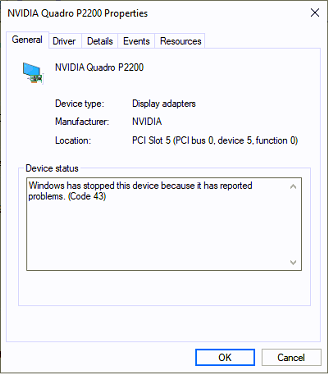
You were right about the code 43: It's a bit quiet here, so I've had time to check the rest. Removing it from Device Management and rebooting it didn't help. Found this one in the updates: Didn't work either. I've tried disabling the graphics card, reboot the VM and enable it again. I did mod the XML file with the addition you made, and it didn't help either. Any other ideas I could try, or should I just start over?

-
This didn't work. I'll double check it though, since I only had 10 minutes yesterday to do it. Just in case. Haven't had time to try removing the driver and reboot Windows. I'll try to get it done during today at work.
-
I'll try that later when I'm home. Thank you so far. I'll let you know what happens.
-
I just thought I did it the wrong way. Because all I've heard, is that it's supposed to be really easy to set up GPU passthrough in unRAID. I'll check that later when I'm home, and give the information.
-
For some reason, it can see the GPU, but it can't use it, and I don't get why. I don't know if it has any relevance, but I had to install Windows in the VM without a GPU before I even got to this point.
-
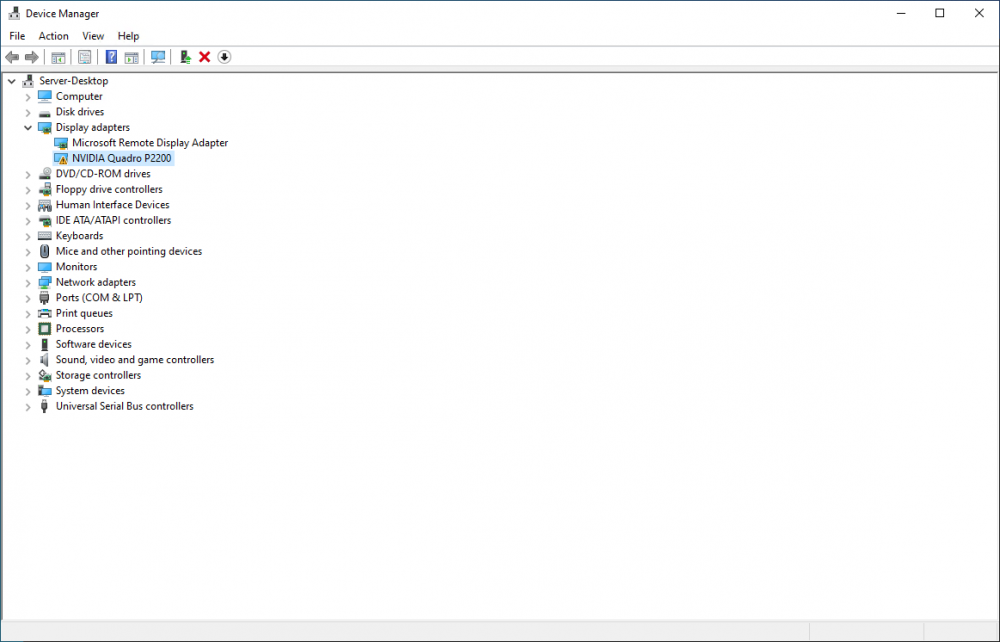
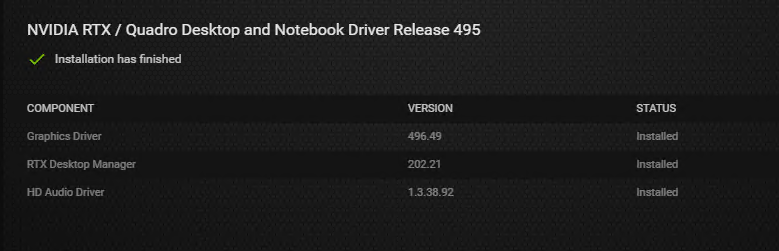
Same result. Device manager says: I tried downloading a driver and save it on the desktop as well and install that. This is version 472.47 (had it from the first time I tried this) of the Nvidia driver. When I tried from Nvidia Geforce Experience I can install it again right after, so there's never an installed driver. I always do a clean install. It's version 496.49 here. And right after: If I check on my desktop (not the VM):


-
I'm such an idiot, sorry. Trying it now. Will get back to you after with the result.
-
Where do I change that? I tried looking for it in the VM, but there's no hostdev section.
-
I haven't told it in details, but I asked if anyone has a guide, or can guide me through it from start to finish. I described the problem; I can see the GPU, I can install the driver, and right after, I can install it again. And it's not using the GPU. It's a P2200, and its the newest in Nvidia GeForce Experience which is version 496.49. Diagnostics are added as well. nanostorage-diagnostics-20211206-2032.zip
-
I'm having trouble making the GPU passthrough work. So far, I can see the GPU in the Windows VM I can install the driver, but right after I've installed it, I can install it again. And it doesn't use it either. I tried following different guides, but I can't make it work. Does anyone have a guide or can tell me the exact requirements to make it work?
-
I've been trying before before making this post, but I'm asking because I'm not sure about it.
-
I mean, I don't know which one is what. How do I tell the difference?
-
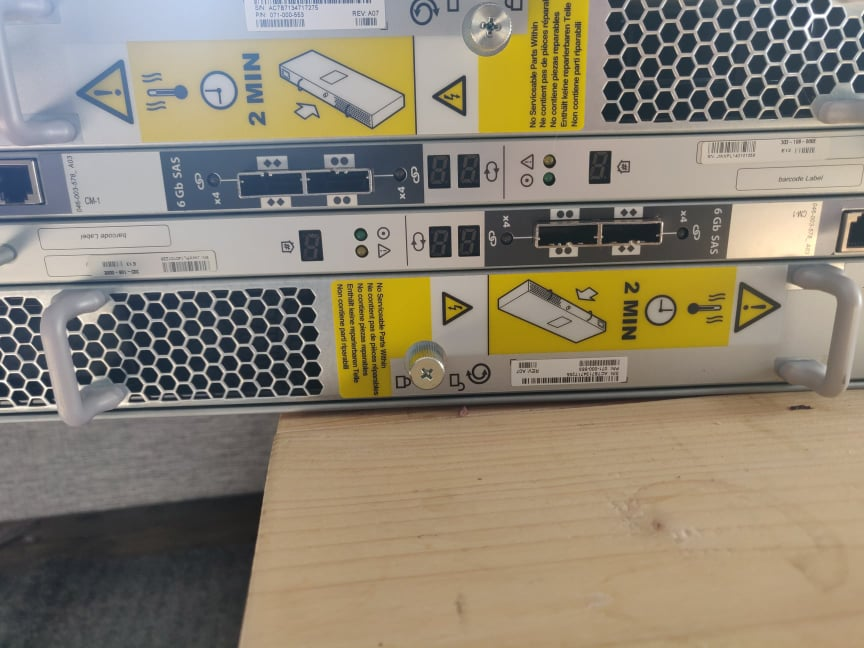
How do I check if it's a straight shelf or not? And I can't seem to find the section in the link, about the one cable. I'm already aware of, that I might need to format them to 512 bit. This is a picture from behind: