





Everything posted by wirenut
-
I posted in the container support thread and was advised to post it here: Got notification docker auto updated overnight during regular schedule for this action. Then received fix common problems notice this morning there was a docker update available, checked docker tab and sure enough said there was. Manually updated, finished successfully. Still shows update available. Pulling image: binhex/arch-krusader:latest IMAGE ID [1269367198]: Pulling from binhex/arch-krusader. IMAGE ID [ba79b0a00404]: Already exists. IMAGE ID [014829145dc4]: Already exists. IMAGE ID [8981650a5ede]: Already exists. IMAGE ID [3e6f6e9c14bc]: Already exists. IMAGE ID [21c1cc086e6b]: Already exists. IMAGE ID [d61b27411559]: Already exists. IMAGE ID [6bed959144b4]: Already exists. IMAGE ID [867955bafe2a]: Already exists. IMAGE ID [af760b31737e]: Already exists. IMAGE ID [b91d01ffc1e9]: Already exists. IMAGE ID [b8db4f2655a2]: Pulling fs layer.Downloading 100% of 3 KB.Verifying Checksum.Download complete.Extracting.Pull complete. IMAGE ID [5f904db18c50]: Pulling fs layer.Downloading 100% of 1 KB.Verifying Checksum.Download complete.Extracting.Pull complete. IMAGE ID [c6b8e095478d]: Pulling fs layer.Downloading 100% of 684 MB.Verifying Checksum.Download complete.Extracting. TOTAL DATA PULLED: 684 MB Stopping container: binhex-krusader Error: Removing container: binhex-krusader Successfully removed container: binhex-krusader Command executiondocker run -d --name='binhex-krusader' --net='bridge' --privileged=true -e TZ="America/Chicago" -e HOST_OS="Unraid" -e HOST_HOSTNAME="Tower" -e HOST_CONTAINERNAME="binhex-krusader" -e 'TEMP_FOLDER'='/config/home/.config/krusader/tmp' -e 'WEBPAGE_TITLE'='Krusader' -e 'VNC_PASSWORD'='' -e 'UMASK'='000' -e 'PUID'='99' -e 'PGID'='100' -l net.unraid.docker.managed=dockerman -l net.unraid.docker.webui='http://[IP]:[PORT:6080]/vnc.html?resize=remote&host=[IP]&port=[PORT:6080]&autoconnect=1' -l net.unraid.docker.icon='https://raw.githubusercontent.com/binhex/docker-templates/master/binhex/images/krusader-icon.png' -p '6080:6080/tcp' -v '/mnt/user':'/media':'rw' -v '/mnt/cache/appdata/binhex-krusader':'/config':'rw' 'binhex/arch-krusader' bf494d6710cd0ba84e94b716483ae787bbb08c3aead77f316918569d68ccf692 The command finished successfully!
-
Interesting, I have been away a few days and was looking to address this today based on binhex last response to me and saw your post. I tried manually again to see if i had same issue you describe, and it appears I do. @binhex my repository is correct as you directed to check, should I still post the issue at https://forums.unraid.net/forum/58-docker-engine/ ?? Pulling image: binhex/arch-krusader:latest IMAGE ID [1269367198]: Pulling from binhex/arch-krusader. IMAGE ID [ba79b0a00404]: Already exists. IMAGE ID [014829145dc4]: Already exists. IMAGE ID [8981650a5ede]: Already exists. IMAGE ID [3e6f6e9c14bc]: Already exists. IMAGE ID [21c1cc086e6b]: Already exists. IMAGE ID [d61b27411559]: Already exists. IMAGE ID [6bed959144b4]: Already exists. IMAGE ID [867955bafe2a]: Already exists. IMAGE ID [af760b31737e]: Already exists. IMAGE ID [b91d01ffc1e9]: Already exists. IMAGE ID [b8db4f2655a2]: Pulling fs layer.Downloading 100% of 3 KB.Verifying Checksum.Download complete.Extracting.Pull complete. IMAGE ID [5f904db18c50]: Pulling fs layer.Downloading 100% of 1 KB.Verifying Checksum.Download complete.Extracting.Pull complete. IMAGE ID [c6b8e095478d]: Pulling fs layer.Downloading 100% of 684 MB.Verifying Checksum.Download complete.Extracting. TOTAL DATA PULLED: 684 MB Stopping container: binhex-krusader Error: Removing container: binhex-krusader Successfully removed container: binhex-krusader Command executiondocker run -d --name='binhex-krusader' --net='bridge' --privileged=true -e TZ="America/Chicago" -e HOST_OS="Unraid" -e HOST_HOSTNAME="Tower" -e HOST_CONTAINERNAME="binhex-krusader" -e 'TEMP_FOLDER'='/config/home/.config/krusader/tmp' -e 'WEBPAGE_TITLE'='Krusader' -e 'VNC_PASSWORD'='' -e 'UMASK'='000' -e 'PUID'='99' -e 'PGID'='100' -l net.unraid.docker.managed=dockerman -l net.unraid.docker.webui='http://[IP]:[PORT:6080]/vnc.html?resize=remote&host=[IP]&port=[PORT:6080]&autoconnect=1' -l net.unraid.docker.icon='https://raw.githubusercontent.com/binhex/docker-templates/master/binhex/images/krusader-icon.png' -p '6080:6080/tcp' -v '/mnt/user':'/media':'rw' -v '/mnt/cache/appdata/binhex-krusader':'/config':'rw' 'binhex/arch-krusader' bf494d6710cd0ba84e94b716483ae787bbb08c3aead77f316918569d68ccf692 The command finished successfully!
-
Same issue for the last two days. Is this an issue on my end or the update side? I am not sure how to troubleshoot this.

-
Got notification docker auto updated overnight during regular schedule for this action. Then received fix common problems notice this morning there was a docker update available, checked docker tab and sure enough said there was. Manually updated, finished successfully. Still shows update available. any idea why?
-
New build on my radar for this year. I've saved it in my wishlist and hope it's still available when I am ready
-
Hmmm Looks like just what I am looking for also. If you pull the trigger, please make sure to leave your thoughts once you have it in hand.
-
Have you looked at the 'mover tuning' plugin? I currently use it for this very purpose. If parity check is running, mover doesn't start.
-
Welcome to the Team Adam!
-
Hmmmm, Damn. it is and now have added Processes to kill before Array is Stopped: ssh,bash My error and not a bug, this is a good thing . Thanks ljm42!
-
I am one who has had an unclean shutdown after upgrading. I followed the instructions for the upgrade to 6.12.3. I did have to use the command line instruction, upgrade went fine and server was up for 6 days, this morning i needed to reboot server. I spun up all discs I individually stopped all my dockers and my VM. I hit reboot button. it is about 4 hours into unclean shutdown parity check with no errors, log repeated this while shutting down: Jul 22 08:34:04 Tower root: umount: /mnt/cache: target is busy. Jul 22 08:34:04 Tower emhttpd: shcmd (5468228): exit status: 32 Jul 22 08:34:04 Tower emhttpd: Retry unmounting disk share(s)... Jul 22 08:34:09 Tower emhttpd: Unmounting disks... Jul 22 08:34:09 Tower emhttpd: shcmd (5468229): umount /mnt/cache Jul 22 08:34:09 Tower root: umount: /mnt/cache: target is busy. Jul 22 08:34:09 Tower emhttpd: shcmd (5468229): exit status: 32 Jul 22 08:34:09 Tower emhttpd: Retry unmounting disk share(s)... attached diagnostics captured from reboot. not sure what/why it happened. tower-diagnostics-20230722-0834.zip
-
I've had syslog server set up for some time now and it has been doing its job just fine. I have recently made a change (approx 24 hours ago) to the settings to enable log rotation due to current log file size of 471,511,591 bytes and to see how it works. The rotation to a new file has not occurred yet. I though maybe making a settings change would enable the check but that didn't happen. What is rotation file size check schedule, daily, weekly or monthly?
-
ok then, with that said its working again. thank you.
-
OK i updated and ran mover again. The files have been moved to the array but the the empty folders are left behind on the cache. I am used to seeing, once mover finished that these would be gone. I am assuming it is ok to delete these but not sure?
-
Well that was fast. Very good thank you.
-
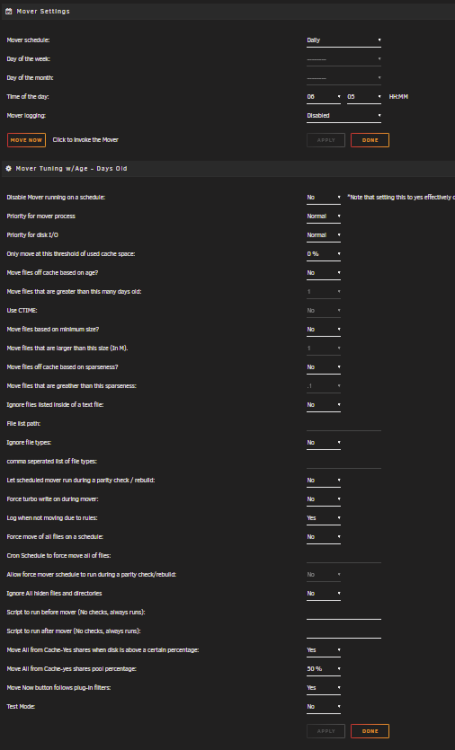
something in the update broke my mover set up. Plugin auto updated yesterday and this morning mover is not moving files from cache to array. My use case for this plugin is a simple one, I just want the functionality to prevent mover from running once a parity check kicks off, otherwise it has been set to run every day at 6 am. It has been doing this with out problem until yesterdays update. I grabbed diagnostics and attached here prior to a reboot hoping that may fix it but no go. Interestingly some of the files are moved off the cache and some are not, but all the directory's remain on cache. After reboot I ran in test mode with logging enabled and the lines output this way: May 18 08:30:33 Tower emhttpd: shcmd (155): /usr/local/sbin/mover |& logger & May 18 08:30:33 Tower root: Starting Mover May 18 08:30:33 Tower root: ionice -c 2 -n 0 nice -n 0 /usr/local/emhttp/plugins/ca.mover.tuning/age_mover start 0 0 0 '' '' '' '' no 50 'yes' '' May 18 08:30:33 Tower root: Log Level: 1 May 18 08:30:33 Tower root: mover: started May 18 08:30:34 Tower root: /usr/local/emhttp/plugins/ca.mover.tuning/age_mover: line 233: ((: TOTALCACHESIZE+="/mnt/cache/MEDIA/Music/CDs/Public Image Ltd/2010 - Live at Brixton Academy 2009: syntax error: operand expected (error token is ""/mnt/cache/MEDIA/Music/CDs/Public Image Ltd/2010 - Live at Brixton Academy 2009") May 18 08:30:34 Tower root: /usr/local/emhttp/plugins/ca.mover.tuning/age_mover: line 233: ((: TOTALCACHESIZE+="/mnt/cache/MEDIA/Music/CDs/Mastodon/2006 - Blood Mountain: syntax error: operand expected (error token is ""/mnt/cache/MEDIA/Music/CDs/Mastodon/2006 - Blood Mountain") May 18 08:30:34 Tower root: /usr/local/emhttp/plugins/ca.mover.tuning/age_mover: line 233: ((: TOTALCACHESIZE+="/mnt/cache/MEDIA/Music/CDs/Mastodon/2006 - Call of the Mastodon: syntax error: operand expected (error token is ""/mnt/cache/MEDIA/Music/CDs/Mastodon/2006 - Call of the Mastodon") May 18 08:30:34 Tower root: /usr/local/emhttp/plugins/ca.mover.tuning/age_mover: line 233: ((: TOTALCACHESIZE+="/mnt/cache/MEDIA/Music/CDs/Mastodon/2009 - Crack the Skye: syntax error: operand expected (error token is ""/mnt/cache/MEDIA/Music/CDs/Mastodon/2009 - Crack the Skye") Settings: ideas to fix it? tower-diagnostics-20230518-0807.zip
-
Will the next unraid update fix this issue? if not, what are the options for existing users?
-
Good news! Thank you @limetech team!
-
I can confirm my results are the same as @Hoopster I also have a monitor connected via VGA controlled by the ASpeed chip. isolating the iGPU from the kernel and the error does not appear.
-
I have done the same. Agree with statement above.
-
This would not work for me as I use iGPU for transcoding
-
@JorgeB followed your link here from your response to me in the release thread. Believe I have followed the recommendations correctly. I also have a monitor plugged in (always have) and it is on. tower-diagnostics-20220926-1033.zip
-
Thanks. I'll take a look.
-
Upgraded last night from 6.10.3 to 6.11 This morning I find log filling with this: Sep 25 08:52:27 Tower kernel: EDID block 0 is all zeroes Sep 25 08:52:29 Tower kernel: EDID has corrupt header Sep 25 08:52:29 Tower kernel: EDID block 0 is all zeroes Sep 25 08:52:31 Tower kernel: EDID has corrupt header Sep 25 08:52:54 Tower kernel: EDID block 0 is all zeroes Sep 25 08:52:56 Tower kernel: EDID has corrupt header Sep 25 08:52:56 Tower kernel: EDID block 0 is all zeroes tower-diagnostics-20220925-0815.zip
-
Hoopster, thank you!!!
-
Yeah. No luck so far for me either. Thanks.


