





BRiT
Members
-
Joined
Everything posted by BRiT
-
Yeah, as they said, at the command prompt type 'diagnostics' to produce the diagnostics file at /boot/logs/machinename-diagnostics-yyyymmdd-hhMM.zip. for instance /boot/logs/tower-diagnostics-20191216-2115.zip diagnostics
-
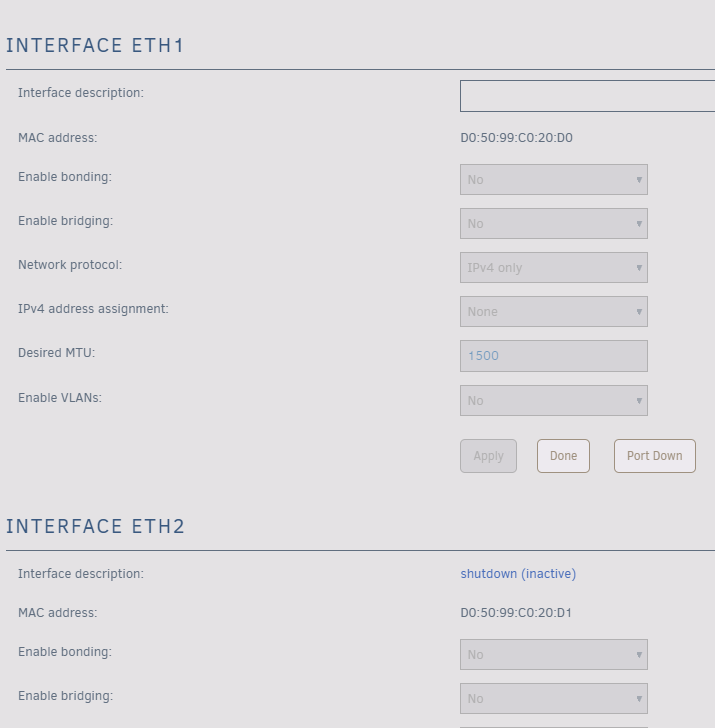
Upgraded from 6.7.2 without issues. Thanks for the solid work everyone who worked on the OS and all the additional plugins and dockers to make this a fine product. I just noticed a minor issue from long ago, and now have it resolved. The system was trying to enable "eth1" when I thought everything was set to only use "eth0". It was because network.cfg had SYSNICS="2" from a time when I did have multiple NICs enabled. Editing the file to have SYSNICS="1" and rebooting took care of it. Network.cfg, from before the edit: # Generated settings: IFNAME[0]="br0" BRNAME[0]="br0" BRSTP[0]="no" BRFD[0]="0" BRNICS[0]="eth0" PROTOCOL[0]="ipv4+ipv6" USE_DHCP[0]="yes" DHCP_KEEPRESOLV="no" USE_DHCP6[0]="yes" DHCP6_KEEPRESOLV="no" SYSNICS="2" Snippet of Syslog showing it's trying to do something on eth1 from before the edit: Dec 15 15:11:00 REAVER rc.inet1: ip -4 addr flush dev eth1 Dec 15 15:11:00 REAVER rc.inet1: ip link set eth1 up Dec 15 15:11:00 REAVER kernel: IPv6: ADDRCONF(NETDEV_UP): eth1: link is not ready Dec 15 15:11:00 REAVER kernel: 8021q: adding VLAN 0 to HW filter on device eth1 Screenshot of Network Settings where Eth2 is shutdown, but Eth1 shows different than Eth2 from before the edit:
-
If he does, it's possibly because no one that is looking for help ever bothers to read the pinned messages before posting. The practice of posting Diagnostics has been standard fare for years already.
-
Unsetup the other devices? Or set the app to ignore notifications on those devices? 😁
-
Would the libvirt snapshotting work on xfs?
-
Try uninstalling PreClear Plugin. I can't say this is a cause, but it's not good to have a current version of something from 2019-08-01 replaced with something from 2017-01-22. [ https://libevent.org/ ] Nov 24 00:07:21 Shaun-NAS root: +============================================================================== Nov 24 00:07:21 Shaun-NAS root: | Upgrading libevent-2.1.11-x86_64-1 package using /boot/config/plugins/preclear.disk/libevent-2.1.8-x86_64-3.txz Nov 24 00:07:21 Shaun-NAS root: +============================================================================== Nov 24 00:07:21 Shaun-NAS root: Pre-installing package libevent-2.1.8-x86_64-3... Nov 24 00:07:22 Shaun-NAS root: Removing package: libevent-2.1.11-x86_64-1-upgraded-2019-11-24,00:07:21 Nov 24 00:07:22 Shaun-NAS root: Verifying package libevent-2.1.8-x86_64-3.txz. Nov 24 00:07:22 Shaun-NAS root: Installing package libevent-2.1.8-x86_64-3.txz:
-
Very odd, since I'm easily able to hit my max wirespeed [ 330 mb/s ] using nzbget docker from usenet to its tmp download directories mapped from /mnt/cache/. Really hard to take guesses on what's wrong with your setup without solid information to look at like at a minimum your Diagnostics from after your d/l attempts.
-
According to your diagnostic and "df", You do not have a cache disk, why are you using /mnt/cache/ in your mappings?
-
Just noticed that some artwork downloads using V3 API even through MediaCenter Master is not working. The metadata scraping is working fine though. https://forums.thetvdb.com/viewtopic.php?f=122&t=60173&sid=b494805077d03d65a4fb1fa52cf05f94 1:57 PM :: tv db Updated base metadata for this show 1:57 PM :: tv db Fetching data for season 1, episode 4 1:57 PM :: tv db "If You Don't Like My Story, Write Your Own" 1:57 PM :: tv db Fetching season 1, episode 4 thumbnail... 1:57 PM :: tv db error downloading: https://artworks.thetvdb.com/banners/episodes/360733/7398586.jpg
-
Probably will be alright as /mnt/disk# maps to /dev/md# . Make sure it's not using /dev/sd##
-
TheTVDB switched all of their APIs over to V3, so hopefully Plex can handle V3 of the APIs instead of possibly using V2. Switching over to V3 on MediaCenterMaster fixed it for that program. I think Plex needs the same thing as well. https://forums.thetvdb.com/viewtopic.php?f=122&t=60034
-
Yeah, I meant Half of Half. Yeah, that's it!
-
Out of sick curiosity, how does it perform with Threads=4 and CPU=Half ?
-
Yes. unRAID runs from RAM and is recreated upon each and every reboot. To make things persistent you would need to use CA User Scripts plugin and have the steps you need to do in your own custom script or put those commands in the "go" file. Using CA User Scripts is the better approach.
-
Dockers don't use SMB / CIF, unless you're accessing them from an entirely different system.
-
Very much so. Some get hit while others don't.
-
Update to 6.8 RC5 as you are likely hitting Plex Database corruptions.
-
Try Upgrade to RC5.
-
Next look through existing scripts shared, if none match then ask if anyone has one.
-
Install CA User Scripts plugin first.
-
Looks like you're having ACPI Errors too. Oct 26 16:12:33 Cube kernel: ACPI Error: SMBus/IPMI/GenericSerialBus write requires Buffer of length 66, found length 32 (20180810/exfield-393) Oct 26 16:12:33 Cube kernel: ACPI Error: Method parse/execution failed \_SB.PMI0._PMM, AE_AML_BUFFER_LIMIT (20180810/psparse-516) Oct 26 16:12:33 Cube kernel: ACPI Error: AE_AML_BUFFER_LIMIT, Evaluating _PMM (20180810/power_meter-338) Oct 26 16:18:02 Cube kernel: ACPI Error: SMBus/IPMI/GenericSerialBus write requires Buffer of length 66, found length 32 (20180810/exfield-393) Oct 26 16:18:02 Cube kernel: ACPI Error: Method parse/execution failed \_SB.PMI0._PMM, AE_AML_BUFFER_LIMIT (20180810/psparse-516) Oct 26 16:18:02 Cube kernel: ACPI Error: AE_AML_BUFFER_LIMIT, Evaluating _PMM (20180810/power_meter-338) Looks like you don't have write cache enabled on some of the drives. Oct 26 16:02:19 Cube kernel: sd 1:0:6:0: [sdg] Write cache: disabled, read cache: enabled, supports DPO and FUA Oct 26 16:02:29 Cube kernel: sdg: sdg1 Oct 26 16:02:35 Cube kernel: sd 1:0:5:0: [sdf] Write cache: disabled, read cache: enabled, supports DPO and FUA Oct 26 16:02:45 Cube kernel: sdf: sdf1 Oct 26 16:02:48 Cube kernel: sd 1:0:4:0: [sde] Write cache: disabled, read cache: enabled, supports DPO and FUA Oct 26 16:02:48 Cube kernel: sde: sde1 Oct 26 16:02:53 Cube kernel: sd 1:0:4:0: [sde] Write cache: enabled, read cache: enabled, supports DPO and FUA Oct 26 16:02:53 Cube kernel: sde: sde1 Oct 26 16:04:12 Cube kernel: sd 1:0:3:0: [sdd] Write cache: disabled, read cache: enabled, supports DPO and FUA Oct 26 16:04:12 Cube kernel: sdd: sdd1 Oct 26 16:04:16 Cube kernel: sd 1:0:3:0: [sdd] Write cache: enabled, read cache: enabled, supports DPO and FUA Oct 26 16:04:16 Cube kernel: sdd: sdd1 Oct 26 16:04:17 Cube kernel: sd 1:0:2:0: [sdc] Write cache: disabled, read cache: enabled, supports DPO and FUA Oct 26 16:04:27 Cube kernel: sdc: sdc1 Oct 26 16:04:31 Cube kernel: sd 1:0:1:0: [sdb] Write cache: disabled, read cache: enabled, supports DPO and FUA Oct 26 16:04:41 Cube kernel: sdb: sdb1 Oct 26 16:08:20 Cube kernel: sd 1:0:1:0: [sdb] Write cache: enabled, read cache: enabled, supports DPO and FUA Oct 26 16:08:20 Cube kernel: sdb: sdb1 Oct 26 16:08:46 Cube kernel: sd 1:0:1:0: [sdb] Write cache: disabled, read cache: enabled, supports DPO and FUA Oct 26 16:08:46 Cube kernel: sdb: sdb1
-
Not quite, look at your disk and directory mappings in the Docker settings for NextCloud.
-
I suspect something in this area. But since you provided nothing (no Diagnostis attached), no one can help you.
-
If you added this via your GO file then change this to be this: cp /boot/custom/docker-shell /usr/local/bin cp /boot/custom/docker-shell /usr/local/bin chmod 755 /usr/local/bin/docker-shell
-
If your script is stored on your Flash drive or under /boot/ then you need to invoke it with "bash " first. This is covered in the release notes and threads for the 6.8 series. Or copy it to /tmp and then chmod 755 (to make it +x executable) then invoke it.


