





BRiT
Members
-
Joined
Everything posted by BRiT
-
The easiest TV Tuners to use in the US are the network based tuners. That way you don't need to deal with kernel-level drivers and just need user-level software.
-
That was your best bet. You're on your own if you attempt to pass-through the card to a Docker. You'll have a far easier time passing it through to a VM.
-
Only Windows Media Center supports recording DRM channels in the US. No other solutions exist for recording US-based PC DVR software with DRM/Premium channels. I can't keep track if SiliconDust's multi-year overdue, behind schedule, and unstable software allows for watching of DRM channels
-
You will need to look at CHBMBs LinuxServer.IO special builds of unRaid with DVB drivers.
-
@Darksurf How would you transition the shares to Read-Only mode on other Linux variants? Or do you mean to make it a passive-only that monitors then when it gets tripped to send a Notification? I suppose it could just have hook-files to be executed on tripped, then leave it up to others to get the nitty-gritty for their specific situations.
-
One could use TurboWrites with iSCSI on unraid to increase performance of write speeds, right?
-
I guess living on the bleeding edge hardware Ryzen for the past 2 months has taken all the time away from a public release?
-
No, it wasnt easier then. Its easier now with CommunityApplications and VMs and Dockers.
-
I think there may be a FAQ for this, but there are other means. You might be able to plug the USB drive into another computer and then bring up an editor (such as Notepad++) on the following file: /boot/config/shadow On the first line you should see something such as: root:$&$&%*1112233484847648DHD$%.:15477:0:99999:7::: You can try changing that line to the following, essentially delete the content between the first and second semi-colons: root::15477:0:99999:7::: That might make the root user no longer have a password. Save the file, eject the USB Flash Drive, plug in to your unRAID server and try booting.
-
Vowels and How to Use Them.
-
It was avilable for me in the Preclear plugin when clicking on drive name. However I do not have UD installed so dont know if that made any difference.
-
That should be in a docker, as it will require a lot of files and programs.
-
Running 6.2.4 and when it installed CA 2017.04.02b the following error shows up on the "Apps" tab and nothing else shows up at all: Fatal error: Call to undefined function my_parse_ini_file() in /usr/local/emhttp/plugins/dynamix/include/DefaultPageLayout.php(300) : eval()'d code on line 22
-
Are you sure you have TCP/IP rules in PFSense setup to allow HTTP traffic outbound? PING Traffic is typically a different rule(set) than HTTP. There are a lot of similar sort of items showing up on a search, such as this thread at pfsense forums: https://forum.pfsense.org/index.php?topic=87856.0 which has a lot of people responding to also see the following thread about KVM/PFSense potential issues: https://forum.pfsense.org/index.php?topic=88467.0 I don't know if this still applies, but it might...
-
Always happy to see more feature addons made available by the community! This will make it onto my server when I get the chance. I'll provide additional feedback after more usage.
-
I'll have to give this a shot once I have some spare time.
-
@Pauven any chance of getting the last version you had in private beta last year posted publicly so we can better tune our 6.2 / 6.3 systems?
-
How's the parity check times on 6.3.2?
-
I would only be concerned with how long backups took if it required stopping functionality that is always or possibly needed. For me, it takes a grand total of 8 seconds for AppData and USB backup including the stopping and re-starting of Dockers. The actual rsync command takes 2 seconds. It's only this fast because I don't keep much on my cache disk so my backups are very quick and my VMs elsewhere.
-
Yes. docker exec -it naneofcontainer bash https://docs.docker.com/engine/reference/commandline/exec/
-
Post up your diagnostics file after you select the additional packages to install to ON and click Apply via the NerdPack User Preferences Settings page. In the Syslog you should see something like this when there are no issues: Jan 21 19:02:22 --- emhttp: cmd: /usr/local/emhttp/plugins/NerdPack/scripts/packagemanager --download Jan 21 19:02:22 --- nerdpack: Processing Packages... Jan 21 19:02:22 --- nerdpack: cpio-2.12 package up to date, checksum ok. Jan 21 19:02:22 --- nerdpack: git-2.9.0 package up to date, checksum ok. Jan 21 19:02:22 --- nerdpack: iftop-1.0pre2 package up to date, checksum ok. Jan 21 19:02:22 --- nerdpack: inotify-tools-3.14 package up to date, checksum ok. Jan 21 19:02:23 --- nerdpack: p7zip-16.02 package up to date, checksum ok. Jan 21 19:02:23 --- nerdpack: screen-4.4.0 package up to date, checksum ok. Jan 21 19:02:23 --- nerdpack: unrar-5.4.2 package up to date, checksum ok. Jan 21 19:02:23 --- nerdpack: utempter-1.1.6 package up to date, checksum ok. Jan 21 19:02:23 --- nerdpack: vim-7.4.1938 package up to date, checksum ok. Jan 21 19:02:23 --- nerdpack: All packages processed...
-
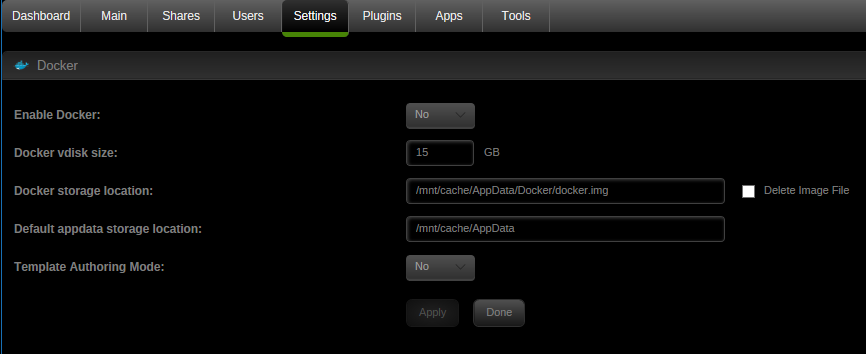
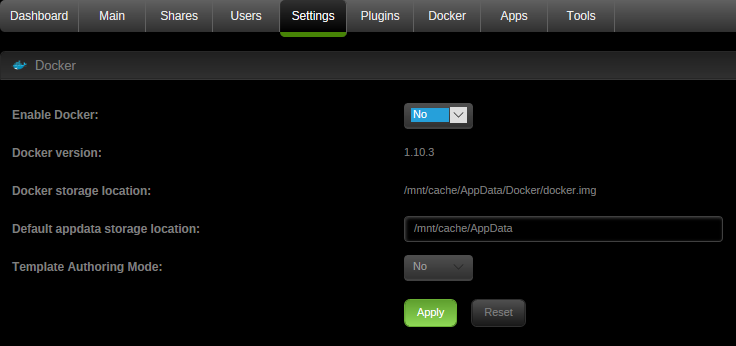
Could we put some more details in about where to find the docker.img file I need to delete, and a quick step by step on how to reinstall it afterward (or at least a link to more detailed instructions)? I am barely managing to remember how to work a unix commandline from back in my uni days, and sometimes it feels like my unRAID server is held together with nothing more than hope. Not sure where to look to find docker.img - I had a quick poke around in /var/lib/docker but couldn't find it. No need to do any of that. Use the Web UI and the Docker Settings page once Docker is stopped by changing "Docker Enabled" to No and clicking Apply, then checking the "Delete Image File" checkbox.
-
Thats an issues with SHFS, which is the LimeTech unraid user filesystem that aggregates the various drives to seem like one. Which version of unraid are you using bigjme? Seems like 6.3.0 RC6?
-
That too is discussed somewhere on this site as well.
-
I'm also looking forward to having even the current work-in-progress version (as imperfect as it might be) released so those of us outside the select testing group can benefit too.


