






bmartino1
Members
-
Joined
-
Last visited
Everything posted by bmartino1
-
Please upvote to continue LXC plugin on unraid: https://product.unraid.net/p/intergrate-lxc to put this on the roadmap and into the base OS.
-
@zapbranagann PM as they are the owners of the samba version.. https://forums.unraid.net/topic/195826-plugin-custom-smb-shares/ By using their GitHub and example plugin code project... By using the smb custom github as a base for the plugin... https://github.com/cslemieux/unraid-custom-smb-shares Here is a generic base setup to redeploy a similar plugin... I made a first-pass Unraid Custom NFS Shares scaffold based on the GitHub page SMB plugin: What it does now: Adds a new plugin namespace: custom.nfs.shares Adds Unraid pages: NFSShares.page NFSSharesAdd.page NFSSharesUpdate.page NFSSharesSettings.page Stores persistent share definitions here: /boot/config/plugins/custom.nfs.shares/shares.jsonGenerates a persistent export file here: /boot/config/plugins/custom.nfs.shares/custom-nfs-shares.exportsMirrors the runtime export drop-in here: /etc/exports.d/custom-nfs-shares.exportsApplies changes with: exportfs -raShows status with: exportfs -vThat matches the NFS-utils behavior: after /etc/exports, exportfs also reads extra export tables from /etc/exports.d, but only files ending in .exports are considered. The exportfs -ra reload path is also the right mechanism for re-exporting definitions without a full service restart. Some Important caveats before this touches a real Unraid box: Treat this as a development scaffold, not a release-ready plugin. I ported the core CRUD/config/reload shape, but the full test suite from the SMB plugin is not ported. Test quoted export paths. The generator currently emits paths using PHP escapeshellarg(), like: '/mnt/user/media' 192.168.1.0/24(rw,sync,no_subtree_check,root_squash)If Unraid’s NFS-utils rejects quoted paths in /etc/exports.d, we should switch that function to backslash-escape spaces instead. Confirm Unraid NFS service behavior. The scaffold assumes NFS service is enabled already. If NFS is disabled in Unraid Settings, exportfs -ra may fail or do nothing useful. The plugin XML still has placeholder release metadata. In custom.nfs.shares.plg, replace: <!ENTITY github "YOUR_GITHUB_USER/unraid-custom-nfs-shares"> <!ENTITY md5 "00000000000000000000000000000000">*For Deployment... Build script included. From the scaffold root: ./build.sh 2026.05.17-devThe core file to review first is: source/usr/local/emhttp/plugins/custom.nfs.shares/include/lib.phpThat is where the NFS export line generation, validation, /etc/exports.d writing, exportfs -ra, and exportfs -v status logic live... This is more to add custom sub folder sharing to nfs by adding to the /etc/exports.d/ ... .... On modern Linux systems, you cannot use a direct "include" directive within the /etc/exports file itself. Instead, the NFS server automatically supports multiple configuration files via a drop-in directory located at /etc/exports.d/ Using the /etc/exports.d/ Directory The exportfs command, which maintains the kernel's export table, is designed to read both the master /etc/exports file and any files ending in .exports within the /etc/exports.d/ directory. How to use it: Create a new file in that directory (e.g., /etc/exports.d/additional_shares.exports) and add your share definitions there using the standard exports syntax. Applying changes: After adding or modifying files in this directory, run the following command to refresh the export table without restarting the service: bash exportfs -ra Use code with caution. The -r flag re-exports all directories, synchronizing the kernel's table with /etc/exports and everything under /etc/exports.d/ I really don't want to support a plugin repo... but think that nfs should have a similar option as samba does on unraid...
-
Updated 2 Unraid systems, the borg and omv with out issues. Thank you.
-
You pass a thumb drive that is labeled unraid and that acts as your GUID license as explained in multiple post above. It is ill-advised to IOMMU device pass the physical hardware TPM that your system boots or you have in the system for unraid licensing. Nor would I advise passing the TPM of the physical hardware into a virtual machine due to root kits and other attack factors that you open yourself up to
-
Untill some one can make reproduceable stpes and submit a bug report.... The clean up is apart of the Dynamix GUI system plugin that was integrated into unraid. the web gui does handle qute a bit of php and fastcgi calls to move dispal and run teh termianl caomnds that would be done when using. I'm not suprsed to see a 5 or more jump... Users getting and hitting the child max have some form of memory leak due to a php and dead fast cgi calls that the task never got the signal to die and became a zombie pid... there are many features, applications, dockers, scripts, that can cause the host's FastCGI PID to not die as its still running a task. Those are memory leaks. As something didn't die and the initial run was stopped before a cleanup or killing of the task. There is no 1 thing that causes the pid to become stale and fill up past 50 its not reproducible, which is the problem. Some issues in the past were the update script for the unraid dashboard (php fastcgi to collect stats and display...), and it was more prone to populate due to the unraid gui dashboard being open somewhere overnight. I can only recommend running the https://forums.unraid.net/topic/178033-bmartino1-user-scripts/page/2/#findComment-1598908 which has the ability to tell you where and potentially fix once activated at boot due to how unraid handles php and fastcgi.
-
if this is a working comand to fix this: sed -i "/disable_xconfig=/c\disable_xconfig=true" /boot/config/plugins/nvidia-driver/settings.cfg then yes we can add a sleep 10 sed -i "/disable_xconfig=/c\disable_xconfig=true" /boot/config/plugins/nvidia-driver/settings.cfg to the usb /boot/config/go or at startup cron first array start with the user script plugin sed -i "/disable_xconfig=/c\disable_xconfig=true" /boot/config/plugins/nvidia-driver/settings.cfg those are the 2 locations I'm aware of that can run the script at boot.
-
Please post a diag file. Make sure that the GPU isn't being vfo bound and is not pulled to any other service such as a VM that may have may not have taken the device. And that no other dockers are using or accessing that card at this time for testing. Otherwise, there's a potential grub of boot edit that we can try, but without diags to verify other information. This looks like a cardisan use elsewhere before this Docker started. As such, a screen x session could not be implemented on the card.
-
drop to the 580 and test again. there is also a known driver issues withteh lattest builkd jub to nvdia not having the vulkan drivers.
-
make sure the LSI HBA is in a full and tru x8 wired slot. https://www.gigabyte.com/Motherboard/GA-EX58-UD5-rev-10/support#Support-Bios F13 is the last bios avalbe due to age. It is recomened to upgraded to the lattest motherboard system firmware... you also have a old board that was at teh transtion phase form pci and pci express Gigabyte GA-EX58-UD is pcie gen 2 if ther is a compabiltiy its a pcie generation of the lsi HBA. The LSI SAS 9300-16i PCIe to 12Gb/s SAS HBA card is PCIe3 x8 I have not had any issues with testing over the years with Marvel chips and super micro boards... Please make sure the motherbaord/system board has at least a pci gen 3 or higher and use that slot. I believe your HBA is PCIE generation where the system board is too old to support the HBA cards you want...
-
https://forums.unraid.net/topic/198068-guide-yet-another-proxmox-pve-unraid-guide/#comment-1616055 https://forums.unraid.net/topic/179219-guide-proxmox-virtualize-unraid-experimental-with-v7/#findComment-1484521 that looks like a proxmox vm config... See the above post regrading some side options and fixes to get unraid usb to boot.
-
Techineclay wasn't deleted [it was hidden] (only a mod/admin has access to the thread). templates and others were removed. Mods were informed. https://docs.unraid.net/unraid-os/using-unraid-to/run-docker-containers/community-applications/ The template was removed and marked for CA removal. info was also updated in GitHub as well see signature. https://github.com/bmartino1/unraid-docker-templates#-removing-from-ca Mainly Due to issues with community standards and users. issues from unifi and other continued support. Unifi doesn't want there os system containerized... UniFi is moving away from traditional, user-managed containerized applications (like Docker) toward UniFi OS Server, a containerized environment based on Podman and systemd. While still containerized, this new approach acts as a "closed" system, removing user control over container networking (e.g., changing ports) to ensure stability, easier updates, and better integration with UniFi’s ecosystem. even the os installer is now a specilaed script for VM use.
-
Upgrade forced to production driver which eol 10 series cards. 580 is last Nvidia drivers for Pascal cards Miffed that the updated forced the driver update... Stalig dmesg at boot also has Nvidia warning and 3rd party missing applications access Either install them or don't
-
Per unified following their MSRP, they're claiming that the best way to do this is in a VM and via Debian. I've only processed and only managing things based on the GitHub project from lemker, which I can confirm function that's intended. All issues and problems that are complaints on this forum which is why I have the three posts anymore are literally user error system specific complications and problems of how they implement dockers. Which has been proven by path, location and file permissions including paid limitations according to whatever Claude and the other person did which is not a fix for their secret problem. But again without logs I can't assist or fix issues. I have been maintaining this for a number of sites for different locations and can confirm that the docker project works just fine. That said, it would be easier to maintain, update and configure if it was in a LXC/ virtual machine. While I do have plans to put that into an LXC and make a template right now, that's a work in progress as I don't have times to go through the inconsistency as of as deployment. And can only recommend if you want a full 100% stable. Go VM. For the quick access, you need it to run now. Go Docker. The beta template in the ca was the old original version. 5. That was not slated to not be ran as privileged. After working with lemker and the docker project itself on GitHub, we made a version that did not require being privileged, but it's still a Debian system D docker and some Docker implementation are required and known. All I've been posted on this post already. All I can say is your results May vary based on the hardware in which you run it on.
-
no but looks, failry straight forward: https://github.com/edenaion/EZ-CorridorKey/blob/main/docker/README.md https://github.com/edenaion/EZ-CorridorKey/blob/main/docker/docker-compose.yml Not sure why i would want a camera / green screen ai docker though. they recomend nvida cuda for this AI ish system. Hardware: An NVIDIA GPU with at least 6GB to 8GB of VRAM is recommended for efficient processing, though higher VRAM (up to 24GB) is beneficial for 4K plates.
-
Kind of late to respond. But yes and good data here and there... I don't have much free time anymore... posting this more for reference. Here are the docker tags and projects as I know them: Space Invader Unraid CA Immich Docker Server and Machine Learning per unraid xml template https://github.com/imagegenius/docker-immich/releases *AIO immich and immich machine learning combo... The Official Project Github: https://github.com/immich-app/immich Official Project Immich Server tags: https://github.com/immich-app/immich/pkgs/container/immich-server/versions Official Project Immich Machine Learning tags: https://github.com/immich-app/immich/pkgs/container/immich-machine-learning/versions Official Project Immich variant Postgres tags: https://github.com/immich-app/base-images/pkgs/container/postgres/versions valkey/redis: https://hub.docker.com/r/valkey/valkey/tags This is what I watch outside of the forum/chatter on other sites when issues occur. While they exist(what's left of the guide and stuff I run... I've stopped making updates on this for a while... so while the Docker will function, it may not be the latest tags... My guides attempted to keep and maintain on the forum (failed 2 times and was done after the 3rd...) My last updated guide per my GitHub for unraid templates: https://github.com/bmartino1/unraid-docker-templates/blob/main/Guides/Compose/Immich/ImmichReadme.md Compose: https://bmartino1.weebly.com/immich-on-unraid-docker-compose-guide.html Unraid Templates https://bmartino1.weebly.com/immich-on-unraid-ca-docker.html All I can say is follow the official project and maintainers' recommendation... Things I have in CA is based on Immich Github and the Official Project... and fixes per post here on the forum when issues arise...
-
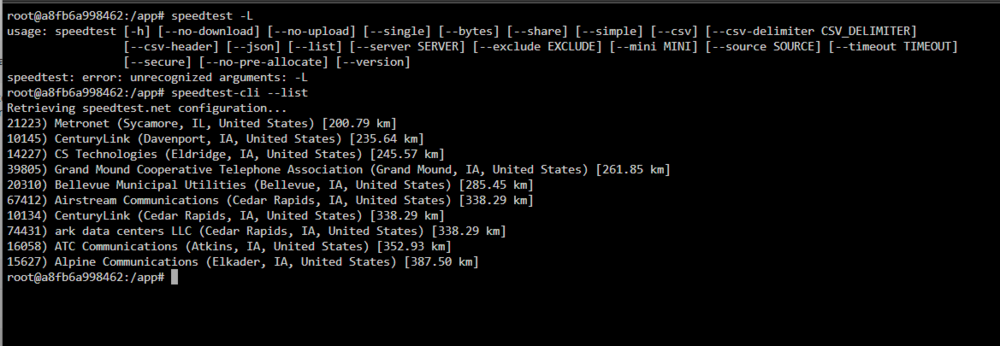
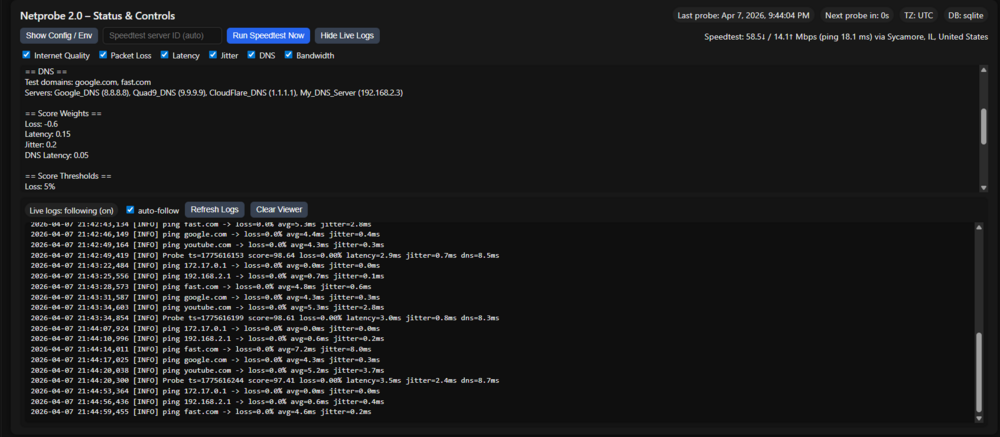
Feature request updates and changes in coming.. speedtest-cli --list you will still need to run this line in the Docker to see availbe speedtest id to set it manually... Options preferred set at docker env level # Optional: force speedtest to use a specific server ID. # Leave blank to use automatic best server selection. # The web UI can override this value for a one-off manual run. SPEEDTEST_SERVER= you can add the Docker env and number to set the server at the Docker template or manually run them in the index page via the id number... -Knowledge is needed beforehand thus the env will not be in the template... by default design it will still be set to auto... There is a Docker tag update change happening soon as I bring this Docker stack back to lattest a templte update will be implemented shortly. See release notes for updates: https://github.com/bmartino1/NetProbe_Python/releases/tag/production-fixes
-
Kind of I'm using the default speedtest binary / python. the CLI technically, there is a way with the CLI to specify the speed test server you're testing from. speedtest-cli: How to Specify a Server - Hivelocity Hosting Speedtest CLI: Internet speed test for the command line The speedtest command in the docekr should use speedtest.net and auto pick the closet / best test server automatically... I will look into it when I have free time and add that as a potential docker environment and feature request. Asnard above. I have slept since then and we'll need to reread the code to re-add or change features, but that should be a fairly simple change or add-on as I have to change the speed test command and add an ENV to set a site, assuming that the speed test CLI accepts custom inputs for that option.
-
so to clarify first try adding this custom edit to the bottom of the xml before teh end of </domain> a <qemu:commandline> <qemu:arg value='-machine'/> <qemu:arg value='q35,accel=kvm,kernel_irqchip=split'/> <qemu:arg value='-cpu'/> <qemu:arg value='host,vmx=on'/> <qemu:arg value='-device'/> <qemu:arg value='intel-iommu,intremap=on,caching-mode=on,device-iotlb=on,aw-bits=48'/> </qemu:commandline>
-
to clarify you want unraid as host and proxmox as teh VM? then you may need to add virtual IOMMU or use qemu arguments and pass host device iommu. the best way to do this is add custom xml code the webui has an area now for cutom qemu aruments and commands... *the important part: vIOMMU is real and required for nested passthrough, but “guest sees an IOMMU” and “nested SR-IOV actually works end-to-end” are not the same thing. What you need is nested virtualization + a virtual IOMMU (vIOMMU) in the Proxmox VM. For QEMU/KVM, the Intel vIOMMU is only supported on a q35 machine, and for assigned devices it should be paired with caching-mode=on; for nested passthrough, interrupt remapping also matters, and libvirt notes that intremap='on' requires split I/O APIC. Proxmox’s own passthrough docs also explicitly say vIOMMU is what enables passing PCIe devices to level-2 VMs from a level-1 VM. more info can be found here: https://www.qemu.org/docs/master/system/qemu-manpage.html So if your goal is: Unraid host (L0) → Proxmox VM (L1) → pass device/VF to a VM inside Proxmox (L2) then “Proxmox can’t find IOMMU enabled” is not cosmetic. For that use case, the Proxmox guest really does need a vIOMMU exposed to it. If you are only passing a device directly from Unraid into the Proxmox VM and using it only inside that Proxmox VM, then the warning can be less important. But for nested passthrough / SR-IOV use inside Proxmox, it matters. Also, nested KVM must be available on the Unraid host. Kernel docs say Intel nested virtualization is controlled by kvm-intel.nested, and modern kernels default it to enabled, though distros can override that; the guest CPU must also expose VMX rather than using a generic CPU model. Use this as your libvirt domain XML basis for the Proxmox VM on Unraid: <domain type='kvm' xmlns:qemu='http://libvirt.org/schemas/domain/qemu/1.0'> <name>proxmox</name> <memory unit='MiB'>16384</memory> <vcpu placement='static'>8</vcpu> <os> <type arch='x86_64' machine='pc-q35-8.2'>hvm</type> </os> <features> <acpi/> <apic/> <ioapic driver='qemu'/> </features> <cpu mode='host-passthrough' check='none'> <feature policy='require' name='vmx'/> </cpu> <devices> <emulator>/usr/local/sbin/qemu</emulator> <!-- vIOMMU for the Proxmox guest --> <iommu model='intel'> <driver intremap='on' caching_mode='on' iotlb='on' aw_bits='48'/> </iommu> <!-- Example virtio disk with iommu awareness --> <disk type='file' device='disk'> <driver name='qemu' type='raw' iommu='on'/> <source file='/mnt/user/domains/proxmox/vdisk1.img'/> <target dev='vda' bus='virtio'/> </disk> <!-- Example virtio-net with ATS + iommu --> <interface type='bridge'> <mac address='52:54:00:12:34:56'/> <source bridge='br0'/> <model type='virtio'/> <driver iommu='on' ats='on'/> </interface> <!-- Pass through a PCIe device from Unraid into the Proxmox VM --> <hostdev mode='subsystem' type='pci' managed='yes'> <driver name='vfio'/> <source> <address domain='0x0000' bus='0x03' slot='0x00' function='0x0'/> </source> <address type='pci' domain='0x0000' bus='0x06' slot='0x00' function='0x0'/> </hostdev> </devices> </domain>That XML is aligned with libvirt’s documented IOMMU device support: <iommu model='intel'> plus intremap, caching_mode, iotlb, and aw_bits. The iommu='on' / ats='on' attributes on virtio devices are also documented by libvirt for use with emulated IOMMU and device-IOTLB. https://libvirt.org/formatdomain.html If Unraid’s libvirt GUI/XML editor does not honor all of that cleanly, you can force it with QEMU args. Equivalent QEMU-side pieces look like this: -machine q35,accel=kvm,kernel_irqchip=split \ -cpu host,vmx=on \ -device intel-iommu,intremap=on,caching-mode=on,device-iotlb=on,aw-bits=48Those options come straight from QEMU’s Intel IOMMU device docs: intel-iommu on q35, caching-mode=on required for vfio-pci, and device-iotlb=on for virtio/vhost use cases with ATS. If you want to inject them via the Unraid/libvirt XML, use: <qemu:commandline> <qemu:arg value='-machine'/> <qemu:arg value='q35,accel=kvm,kernel_irqchip=split'/> <qemu:arg value='-cpu'/> <qemu:arg value='host,vmx=on'/> <qemu:arg value='-device'/> <qemu:arg value='intel-iommu,intremap=on,caching-mode=on,device-iotlb=on,aw-bits=48'/> </qemu:commandline>On the Unraid host, also verify these before blaming Proxmox: cat /sys/module/kvm_intel/parameters/nested egrep -o 'vmx|svm' /proc/cpuinfo | head cat /proc/cmdline dmesg | grep -i -e iommu -e dmarFor Intel, you want to see nested enabled and host IOMMU/DMAR active. Kernel docs confirm kvm-intel.nested is the switch for nested VMX. Inside the Proxmox VM, check: dmesg | grep -i -e iommu -e dmar find /sys/kernel/iommu_groups -maxdepth 2 -type lIf Proxmox still says no IOMMU after the above, the usual causes are: VM is not using q35. No vIOMMU device was actually added. CPU is not host-passthrough / VMX exposed. kernel_irqchip=split / <ioapic driver='qemu'/> is missing. Unraid rewrote the XML and dropped the custom options. One more important practical point: vIOMMU lets Proxmox pass devices onward to L2 guests, but it does not guarantee that a passed-through physical function will expose fully working SR-IOV management inside the VM. In practice, the more reliable design is often: enable SR-IOV on the Unraid host, create the VFs on Unraid, pass the needed VF(s) to the Proxmox VM or directly to target guests. If your Intel B50 is not showing SR-IOV capability at all, that may indeed be firmware / card support / driver exposure, separate from the Proxmox vIOMMU issue. The two problems can exist at the same time. My bottom line: for PVE-in-a-VM doing nested passthrough, this is not just a cosmetic Proxmox error. Add the Intel vIOMMU, use q35, expose VMX, use split irqchip, and then test again. If you want, I can turn your current Unraid VM XML into a fully corrected paste-ready version.
-
Most likely VNC access via unraid console. could have used cached cookies after gaining access to hit the web vnc for the VM. Data would be seen in the URaid system log.
-
To survive reboots one may write settigns to the flsh drive mounted at "/boot/" the partition in the plugin directory. if your lookign for a place to store a file that will survive a reboot.
-
Because this is a traditional array. parity based on the info screen picture provided is only parity for disk 1... See unriad docs: https://docs.unraid.net/unraid-os/using-unraid-to/manage-storage/array/overview/ https://docs.unraid.net/unraid-os/using-unraid-to/manage-storage/array/replacing-disks-in-array/ Where going ZFS would put 3 disks via raid z1 into a raid5/6 setup with striped and mirroed having parity, where 1 disk goes, you still have all data and give some space between 3 disks of the same size. https://www.youtube.com/watch?v=UR5RCItyCsw but wold requrie seting up pool disk and transitioning 3 disk out. in a zfs you could replace disk over time more easily and gain space by doing so... I posted as such as your main target was parity... but ultimately, this means your moving disk into cache pools https://docs.unraid.net/unraid-os/using-unraid-to/manage-storage/cache-pools/ which can result in some maximized space being lost for zfs parity. usulay when one has more than 6 drives of similar size the standard unriad array doesn't make sense and one should look into muti disk raid setups to handle storage and content... I'm just throwing out an option but it would require resetting up data and disk on unraid... https://www.reddit.com/r/unRAID/comments/14zq1mz/video_guide_array_disk_conversion_to_zfs_or_other/
-
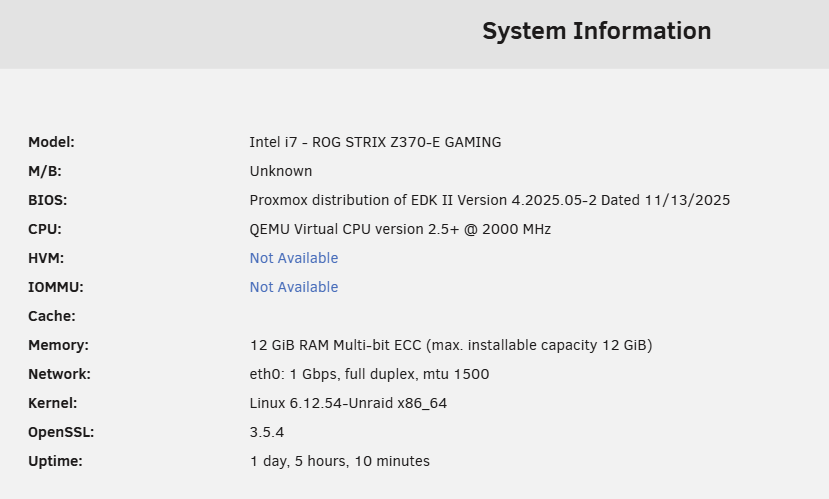
what level of hardware is being passed and used in the vm? there are a few plugins to help mange usb devices. But ultimately if you have the pcie bandwith its best to pass a iommu nvme, g card and usb contorler into the VM. all can require a bit of high-level knowledge. unraids vm sytems have been updated but is mostly the same... use libvirt qemu kvm hyper v in domain xml code foramt for implementation. https://libvirt.org/formatdomain.html So I would requrie a diag file to verify lspci and devices you have. so what hardware are you runnign and what hardware do you have for use to pass keyboard mouse etc... for gcards: https://www.youtube.com/watch?v=QlTVANDndpM For hd and other devices: https://www.youtube.com/watch?v=QaB9HhpbDAI as I run PVE for better VM hardware host access and virtualize Unriad. giveing PVE host dutions as a Hyper V for more VM and easeir GUI options in passing devices. First we need to make sure bios settings are correct adn taht IOMMU is enabled. in unraid clcic the pc square and open sytem inforamtion we need to know if your HAve iommu enabled first and for most. Iommu is the heart of passing pcie hardware like a Gcard into a VM. and ultimatle we will need a xml file of the VM to show and make edits. to run this on unraid. THer are other tempaltes onthe forum as well. see also: https://www.youtube.com/watch?v=WF6Psns9Zt0
-
alot of my stuff is "assisted" more for grammar/spell check.
-
I would recommend converting some disks into zfs or pool disk raid setups. like 3 disk in a raid z1




