






bmartino1
Members
-
Joined
-
Last visited
Everything posted by bmartino1
-
docker 0 is the interface made by teh docker/dockerd sytem application and is used for the docker bridge driver. the br-53a22d28af07 is a shim bridge that conects over and uses teh br0 netork to give the docker a lan IP. This tells me that you are running a docker at a custom br0 and have givein it a static IP. This is normal and assit docker and the container application at asigning a IP off the interface of br0 review more info here:
-
This is why I prefer to use MariaDB (Docker setting and easier to setup and make a sql instance wiht a sinlge user for a applicaiotn.... You are most likely fighting mysql allowed access networks and need to run MySQL database termainl commands to grant other netwroks and ip a username and password to the MySQL tables... Potentail port and dokcer network conflicts as well... Heres a rundown Checklist for Running Multiple MySQL Containers on a Custom Network Use a Custom Bridge or Macvlan Network (not bridge)!If you're using br0, make sure: It’s created correctly. IPs aren’t conflicting. Containers are properly assigned. To create a Docker bridge network (if not done already): Unraid Terminal Commands make a new docker bridge network called mynet docker network create \ --driver bridge \ --subnet=172.25.0.0/24 \ mynet Without some info and due to security... Here's an example... https://forums.unraid.net/topic/188695-docker-network-issue/#findComment-1541042 (You would set theses in the unriad web UI docker template...) Default docker bridge is fine... unriad terminal commands to run 2 mysql instances # MySQL 1 docker run -d \ --name=mysql1 \ -e MYSQL_ROOT_PASSWORD=password \ -v /mnt/appdata/mysql1:/var/lib/mysql \ -p 3306:3306 \ --network=mynet \ mysql:latest # MySQL 2 docker run -d \ --name=mysql2 \ -e MYSQL_ROOT_PASSWORD=password \ -v /mnt/appdata/mysql2:/var/lib/mysql \ -p 3307:3306 \ # <- different host port --network=mynet \ mysql:latest *So First Confirm you're not using -p 3306:3306 for both containers. That would cause "connection refused" for the second one due to port binding failure. Like all dockers, check the logs. What does the log say... SQL database docker especially need time for first initialization... After the MySQL Initialization Delay about 5 min.... Check logs... docker logs -f mysql2 You would use the drop-down and click the mysql and click log options and look for: "[Server] ready for connections." Connecting by Container Name:If both are on the same Docker network, container name DNS works: mysql -h mysql2 -P 3306 -u root -p *--If on a macvlan (br0) network, Docker container DNS won’t work. Use the container’s IP directly. You can use a extra parm to set a container host name These are all Optional! --hostname redis.home.arpa --dns=192.168.2.1 --dns=8.8.8.8 *****Must use FQDN my search domin is home.arpa the container name is redis my FQDN is redis.home.arpa extra dns options if using tailscale to gurantee dns ip within a docker... Double check on unraid permission and Puid and Guid Data Directory Permissions Ensure the /mnt/appdata/mysql2 folder is owned by the right UID/GID: docker safe permissions chmod 777 -R * chown nobody:users -R * Otherwise its network database connection issues. You will need the sql docker runnign and console into it and conect to your sql with the root user at local host / 127.0.0.1 GRANT ALL PRIVILEGES ON your_database_name.* TO 'your_user'@'%' IDENTIFIED BY 'your_password'; Replace: your_database_name with the name of your database your_user with the username '%' allows access from any host (you can use 'localhost' or a specific IP) your_password is the desired password Then Flush sql privileges... FLUSH PRIVILEGES; example sql file... If you want to give user appuser full access to a database called appdb, and allow remote access CREATE DATABASE IF NOT EXISTS appdb; CREATE USER IF NOT EXISTS 'appuser'@'%' IDENTIFIED BY 'supersecretpassword'; GRANT ALL PRIVILEGES ON appdb.* TO 'appuser'@'%'; FLUSH PRIVILEGES; Use mysql -u root -p to log in as root before running these commands. For local-only access, change '%' to 'localhost'.or the ip of the network that will be access it (May be more then one the docker bridge network and the lan subnet...) For security, avoid using root for apps—create a dedicated user per app.
-
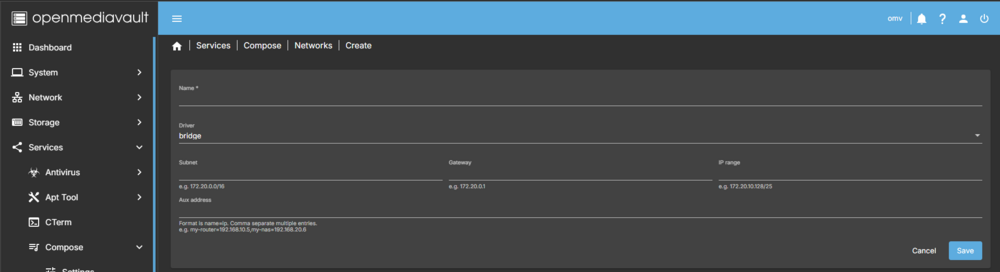
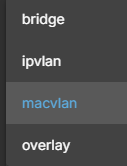
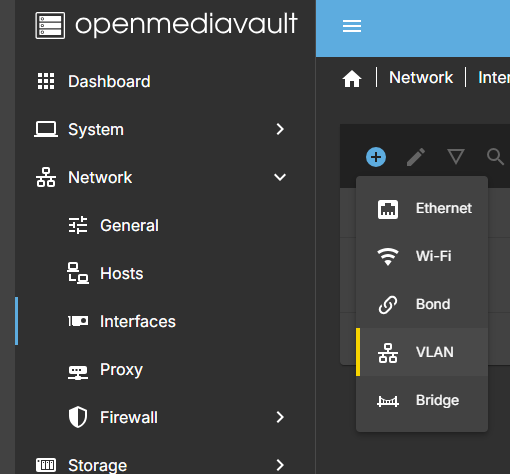
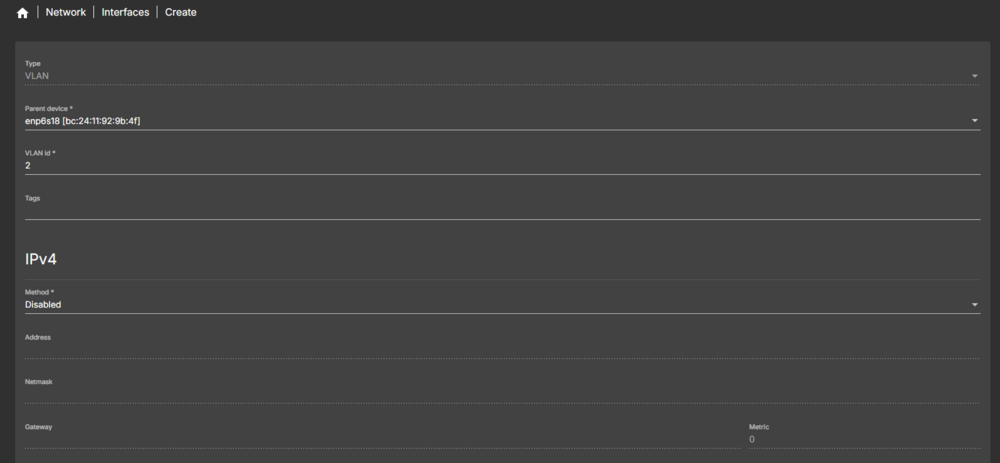
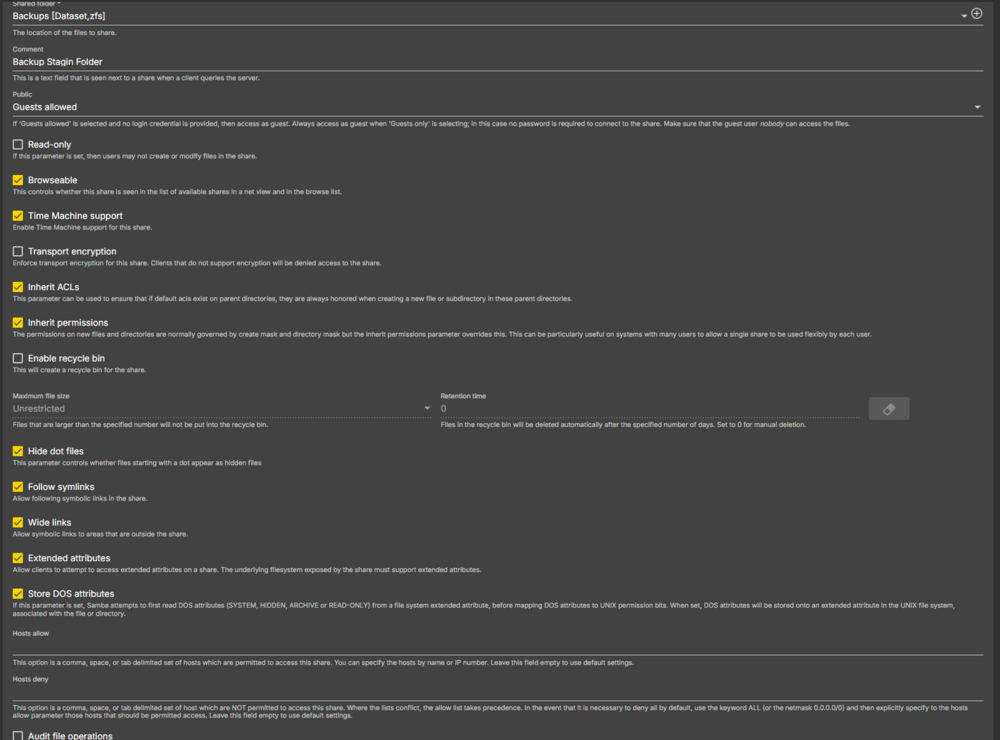
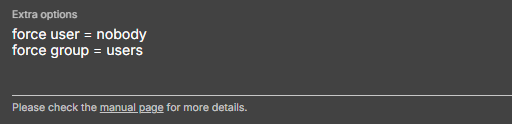
Clustering with multiple unraid systems of simlar hardware would be cool some devs have worked on simlar with zfs buddy and unraid replication.... I would like to see Ceph implementation at a enterprise level at that poin.... After stewing over some things.... Thought I'd throw some competitor stuff out there... As While, it works its taking away things that should exist and be in Unraid. While yes unraids Smb works, there still weirdness all around issues with it. I often end up having to manually edit smb to fix it... More current Example the Unraid v7 webui more in the new settings layout with network interfaces... especial in v7 and the networking tab options now... We should really Make it easier to make and use networking and interface options More targeting at manupilation and the use of Vlans and potentialy ability to make docker networks tied to interfaces WITHIN THE WEBUI!... So, lets look at a competitor as an example... OMV (Open Media Vault): I can easily make docker network. A simple add docker network with docker driver option drop down, fill in can go a long way! Even open up making edits to the default ipvlan br0 docker network... Those with 1 nic in unraid machine but still need to isolate teh vlan interface with a untaged br0 ... Even interfacing with linux networks such as vlans... as this is a common unraid issue and topic I've seen over the years. With not much documentation out there... But More to the Point... I'm finding Parts of the core main functionality for unraid with NFS and Samba have eroded over the years, what once was a easier one click setups within the web UI... now tends to be a headache with no clear in page direction... Samba still a hot topic for me, while its gotten better... I simpole love OMV samba setup and interfaceing... somethign unriad Share setings page should implement! (True nas had it for a time as well now they don't)... the abilty to add samba share options to the sahre or add [subfolder] samba sahre to a extra area.... Sub folders shareing is a thing and needs implemented!!! Unraid Smb and NFS share should have a bit more functionality and setting that don't seem to be avilable in the current unraid sharea area!!! Example OMV Share area simple check boxes for options for a share.... The big one here for me is per share extra options... *As I want to add security and group for samba users... this Requires me to set sahre setting permission... WHile private and other setings exist its not the same and some funcationaly breaks... So here to another testparm samba share that OMV does that just works!!! Fixing and making samba better... aside... testparm: Bare Min SMB confg for proper sharing.... # Global parameters [global] allow insecure wide links = Yes disable spoolss = Yes dns proxy = No load printers = No log file = /var/log/samba/log.%m logging = syslog map to guest = Bad User max log size = 1000 multicast dns register = No pam password change = Yes panic action = /usr/share/samba/panic-action %d passwd chat = Enter\snew\s\spassword:* %n\n Retype\snew\s\spassword:* %n\n password\supdated\ssuccessfully . passwd program = /usr/bin/passwd %u printcap name = /dev/null server string = %h server socket options = TCP_NODELAY IPTOS_LOWDELAY fruit:nfs_aces = no fruit:copyfile = yes fruit:aapl = yes idmap config * : backend = tdb create mask = 0777 directory mask = 0777 printing = bsd use sendfile = Yes [Backups] comment = Backup Stagin Folder create mask = 0664 directory mask = 0775 force create mode = 0664 force directory mode = 0775 force group = users force user = nobody guest ok = Yes hide special files = Yes inherit acls = Yes inherit permissions = Yes path = /mnt/vm-zfs/Backups/ read only = No vfs objects = fruit streams_xattr wide links = Yes fruit:time machine = yes fruit:delete_empty_adfiles = yes fruit:wipe_intentionally_left_blank_rfork = yes fruit:veto_appledouble = no fruit:resource = file fruit:metadata = stream fruit:locking = none fruit:encoding = private full smb conf that OMV does to make a proper samba seerver... root@omv:~# cat /etc/samba/smb.conf # This file is auto-generated by openmediavault (https://www.openmediavault.org) # WARNING: Do not edit this file, your changes will get lost. #======================= Global Settings ======================= [global] workgroup = WORKGROUP server string = %h server dns proxy = no log level = 0 log file = /var/log/samba/log.%m max log size = 1000 logging = syslog panic action = /usr/share/samba/panic-action %d passdb backend = tdbsam obey pam restrictions = no unix password sync = no passwd program = /usr/bin/passwd %u passwd chat = Enter\snew\s\spassword:* %n\n Retype\snew\s\spassword:* %n\n password\supdated\ssuccessfully . pam password change = yes socket options = TCP_NODELAY IPTOS_LOWDELAY guest account = nobody load printers = no disable spoolss = yes printing = bsd printcap name = /dev/null unix extensions = yes allow insecure wide links = yes create mask = 0777 directory mask = 0777 map to guest = Bad User use sendfile = yes aio read size = 1 aio write size = 1 time server = no wins support = no disable netbios = no multicast dns register = no server min protocol = SMB2_02 # Special configuration for Apple's Time Machine fruit:aapl = yes fruit:copyfile = yes fruit:nfs_aces = no #======================= Share Definitions ======================= [Backups] comment = Backup Stagin Folder path = /mnt/vm-zfs/Backups/ guest ok = yes guest only = no read only = no browseable = yes inherit acls = yes inherit permissions = yes ea support = yes store dos attributes = yes fruit:encoding = private fruit:locking = none fruit:metadata = stream fruit:resource = file fruit:veto_appledouble = no fruit:wipe_intentionally_left_blank_rfork = yes fruit:delete_empty_adfiles = yes fruit:time machine = yes vfs objects = fruit streams_xattr printable = no create mask = 0664 force create mode = 0664 directory mask = 0775 force directory mode = 0775 hide special files = yes follow symlinks = yes wide links = yes hide dot files = yes read list = write list = force user = nobody force group = users I get it though.. if it works why change... theses are just some core functionalities that make me pass on unraid for others atm. ItIt's gettingarder to say yes go Unraid with the 1 click and done setup but I often find myself having to tinker with unraid constantly to get a bare min feature set that the competitors do coretly out of the box... While annoying... the fact is Unraid dropped the ball with docker compose and implementation of the docker statk and sahring a docker stack in the CA. Plans with Squid have been implemented to share Compose Tempatles via The CA. Not somethign taht can be done over night... I Love the CA and the current Docker setup and implementation over the years. But Dam, alot of issues keep coming up with muti-docker setups anymore... It apears that some devs and old users left after the key change and license change over. I'm not upset at unraid / Limetehc as a business I'm upset that the core functional seem to be stagnant and not getting better... Where its competitors, Often free have this ironed out... Other examples... 45drives on rocky linux(debain stuff exists). Truenas scale(debain esk) and Truenas core(Freebsd), My go to now... Debain with Open Media Vault. Then there runnign Proxmox no sub and using LXC helper scripts... Pro/Cons and To each there own... I just know that something needs to change and be implemented to make it wroth while. As even older version of unraid like v6.9 shoudl get support hopefully with the unraid patch plugin... These older OS should get at least core app slackpack updated for CVE and some love touchup for those who can't risk nor refuse to move off unraid v6 per example... (Mainly due to hardware driver and kerneal issues...) A lot of things aren't easily implement nor go through rigors code testing...(looking at the recent OS updates witht he mover data bug incident at v7.0.1 and 7.1 and the Orginal issue update jump of v6 to v7 jump of bad config writes....) Theses things should have been handled better... Its frustrating and insulting as opps they update to be secure an now nope data disk is done and gone now... Some haven't recovered and lost data... So, looking thorugh current market, I'm sorry but unriad no longer has my number 1 spot... Its may still get a mention as Major Great strides have been made to keep it around. but the future for Unraid is concerning... Especially when the forum gets quite... 20 years in and hoping to see it in another 20 years...
-
Wow, 20 years already—time really flies! I first encountered Unraid all the way back in the 2005 era. At the time, I was working with an ISP and was sent onsite to troubleshoot what turned out to be a Samba server powered by Unraid. That moment stuck with me. I didn’t create a forum account back then, but I ran Unraid through the tail end of version 5 and kept up with every update through all of version 6 and now on to the latest stable version 7.1.3... I finally jumped onto the forum in December 2020, right in the middle of COVID. A plugin notification and some questionable info floating around got me involved, and I’ve stuck around since. Being part of the forum has been a two-way street: I’ve helped others, been helped myself, and learned a ton along the way. Unraid also gave me the push to dig deeper into Slackware Linux, Docker, and GitHub. That learning curve led me to creating some of my own apps and guides for the community. Something I never would’ve imagined back when I started. (More due to issue of sharing and how to do x and now x can't be done anymore...) Looking at You Proxmox and Truenas... I’ve got 3 Unraid licenses, with 1 still in active use and 2 retired but ready to spin up if needed. Thanks to newer hardware and advanced linux settings and configs, I now run almost everything I need from a single system. I’m not quite an expert or a vet—but I’ve definitely seen a thing or two and done a thing or two. Unraid has come a long way, and I’m happy its still araound and working all these years later. the SanDisk cruzer usb I have been a champ only 1 flash drive replacement for the life of the machines...
-
??? ... https://www.youtube.com/shorts/crDokVQTQiY https://forums.unraid.net/topic/68376-install-zerotier-in-unraid/ https://github.com/Spikhalskiy/zerotier-unraid-docker https://github.com/SpaceinvaderOne/Unraid-ZeroTier-Server-Restart-fix https://www.youtube.com/watch?v=oC7y_qYKUTU Space invader has some vidoes to use and implemnt ziero tier on unraid via docker see: https://forums.unraid.net/topic/68376-install-zerotier-in-unraid/ and support forum from CA: https://forums.unraid.net/topic/72030-support-spikhalskiy-zerotier/
-
mby the zfs replication plugin... Theeis apears to be a script... Unless in the scripts that you may or may not be using to replicate zfs snapshots. You could add a log for that. Syslog / dmesg command is the reason why we see it in syslog... Yes the connection could be form you zfs snapshot depending on how your sending them and how your script is setup to send them. still 500 different connection is a bit much... General Overview: Your syslog confirms a huge number of open SSH sessions, which is highly unusual unless explicitly intended. Based on your description and the Unraid post: ZFS snapshot replication is likely being done over SSH using custom scripts. It's bi-directional, meaning both systems may be initiating and accepting connections. Sessions may not be closing cleanly or could be leaking, causing buildup over time (hence the 27-day uptime correlation). Here some things you can do to check... Confirm SSH SourceTo isolate if it's really your ZFS replication doing this, run: who | wc -l lsof -i :22 | grep ESTABLISHED | wc -l And this, to view and analyze the actice connections: lsof -i :22 | grep ESTABLISHED *Look for many repeated IPs or usernames (likely your replication account). Check the replication methodIt’s highly likely a cron or user script is using ssh or zfs send/receive in a way that does not exit properly, especially if you’re using something like: in your script if its the zfs replication ssh user@remote zfs receive ... -- Make sure all such processes use: ControlMaster=auto ControlPersist=60 (for reuse, not excess) Proper trap or exit handling in scripts Example user scirpt: ssh session cleanup dead/closed connections... #!/bin/bash # Kill stale SSH sessions and log LOG="/boot/logs/ssh_prune.log" DATE=$(date "+%Y-%m-%d %H:%M:%S") # Find and kill idle SSH sessions older than 1 hour echo "[$DATE] Checking SSH sessions..." >> "$LOG" COUNT=$(ps -ef | grep '[s]shd: ' | wc -l) echo "[$DATE] Active SSHD sessions: $COUNT" >> "$LOG" # Optional: Kill excess (over 100) if [ "$COUNT" -gt 100 ]; then echo "[$DATE] Too many sessions, pruning..." >> "$LOG" ps -ef | grep '[s]shd: ' | awk '{print $2}' | xargs -n1 kill -9 echo "[$DATE] Sessions killed." >> "$LOG" else echo "[$DATE] Count acceptable." >> "$LOG" fi some side script tips for ssh zfs replication: If you’re using zfs-auto-snapshot + zfs-auto-send, use mbuffer or ssh multiplexing to manage connections better. Add -o ConnectionTimeout=60 -o ServerAliveInterval=30 -o ServerAliveCountMax=2 to your SSH options. Track with something like: journalctl -u ssh | grep "Accepted" This does not appear malicious, but is almost certainly automation gone leaky. Fixing the SSH process lifecycle and possibly batching or limiting sessions will resolve this. Example zfs replication scirpt: Uses SSH with connection control Supports multiple datasets Handles bidirectional ZFS snapshot replication Cleans up old SSH connections Includes easy configuration at the top zfs-replicator.sh #!/bin/bash # ZFS Replication & SSH Management Script for Unraid # Supports bidirectional snapshot replication between two Unraid systems ########################## # ==== CONFIGURATION ==== ########################## # List of datasets to replicate FROM this machine to the remote DATASETS_TO_SEND=( "tank/media" "tank/backups" ) # List of datasets to replicate FROM remote to this machine DATASETS_TO_RECEIVE=( "tank/documents" ) # IP or hostname of the remote Unraid server REMOTE_HOST="192.168.1.20" # User for SSH (must have key-based auth) SSH_USER="root" # SSH Port if not default SSH_PORT=22 # Base dataset path for receiving on local (optional, leave blank to use same names) LOCAL_RECEIVE_BASE="" # Set to true to show commands as they run DEBUG=false # SSH Control path for persistent session CONTROL_SOCKET="/tmp/ssh-zfs-ctl.sock" ########################## # ==== SSH FUNCTIONS ==== ########################## start_ssh_connection() { if $DEBUG; then echo " Starting persistent SSH connection..."; fi ssh -M -S "$CONTROL_SOCKET" -fnNT -o ControlPersist=300 -p $SSH_PORT "$SSH_USER@$REMOTE_HOST" } close_ssh_connection() { if $DEBUG; then echo "🧹 Closing SSH connection..."; fi ssh -S "$CONTROL_SOCKET" -O exit "$SSH_USER@$REMOTE_HOST" 2>/dev/null } run_ssh_command() { ssh -S "$CONTROL_SOCKET" -p $SSH_PORT "$SSH_USER@$REMOTE_HOST" "$1" } ############################## # ==== ZFS REPLICATION ==== ############################## replicate_to_remote() { for DATASET in "${DATASETS_TO_SEND[@]}"; do SNAP_NAME="replication-$(date +%Y%m%d-%H%M%S)" echo " Sending $DATASET to $REMOTE_HOST as snapshot $SNAP_NAME" zfs snapshot "${DATASET}@${SNAP_NAME}" zfs send -c "${DATASET}@${SNAP_NAME}" | ssh -S "$CONTROL_SOCKET" -p $SSH_PORT "$SSH_USER@$REMOTE_HOST" "zfs receive -F $DATASET" done } replicate_from_remote() { for DATASET in "${DATASETS_TO_RECEIVE[@]}"; do SNAP_NAME="replication-$(date +%Y%m%d-%H%M%S)" echo " Receiving $DATASET from $REMOTE_HOST as snapshot $SNAP_NAME" run_ssh_command "zfs snapshot ${DATASET}@${SNAP_NAME}" run_ssh_command "zfs send -c ${DATASET}@${SNAP_NAME}" | zfs receive -F "${LOCAL_RECEIVE_BASE}${DATASET}" done } ############################ # ==== MAIN EXECUTION ==== ############################ echo " Starting ZFS Replication Script" start_ssh_connection replicate_to_remote replicate_from_remote close_ssh_connection echo " Replication completed!" NotesSSH control socket allows multiple commands over one connection. ZFS snapshots are timestamped (replication-YYYYMMDD-HHMMSS). You must have SSH key-based login between systems. This script assumes both servers have identical dataset names unless LOCAL_RECEIVE_BASE is set. so now lets add loging to the example script above and maybe make use of mbuffer.. -mbuffer is a deb only pacakge... As this is something I use in my ring network... unraid user scirpt plugin... zfs-bidirectional-replicator.sh #!/bin/bash # ZFS Snapshot + Bidirectional Replication Script with SSH Key Auth and Logging #################################### # ==== USER CONFIGURATION ========= #################################### # Local datasets to replicate to remote DATASETS_TO_SEND=( "tank/media" "tank/backups" ) # Remote datasets to replicate to local DATASETS_TO_RECEIVE=( "tank/documents" ) # Remote host config REMOTE_HOST="192.168.1.20" SSH_USER="root" SSH_PORT=22 # Optional: receive into base prefix (e.g., "remote/"), or leave blank LOCAL_RECEIVE_BASE="" # Number of snapshots to keep per dataset SNAPSHOT_RETENTION=12 # Enable debug output DEBUG=true # Log file LOGFILE="/var/log/zfs-replication-$(date +%F).log" # SSH control socket for connection reuse CONTROL_SOCKET="/tmp/ssh-zfs-ctl.sock" #################################### # ==== LOGGING UTILITY ============ #################################### log() { echo "[$(date '+%F %T')] $*" | tee -a "$LOGFILE" } run_debug() { if $DEBUG; then log "$*"; fi eval "$@" } #################################### # ==== SSH CONNECTION MGMT ======== #################################### test_ssh_connection() { log "Testing SSH key connection to $REMOTE_HOST..." ssh -o BatchMode=yes -o ConnectTimeout=5 "$SSH_USER@$REMOTE_HOST" "echo SSH connection OK" >/dev/null 2>&1 if [ $? -ne 0 ]; then log "ERROR: SSH key authentication failed. Make sure SSH keys are set up and authorized_keys is configured." exit 1 fi log "SSH connection test successful." } start_ssh_connection() { log "Starting SSH control connection..." ssh -M -S "$CONTROL_SOCKET" -fnNT -o ControlPersist=300 -p "$SSH_PORT" "$SSH_USER@$REMOTE_HOST" } close_ssh_connection() { log "Closing SSH connection..." ssh -S "$CONTROL_SOCKET" -O exit "$SSH_USER@$REMOTE_HOST" 2>/dev/null || true } run_ssh_command() { ssh -S "$CONTROL_SOCKET" -p "$SSH_PORT" "$SSH_USER@$REMOTE_HOST" "$1" } #################################### # ==== SNAPSHOT HANDLING ========== #################################### create_snapshot_if_changed() { local dataset="$1" local written written=$(zfs get -H -o value written "$dataset") if [[ "$written" != "0" ]]; then local snap_name="replication-$(date '+%Y%m%d-%H%M%S')" zfs snapshot "$dataset@$snap_name" log "Snapshot created: $dataset@$snap_name" echo "$snap_name" else log "No changes in $dataset, skipping snapshot." echo "" fi } prune_snapshots() { local dataset="$1" local snapshots=($(zfs list -t snapshot -o name -s creation -r "$dataset" | grep "^$dataset@")) local total=${#snapshots[@]} if (( total > SNAPSHOT_RETENTION )); then local to_delete=$(( total - SNAPSHOT_RETENTION )) for (( i=0; i<to_delete; i++ )); do log "Deleting old snapshot: ${snapshots[$i]}" zfs destroy "${snapshots[$i]}" done fi } #################################### # ==== ZFS SEND TO REMOTE ========= #################################### replicate_to_remote() { for dataset in "${DATASETS_TO_SEND[@]}"; do log "Sending dataset: $dataset" local snap_name snap_name=$(create_snapshot_if_changed "$dataset") if [[ -n "$snap_name" ]]; then prune_snapshots "$dataset" log "Sending $dataset@$snap_name to $REMOTE_HOST" zfs send -c "$dataset@$snap_name" | ssh -S "$CONTROL_SOCKET" -p "$SSH_PORT" "$SSH_USER@$REMOTE_HOST" "zfs receive -F $dataset" fi done } #################################### # ==== ZFS RECEIVE FROM REMOTE ==== #################################### replicate_from_remote() { for dataset in "${DATASETS_TO_RECEIVE[@]}"; do log "Receiving dataset: $dataset from $REMOTE_HOST" snap_name="replication-$(date '+%Y%m%d-%H%M%S')" run_ssh_command "zfs snapshot $dataset@$snap_name && zfs list -t snapshot $dataset@$snap_name" || { log "Failed to snapshot remote dataset: $dataset" continue } run_ssh_command "prune() { list=(\$(zfs list -t snapshot -o name -s creation -r $dataset | grep \"^$dataset@\")); \ total=\${#list[@]}; \ if (( total > $SNAPSHOT_RETENTION )); then \ del=\$((total - $SNAPSHOT_RETENTION)); \ for ((i=0; i<del; i++)); do zfs destroy \"\${list[\$i]}\"; done; \ fi }; prune" run_ssh_command "zfs send -c $dataset@$snap_name" | zfs receive -F "${LOCAL_RECEIVE_BASE}${dataset}" done } #################################### # ==== MAIN EXECUTION ============= #################################### log "===== ZFS Bidirectional Replication Job =====" test_ssh_connection start_ssh_connection replicate_to_remote replicate_from_remote close_ssh_connection log "Replication complete" This script enables bidirectional ZFS snapshot replication between two Unraid servers over SSH, using machine SSH keys (key-based auth only, no passwords). Creates a new snapshot only if there’s changed data. Prunes older snapshots, keeping only a set number. Sends and receives snapshots using zfs send / zfs receive. Uses SSH ControlMaster sockets to reuse a single SSH connection safely. Logs all actions to /var/log/zfs-replication-YYYY-MM-DD.log.
-
Really depends on your needs and what this system will be doing... How your handling storage... 12 gen intel 1 TB SSD ... here is one that can work for mini pc... as example https://www.newegg.com/minisforum-barebone-systems-mini-pc-intel-core-i9-12900hk/p/2SW-002G-000K3?item=9SIBJ6VKB27253 As I wouldn't advise using usb HDD as teh array or pool devices. If using removable storage to use the unsinged plugin. I would, i'll advise and advise you go use a nas SFF form factor and have sata base HD connections. Case: https://a.co/d/5YVTmpL with a cheap itx system... https://www.ebay.com/itm/116607129618 I'm still waiting on pi5 and other pcie projects to use thunderport with pcie lanes to make a hba. https://www.michaelstinkerings.org/a-new-breed-of-hba-raiden-thunderbolt-to-sata-hba-8-ports-indiegogo-campaign/ as one could use a egpu pciex16 thunderbolt with a hba to have usbc thunderport movable storage... -Tested at one time wiht unraid... there are other nas systems out there such as trunase scale / core Openmedia vault (debian) 45drives rocky linux even 1U rac mount nas systems like zyxel / unifi Really comes down to what you need it to do. Unraid is nice it has a lot of good 1 click and done features... Advance build your own opensource: I've found myself going Debian lately for security and repostiory updates... running Porxmox for VM, and Open-media vault 2 different webUI on the same machine. proxmox for VMs / LXC, Openmedia vault for samba/nfs and dockers...
-
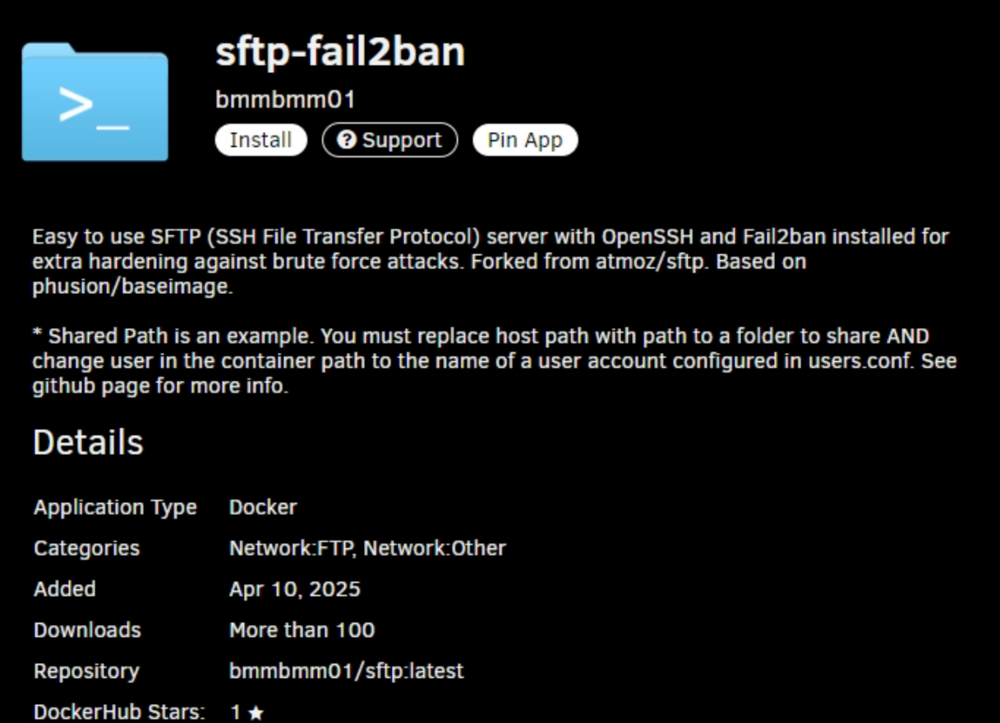
500 sessions have successfully logged in yes... This could be web uI login but this apears to be ssh session and ssh keys... Mostlikly a bot / hack... Delete your ssh keys from the USB and disable ssh on unraid. use the fail2ban plugin or install the sftp-fail2ban docker to caputre and block bad actors... in /boot/config/ssh delete the ssh folder and reboot. This will reset all ssh keys... then in the web UI go to setting > managment access disable turn off ssh
-
this seems more like a issue of vlan tagged and/or how you setup the vlans... unraid server has a 4 port nic, each port is connected to a different vlan. (10 br0),(20 br1), (30 br5). Usually unraid will show br0.10 to designate that the br0 interface over vlan10 *Vlan Networking on Unraid s is a pain to explain... review post: https://forums.unraid.net/topic/190501-unraid-in-unifi/#findComment-1558254 start at the top and go thorugh the whole post! Unraid is not networking equipment... untaged / taged vlan on a interface issue... ############################ the br-#### is normal to see that is a software bridge containing over and made for the docker usually something set to a custom br0 - macvlan/ipvlan Giving this info: as the dockers don't see br0.10 unraid is using default vlan1 when calling br0 for this docker and ip range. Thus a cros talk miscommunication issue... The fix is removed the br5, br1 and make a docker network at interface br5.vlan# etc etc... This is called vlan tagging... Other unraid settings need to be checked and setup... as example seen here *You shouldn't have to disable bridging... Make sure vlans are enabled in the unraid network interface tab... under docker settings. *I recommend using macvlan... Enable host custom access enable preserver custom docker settings... Move to macvlan is set to ipvaln *Macvlan is prefered due to isolation and the need for each service / device gettign a different mac address... under vm setting make sure the vm netowrk is not set to vmbir set it to br0 as this changes things with unraid vm hyperv switch taht was a breaking point for how soem docker networks were created... then proced to make docker networks at br#.vlan at the ip scheme... (YOU MAY NEED TO DELETE EXISTING DOCKER NETRWORKS! Double check newotk settings . layer 3 swith settings . router setting to confirm a bridge... use console and test dockers suh as docker run bash connected to your docker vlan... Do to isseu with unraid and otehrs networking setups espcal with thoses who won't follow the instruction as seen in that post... I will no longer give commands nor help any further than saying it is possible but not easily done and setup on unraid due to many points of failure and netwroking hardware one uses... I hate unraid with Vlan setups wish its was easier and done in the web ui... unraid is not networking equipment... --May put in a feature request to have the ability to make docker networks within the web ui. and a area for vlan taging a interface... a lot of php code and terminal networking commands woudl need pre-programmed to make that work... doubt the devs will implement... (as I moved away form unraid do to similar issues and the inability to edit br0 docker network... good luck...

-
Sometimes the grub boot doesn't look like it will preceded to boot if there is another G-card in the system essential that became the primary display and the last on screen sent to the onboard that you saw could say bzroot... ok double check router and let it run for 10-15 min and see if you can ping the machine / access the web UI otherwise at the grub boot menu you may need to add an additional gurb boot option pres e to edit unraid boot option and go the to end... try adational grub linux boot paramerters.... consoleblank=0 acpi=force acpi_osi=Linux nomodeset *we can later edit the unraid boot options and add them to the webui to be apart of the grub boot options... As this could be a bios / acpi bug issue...
-
which plex docker. binhex? linux server? etc... Unhealthy means something failed with the docker image itself. this is usualy checked by a dockers health check which it failed. That can be caused by many different reasons. Transcode? Temp Ramdisk or resource exhaustion. Docker vdisk image logs, continuer and other hit capacity Misconfiguration within plex Plex database corruption. Thank you for a dig file. unfortule there are some things it doesn't captures... Such as docker logs... What does teh plex docker log say?
-
install the docker: set this to auto run at unraid reboot. This will add more vm icons the doesn't stay running and will reinitiate the download. Most likely at boot there was a network error and a inabilty to access githib for the system to download the VM icons.
-
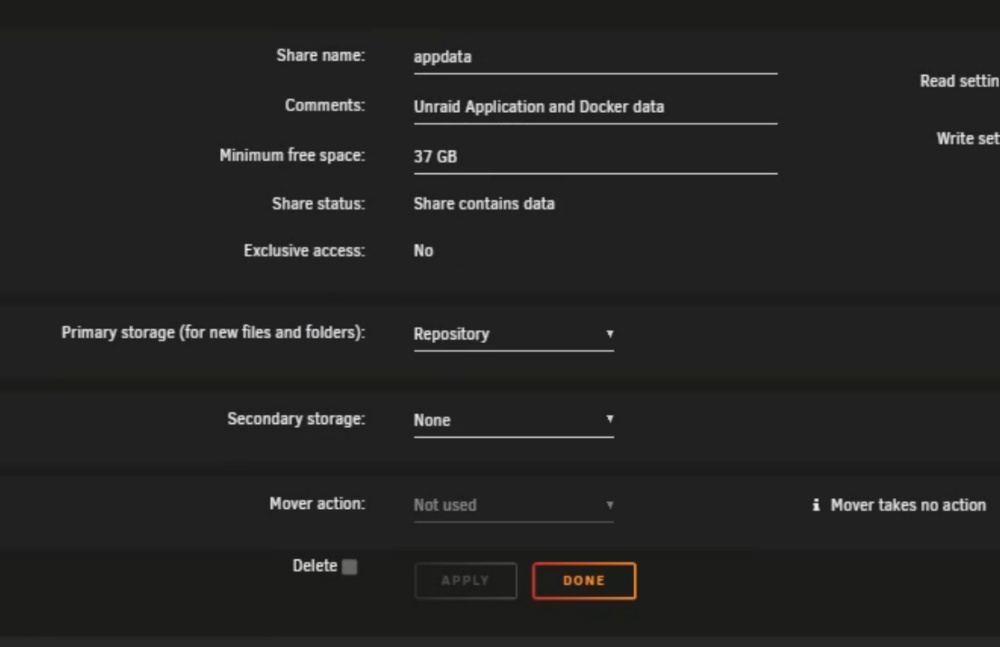
the issue is that you have secondary setup at all appdata should not and can't support this """"""""secondary storage array, mover: cache<-array"""""""""" Remove secondary and make sure all files exist on 1 primary disk for data and location. as new fiels are written to the primary disk and previous data doesn't exist on cache... Review the docs. https://docs.unraid.net/unraid-os/manual/shares/user-shares/#default-shares https://docs.unraid.net/unraid-os/manual/shares/ https://docs.unraid.net/unraid-os/manual/shares/user-shares/ Your using unraid fuse (/mn/user) and mover wrong in unraid... thus you need to answer the question of who touched what where. And where is that data stored at now?
-
you most likely have a primary and secondary storage setup for the appdata share in your unraid share settings. This is breaking your docker bind mounts when in use. (That or system resources overload and limits need set...) Moving to disk paths (hardlinks over the unraid fuse system...: /mnt/cache instead of /mnt/user This is a good start... (the share settings still affect this...) should help but you need to fix all docker template paths to be at there correct location... Since you said your using zfs.. /mnt/cache seems incorrect NOT ENOUTH INFO TO ASSIST! unless you named your zfs pool cache... Please post a unraid diagnostic and share the settings for your share tab... Make sure that appdata is a dataset and is correctly setup to write to the zfs dataset...
-
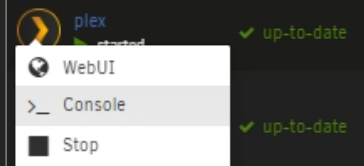
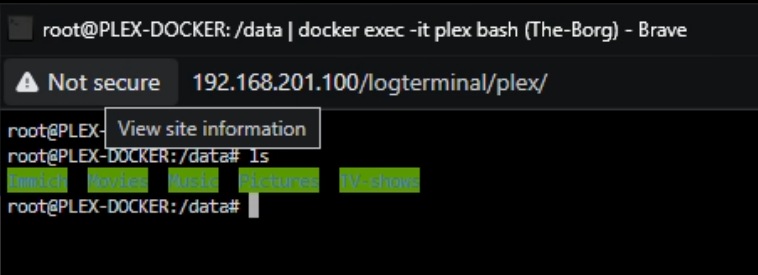
Thank you for confirming its samba for the network connections. SMB. What I'm refering too is: confirming your plex container path and mount path for the /mnt/remote In my case I want to confirm plex docker can see the folder and files. I'm referring you to enter console fo plex. a terminal windows as if you are on the local machine at a CMD promt for plex: then cd into the path. in my case this is /data and make sure the folder and files are there. then we can look at plex and the library options to sync the content. I'm around if needed. use the "@" and at me or PM me if needed. I don't always see responses to (Solutions) closed forum threads.

-
cool. some weird first indexing of a docker bind mount most likely. glad its working again.
-
a lot here so lets first start with some basics. Regarding #3 with plex on (as this sounds and seems like the culprit. I set up container path under name /TV Shows. I assume path name doesn't change just because host path is /mnt/remotes/......? Console the plex docker and cd into the template path you shared that connect to the /mnt/remotes/TOWER3_Media3/TV SHOWS/ if you don't see TV Shows/Series name/Season 1>media.mp4/mkv/avi etc... Then you have issues with the remote and volume mounts. and may need to adjust your plex system. My guess is that somehow the template path mounted something else and tv shows is not in the plex path provided over the share. ##################### #1 set up both servers and have them both mounted to each other -Just to claify you have then sharing by ?NFS or by SMB? set up the docker path, pretty easy, Docker could see where I wanted to go. It found this: /mnt/remotes/TOWER3_Media3/TV SHOWS/...also ensured it was set to read/write slave so far no issues Regardless if its nfs / samba as long as the remote system and enter the folder, read and write to the folder its fine. its then pathing and network access questions. #2 setup path --Not all shares settings are universal and 24/7 Some network based shares have timeouts and will drop the connection when idle. (this could be the case but unlikely) Advance smb / nfs settings changes would need to be done to prevent this. #3 plex docker can read write the path sent in via the docker template... confirm you see file and folder within the docker... #4 Plex Library scan Can only check and run after confirming step/q and a of 3 so it sounds like you have a network share working in some form and fasion. *we may need to look into advance samba/nfs share setting so that a network conection doesn't close or become idle and disconect (thus no files and fodlers) We need to make sure the plex docker when in the docker is seeing the folder and files at the remote mount paths... Please confirm if this is shared via SMB / NFS... Please confimr in the plex docker, console into it and cd to the template path ? cd /data ls depenign on the plex container path set in the docker template.
-
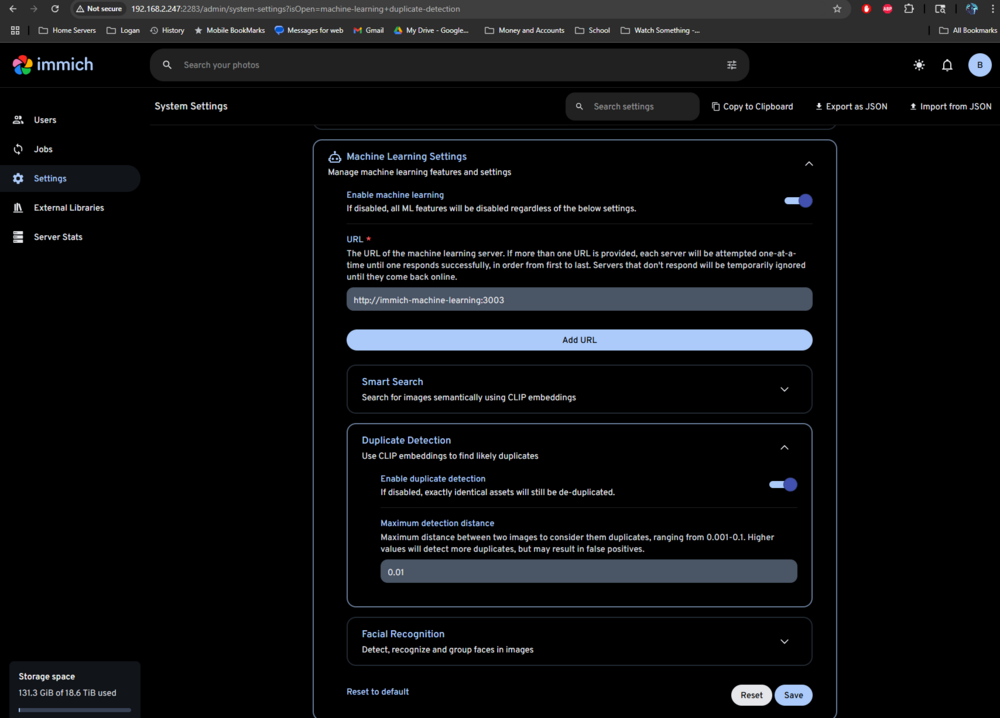
kinda... https://www.reddit.com/r/immich/comments/1c63ryv/immich_duplicate_finder/ To disable duplicate detection in Immich, you can adjust the Maximum detection distance setting in System Settings under Administration > Settings > Machine Learning Settings > Smart Search. A higher value will detect more duplicates, while a lower value will detect fewer. You can also disable machine learning entirely, which will also disable duplicate detection, under Administration > Settings > Machine Learning Settings. Detailed Steps: Access Administration Settings: Log in to your Immich server and navigate to Administration > Settings. Locate Machine Learning Settings: Navigate to Machine Learning Settings, specifically under Smart Search. Adjust Maximum Detection Distance: Find the "Maximum detection distance" setting. This controls how closely images need to match to be considered duplicates. A lower value (e.g., 0.001) will be less sensitive and detect fewer duplicates, but may also reduce false positives. A higher value (e.g., 0.1) will be more sensitive and detect more duplicates, but may also lead to false positives. Disable Machine Learning (Optional): If you want to disable duplicate detection completely, you can disable all machine learning features or specific models like Smart Search. You can do this under Administration > Settings > Machine Learning Settings. Disabling machine learning will also disable other features like smart search and facial recognition, impacting the Explore page and search functionality. Save Changes: Make sure to save your changes after adjusting any settings. Alternative: Disable the entire machine learning service (advanced): To prevent the machine learning service from starting at all, you can comment out the immich-machine-learning section in the docker-compose.yml file. This will disable Smart Search, Face Detection, and Duplicate Detection tasks. If you do this, you'll need to manually retry any tasks that rely on these features by clicking the "Missing" button on the Job Status page.
-
*Unraid uses LUKS full-disk encryption (via Linux Unified Key System). Here's how to set it up: Stop the array. On the Main tab, select a disk. Change its file system to an encrypted type. Click Apply, then Done. Format the newly encrypted (unmountable) disk when prompted. To use it, supply the passphrase or keyfile at array startup. Review: https://docs.unraid.net/unraid-os/manual/security/data-encryption/ Syncing Encrypted Disks Disk‑to‑Disk with rsyncYou have two scenarios: (A / B) A: Local rsync (within one Unraid box) Perfect for syncing from one encrypted disk to another (e.g., backups to an unassigned encrypted disk). Example: example rsync comand at local machien disk to disk rsync --archive --delete \ /mnt/disk2/SourceFolder/ \ /mnt/disks/EncryptedBackup/ --archive: preserves permissions, symlinks, etc. --delete: cleans up files not present in source. -*Mutt has a good script on the forum for this: https://forums.unraid.net/topic/97958-rsync-incremental-backup/ Script: https://codeberg.org/mgutt/rsync-incremental-backup/src/branch/main/incbackup.sh https://forums.unraid.net/topic/190797-simplest-setup-for-auto-downloading-from-sftp-to-unraid/#findComment-1558756 --Or even syncing into an array disk: rsync --archive --delete /mnt/user/SourceFolder/ /mnt/disk4/BackupFolder/ https://japanatron.com/blog/other/it/10402-unraid-backing-up-using-rsync B: Remote rsync Over SSH or SFTP (disk-to-disk backup across systems)i) Set Up SSH Key AccessOn the target machine (backup receiver): ssh-keygen -t rsa -b 2048 -f /root/.ssh/backup-rsync-key Copy the public key to the source machine (authorized_keys), ensuring proper permissions: chmod 700 ~/.ssh chmod 600 ~/.ssh/authorized_keys ii) Use rsync via SSHRun from target to pull from source: rsync local to remote via sftp rsync -avu --numeric-ids --progress \ -e "ssh -i /root/.ssh/backup-rsync-key -T -o Compression=no -x" \ root@source:/mnt/diskX/EncryptedSource/ \ /mnt/disks/EncryptedBackup/ -u: skip files newer on receiver --numeric-ids: maintain user/group IDs -T: disable pseudo-tty -o Compression=no: let rsync handle compression -x: stay on one file system iii) Automate with --remove-source-filesTo move files (delete after successful copy): rsync -avz --remove-source-files \ -e "ssh -i /root/.ssh/backup-rsync-key" \ root@source:/mnt/encrypted1/ /mnt/encrypted2/ You can then optionally clean up any empty directories: ssh -i /root/.ssh/backup-rsync-key root@source \ "find /mnt/encrypted1/ -type f -delete" Other examples of a sample Automation Script (Local or Remote) Adapt this for local disks or remote SSH pulls: -Set paths in script... Example: Rsync Script – Local & Remote Ready #!/bin/bash # ======================== # USER CONFIGURATION # ======================== # Set to 1 if using remote SSH; set to 0 for local rsync USE_SSH=1 # Source and destination paths SRC="/mnt/encrypted_source/" DST="/mnt/disks/encrypted_backup/" # Remote SSH settings (used only if USE_SSH=1) SSH_USER="root" SSH_HOST="192.168.1.100" SSH_KEY="/root/.ssh/backup-rsync-key" # Optional: Delete source files after sync (1 = yes, 0 = no) REMOVE_SOURCE=1 # ======================== # RSYNC LOGIC # ======================== # Build rsync command if [ "$USE_SSH" -eq 1 ]; then echo "Running rsync over SSH..." RSYNC_CMD="rsync -avz --numeric-ids --progress" [ "$REMOVE_SOURCE" -eq 1 ] && RSYNC_CMD="$RSYNC_CMD --remove-source-files" $RSYNC_CMD -e "ssh -i $SSH_KEY -o Compression=no" \ "$SSH_USER@$SSH_HOST:$SRC" "$DST" if [ "$REMOVE_SOURCE" -eq 1 ]; then echo "Cleaning up remote source files..." ssh -i "$SSH_KEY" "$SSH_USER@$SSH_HOST" \ "find \"$SRC\" -type f -delete" fi else echo "Running local rsync..." RSYNC_CMD="rsync -avz --numeric-ids --progress" [ "$REMOVE_SOURCE" -eq 1 ] && RSYNC_CMD="$RSYNC_CMD --remove-source-files" $RSYNC_CMD "$SRC" "$DST" if [ "$REMOVE_SOURCE" -eq 1 ]; then echo "Cleaning up local source files..." find "$SRC" -type f -delete fi fi echo "Rsync operation completed." *Edit the SRC, DST, USE_SSH, and SSH settings as needed. Run manually or schedule via Unraid's User Scripts plugin.
-
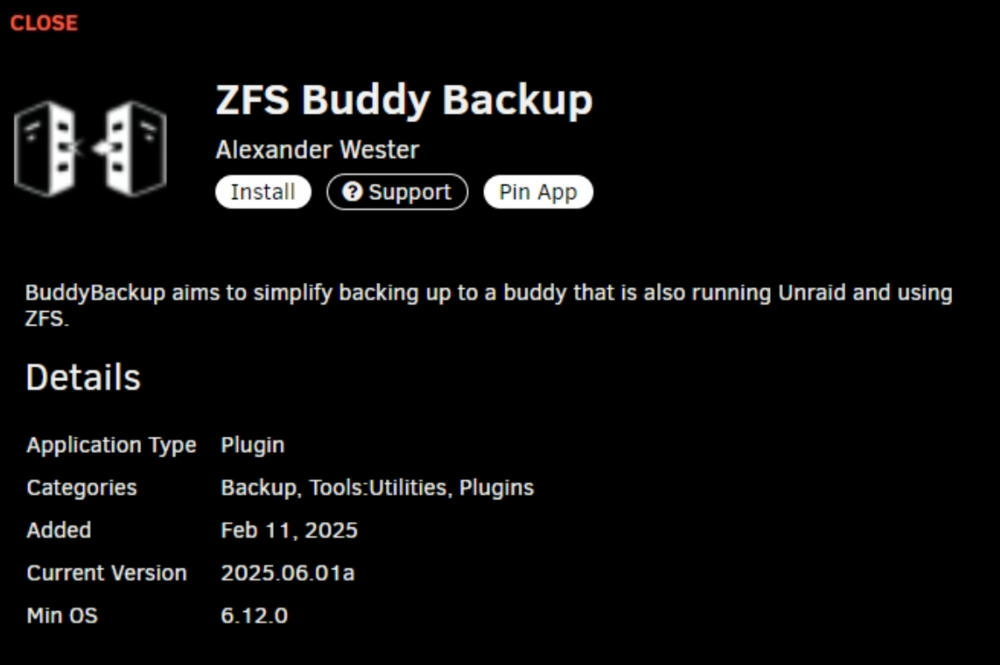
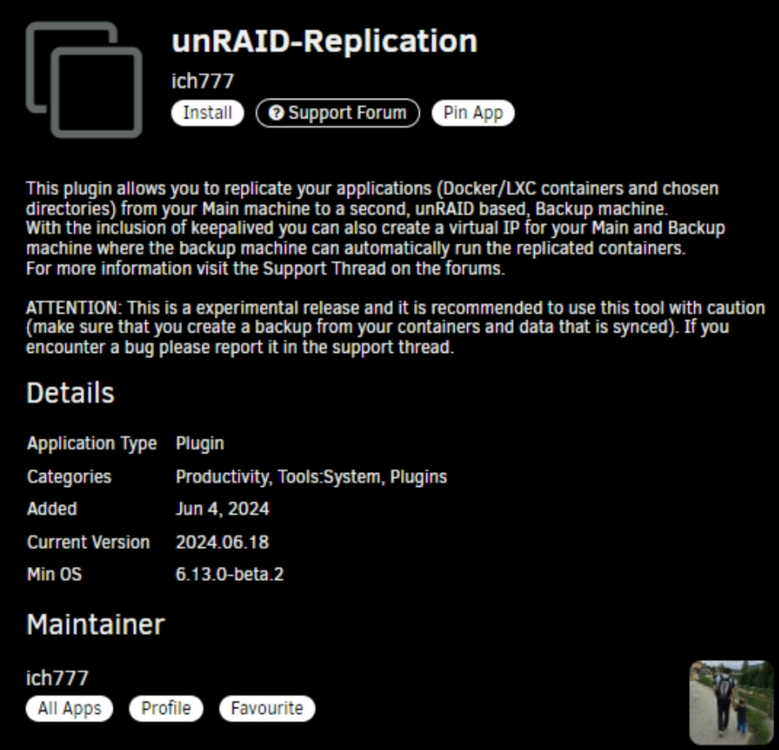
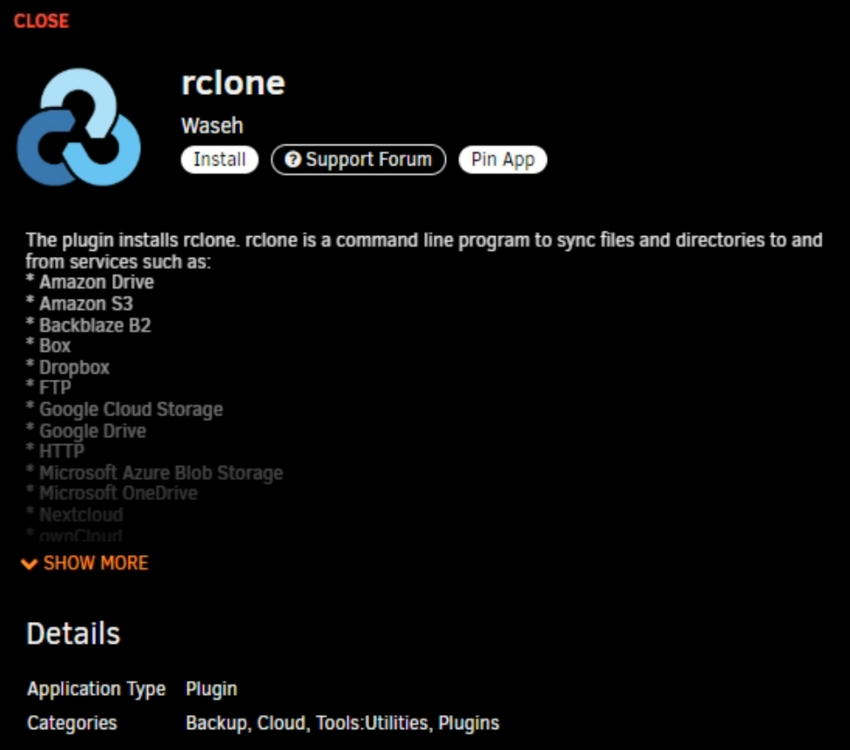
Quite a few plugin and tools. The main one I would recommend to have installed when moving between disk is: ah, there are a few plugins that can help with this actual. If both are running unraid ICH777 made a unraid duplicator pluging. (Depending on data / file on disk) *More Docker and unraid system backup restore. Yes, there is a web rsync plugin. but that depends on how long you are willing to wait to verify, hash and guarantee file copy over a standard file copy. If using zfs / zfs pools with encryption. One could use zfs send to transfer disk data. I personly use mc at the local machine (Boot unriad in GUI mode) coenct local host. so the tranfer betweeen disk happen at and on the local machine. there some interactions as well such as using sftp via ssh and filezilla(another common way that I interact with unraid to move large data between systems.) can, should, will are hard to answer. are there soultions yes, should debateable. I can go over some rsync comands if you want. I've found rsync to really be good once a copy paste is done to run to confirm changes and copy differences. using a 10GB nic and tranfers between two sytems is a good start. If it helps I alos have a sftp/fail2ban docker that can be used in conjuntcion with the rclone (rsync web application) comes down to how you want to interact with it and what you want it to do. I use sftp thoruhg the internet with unfi site magic and sftp/filezila/rsync to a ring network of friends to keep a offsite backup of files between each other
-
you may need a wake on lan or secondary script to stop/start (Restart) dockers when s3 wakes up and leaves the power states... as the dockers still try to run when palced in to idel lose network and error out when this occurs... I honestly wouldn't use sleep and disable sleep on unraid. let the disk spin down be your sleep like state to save power/electric costs. some bios options have setting when the device enter s3 trying to engage s5 and adational memry / parts can become corupted. form time counters and other settings like fast startup taht can corrupt ram. Unraid sits in ram so I don't advise the use of sleep / Wake on Lan... Double check soem bios settings turn off s5 / s4 use s3 only and turn off fast startup. double check usb power when asleep to make sure there is no los to usb drive access as well... review: Set up Wake-on-LAN (WOL) | Unrai...Set up Wake-on-LAN (WOL) | Unraid DocsYou can set up the Unraid server to wake up from a shutdown or sleep state by sending what is known as a magic packet over the network. A magic packet is a special data packet that contains the tar...Setup Sleep (S3) and Wake on Lan...Setup Sleep (S3) and Wake on Lan (WOL) | Unraid DocsThe following are my notes for setting up my Unraid server to sleep to
-
since this is a VM on unraid? If i'm understanding this correctly... USB Manger Plugin / Udev rules to script when device is attached / detected. or use unraids vfio folder share??? or use netwrok fiel sharing technology like sftp / syncthing or web rsync??? While I can't vouch for the BC program. form testing wiht other file tranfers I would sugest option 1 as option 2 relies on data in the array whcih in my experience and testing has been file access and disk io problematic in terms of perfomance due to parity. either way your biggest bottle neck is USB 3.0 sppeds and the file tranfer sppeds using usb3. thus the mention of netowrk file sharing methods.
-
reboot the system. Something hapend to your disk drive and the array is in a fubar state. the docker vdisk image may be missing...
-
Thermal local access (monitor keyboard and logged in to the physical machine... run Htop when symptoms occur... enable syslog server. without logging or a log hard to say.
-
mby... in my testing, this doesn't work the usb needs a GUID. not all nvme addon and USB devices will give teh disk a GUID to use correctly. can you us a ssd / nvme usb device for unraid yes. Trial and error...








