





ConnerVT
Members
-
Joined
-
Last visited
Everything posted by ConnerVT
-
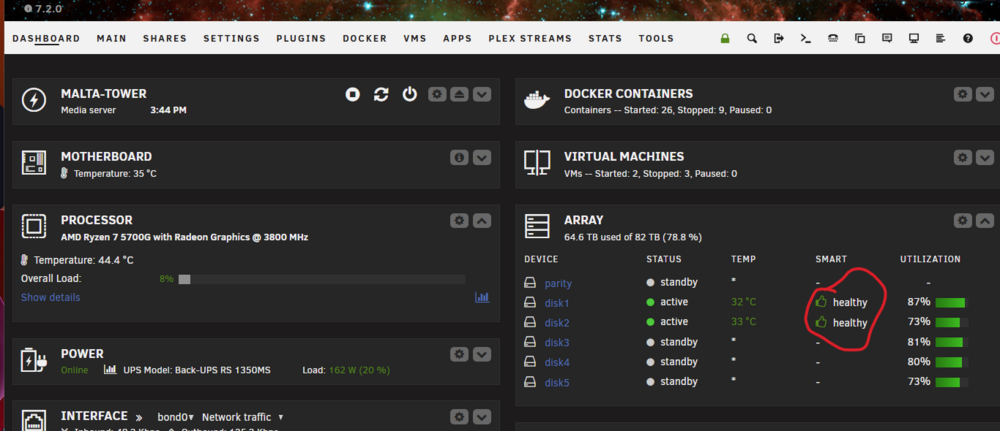
Oops - My bad. I meant the OTHER main tab. The one my server initally loads, called DASHBOARD. 😄 Sorry about that.
-
Clear the error by clicking on the fail icon on the Main Tab. Monitor, if you get more errors, post details and diagnostics.
-
Do you mean "CRC" count? If so, this is almost always a cabling issue. Check/replace the SATA cable, and monitor for increasing error count (as CRC error count does not reset to zero).
-
Well, it's only data. He probably didn't really need it anyway. 😜
-
Looks as all of your troubleshooting tired the kids out. 😀
-
I do something similar. I have an external USB drive attached to my server, which via a script that runs once a week, I rsync the folder which contains backups of several Windows machines in the house, my appdata backup folder (which has my Unraid flash drive backups), as well as a few other miscellaneous things. I actually have two of these drives, and I rotate them out every few months, keeping one offsite. Having the data on a drive I can grab and move to another machine is very convenient if any data recovery is needed.
-
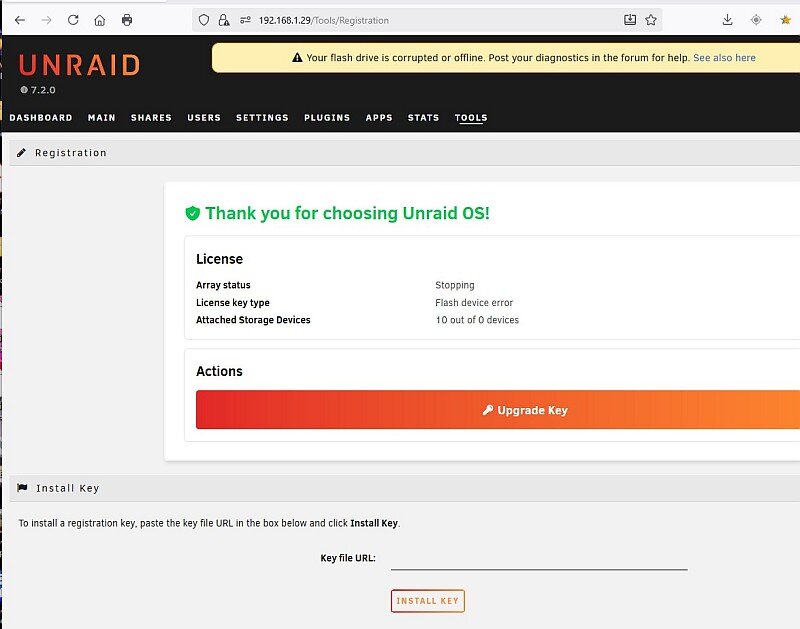
Well, I took the plunge. Fortunately after being greeted by this screen, things seem to be working nominally after a power down restart and cancelling the parity check.
-
Other things to check: Inspect DRAM sockets on motherboard, connections are not bent or dirty/full of dust, DRAM snaps firmly into sockets. Remove CPU, clean/inspect socket and CPU connections. A poor connection between the CPU and DRAM module can result in what you are seeing.
-
Updated the 2nd server to 7.2.0. So far, so good. But it really doesn't do much, so I didn't expect issues. I'm feeling pretty good about this update. Enough that I will likely take the plunge and bring the main server up to date from 6.12.10 to 7.2.0. I have time the next day or two, so we will see how it goes. Those who know, I'm hesitant to update unless I have a compelling reason to do so. 7.2.0 looks like a stable point to take the plunge.
-
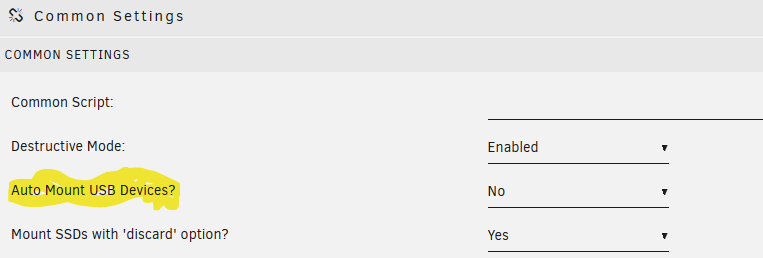
Perhaps he meant this?
-
Some hard drives conform to a newer SATA specification, where the drive is disabled when 3.3V are applied to Pin 3. There are several solutions if this is your issue: Tape over the pin, use a Molex to SATA power adapter (has only 12V and 5V), or purchase special data/power cables, or use a different drive. It all depends if this is your issue, the hardware involved, and your comfort level. https://www.instructables.com/How-to-Fix-the-33V-Pin-Issue-in-White-Label-Disks-/
-
I am glad to say, after several months of being basically unusable, the Lidarr team seems to finally have resolved their database issues and it is now possible to search/add new artists. I just spent the past 20 minutes adding music I've been wishing for. You do not need to use the lidarr:xxxxxxxx Musicbrainz format - a text search now works. A couple things to note: The Lidarr devs state that their server is still getting hit hard (by all of the users finally able to use it) so you may still get an error at times - Try again a little later (I did not have any issue this morning). I tried this a few days ago, and was still having issues. I updated my Lidarr container last night, and now all looks good. I recommend updating to the latest as well. Good luck, happy hunting.
-
I have run several AMD CPUs with Unraid for the past 5 years. Starting with my main server in 2020, it started with a 1500X, then 2600 and now a 5700G. Build a second server with a 5600GT for mostly backup duty but also runs Frigate. My experience with AMD processors has been issue free, except for intermittent system freezes when I first built my initial server on 2020, This was with the first generation 1500X. This was resolved with the BIOS setting typical current idle, which I now make sure I set on any Ryzen build. The issue this addresses generally only affects 1st gen Ryzen (and possibly some 2nd gen) but there is little reason not to use this setting, unless you in a "how low power can you go" contest. The Ryzen memory controller (Infinity Fabric) can be a little finicky. I use G.Skill Ripjaws V (F4-3200C16D-32GVK) in my builds. Don't get caught up in the industry's XMP marketing - run at the memory's JEDEC setting that corresponds with the tables in the Ryzen FAQ. If in doubt if your DRAM is Single or Dual Bank, choose the Dual setting. Unless you perform frequent CPU computational tasks, you won't notice the speed difference.
-
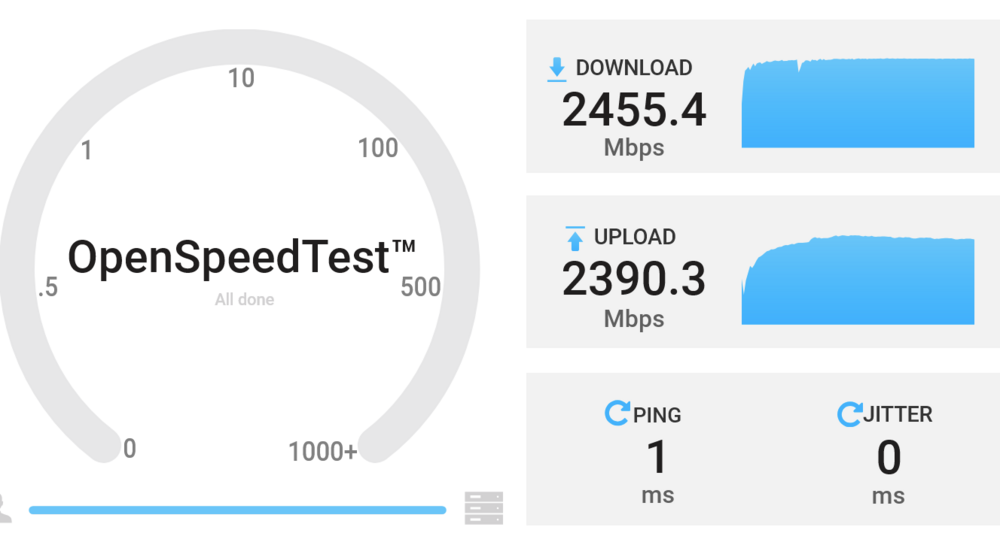
i-226-V works fine. Unraid has driver already in base installation. From my desktop (Realtek on MB, a little flaky) to my server (i226 on MB):
-
Just updated to 7.2.0-rc1 last night on my backup server. All went smoothly. Server really isn't running much at all. Simple array without parity, VM service off, Docker basically idle (Frigate installed but stopped for a few month now, pending camera re-installations). Updated around 9:00PM last night. While asleep at 3:00AM, logged this error in syslog. Do not believe there was any activity on the server (outside the times which my scheduled backup activities happen). Diags attached. Is this something I should be concerned? I found some hits searching the forum, but no answers. Oct 3 20:16:37 NASty emhttpd: spinning down /dev/sde Oct 3 20:20:10 NASty emhttpd: spinning down /dev/sdf Oct 4 03:32:26 NASty php-fpm[10126]: [WARNING] [pool www] server reached max_children setting (50), consider raising it Oct 4 03:52:21 NASty monitor_nchan: Stop running nchan processes Oct 4 20:44:22 NASty webgui: Successful login user root from 192.168.1.20 Oct 4 20:53:15 NASty root: Fix Common Problems Version 2025.08.07 nasty-diagnostics-20251004-2053.zip
-
How mission critical is your server? What would be the impact if an issue came up and it took you time to troubleshoot and resolve? Do you have the time available to do it? Do you have the skills to do it? If you have answers for the above which make you feel good, then update. But then, 7.2.0-beta3 is the latest/greatest out there. I would at lease wait until a true 7.2.0 is available, then watch this forum for a few weeks to see what issues people may be having. There are always issues, so I generally focus on things which will impact my setup. If you note my siggy, I too am running 6.12.10 on my primary server. I've been waiting to upgrade this one since 7.0.0 first came out.
-
Correct me if I'm wrong, but I believe the OP has removed his Nextcloud docker, and MariaDB was installed during his setup of Nextcloud. So unless he is sharing MariaDB with another docker application on his server, neither the MariaDB container nor its appdata is needed.
-
Just a quick heads up for those who reset their password - After resetting my password and getting my server up and running, found my son could no longer connect as a guest user (he has Library access and has been using my server for several years). We tried a bunch of troubleshooting fixes, and found out if you are using an older release of Plex Server that Plex is blocking remote users (server owner can still connect). Solution is to update to the latest server version - 1.42.1 Source: Plex Media Server - Security Update - Announcements - Plex Forum
-
Just a quick heads up for those who reset their password - After resetting my password and getting my server up and running, found my son could no longer connect as a guest user (he has Library access and has been using my server for several years). We tried a bunch of troubleshooting fixes, and found out if you are using an older release of Plex Server that Plex is blocking remote users (server owner can still connect). Solution is to update to the latest server version - 1.42.1 Source: Plex Media Server - Security Update - Announcements - Plex Forum
-
Could be a lot of things - corrupted database, bad mapping, incorrect file permissions, bad characters in file names, something wonky with a download client. Start here: Google Search
-
Per the release docs, 7.1.3 uses the 6.12.24 kernel.
-
Glad to see I'm not the only one who does this.
-
Because arrays are cool.
-
A follow up, as I had some time this morning to play with this. I have a list of 20+ artists I wished to add to Lidarr. By doing the following, I was able to add about a dozen of them: Search for the artist in Musicbrainz Copy the ID part out of the URL (looks like 56cd15a1-0d74-438b-8244-c96ffe1cae03) In the New search, add this: lidarr:56cd15a1-0d74-438b-8244-c96ffe1cae03 I was having about a 50% success getting the needed hit on the search. The other 50% was the error that it has been reporting for a while now. Repeated search of the same ID was never successful (in my short time testing) so I suspect it hasn't been cached yet in the app's database. So hopefully this is a sign that there is a light at the end of the tunnel. Fingers crosses.
-
Yes, I saw the same. Happens both with the text search and when using the lidarr:<MusicbrainzID> in the New search. In the Github discussion about this, three days ago they said the new database was rebuilding, and they are routing around 60% of the requests to the new server as the cache builds. So we can only hope this resolves itself in the next few days.




