Anym001
Members
-
Joined
-
Last visited
Everything posted by Anym001
-
Dockers Available so far: Bitcoind: Bitcoin Core connects to the Bitcoin peer-to-peer network to download and fully validate blocks and transactions. Electrs: Electrs provides a fast, private, and fully indexed Electrum-compatible API backed by your own Bitcoin Core node.
-
Summary: Support Thread for Anym001 Application Dockers GitHub: https://github.com/anym001/ Please read the discription of each docker and the variables (some dockers need special variables to run).
-
Tipp: Vorher unbedingt deine Datenbank sichern! Zuerst in MariaDB einsteigen: docker exec -it <container_name> /bin/bash Danach anmelden: mysql -u $DB_USER -p$DB_PASS $DB_NAME Checken wie der aktuelle Stand ist. (Gegenkontrolle nach dem nachfolgenden Script ebenfalls mit diesem Befehl durchführen) select table_name, row_format from information_schema.tables where table_schema = 'nextcloud' and ENGINE = 'InnoDB'; Zu guter Letzt noch das Script ausführen: #!/bin/bash # Prompt for database credentials read -p "Enter Database Name: " DB_NAME read -p "Enter Username: " DB_USER read -s -p "Enter Password: " DB_PASS echo # Execute all ALTER TABLE statements in one query mysql -u "$DB_USER" -p"$DB_PASS" "$DB_NAME" -Bse " SELECT CONCAT('ALTER TABLE \`', TABLE_NAME, '\` ROW_FORMAT=DYNAMIC;') FROM INFORMATION_SCHEMA.TABLES WHERE TABLE_SCHEMA = '$DB_NAME' AND ENGINE = 'InnoDB' " | mysql -u "$DB_USER" -p"$DB_PASS" "$DB_NAME" https://help.nextcloud.com/t/upgrade-to-nextcloud-hub-10-31-0-0-incorrect-row-format-found-in-your-database/218366/12
-
How does the interaction between the ‘classic’ Linux read/write cache and the ZFS ARC cache actually work? Is data then stored in both caches in parallel? Or is only the ARC cache primarily used and the ‘classic’ Linux read/write cache can be deactivated or reduced? I hope someone here has an explanation for this topic.
-
Hello, I have updated from 6.12.10 to 7.0.0-beta.1 and then initiated a container update. The container update could not be carried out. -> Update ran in an endless loop. Docker page no longer accessible. Subsequent reboot no longer possible. Cold start necessary and after downgrade to 6.12.10 parity rebuild. Screenshots and diagnostics attached. Reboot attempt, recorded via PiKVM. sirius-diagnostics-20240705_0905.zip
-
Update works for me without any problems. Many thanks for that. What I don't find so great, however, is that you now must have to register to get the next realeases. Was that really necessary?
-
Dafür gibt es in Nextcloud eine eigene App. https://apps.nextcloud.com/apps/memories Hier kann sogar eine Demo dafür ausprobiert werden. https://demo.memories.gallery/apps/memories/
-
@sonic6 Wie würde denn das Wiederherstellen eines solchen backups funktionieren?
-
Oct 28 01:10:32 Sirius usbhid-ups[19839]: WARNING: send_to_all: write 34 bytes to socket 15 failed (ret=-1), disconnecting: Broken pipe Oct 28 01:10:42 Sirius usbhid-ups[32495]: upsnotify: failed to notify about state 2: no notification tech defined, will not spam more about it Oct 28 01:10:43 Sirius upsd[32517]: upsnotify: failed to notify about state 2: no notification tech defined, will not spam more about it Oct 28 01:10:43 Sirius upsmon[32521]: upsnotify: failed to notify about state 2: no notification tech defined, will not spam more about it I have recently been getting the following error messages in the syslog. Does anyone have an idea what this could mean?
-
Ich habe dazu, gleich wie du die 3 Phasen vom Shelly 3EM zusammengerechnet, aber zusätzlich diese 3 Phasen beim Recorder deaktivier, damit diese nicht mehr in die Datenbank geschrieben werden. (Siehe -> sensor.shellypro3em_*_active_power) - trigger: - platform: time_pattern seconds: "/10" sensor: - name: ShellyPro3EM aktuelle Leistung Gesamt unique_id: shellypro3em_aktuelle_leistung_gesamt unit_of_measurement: 'W' state: '{{ (states("sensor.shellypro3em_0cb815fcbbd4_phase_a_active_power") | float(0) + states("sensor.shellypro3em_0cb815fcbbd4_phase_b_active_power") | float(0) + states("sensor.shellypro3em_0cb815fcbbd4_phase_c_active_power") | float(0)) | round(2) }}' device_class: power state_class: measurement Recorder Einstellungen: db_url: !secret mariadb_url purge_keep_days: 30 commit_interval: 60 exclude: domains: - device_tracker - sun entity_globs: - sensor.count* - sensor.date* - sensor.time* - sensor.internet_time* - sensor.abfalltermine_* # sonos - switch.*_surround_music_full_volume* - switch.*_surround_enabled* - switch.*_subwoofer_enabled* - switch.*_speech_enhancement* - switch.*_night_sound* - switch.*_loudness* - switch.*_crossfade* - number.*_treble* - number.*_bass* - number.*_gain* - number.*_surround_level* - number.*_sub_gain* - number.*_audio_delay* - binary_sensor.*_microphone* # shelly - sensor.shellypro3em_*_active_power - sensor.*_power_factor - sensor.*_voltage - sensor.*_current - sensor.*_device_temperature* - binary_sensor.*_overheating - binary_sensor.*_overpowering - binary_sensor.*_overvoltage # aqara weather and window sensor - button.lumi*_identify* # aqara smart plug - sensor.lumi*_rms_voltage* - sensor.lumi*_power_factor* - sensor.lumi*_device_temperature* - button.lumi*_identify* entities: # shelly - sensor.steckdose_server_power Bei mir funktionier es unter Entwicklerwerkzeuge > Dienste > Recorder: Purge Entities > Entität auswählen. Ich wähle einfach alle gewünschten Enitäten manuell aus und gehe dann auf Dienst ausführen. Danach 5-10 warten und Neustart. Das hilft normalerweise.
-
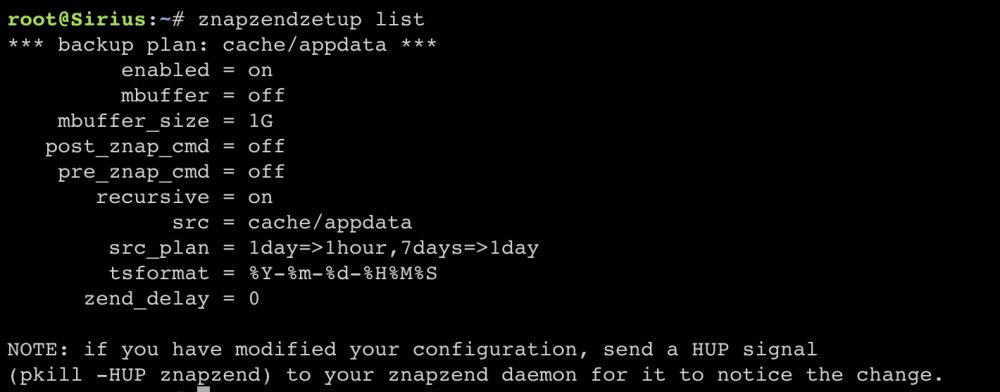
Folgendes Script wird bei mir via UserScripts Plugin beim Array Start ausgeführt: #!/bin/bash znapzend --logto=/var/log/znapzend.log --daemonize Und das sind die Settings für das Backup vom Appdata Share: Der Befehl dafür ist im oberen Post von mir verlinkt.
-
@d3z1b3l Du müsstest in den Settings noch "Turn off UPS after shutdown" auf "Yes" stellen.
-
@Markus-Berlin Redis ist zwar prinzipiell nicht notwendig, ich verwende es jedoch auch für das File Locking weil die Performance dadurch gefühlt besser ist. Schaut in meiner config.php wie folgt aus: 'memcache.local' => '\\OC\\Memcache\\APCu', 'memcache.distributed' => '\\OC\\Memcache\\Redis', 'memcache.locking' => '\\OC\\Memcache\\Redis', 'redis' => array ( 'host' => 'Redis', 'port' => 6379, ), Dazu die offizielle Doku bzw. die Empfehlungen von Nextcloud: https://docs.nextcloud.com/server/latest/admin_manual/configuration_server/caching_configuration.html
-
Den Container eventuell als root ausführen? (User ID, Group ID)
-
Hey, after the update to RC6 I can’t access my exclusive access shares in my duplicacy container. For example my Paperless Share has exclusive access enabled. In my Duplicacy Container I mounted /mnt/user to /unraid Here the ls -l command inside the container. Following error message appears when I start a backup for the share „Paperless“. Other Shares for example „backup“ which has no exclusive access works without problems.
-
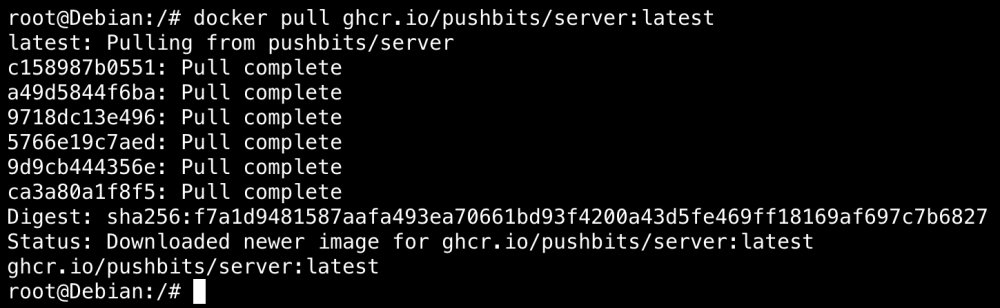
Es hat tatsächlich etwas mit Docker Credentials zu tun. Ich habe folgenden Befehl ausprobiert: (Zuerst auf GitHub mit meinem Account einen API Token erstellt) echo <GITHUB_TOKEN> | docker login ghcr.io -u <GITHUB_USERNAME> --password-stdin Daraufhin werden Zugangsdaten in der Datei /root/.docker/config.json abgespeichert. Diese sind auch noch nach einem Reboot verfügbar. (Müssten die nicht nach einem Reboot eigentlich verschwunden sein?) Damit war es mir dann möglich den oben genannten Container zu pullen. Was mir nicht ganz klar ist, warum hier nicht von Unraid nach einem Reboot Zugangsdaten gesetzt werden, damit ein Pullen von Containern von ghcr.io standardmäßig möglich ist? EDIT: Ich habe nun die Datei /root/.docker/config.json komplett gelöscht. Damit war es mir ebenfalls möglich den Container zu pullen.
-
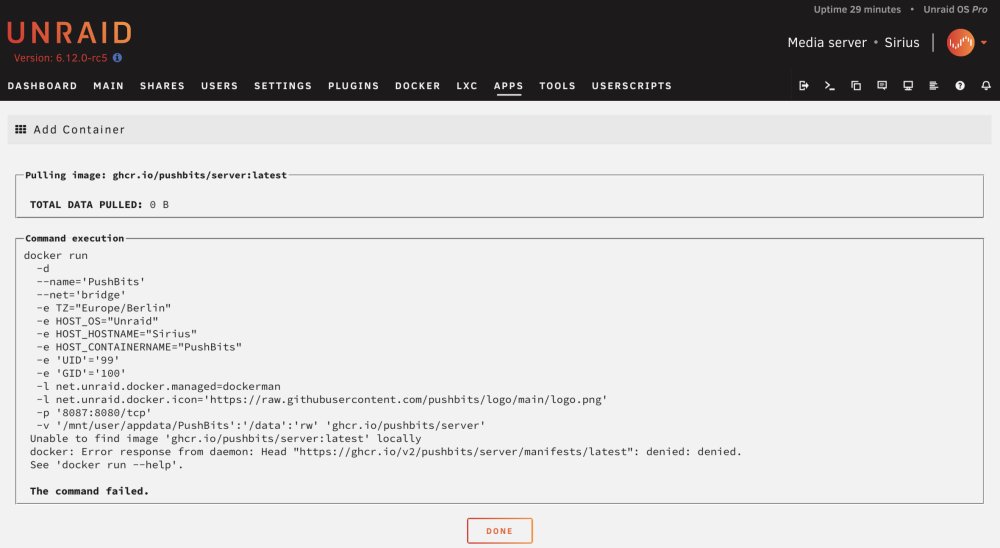
Hallo, leider habe ich das Problem, dass ich keine Container von ghcr.io pullen kann. Beim pullen erhalte ich folgende Meldung. Daraufhin habe ich testweise eine LXC Umgebung unter Unraid installiert, darin Docker installiert und das gleiche Image gepullt. Hier hat es funktioniert. Daher kann ich schon mal DNS oder Firewall Probleme ausschließen. Was ich noch versucht habe: Im Go File alle Powertop Features deaktiviert User Scripts gecheckt Docker Logout + anschließender reboot (Vermutung auf Docker registry credentials) Kein custom docker deamon.json file in Verwendung Keine custom Änderungen in der docker.cfg vorgenommen Bin leider mit meinem Latein am Ende. Vielleicht hat ja von euch noch jemand eine Idee an was es liegen könnte?
-
Wenn man docker auf /mnt/cache umgestellt hat und es auf /mnt/user zurückbauen will. So war das gemeint. Ah okay verstehe. Also eigentlich überall hier oder? 1. bei allen Containern im Template auf /mnt/user umstellen 2. In den docker settings auf /mnt/user umstellen (sowohl bei image als auch bei directory mode) 3. Eventuelle Skripte auf /mnt/user umändern 4. In den VM Templates auf /mnt/user umstellen 5. In den VM Settings auf /mnt/user umstellen Hoffe ich hab nichts vergessen.
-
Du meinst /mnt/user oder?
-
Verstehe ich das richtig, dass man damit nicht mehr /mnt/cache/appdata/whatever machen muss um eine bessere Leistung zu erzielen, sondern /mnt/user/appdata/whatever das selbe Ergebnis bringt? (Stichwort Leistungsvorteil bei zB Nextcloud bzw. MariaDB durch direkt mount)
-
@Rockikone Du könntest dir auch folgendes Plugin mal ansehen. Damit mache ich regelmäßig Snapshots von meinem appdata Share.
-
Many thanks for the information and the prompt adjustments.
-
-
@stulpinger Bitte den Beitrag vollständig lesen. "Mittlerweile ist es bei Nextcloud möglich, das MEMORY_LIMIT bzw. die UPLOAD_MAX_FILESIZE per Variable zu setzen. Somit ist ein Script, wie oben beschrieben, nicht mehr notwendig."
-
Could you update as well and upload a new debug log? I saw an issue inside your log and want to confirm its fixed. Here the debug.log with the updated version. Does it make sense to output the following information as info instead of warning? [25.04.2023 06:54:10][swag][warning] Exclusion "/mnt/cache/appdata/Jellyfin/config/log" matches a container volume - ignoring volume/exclusion pair [25.04.2023 06:54:11][swag][warning] Exclusion "/mnt/cache/appdata/nextcloud/log" matches a container volume - ignoring volume/exclusion pair [25.04.2023 06:54:12][swag][warning] Exclusion "/mnt/cache/appdata/vaultwarden/vaultwarden.log" matches a container volume - ignoring volume/exclusion pair The excludes of "debian-bullseye" and "PhotoPrism" Container are not considered. [25.04.2023 06:54:22][Debian-Bullseye][debug] Container got excludes! /mnt/cache/appdata/other/debian-bullseye/ [25.04.2023 06:54:22][Debian-Bullseye][info] Calculated volumes to back up: /mnt/cache/appdata/debian-bullseye, /mnt/cache/appdata/other/debian-bullseye/debian.sh [25.04.2023 07:07:10][PhotoPrism][debug] Container got excludes! /mnt/cache/appdata/other/PhotoPrism/ [25.04.2023 07:07:10][PhotoPrism][info] Calculated volumes to back up: /mnt/cache/appdata/photoprism/config, /mnt/cache/appdata/other/PhotoPrism/.ppignore ab.debug.log