





shpitz461
Members
-
Joined
-
Last visited
Everything posted by shpitz461
-
Can you access those remotes when you're inside the container's console session? Right click on the container in Docker tab and click Console, then try to access those shares.
-
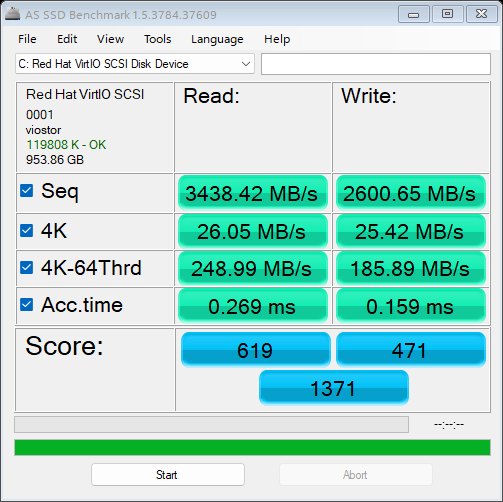
Thanks, this fixed my Windows 11 VM performance passing an ADATA SX8200PNP 1TB NVMe:
-
Hi everyone, installed a fresh copy, on network bridge I get an IP, but if I change the network to my custom docker network, the container starts but doesn't get an IP assigned. Any idea what could be wrong? I haven't changed anything other than the network type.

-
Another thing that can prevent browsing Unraid shares is the Workstation service (LanmanWorkstation), it was disabled on a fresh copy of Windows 11 (22H2 build 22621.1) and none of the other tweaks in the various threads about this issue helped. Hope this helps someone!
-
Sure, just read the docker description again, e.g.
-
All is well, I removed the container, deleted the appdata folder, then downloaded the config and now it's working.
-
No clue, but if this is something that started recently, try to revert the changes you've done and see if it goes away. Another approach is to revert the config file to its origin and then start adding to it and test each time.
-
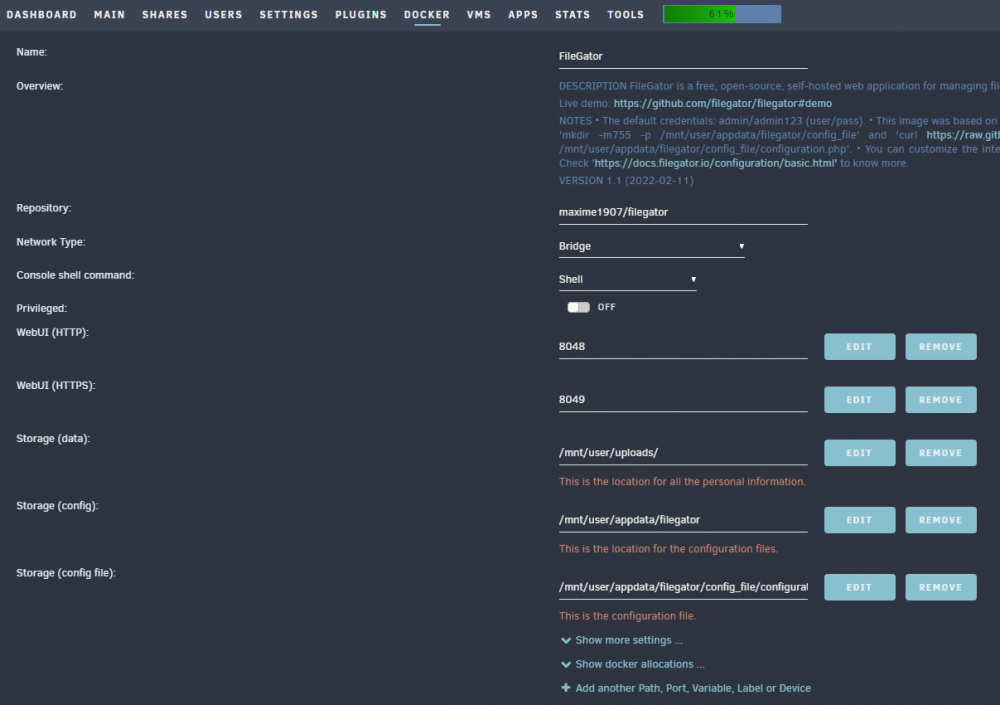
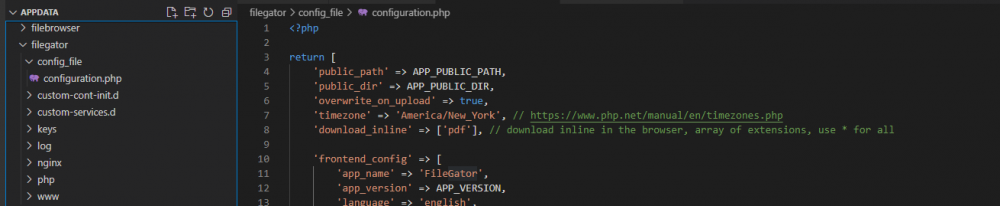
Hi @SmartPhoneLover, I've installed the container but WebUI doesn't work. Here's my config: <?php return [ 'public_path' => APP_PUBLIC_PATH, 'public_dir' => APP_PUBLIC_DIR, 'overwrite_on_upload' => true, 'timezone' => 'America/New_York', // https://www.php.net/manual/en/timezones.php 'download_inline' => ['pdf'], // download inline in the browser, array of extensions, use * for all 'frontend_config' => [ 'app_name' => 'FileGator', 'app_version' => APP_VERSION, 'language' => 'english', 'logo' => 'https://filegator.io/filegator_logo.svg', 'upload_max_size' => 100 * 1024 * 1024, // 100MB 'upload_chunk_size' => 1 * 1024 * 1024, // 1MB 'upload_simultaneous' => 3, 'default_archive_name' => 'archive.zip', 'editable' => ['.txt', '.css', '.js', '.ts', '.html', '.php', '.json', '.md'], 'date_format' => 'YY/MM/DD hh:mm:ss', // see: https://momentjs.com/docs/#/displaying/format/ 'guest_redirection' => '', // useful for external auth adapters 'search_simultaneous' => 5, 'filter_entries' => [], ], 'services' => [ 'Filegator\Services\Logger\LoggerInterface' => [ 'handler' => '\Filegator\Services\Logger\Adapters\MonoLogger', 'config' => [ 'monolog_handlers' => [ function () { return new \Monolog\Handler\StreamHandler( __DIR__.'/private/logs/app.log', \Monolog\Logger::DEBUG ); }, ], ], ], 'Filegator\Services\Session\SessionStorageInterface' => [ 'handler' => '\Filegator\Services\Session\Adapters\SessionStorage', 'config' => [ 'handler' => function () { $save_path = null; // use default system path //$save_path = __DIR__.'/private/sessions'; $handler = new \Symfony\Component\HttpFoundation\Session\Storage\Handler\NativeFileSessionHandler($save_path); return new \Symfony\Component\HttpFoundation\Session\Storage\NativeSessionStorage([ "cookie_samesite" => "Lax", "cookie_secure" => null, "cookie_httponly" => true, ], $handler); }, ], ], 'Filegator\Services\Cors\Cors' => [ 'handler' => '\Filegator\Services\Cors\Cors', 'config' => [ 'enabled' => APP_ENV == 'production' ? false : true, ], ], 'Filegator\Services\Tmpfs\TmpfsInterface' => [ 'handler' => '\Filegator\Services\Tmpfs\Adapters\Tmpfs', 'config' => [ 'path' => __DIR__.'/private/tmp/', 'gc_probability_perc' => 10, 'gc_older_than' => 60 * 60 * 24 * 2, // 2 days ], ], 'Filegator\Services\Security\Security' => [ 'handler' => '\Filegator\Services\Security\Security', 'config' => [ 'csrf_protection' => true, 'csrf_key' => "123456", // randomize this 'ip_allowlist' => [], 'ip_denylist' => [], 'allow_insecure_overlays' => false, ], ], 'Filegator\Services\View\ViewInterface' => [ 'handler' => '\Filegator\Services\View\Adapters\Vuejs', 'config' => [ 'add_to_head' => '', 'add_to_body' => '', ], ], 'Filegator\Services\Storage\Filesystem' => [ 'handler' => '\Filegator\Services\Storage\Filesystem', 'config' => [ 'separator' => '/', 'config' => [], 'adapter' => function () { return new \League\Flysystem\Adapter\Local( __DIR__.'/repository' ); }, ], ], 'Filegator\Services\Archiver\ArchiverInterface' => [ 'handler' => '\Filegator\Services\Archiver\Adapters\ZipArchiver', 'config' => [], ], 'Filegator\Services\Auth\AuthInterface' => [ 'handler' => '\Filegator\Services\Auth\Adapters\JsonFile', 'config' => [ 'file' => __DIR__.'/private/users.json', ], ], 'Filegator\Services\Router\Router' => [ 'handler' => '\Filegator\Services\Router\Router', 'config' => [ 'query_param' => 'r', 'routes_file' => __DIR__.'/backend/Controllers/routes.php', ], ], ], ]; > I've added the '>' at the end, the downloaded config didn't have it which seems wrong having open tag "<?php" and no closing '>'. And this is the log: [s6-init] making user provided files available at /var/run/s6/etc...exited 0. [s6-init] ensuring user provided files have correct perms...exited 0. [fix-attrs.d] applying ownership & permissions fixes... [fix-attrs.d] done. [cont-init.d] executing container initialization scripts... [cont-init.d] 01-envfile: executing... [cont-init.d] 01-envfile: exited 0. [cont-init.d] 10-adduser: executing... usermod: no changes ------------------------------------- _ () | | ___ _ __ | | / __| | | / \ | | \__ \ | | | () | |_| |___/ |_| \__/ Brought to you by linuxserver.io ------------------------------------- To support LSIO projects visit: https://www.linuxserver.io/donate/ ------------------------------------- GID/UID ------------------------------------- User uid: 99 User gid: 100 ------------------------------------- [cont-init.d] 10-adduser: exited 0. [cont-init.d] 20-config: executing... [cont-init.d] 20-config: exited 0. [cont-init.d] 30-keygen: executing... using keys found in /config/keys [cont-init.d] 30-keygen: exited 0. [cont-init.d] 50-config: executing... Creating base folders Setting permissions Setting permissions [cont-init.d] 50-config: exited 0. [cont-init.d] 90-custom-folders: executing... [cont-init.d] 90-custom-folders: exited 0. [cont-init.d] 99-custom-files: executing... [custom-init] no custom files found exiting... [cont-init.d] 99-custom-files: exited 0. [cont-init.d] done. [services.d] starting services [services.d] done. Any idea what I'm doing wrong? I tried both http and https on the different ports to no avail.
-
Syncthing works beautifully for this, got multiple phones synching up photos and music, you can do bi-directory or unidirectional sync, I like it much.
-
Hi Sycotix, great tutorials mate! I followed your Authelia tutorial but I cannot get it to start, i keep getting this error: This is my Authelia config: I tried changing the redis host to 'redis' and also to the unraid host ip, the .20.55 is a fixed IP I set on redis on my customer docker network. Any idea what I'm doing wrong? why can't the Authelia container see the redis container? Redis container is up and running on default port. Authelia container is set to custom docker network as well. Thanks! EDIT: If I change the host to 'redis', this is what I get in the Authelia log: 192.168.1.254 is my modem/default gateway, no idea how it got resolved to this IP. When I go to other containers and I try to ping 'redis', I get the correct custom network IP of redis .20.55.
-
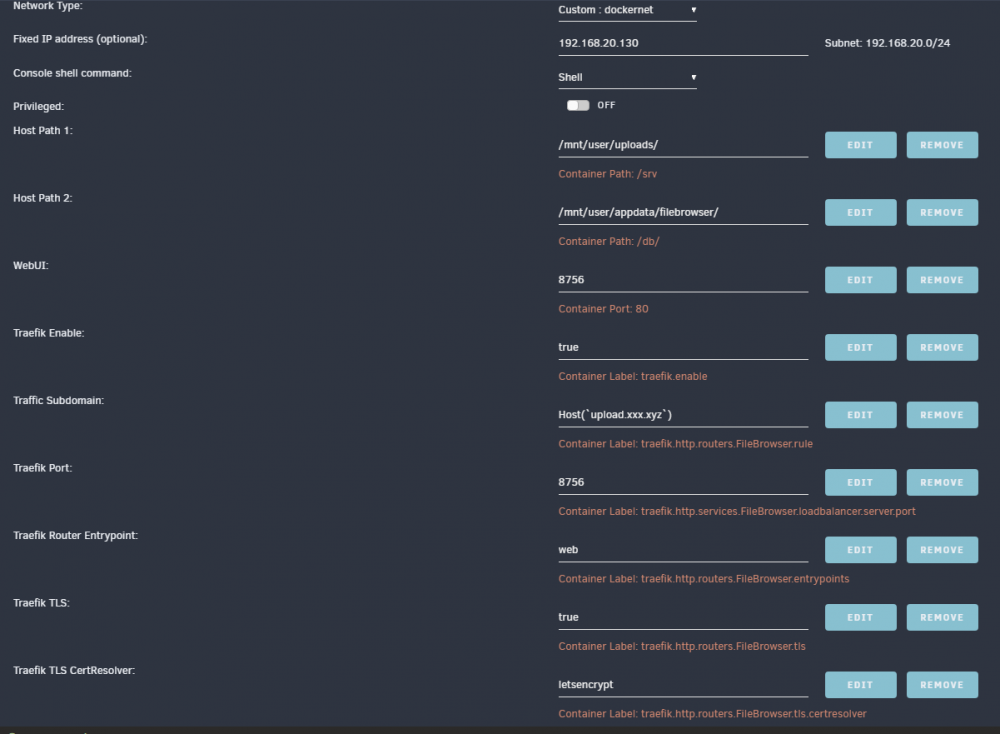
Is anyone able to run this behind Traefik? These are my labels in FileBrowser: If I set entrypoint to web (http), I get a 404. If I set entrypoint to websecure (https) I get a 502. Any idea what I'm doing wrong? Got a bunch of other containers working great via Traefik. Thanks!
-
Did you try in incognito mode? Also try to clear cookies and re-try.
-
Are you using mariadb?
-
Ha, I have the same exact issue with the same exact motherboard! I actually have an AMD 5770 gpu in slot-6, I'll move it to another one and see if the issue is gone, thanks! Where did you place you Hyper M.2? I placed mine in slot-1 and I'm having all kinds of errors with the drives. For test I ran pre-clear on all 4 NVME's at the same time, two were working around 2.5GB/s while the other two were @ 250MB/s and many errors in syslog. I have 4 Adata XPG SX8200 Pro 1TB drives, all with latest firmware.
-
I believe you need to put the hostname, which is the name of the container. I've put 'traefik' in mine since that's the name of my traefik container. If your nginx container name is 'NginxProxyManager' then put that there. Not sure about your issue #2, did you look in the documentation like it said you should?
-
Which NextCloud repo do you guys use? Mine is the 'lscr.io/linuxserver/nextcloud' one and it is still on 23.0.0 and says no updates... And when I try to update manually via the UI, I get an error when it's trying to do a backup. EDIT: nm, the error I got was a timeout, so I continued the update process twice and it updated fine. I also got the indices warning: I ran the command listed and now the warning is gone. I do have the following warning which I cannot seem to be able to get rid of: My X-Robots-Tag is set to "none,noarchive,nosnippet,notranslate,noimageindex" My X-Frame-Options is set to "frameDeny: true # X-Frame-Options=deny" Should I just ignore these warnings? My securityheaders.com scan shows an A.
-
You da man! All I was missing was this label: Thanks much!
-
Accessing NextCloud locally works great. Any ideas how to fix this error going through Traefik?
-
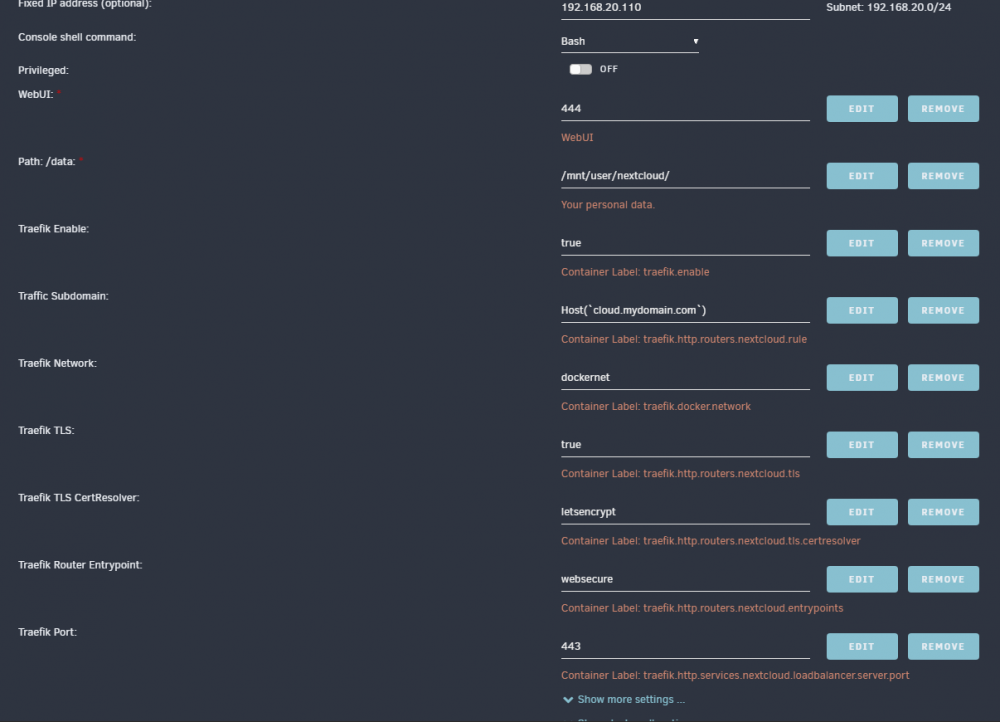
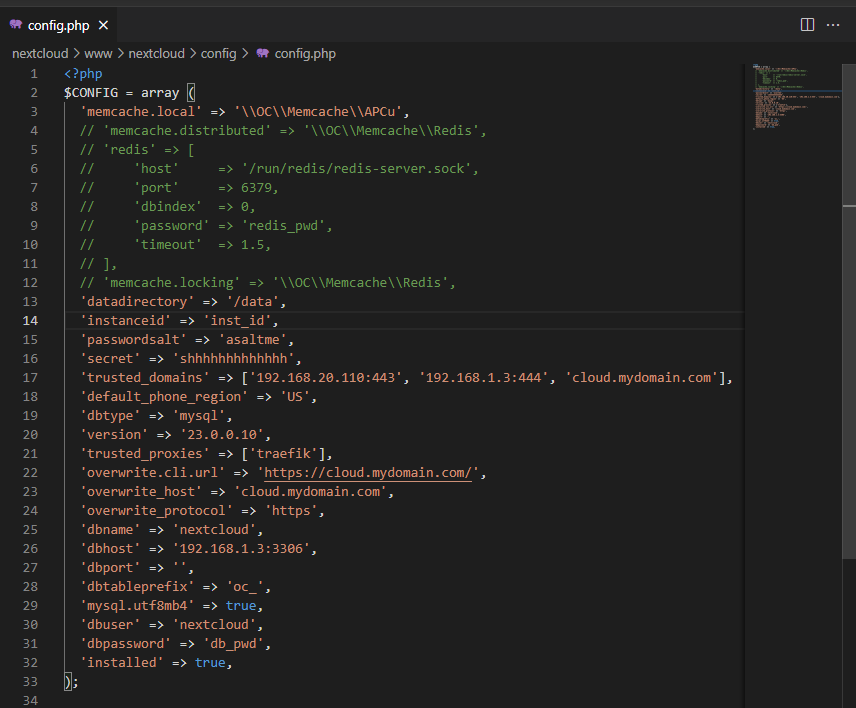
Hi everyone, I'm going crazy over this one. I'm running Traefik 2.6, other containers are working great, but doesn't matter what I do with NextCloud, it refuses to work via the proxy. Accessing NextCloud locally works great. here's my config: I couldn't also use Redis, getting an internal error something, but that's another story. Any ideas why http->https doesn't work for me with Traefik? Thanks!
-
Ha, and as I'm watching ibracorp's tutorial for running Authelia, he shows how to generate the hash: So this works for the generic password, but it doesn't work for the sudo password.
-
How did you get the echo command to work? I'm getting "bash: npx: command not found" I tried with the openssl command someone suggested but the $sdas$asdas$adasdasd result doesn't work regardless of the password I use. Thanks!
-
The only version I had success with is binhex's qbittorrent-vpn
-
@gellux, Hi, can you provide details of what you changed in the config? I don't see a setting for a theme file, it only has a WebUI Alternative setting which require a whole bunch of files.
-
Hi @SmartPhoneLover, how do I update it manually? I'm seeing this info in the log: Also, @amnesia, it connects via the 18081 port (in my case I chose 17081 since 180xx is used by freepbx.
-
That would be great since I'm only running the cpu portion. the CC fork also says that api is built-in, would be nice to interact with the miner via API. Thanks!






