





shpitz461
Members
-
Joined
-
Last visited
Everything posted by shpitz461
-
Here you go:

-
Have you done any tweaking? I followed this guide: https://fasterdata.es.net/host-tuning/linux/
-
Ha, you da man! I already have iperf3 server running in a docker, so I just called your docker client piece, and this is what I'm getting: docker run -it --rm --net='host' networkstatic/iperf3 -c 192.168.1.3 The initial test in the OP was from a VM to unraid iperf3 server docker instance, i actually never tested VM->VM. Now you got me curious.
-
Hi @dlandon, did you get a chance to look @ the errors posted in syslog when on MAIN page? Thanks!
-
virtio. As far as I know virtio-net is limited to 1gbps. I am running the iperf3 docker server to do the testing. When connected to another pc with the same NIC via a 40gbe switch I get 20-35gbps so i know the network chain is good.
-
Interesting info, thanks @Vr2Io! Reason I was asking is iperf3 shows ~10gbit in both directions: Any idea how to improve that? I get the same speed with multiple streams.
-
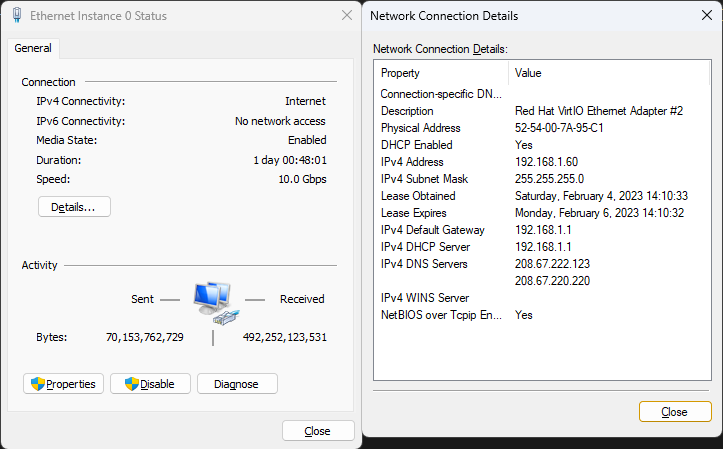
Hi everyone, I cannot find an answer anywhere so I'll ask. Is there a way to have the VM network bridge connect @ 40gbe instead of the standard 10gbe? I have an Mellanox ConnectX-3 card that I'm using as eth0 and eth1 (eth1 is disconnected), but any Windows VM I create with virtio bridge results in a 10gbe connection. Here's the NIC's info: Thanks!
-
Here you go. There was an update this morning, but the errors still appear when I'm on MAIN page. Thanks! selanas-diagnostics-20230205-1444.zip
-
After further investigation these errors only appear when I'm in the MAIN tab, other tabs do not cause the errors to be logged.
-
And I've started getting these errors in syslog: Every three seconds. Unraid 6.11.5. I tried uninstalling the plugins (both unassigned devices and unassigned devices plus), still same error. I tried rebooting, same error. Thanks
-
Try the solution posted in this thread, works on my 3090 with an AMD Epyc setup.
-
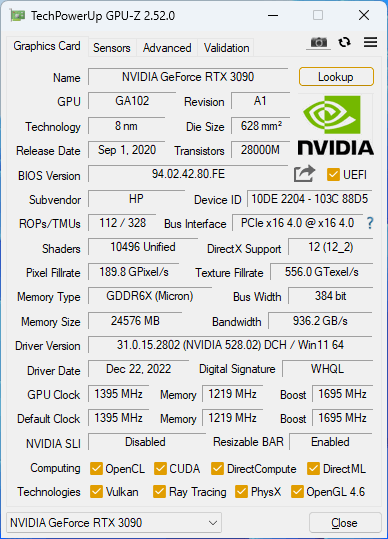
Great find, this worked for me after I was getting a blank screen and VM won't boot as soon as I turn on Resizable BAR in the BIOS. It worked fine bare metal, so I knew it was something to do with KVM but didn't know what. I have an HP RTX 3090, motherboard is an ASRock ROMED8-2T (with beta BIOS that has ReBAR support and is not public yet). Here's the GPUZ info from the VM: Here's my lspci dump for the card: I'm on Unraid 6.11.5 and VM is on Q35-7.1, Win-11.
-
Check this out: The secret is using SAS Expanders. Check out his channel, has tons of server-related videos with great explanations.
-
Happened to me as well just now, after a reboot cause one NVMe drive was reported missing (but BIOS saw the drive, this has been happening from time-to-time with the Asus Hyper M.2 V2 Gen3 card for unknown reason). To get the START ARRAY button back I did what was suggested by @jagz707 I clicked the play button in the Dashboard, but the array didn't start cause I have it encrypted. I then went back to the Main page and all the bottom buttons were there and was able to put the passphrase and start it up. So there's something going on.
-
Hi everyone, is there a way to allow captcha in the container?
-
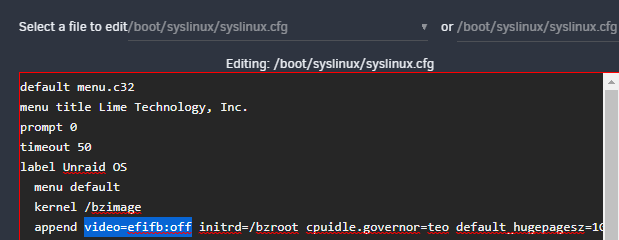
Another thing that might help is add the following feature: <features> ... <hyperv> ... <vendor_id state='on' value='0123756792CD'/> ... </hyperv> </features> value is a 12-character random string And @ghost82 suggestion, edit /boot/syslinux/syslinux.cfg and add 'video=efifb:off' after 'append', like this: And see if this helps.
-
Great catch @Jumbo_Erdnuesse! Looks like cores 1 & 5 are shared between the VM's, this should be a no-no. Also, you don't need to use VNC, you can have remote full acceleration using Parsec (https://parsec.app/), it works well with Nvidia cards. Another streaming option would be to use sunshine/openstream servers and moonlight client. For testing, you can eliminate the duplicate cpu cores usage, and remove the VNC portion and setup streaming, and see if that solves your problem(s). On another note, why are you passing the hdd by-id? You can also pass it directly with vfio, just like the GPU... Here's how I pass an NVMe drive in my VM: It needs to be isolated in its own IOMMU group of course. And in general, you should not be afraid playing with the xml, just save it to a text file, and if you make changes and break the VM, you can just restore the xml that you backed-up.

-
In the VMS tab, are the GPU's listed properly per VM? Each GPU is in its own IOMMU group? Not sure why you show Graphics Card set to 'Virtual', aren't you passing-through the GPU's as primary Graphics Card? Also make sure the device ID's didn't change (01:00.x is 3090, 02:00.x is 1080) and that they match their corresponding xml's. Make sure the xml's are proper like you show in the OP, with multifunction='on' and both video and audio passthrough are on the same bus/slot.

-
See my reply here: Maybe that's your issue... Report back if it doesn't solve it. Also would be nice if you post your VM's xml.
-
Can you post the VM's xml? I always edit the xml directly as the UI is making changes that aren't proper, I only use the UI for the initial VM setup. There is an issue in 6.9.2, not sure in newer versions of Unraid, that the video and audio parts are not passed properly via the UI, you need to manually edit the xml. Here's mine: <hostdev mode='subsystem' type='pci' managed='yes'> <driver name='vfio'/> <source> <address domain='0x0000' bus='0x85' slot='0x00' function='0x0'/> </source> <rom file='/mnt/user/isos/vbios/HP.RTX3090.24576.210310.rom'/> <address type='pci' domain='0x0000' bus='0x00' slot='0x04' function='0x0' multifunction='on'/> </hostdev> <hostdev mode='subsystem' type='pci' managed='yes'> <driver name='vfio'/> <source> <address domain='0x0000' bus='0x85' slot='0x00' function='0x1'/> </source> <address type='pci' domain='0x0000' bus='0x00' slot='0x04' function='0x1'/> </hostdev> You will need to edit the xml, add "multifunction='on'/>" on the 1st device, which is the video portion of the card, and note the slot and function. You then modify the 2nd device, which is the audio portion of the card, to the same slot but with function '0x1'. So "bus='0x85' slot='0x00' function='0x0'" translates to 85:00.0. And "bus='0x85' slot='0x00' function='0x1'" translates to 85:00.1. Is the VM stable when you don't pass the GPU?

-
Also make sure you stop docker/VMs in order to improve rebuild performance.
-
Also make sure "Workstation" (LanmanWorkstation) service is started on Windows client machines. Some Windows iso distributions come with the service disabled by default. Another thing I do to eliminate DNS issues like this is add 192.168.1.143 tower to my hosts file (located in "%windir%\system32\drivers\etc\") for each WIndows client
-
To answer myself, I'm running UrBackup and doing an image, seems to be working fine for what I need.
-
Hi everyone, if I don't actually have any vdisks and passing-through SSD's, what would be the best way to backup my VM's? Two Windows VM's, Win10 and Win11. Thanks!
-
You could get a 16i controller instead of 2x8i, that will save you 1 slot. I had to RMA my ROMED8-2T cause of a NIC not working, ASRock doesn't have any stock of it and it's been a month now that I'm without a board. They offered me the same board with Broadcom NIC controller instead of the original Intel X550, but it appears the new board is missing the rear USB-C port, so I'm still waiting on ASRock to provide a replacement solution.





