





Lolight
Members
-
Joined
Everything posted by Lolight
-
A 24 drive system (as opposed to a consumer-grade 12-14 drive one) would be a big jump in complexity and likely noise. It wouldn't be advisable to start at that level If you're not an IT-pro. That's probably why there were no other responses to your question. I think it would make more sense to start with a 12-16 drive system pictured in this thread:
-
What is your current NAS system?
-
Can you clarify why you need the HBA?I suspect It's gonna be a long while before those start showing up in retail (more than 6 months). And even then I don't think that the 20 TB versions are gonna be a similarly great deal compared to their 10-18 TB brethren (as with the Expansion externals) if Seagate switches in those back to the SMR tech. At least I haven't heard of them making any noises of developing SMR versions in the 10-18 TB range.The selected motherboard won't fit into the Node 304 case. It's designed to accept mini-ITX boards. MSI B460M-A PRO is a larger micro-ATX. On another note, the thermal qualities of both of those cases don't seem to be all that great. Have you considered the Node 804 case? It's designed to accept micro-ATX boards and has superior thermals (to keep HDD's as cool as possible).EVGA 500 White is a low quality PSU - Avoid!Nothing to do with discounting and everything to do with lower levels of taxation, inefficiency and retail greed.Hear ya! But in the case with the hard drives it was clearly the Chia mining hype and nothing else. Now that the disk buying panic related to Chia is over, the prices have started to slowly come down. Doesn't mean that they will return back to the pre Chia levels. Not until a sizable number of the Chia miners completely loose interest in expanding their "farms" and stop buying new disks.Welcome! Please keep it in mind that probably even more people are using consumer grade boards, especially when they're just starting. Because it's a much cheaper and simpler approach to building a home server.Seems like it's about to change with the hardware acceleration support being worked on: https://forum.armbian.com/topic/8451-emby-server-with-hardware-transcoding-in-xu4hc1hc2-armbian-stretch/?do=findComment&comment=113019I run the N2 on Coreelec as a client. Sorry, don't use Emby. This long thread might be of interest: https://www.avsforum.com/threads/75-server-or-media-client.2581649/page-16EVGA 500W White is a low quality PSU - avoid.Odroid C4 Odroid N2+ Odroid XU4I'd take the newer processor. In addition to the much faster RAM and newer GPU, it's also cooler running and more efficient (14 nm vs the older 22 nm lithography)Only hardware accelerated transcoding allows the lowest possible power consumption. Plex doesn't support hardware transcoding on AMD. You'll need Intel's QuickSync for that.The failed PSU model? Year? The replacement PSU model?Deleted (overlooked the date of this thread)Transcoding 4K movies is not a trivial task. You might consider a direct play option on a $50-$80 media box attached to your TV. Then a modestly specced and cheaply priced server is all you would need for non-transcoding streaming. The media boxes are build on very specialized SOC's allowing them to easily play 4K SDR/HDR + HD audio streams. If you decide to take that path, then I'd recommend purchasing one of the Odroid Amlogic based only boxes (C4 or N2+). https://discourse.coreelec.org/t/best-device-for-coreelec-in-2021/14348 They are nicely built units that are fully supported by Coreelec developers. https://coreelec.org/ Also suggest buying an eMMC module along with USB eMMC module writer. Those are really worth the extra few bucks to simplify the Coreelec installation process. The next step would be Installing Coreelec. Coreelec is a very small footprint Linux OS paired with a Kodi based GUI. Kodi is a media player.UNRAID Version 6.10.0 - Beta23 2021-07-08You can find the google paper here: https://research.google/pubs/pub32774/ Other studies: http://0b4af6cdc2f0c5998459-c0245c5c937c5dedcca3f1764ecc9b2f.r43.cf2.rackcdn.com/23104-fast16-papers-manousakis.pdf http://www.cs.virginia.edu/~gurumurthi/papers/acmtos13.pdf From the link above (AFR -Annualized failure rate):
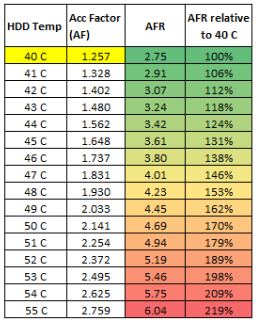 More like deceptive and pointless to anyone who's not a data center maintaining optimum airflows in a perfectly controlled low temperature environment....Is this one? https://www.backblaze.com/blog/hard-drive-temperature-does-it-matter/ Their conclusion is surprisingly nonsensical (read the comments under the report).Airflow (cool air) is what removes heat from a HDD. All by itself it doesn't make a HDD more tolerable of the higher operating temps. What matters is the resulting drive's temperature. Airflow by itself is irrelevant to the HDD's lifespan.50's is too hot. 40's is tolerable. 30's is desirable. The higher the HDD's operating temps, the lower its lifespan. The case's airflow volume, static pressure and the air's temperature are crucial parts here. But even with an optimum airflow it might not be possible to keep the densely packed drives in the 30's (under load) if your ambient temps don't stay well below of 25 degrees.





