






Fuggin
Members
-
Joined
-
Last visited
Everything posted by Fuggin
-
Love this feature....now if we could just get a cell phone app!
-
I would post your diagnostics file here then...
-
Go to console and type ifconfig and paste a screenshot of the eth0: stats. If it is 100, then you might need to use ehtool to change the settings in Unraid. Reason you get get something different in a linux environment from a windows environment may just be a setting in the linux environment in unraid. Unless someone else has a better solution...that's my guess.
-
Using 6.9.1 SAS Assist 0.86 4 drives won't spin down. I assume they might be not compatible with plugin commands? diags attached. please advise. tower-diagnostics-20210907-2128.zip
-
Both drives are the same make/model/size
-
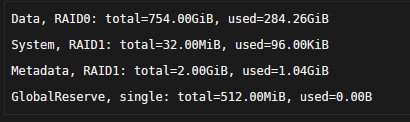
Actually nevermind....saw the logs that it reduces redundancy if I do that...so as long as the data is RAID0, i guess it should be fine. It'll be better than how I had my cache pool configured before anyways.
-
Hello...I had made some cache pool changes and wanted to make the entire cache pool RAID0. When I run the RAID0 balance it didn't balance the system and metadata. Do I run the system and metadata conversion manually? If so...what is the command for manually converting the system? Thanks.
-
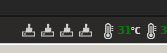
Hi...I am preclearing 2 larger HDDs I installed...it's been awhile since I have used preclear. I am not seeing the eyeball icon, however, I see all these icons on my bottom header...I would prefer to see the status window. Is there a way to see it?

-
Actually a problem... I inadvertently made 2 tunnels. How do I delete wg1? I tried the command on the console but it wouldn't work.
-
Works like a charm after OpenVPN stopped working. Thank you!
-
Doubled the inotify watches, which seems to be the common theme, works.
-
Snarky. I was doing file transfers and I wanted to see how it worked. Nothing showed up. Your move.
-
It this plugin still functioning? I installed it, started it and nothing appears in the file activity.
-
It this plugin still functioning? I installed it, started it and nothing appears in the file activity.
-
Hello....added a new disk to the array and it showed up on unassigned disks. I selected the preclear option and it just stays stuck on "retrieving information". Please advise.
-
Hi Fuggin, those permissions issues are more like warnings. If Fix Common Problems doesn't find any issues, you should be ok. Also, if you run calc again after Fix Common Problems, do you still get the warnings ? In any case, I'll check if I'm on sync with FCP issue detection. Yes...I get the warnings all the time even after doing a rescan of FCP. I just didn't want to risk moving anything until I was sure. Thx!
-
Performed a dry run calc and it gave me all these permissions issues. As instructed, ran Fix Common Problems and there were no problems with permissions. I don't use Dockers. Please advise.
-
I enabled the unbalance server and when I go to click on the open UI....nothing happens. I am running 6.3.0-rc4
-
RUnning v6.3.0-rc2 and using the version mentioned above, but unless I am completely missing it, where are the settings and changes for this?
-
I too have been enjoying this tool, has helped with some testing I've been doing. Thanks! We're getting off-topic though, perhaps it deserves its own thread? Running the latest version - the Total column looks more like an average to me. I would have expected a sum? Is this plugin still around? The link doesn't work...
-
Regarding the new permission check...here's what mine is set to now: Share Misc has non-standard permissions set The permission on the share is currently set to 0770 (standard permissions are 0777). You may have trouble accessing this share locally and/or over the network due to this issue. You should run the tool to fix this issue Share MoviesHD has non-standard permissions set The permission on the share is currently set to 0770 (standard permissions are 0777). You may have trouble accessing this share locally and/or over the network due to this issue. You should run the tool to fix this issue Share MoviesSD has non-standard permissions set The permission on the share is currently set to 0770 (standard permissions are 0777). You may have trouble accessing this share locally and/or over the network due to this issue. You should run the tool to fix this issue Share Music has non-standard permissions set The permission on the share is currently set to 0770 (standard permissions are 0777). You may have trouble accessing this share locally and/or over the network due to this issue. You should run the tool to fix this issue Share .PhAzE-Common has non-standard permissions set The permission on the share is currently set to 0755 (standard permissions are 0777). You may have trouble accessing this share locally and/or over the network due to this issue. You should run the tool to fix this issue Share Photos has non-standard permissions set The permission on the share is currently set to 0770 (standard permissions are 0777). You may have trouble accessing this share locally and/or over the network due to this issue. You should run the tool to fix this issue Share TV_Shows has non-standard permissions set The permission on the share is currently set to 0770 (standard permissions are 0777). You may have trouble accessing this share locally and/or over the network due to this issue. You should run the tool to fix this issue I don't know what 0770 or 0777 means...I just had it set up to whatever default setup Unraid had....I just want to be sure if I have this plugin change the permissions, that my files and server don't go sideways
-
Hi fonzie, No, unBALANCE doesn't work with the cache drive. I don't have one in my system, so I can't really help out, but a suggestion would be to use rsync. It's not that difficult in the end. Check the thread for rfs to xfs data transfer, it should be helpful. I know what fonzie is asking for and it is something I would find useful as well (I am sure others as well). It would be an excellent option to be able to just select an entire disk-to-disk transfer (if you didn't want to select folders). I am assuming your program scans the array for disk1 thru disk24 IDs....why not add Cache to that scan? Regardless...this plugin has been extremely awesome for my needs so far. Thanks!
-
aha! That fixed it....I knew something wasn't quite right. Thank you!
-
Updated...won't even calculate now. Just sits there at "CALCULATE: Operation started"
-
bump for itimpi and myself...can anyone advise?


