





FreeMan
Members
-
Joined
-
Last visited
Everything posted by FreeMan
-
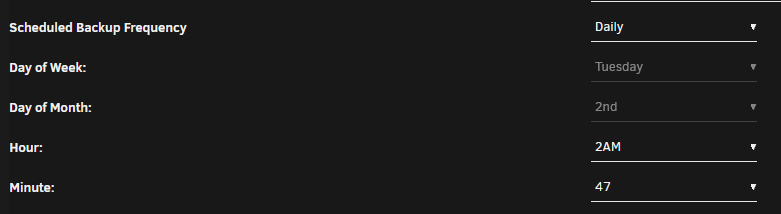
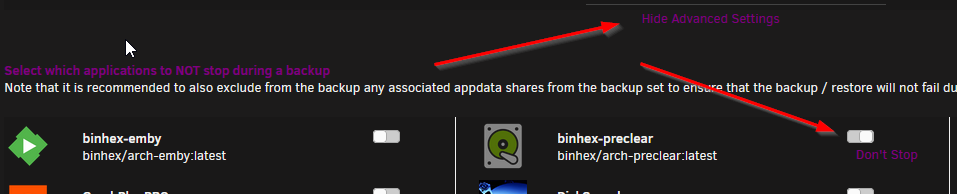
Well, there was a big arrow pointing at the text, but I suppose when it was totally out of context, it's hard to figure out where that was actually pointing. Especially since the list of dockers doesn't appear until after you click the "advanced" link.
-
hrm... this isn't a good sign. Container uptime 9 hours. Server uptime 2 days, 15 hours 43 minutes. The container shut down at 02:47 this morning. Here's the last line in the log from the start up on 9/21, followed by the shutdown early am on 9/22 and the startup 1 hour later on 9/22. Never mind... Because: Disables CA Backup. Makes calendar entry to re-enable it when preclear is finished. Makes additional note to re-read Note in FAQ Answer #7. It may do well to highlight that note - it took both of us 2 days to realize what was causing the issue, so it's likely others will miss it as well. Actually - a better option exists in the CA Backup config: Leave backups enabled, just don't allow it to stop binhex-preclear. I don't know if there would be any open files in the docker that may not get backed up, but considering that there aren't really any options to set (defaults work just fine for me!) and even if you do customize ports or something else, you'll probably have multiple backups made before and after running an individual preclear, this seems reasonable.
-
Currently 15 hours. It was 12 when you asked. That would explain a lot... Not sure why it restarted - Server's been up and there wasn't an update.
-
I've ended up restarting the preclear. It started from 0 at the pre-read. it is ripping right along on the preclear, though:
-
The container was up and running prior to plugging in the adapter at either end. I'll be happy to try plugging in with the docker running prior. I've never seen a drive do anything at that speed in my machine! Usually, I've done preclears via the USB<->SATA adapter, so I don't get anywhere near that kind of speed, so this is a bit of a revelation for me! It's a Seagate EXOS 8TB drive - maybe they're actually really fast! It does run at 7200 RP< I've not had issues with the adapter with anything else I've tried to use it for on either unRAID server or connected to my Win10 desktop, so I'd hazard a guess that it's got more to do with the order of connection/activation. Okey dokey then... steps back from the keyboard... One issue: After starting the PC last night, I checked on it this morning. noVNC had disconnected. Based on the FAQ, I figured "no problem". I clicked the reconnect button and... that was 12 hours ago, I don't remember exactly. I think I ended up closing the browser tab and relaunching the WebGUI again from the docker icon. When it came back up, I've got a terminal session, but no indication of the currently running preclear. ps -ef | grep pre gives me one result - itself, so it appears to no longer be running. Is there anything else I can do to check to see if it's still running on a background thread somewhere, or do I just presume it managed to die on me and restart it from scratch? preclear_binhex.sh -l lists the drive, but that seems like a reasonable thing for it to have done since it hasn't been added to the array yet. Any suggestions on this?
-
Yup, definitely something to do with the USB<->SATA adapter. I shut down the server, plugged the drive in to an internal SATA port and she's up and running 1 cycle. Running between 208 & 222MB/s right now. I think that's the fastest I've ever seen on my system! @binhex - you may want to modify the answer to Q6 - Can I preclear via USB. I would list that as a definite maybe... May work for some, not for others. Don't know if you had success doing so, it may just be my configuration. Also, having uninstalled gfjardim's plugin, on reboot, Fix Common Problems reminded me to uninstall the Statistics plugin that went along with it. Do you have any plans to implement any sort of statistics gathering? (Does anyone know if there were any results of gfjardim's statistics gathering ever published?)
-
That was my thought, too. Well, sort of... I will give it a try plugged in internally. I just didn't have time right then. Sent from Tapatalk
-
The drive just arrived today - shockingly fast considering the "SmartPost" delivery. Of course, it looks like the box was kicked 1/2 way across the country... Following the instructions on GitHub, I got this error I'm not sure what "does not exist as a block device" means. I have double (nay, triple) checked that this is the correct drive, and it's the only on on the machine not already assigned to data/parity/cache, so that is the correct one (plus the model/serial match). At the moment, I've got it sitting on top of the server connected via a USB3.0 -> SATA adapter. I've used that for my last 2 or 3 preclears, though those were with the plugin, not the docker, if that matters, without issue. I've gotta run for a couple of hours (I was hoping to give it a head start). If no response when I return, I'll dig into the preclear instructions to see if they have anything to say...
-
@Dmitry Spikhalskiy Just thought I'd let you know that whatever the issue was that was causing the servers to drop off the ZT network does seem to have resolved itself. This was even before you pushed 1.4.6 as a general update. Thanks to Auto-Update, they're both running 1.4.6 now and I've not had any issues. This is greatly appreciated!! With my limited networking knowledge, it'll be much easier to get any new server users configured now, since I can have them install the ZT client on their machine instead of trying to get them through my LetsEncrypt-NGNIX/OpenVPN solution (which works, but it's been long enough since I configured it that I've forgotten what needs to be done ). Just one question (I could probably read the ZT docs, but this is so much easier...) How do I configure the servers with a static IP address? Do I hit the little trash can next to the assigned IP then the + below it to add a static IP?
-
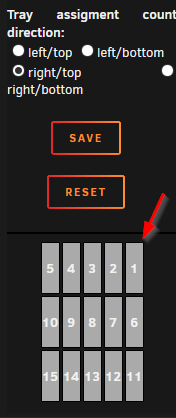
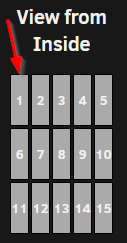
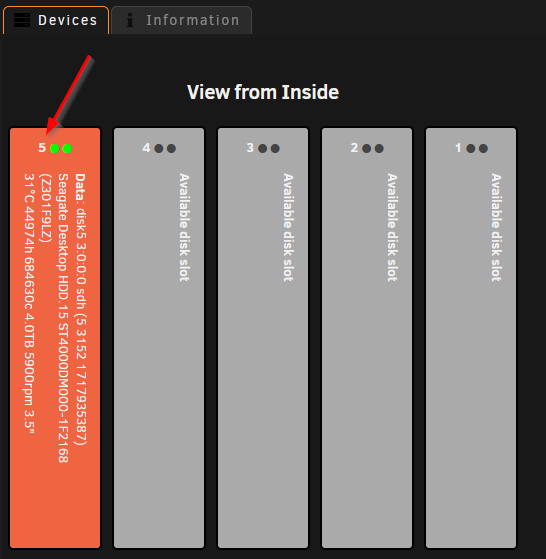
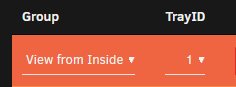
I've just discovered this and am starting to play with it. This will be really helpful (so long as I remember to keep it updated... ) I noticed one small bug, though - on the configuration screen, I have this set up: Showing the #1 bay in the top right corner. However, when I go to the Tray Allocations tab, I see this: Showing the #1 bay in the top left corner. I assigned a disk to slot #1: then go to look at my setup under Tools | Disk Location, it's back to the configuration I selected: so it seems to be working off of the physical location in the graphic, not the numbered slot that I've assigned. I just have to remember to use the slot numbers as shown in the config, knowing that they'll appear properly numbered & located when I look at it later. All in all, a fairly minor complaint, but I thought I'd pass it along. So far, so good! This will be super handy for my off-site backup server. I will be able to include a nice picture of which drive to swap out when I send my son back to his place with a replacement!
-
I've got a new 8TB drive on its way and I'll be using the docker version as soon as it gets here. I'll post back and let you know. I understand and get the point of the docker vs potentially breaking the plug-in, but, even though I grew up in the DOS days and used *nix in the 90s, I've gotten lazy and do like the GUIness of the plug-in. I'll live. Oh, and welcome back!
-
Thanks for that suggestion @spants. Unfortunately, this seems to be bouncing at random... It now reads: Backup Online NAS Online I had not restarted either docker, and when I first looked a minute ago after seeing your response, NAS, was 13 minutes since it had last been seen. By the time I'd quoted your message and typed that first bit of mine, it had come back online. Is there any logging anywhere that is going to show me something more useful than "200 join OK" that might help diagnose the issue? Update: Now they're showing offline for 6 and 4 minutes...
-
I keep having my main and backup server drop offline: If I restart the docker, they will, of course come back up. On a couple of occasions, I've browsed to the ZT IP address from Win Explorer, and the server has responded, and my.zerotier will then show that it's online. Of course, this is NOT very helpful if I'm not at home and am trying to get access to the server. This is all I see in unRAID's log for the ZT container: Again, not very useful... I'm running the default 1.2.12 build version on both of my servers. Any idea why this is happening or what I can do to fix it?

-
In the docker terminal, type which zerotier-cli which will tell you where the zerotier-cli program is installed. Its installation path isn't on the search path by default, so you'll need to cd to that path. IIRC, it is "/user/sbin/zerotier-cli", but I'm not 100% on that. Once you've CD'd to that directory, you can run the zerotier-cli * commands from the first post to get the info necessary to get other help. Sorry, but that's about as far as my very limited knowledge will take you, but it's a start!
-
Just discovered this tonight. Got my account created. Installed the docker on my main machine & got it authorized. Installed a client on my Android phone & got it authorized. Installed the docker on my backup server & got it authorized. I can connect to the WebGUI of my main server from my phone with WiFi turned off no problem! I do have to use the ZT IP address to access it, but I often have issues accessing my server internally via name instead of IP, so I'm not too concerned about that. I cannot browse the server with Astro (an Android file manager app) like I used to, but I don't think that's ZeroTier's fault - I haven't been able to do that for months. (Must find new file manager app.) Also, I cannot access the servier via ControlR or get nzb360 to connect even though both will work just fine via openVPN. I have a test Duplicati backup running to my backup server via an Unassigned Devices share. Now I just need to get the server off-site and test it out that way! Probably took me 30 minutes including playing around with Astro and submitting an issue to them about the network browsing not working. All-in-all a successful evening I'm probably going to come up with a different backup solution than Duplicati, but otherwise, I'm feeling 100% with what I've got right now. Thanks for making this available, @Dmitry Spikhalskiy!
-
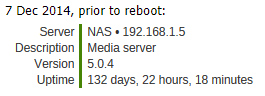
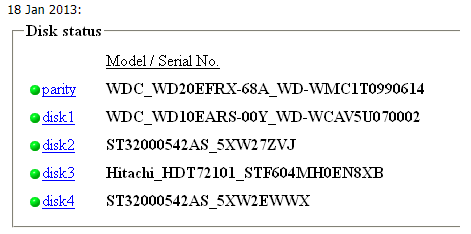
Been using unRAID since 2012 (at least, that's when I created my forum account). I started by migrating 2 1TB drives and a couple of smaller ones out of my overstuffed WinXP machine. Very happy to be here! I have nearly no need for storage space on any of my daily machines, but it's so hard to find drives under 1TB, so mostly they just sit there with lots of empty space... A couple of memories of the early days of my setup: From when there was NO WAY a WinXP box would stay up that long and: One of my first disk config screen shots (so I could make sure I got things back in the right order). (Yes, I'm a bit of a pack rat, why do you ask? It seems this is probably about the same time I started using Evernote, which is where those were stored...) I'm now running two servers (one is a backup and is almost ready to be moved offsite). Congrats and here's to another 14+ more and more pictures of Tom in Hawaiian shirts!
-
Don't move data from /mnt/disk1/MyShare/... to /mnt/user/MyShare/... (or vice versa) That is considered mixing drive shares with user shares and it just doesn't work out well at all. You can go from /mnt/disk1/MyShare/... to /mnt/disk2/MyShare/... or /mnt/user/Share1/... to /mnt/user/Share2/... without problem, using whatever tool (Krusader/Dolphin/MC/command line/etc) you'd like.
-
I've rolled through SpaceInvader One's review video and I do really like the new dashboard. The monochrome look there isn't horrible, but my opinion on removing all color from icons still stands. I've posted on the rc3 thread, as I presume nobody's looking at the rc1 or 2 threads any more. OK, rant off. I've said my piece and I'm probably the lone voice. There are much more important issues in the world, so I'll go find a different windmill at which to tilt. Thanks for listening!
-
I agree 100%! I think this whole design trend was started by some 24-year-old millennial who never had to look at a monochrome green or amber display where everything was just one color. It's especially hard for those whose eyesight isn't quite what it used to be. UGH! Even worse. My server has been as stable as can be under 6.6.6 (despite the implications of its version number). Unless there are significant security issues, maybe I'll just stay here... To save time, I'll just copy/pasta my thoughts there. Again - I really appreciate the incredible amount of effort you put into developing this and the weekly, if not daily, effort that goes into maintaining it. I saw your comment in the OP about this being the best maintained app on the planet, and I am not going to disagree with you on that! Also, I'm glad to know I'm not the only curmudgeon around who thinks that not every one of the latest trends is a good idea.
-
Excellent! Also, after having just taken a look at the changes Squid made to CA, please - I beg you - please don't succumb to the "everything has to be monochrome" design theory!!! I really, really like the fact that I can find ControlR by the 4 red Cs, simply by seeing the color, instead of having to examine every icon to see which of the 10 blue ones it is that I'm looking for.
-
Great updates as always. I like the new icon style and shapes, but intensely dislike the lack of color. I know you're just following trends set by MS, Apple, & Google in their interfaces, but color is so vital to humans in recognizing things. Looking at my Settings | User Utilities section now is just one big sea of blue on a black (dark theme) background. It takes much more effort to look at each icon to see if it's the one I want, instead of just being able to find a color pattern. I guarantee you that ControlR and Unbalance are now the first things I see when I look at that screen simply because they're red and green (respectively) in an otherwise monochrome blur. FIP and Stats Settings are the next things I see - even though they're primarily blue, they're at least different shades of blue. Heck, I find ControlR on my phone screen because of the red circles even though my home screen page is full of different colored icons scattered everywhere (even though Android deems it necessary to put an ugly white circle behind them). Again, I get that you're following the herd, but when the herd is headed toward a cliff... Based on the comments, I'm going to guess that when I install 6.7, all the icons will be monochrome. For that reason alone, this will be one upgrade I'm not looking forward to. Just my 3 cents worth (gotta account for inflation)... </rant>
-
The line in the middle is what I'm referring to. Maybe it's just my eyes getting old but it's a bit too dim. Sent from Tapatalk
-
Hey, I got my icon back! thanks for the super quick fix! It seems like the text color changed on the action buttons (spin up, spin down, etc) to yellow. It's that the True Black scheme and I just didn't notice before? I was referring to the "status", "uptime", "load", etc labels, in case I wasn't clear. Sent from Tapatalk
-
I agree, the True Black is very nice! The label font (below the server status line) could be a bit whiter to help it show up better, but not much, and that's a minor nit pic. I miss the scrolling status line. I don't know if there were technical reasons for removing it, but if not, it would be nice to have as an option. Also, I seem to have lost the "3 C" logo as the icon on my android phone. I now get just the default android poking his head up icon. Thanks for continuing to improve this! Sent from Tapatalk
-
That makes sense. Maybe add a default "Restore Point" mapping that's mounted r/w from the get go. Of course, I'm not 100% certain I'd have thought to use that since I blew away entire shares of data and was in a panic state... NOTE TO SELF: do NOT attempt to manually fix unRAID issues from a terminal session without ingesting at least 2 cups of coffee prior to starting! Sent from Tapatalk



