





bonienl
Community Developer
-
Joined
-
Last visited
Everything posted by bonienl
-
The update frequency of preclear is determined by the preclear plugin. Different parts of the GUI have different update frequencies, Unraid version 6.10 uses an event driven model to do updates, you may want to upgrade. Note version 6.10 is currently a release candidate, but stable enough to use.
-
What version of Unraid are you using? Page Update Frequency is something from the past, current versions have real-time screen updates.
-
Remark: the upcoming Unraid version 6.10-rc5 has a new setting to enable or disable SMB multi-channel (it is disabled by default).
-
Ah wait.... This setting is only meant for pool devices, not disk devices! Will make a correction, will become available in a future release (probably not the next release rc5).
-
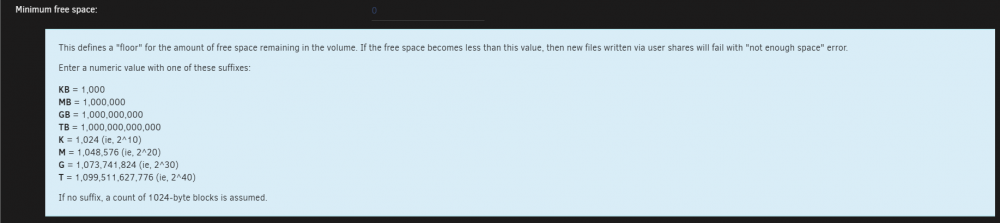
Not a mistake. Have a look at the built-in Help.
-
All these values are monitored in real time, whenever something changes you will see it in the GUI.
-
Glad you like it and my other plugins as well. No obligations, but feel free to click on the link given in my signature.
-
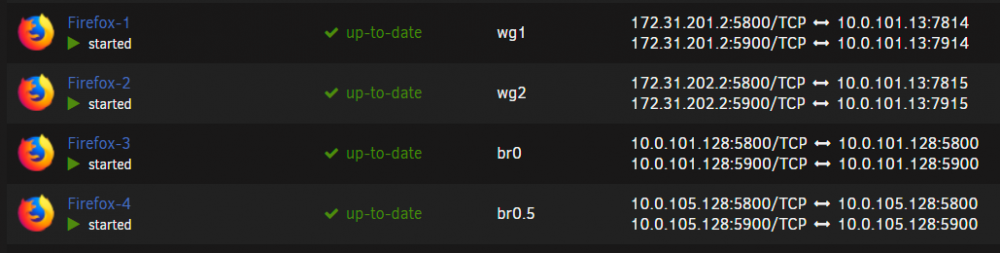
You can assign a docker container to a WireGuard tunnel just like another interface. In the example below I have 4 browser containers, each connected to a different network, two of them use a VPN tunnel (wg1 and wg2) and hide my IP address
-
The 'df' command is used to obtain the utilization percentage information. The GUI displays the result of this command for the different areas.
-
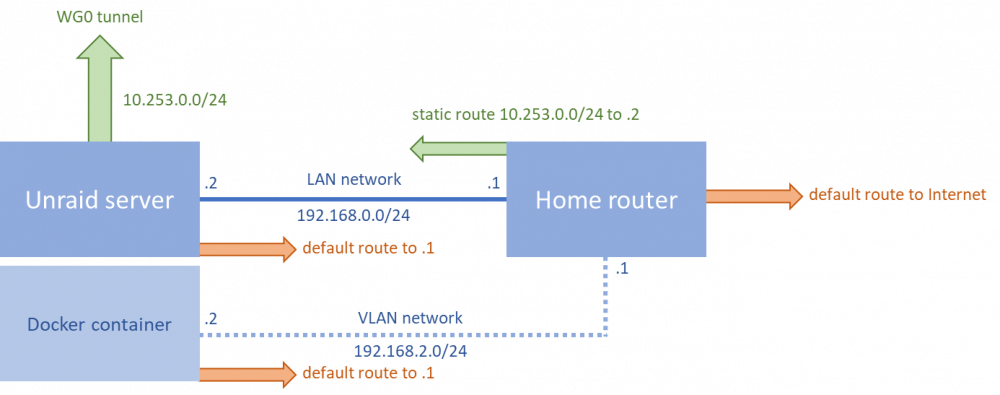
The normal routing flow in the LAN network and the VLAN network is the default route towards the home router, which on its turn has a default route to go out on the Internet. This is a straightforward left-to-right path in the picture below and works for both the Unraid server and Docker container to go out on the Internet. When a WireGuard tunnel is introduced, it resides on the Unraid server. The docker container in the VLAN network is unaware of this tunnel and don't know how to reach it, here the default route towards the home router is still followed. The home router needs to know how to reach the WireGuard tunnel, by adding a static route of the tunnel network (10.253.0.0/24) and pointing to the Unraid server address (.2). With this static route in place the VLAN network has a route back to the WireGuard tunnel and this allows a remote device to access the container over the WireGuard tunnel. There is one gotcha, both the WireGuard tunnel and Docker container reside on the same Unraid server, and docker by default does not allow a docker container in a custom network to talk to the host, hence it is required to enable the setting "Allow host access to custom network" to allow communication between container and tunnel.
-
Network Rules only exists when more than one ethernet connection is detected on your system.
-
I added in Unraid 6.10-rc5 the automatic creation of the necessary routes to access containers on network 'br0' remotely. "Host access to custom networks" must be enabled, to allow communication to the container using a WireGuard tunnel configured for remote LAN access. With this feature users are not obliged to create static routes on their home router (gateway), though more complex network setups with VLANs (=additional networks) still require proper static routes on the router. @JackieWu thanks for introducing this solution!
-
It is included as placeholder for the “Done” button, it will know where to return to. Done is actually preferred over the browser back button, it will keep the GUI up to date instead of a cached browser copy. In addition the placeholders are used to load the correct translations, without them translations won’t be complete.
-
syslog rotation looks at the size of the log file and when greater than the indicated size, it will start a new log file while renaming the older log file with a sequence number. The user can select how many previous log files to keep stored next to the current log file.
-
This is normal, later versions of Unraid come with sensors-detect included.
-
Both HBA 1000 and HBA 1100 series work out of the box, though it is recommended to update to the latest available firmware version.
-
Yes this causes PHP errors when doing disk calculations (share calculations are fine). I made a fix for this in the next release. Thx.
-
All the Dynamix plugins are maintained and supported on best-effort basis. Right now I am pretty busy and focus is on the next Unraid release. I am using this plugin myself too and don't see any issues. Note for those who want to uninstall this plugin, before uninstalling the plugin itself you need to remove the calculated hashes, this is done by the "Clear" operation (select all disks and then Clear, see also the built-in Help). After the plugin is removed, you can delete the folder /config/plugins/dynamix.file.integrity on your flash devices to remove all log and other files.
-
This is a display issue only and fixed in Unraid 6.10.
-
rc4 has been tested with Chrome, Edge, Firefox, Safari and Brave and works as expected.
-
Unraid uses "udev" to discover the hardware components of your system, including the installed NICs. Your NIC seems to report the wrong information and issues the same MAC address twice. See if a firmware update exists for your NIC.
-
First thing to do is test in safe mode without plugins. The usual suspect when it comes to software updates is NerdPack, which may install incompatible packages.
-
Getting a 169.254.xxx.xxx address means the system could not get an IP address from your router. This suggests you have some network issue. Try replacing cables and. moving ports on your switch or router. You mentioned the message about interface eth0 down, this is another indicator that there is a network issue. This interface should never go down, otherwise you loose connectivity.
-
Some people have reported issues with RealTek NICs and bonding. Since you have a single interface, disable bonding in the network settings and see if that makes a difference.
-
Today's update has added a file viewer for files with extension: .pdf, .jpg, png, .jpeg, .gif Check it out!




