






JorgeB
Moderators
-
Joined
-
Last visited
Everything posted by JorgeB
-
Disk2 is online, the one being resilvered is disk3 NAME STATE READ WRITE CKSUM zfs DEGRADED 0 0 0 raidz2-0 DEGRADED 0 0 0 sda1 ONLINE 0 0 0 sdc1 ONLINE 0 0 0 replacing-2 DEGRADED 0 0 0 5034914802460489689 FAULTED 0 0 0 was /dev/sdc1 sdb1 ONLINE 0 0 0 (resilvering) sde1 ONLINE 0 0 0 sdd1 ONLINE 0 0 0 sdh1 ONLINE 0 0 0 sdg1 ONLINE 0 0 0 sdf1 ONLINE 0 0 0
-
Errors are not logged as a disk error but are soon after spin up, so you may want to retest with spin down disabled to see if it's related.
-
Yes. Boot from a flash drive and rerun the wizard. Yes, with a paid license, trial licenses cannot be transferred.
-
Most likely because it was fixed by the kernel update without LT knowing, since it only happened with a few UPS models.
-
That's bizarre, but yeah, if you can test a new VM with a new vdisk.
-
You have a Starter key, so you can only have a max of 6 attached devices; there are currently 10. That's why you cannot start the array.
-
The pool is raid1 only now, you should be able to replace a device.
-
You can assign one if you like, this is normal, it will always show that slot with the array stopped. You can also assign an extra disk there, you can reduce the slot count to 11 to not show that.
-
Since this thread is still active, and to avoid confusion, please start a new one and post the diagnostics.
-
Even after typing that?
-
This may be a bug, but you can ignore, it's just a display issue. @SimonF any idea how to check what is causing that error?
-
I don't see the Connect icon, try this, open a terminal window and copy/paste unraid-api plugins install unraid-api-plugin-connect Then refresh the GUI and see if the icon shows

-
Looks like the sparse bundle got corrupt: fruit_get_bandsize: Didn't find band-size key in .../Info.plist fruit_tmsize_do_dirent: Processing sparsebundle failed The best bet is to delete the TM backup bundle for that Mac and start a new one.
-
I have a Windows 2022 server VM with 8 vCPUs, don't notice any lag, but I'm not using encryption, not sure if that adds any latency. I'm also using a zfs zvol, which in my test performed better than an image on zfs.
-
Please post the diagnostics and a screenshot of where you see that "can't open" error.
-
With the plugin installed, it's in the API settings Tab
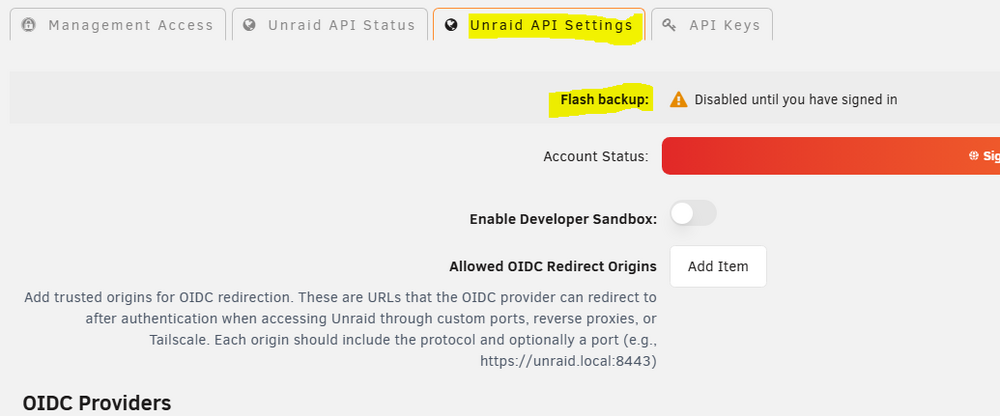
-
Just the image, without containers?
-
Can you retest without passing through any PCI devices to the VM? Also, do you have ACS override enabled?
-
You need to install the Connect plugin for that.
-
Looks like a drive problem to me, it cannot even get the capacity. May 26 21:10:52 HomeServer kernel: sd 9:0:3:0: [sdh] Read Capacity(16) failed: Result: hostbyte=0x00 driverbyte=DRIVER_OK May 26 21:10:52 HomeServer kernel: sd 9:0:3:0: [sdh] Sense Key : 0x2 [current] [descriptor] May 26 21:10:52 HomeServer kernel: sd 9:0:3:0: [sdh] ASC=0x4 ASCQ=0x22 May 26 21:10:52 HomeServer kernel: sd 9:0:3:0: [sdh] Read Capacity(10) failed: Result: hostbyte=0x00 driverbyte=DRIVER_OK May 26 21:10:52 HomeServer kernel: sd 9:0:3:0: [sdh] Sense Key : 0x2 [current] [descriptor] May 26 21:10:52 HomeServer kernel: sd 9:0:3:0: [sdh] ASC=0x4 ASCQ=0x22 May 26 21:10:52 HomeServer kernel: sd 9:0:3:0: [sdh] 0 512-byte logical blocks: (0 B/0 B) May 26 21:10:52 HomeServer kernel: sd 9:0:3:0: [sdh] 0-byte physical blocks May 26 21:10:52 HomeServer kernel: sd 9:0:3:0: [sdh] Test WP failed, assume Write Enabled May 26 21:10:52 HomeServer kernel: sd 9:0:3:0: [sdh] Asking for cache data failed May 26 21:10:52 HomeServer kernel: sd 9:0:3:0: [sdh] Assuming drive cache: write through May 26 21:10:52 HomeServer kernel: sd 9:0:3:0: [sdh] Preferred minimum I/O size 4096 bytes not a multiple of physical block size (0 bytes) May 26 21:10:52 HomeServer kernel: sd 9:0:3:0: [sdh] Attached SCSI disk And not even the SMART report is working: === START OF INFORMATION SECTION === Vendor: SEAGATE Product: ST6000NM0034 Revision: NE03 Compliance: SPC-4 LU is fully provisioned Rotation Rate: 7200 rpm Form Factor: 3.5 inches Logical Unit id: 0x5000c500854ad603 Serial number: Z4D4CVS00000R632V7WW Device type: disk Transport protocol: SAS (SPL-4) Local Time is: Tue May 26 22:25:39 2026 EDT device is NOT READY (e.g. spun down, busy)
-
Where is it showing extra devices? Also note that RAID controllers are not recommended with Unraid.
-
That should be OK; better to disable Docker and VM services before starting.
-
If the containers are not set to autostart, you can start the service and then start them one by one. If they are, you would need to remove that first, don't remember how it's done, but searching the forum should have some results. Worst case, recreate the Docker image and restore the apps one by one.
-
If the client is SMB capable, it may also be worth changing it since NFS tends to me more problematic, mostly meaning not as well tested.
-
If the 2TB was originally in the pool, and its capacity is still being limited by that device, you can use it to replace the missing one, but only using the CLI, the GUI will not allow it since that is the only small device. I can post the steps if you like.


