






JorgeB
Moderators
-
Joined
-
Last visited
Everything posted by JorgeB
-
Please see the release notes, there's an apparent kernel regression with the APC UPS service affecting some models, you can use the NUT plugin instead for now, that should still work fine and has very similar functionality.
-
There are two pools set as the pool, one named "boot" and another named "mmc." Since "boot" appears to be the one in use, open a terminal window and type mv /boot/config/pools/mmc.cfg /boot/config/pools/mmc.bak Then reboot and retest.
-
TPM is being detected, but it's failing to initialize: May 15 22:41:31 Tower kernel: tpm_crb MSFT0101:00: [Firmware Bug]: ACPI region does not cover the entire command/response buffer. [mem 0x78ab0000-0x78ab0fff flags 0x200] vs 78ab0000 4000 May 15 22:41:31 Tower kernel: tpm_crb MSFT0101:00: error -EBUSY: can't request region for resource [mem 0x78ab0000-0x78ab0fff] May 15 22:41:31 Tower kernel: tpm_crb MSFT0101:00: probe with driver tpm_crb failed with error -16 Looks like a BIOS issues, look for an update.
-
What is the name of the pool? 7.3 has some new reserved names.
-
Go to Tools - System Devices and see if the controllers shows there.
-
One of the NVMe devices appears to be failing cauisng very slow i/o: May 16 23:00:01 TheWired kernel: critical medium error, dev nvme0n1, sector 0 op 0x0:(READ) flags 0x80700 phys_seg 1 prio class 2 May 16 23:00:01 TheWired kernel: nvme0n1: I/O Cmd(0x2) @ LBA 0, 8 blocks, I/O Error (sct 0x2 / sc 0x81) May 16 23:00:01 TheWired kernel: critical medium error, dev nvme0n1, sector 0 op 0x0:(READ) flags 0x0 phys_seg 1 prio class 2 May 16 23:00:01 TheWired kernel: Buffer I/O error on dev nvme0n1, logical block 0, async page read May 16 23:01:01 TheWired kernel: nvme0n1: I/O Cmd(0x2) @ LBA 0, 8 blocks, I/O Error (sct 0x2 / sc 0x81) May 16 23:01:01 TheWired kernel: critical medium error, dev nvme0n1, sector 0 op 0x0:(READ) flags 0x80700 phys_seg 1 prio class 2 May 16 23:01:01 TheWired kernel: nvme0n1: I/O Cmd(0x2) @ LBA 0, 8 blocks, I/O Error (sct 0x2 / sc 0x81) May 16 23:01:01 TheWired kernel: critical medium error, dev nvme0n1, sector 0 op 0x0:(READ) flags 0x0 phys_seg 1 prio class 2 Physically remove that device and try starting the pool with only the other one.
-
If you click the 2nd pool, do you see an option to "remove pool"? If yes, click there. Also post the diagnostics
-
Post a photo showing where it's stuck.
-
Please post the diagnostics.
-
The flash drive is read-only: May 16 12:22:40 Crimson emhttpd: error: update_pool_cfg, 371: Read-only file system (30): fopen_pool_write: cache Read-only file system Backup the current one, recreate it using the USB tool, then restore only the config folder if it happens again, replace the flash drive.
-
May 16 17:37:17 Bunker kernel: FAT-fs (sde1): error, fat_get_cluster: invalid cluster chain (i_pos 0) Flash drive problem: you try running ScanDisk on it, or just recreating it, if issues persist, replace it.
-
Try checkinmg filesystem on that disk, using the checkmark icon on UD.
-
That disk needs to get replaced as well. Since you have dual parity, you can replace both at the same time, or if you don't have a spare, rebuild disk2 first, then replace disk1.
-
There's a problem with the pool cfg file, try this first: on main click on the first device for that pool and then "remove pool" back on main, create a new pool with the same name and number of slots assign the pool devices, leave the filesystem set to auto start the array to import the pool and post new diags.
-
Please create a new thread in the general support forum and post the diagnostics after updating.
-
Thanks for the post, 7.3 is more strict about the flash drive layout. You can also just back up the current flash drive, recreate it using the USB tool, restore only the config folder from the backup and you are all set.
-
There are issues with two devices, not just one; please post the diagnostics.
-
Please use the existing plugin suppor thread.
-
That will be a plugin.
-
This suggests a hardware issue; recommend addressing this first. Read errors on disk1 are logged as a disk problem; run an extended SMART test.
-
You should have backups of anything important either way, if you have good backups and they are easy to restore, RAIDZ1 is less of a risk, but even with RAIDZ2, backups are still needed.
-
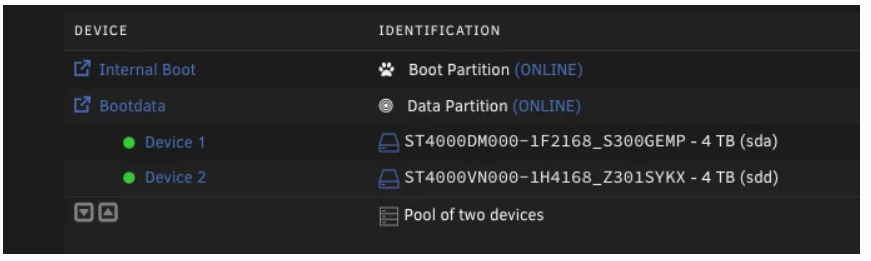
This is the boot pool, these two disks, if those are the one you wanted to use, it's correct. It is. Post the diagnosis to confirm a TPM device is not being detected, or if it is but there'sa problem..
-
Try the open files plugin.
-
You can, or you will need to resync parity. Either way, the new disk will need to be formatted in the end.
-
It would mostly depend on how good the backups are. The extra I/O should not be a big deal for healthy drives.




