





dboonthego
Members
-
Joined
-
Last visited
Everything posted by dboonthego
-
Is there a precedence to the retention setting? If I backup monthly, will I have THREE backups or ONE after the 4th month?

-
Having duplicate files on both the cache and array would spin up parity. Check to make sure there are no files having the same name that exist in the same path on different disks.
-
The share settings dictate how unraid will choose a disk for writing. If you set included disks, only those disks will be considered for writing of new files. If you set excluded, all other disks are considered. If you don't specify anything, then drives allowed under Settings > Global Share settings are allowed. So if you want all new files to be written to your new disk (say that's disk2) then set the share to include disk2. It's personal preference really with perhaps some performance considerations, but nothing wrong with doing it. Unraid will still read files that exist on any included/excluded disks if the share exists on them.
-
Yep. Do the new config again by checking the yes box and apply. Assign your disks again without #6 and start the array. A parity sync will begin. You will see reads on all data disks and writes to parity with overall progress at the bottom of main tab. During sync, you may still see alerts ⚠️ that array is unprotected. That's normal until a successful parity sync. You will also want to review your default disk settings (spin down, filesystem, etc) and set them accordingly. The new config resets these settings to defaults. If you had disk shares enabled, those would need to be enabled again too.
-
Where do you see this? Disk6 looks unassigned/not missing to me. Yes, but I don't think you need to do it. It looks like Disk6 is unassigned to me too. After doing the new config and starting the array, a parity sync begins and is calculated against all your array disks. It's normal to see a ln icon or status showing your system isn't protected while this is in progress. Once the sync is successful, that should go away. What does your main tab look like? What does it say for parity at the botom?
-
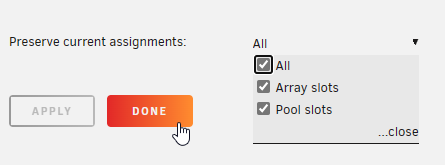
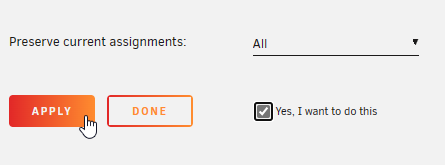
Instead of checking the box "Yes, I want to do this" and clicking Apply, is it possible, you simply clicked "Done" and proceeded to unassign your disk? The checkbox is very easy to miss because it's hidden behind the preserve assignment drop down. "Apply" is greyed out until you check the box leaving you with "Done" being your only option. A reasonable person would assume they're "Done" making changes and click the button thinking it works similarly to how OK vs. Apply works in a Windows environment, but it seems "Done" doesn't actually do anything but kick you back to the Tools menu. What I'm thinking you did. What needs to be done.
-
I don't understand this. Unraid supports one user (root) with SSH access.
-
Unlikely to ever be baked into OS. To do it on your own would require exporting existing crontab, editing that to include you new spinup job, editing the GO script to import the edited crontab at boot, and of course a script to manage the actual spinups. Honestly, user scripts is easier.
-
Should be able to remove the drive and balance. Under the cache disk settings, choose convert to single mode. https://docs.unraid.net/unraid-os/manual/storage-management/#removing-disks-from-a-multi-device-pool
-
Sounds like you have a download folder on a disk somewhere. Posting the diagnostics as requested will help. This happens because your windows user doesn't have permission to the share. Usually because root/root is defined instead of nobody/users.
-
The smart reports look fine. If you have room for them in your backup system, why not use them?
-
Unraid only supports one admin (root) user for administration of the system. For shares, you would do it for better security. It's recommended to use read-only shares where you can and create separate users having different access levels. If any of your devices are compromised, your SMB shares are exposed and not having full rights everywhere can reduce the damage from the attack.
-
Hmm, I read the original question as wanting to add the old parity as an additional data disk. My mistake. If replacing an existing data disk, then yes, don't format.
-
You're correct. After the 10TB parity sync is complete, simply assign the old 8TB parity to a data slot. Unraid will prompt you to clear and format it.
-
Something to consider if you re-arrange the disk order is your include/exclude disks in your share settings. Like, if you specifically included disk7 and now that disk has been moved to position 6, you'd want to reflect that in your share settings.
-
Was disk1 in a USB enclosure? When you get a replacement disk, you can simply install it and assign to slot1 to rebuild it from parity. In the meantime, you're effectively already using the parity as an emulated data disk. If your question is literally how to turn your parity disk into the data disk then you would Tools-->New config and assign the parity disk to disk1. This works in your scenario because you only have 1 data and 1 parity in raid1. There is no reason to do this unless you plan to use a replacement disk that is larger than your existing parity or if you just don't plan to replace the disk at all.
-
In your case, the parity disk is a mirror of the data disk. So depending on the nature of failure, your data may be secure on parity. Of course post the diagnostics and don't format anything!
-
#1. Absolutely if your data is important to you. Parity will protect you from disk failure, but it won't help with filesystem corruption, theft, accidental deletes, etc. #2. Dual parity certainly provides more fault tolerance and in your case would probably have saved you, but may not be the most economical for smaller systems. If you have budget and capacity, go for it, but I would put priority to backups before dual parity. #3. Yes you can have a mix, but if you have REISERFS in your system, you should think about converting to XFS soon. It's obsolete and likely not to be supported soon. You may still be able to recover data on disk5. Try mounting with Unassigned Devices. You may get lucky and can copy contents to disks 1-4.
-
My Nextcloud share uses primary cache and secondary array storage with mover going from cache-->array, but I only use it for auto-upload of photos and not much else. There's nothing wrong with using a cache only if you have the space. You'll be protected by mirror and remote backups.
-
Party2 is showing invaild by the way. There are read errors with Disk4 and it has has a bunch of re-allocated sectors and failed the S.M.A.R.T. test. You won't get a successful parity sync until that disk is corrected.
-
With parity1 and disk1 disabled, you need parity2 to read without error to rebuild disk1. You can build parity to new disk(s) without disk1 by performing a new config; retaining all disk assignments while setting your new parity slot(s) and omitting disk1. Then you can attempt to recover data from disk1 if it can be mounted outside the array. Do you have backups?
-
You got it 👍
-
I wouldn't. Just replace and rebuild the disk. If you choose to also copy, toss it in a subfolder on disk2 that way when you rebuild disk1, you won't have duplicate files in the same path across multiple disks. This will do it. rsync -avhPX /mnt/disk1/ /mnt/disk2/disk1copy/
-
A seek error happens when heads are unable to locate the data. Could be mechanical or misalignment, but being the drive is new, I would warranty replace it. No, a disk rebuild to a new disk will work. An advantage of also copying data is redundancy incase something goes wrong during rebuild.
-
If you change the disk configuration it is normal to undergo a rebuild. False sense. Parity is calculated against all your data disks and requires 0 read errors to be valid. Sounds like you have single parity with multiple disk failures. If the errors are due to bad sata/power connections, then you can probably correct them by reseating or replacing the cables (eliminate splitters if possible). If read errors are due to cables, you can do a new config and retain all disk assignments to rebuild parity. Don't rebuild the data disk on-top of itself because your parity as of now is no good. You can also try mounting the disk with Unassigned Devices plug-in and copy the contents elsewhere.


