





ken-ji
Members
-
Joined
-
Last visited
Everything posted by ken-ji
-
Could also be some file corruption on your USB stick, where the SSH host keys became 0-byte files or were deleted not copying from /boot during boot is usually an indicator of possible issues with the USB though
-
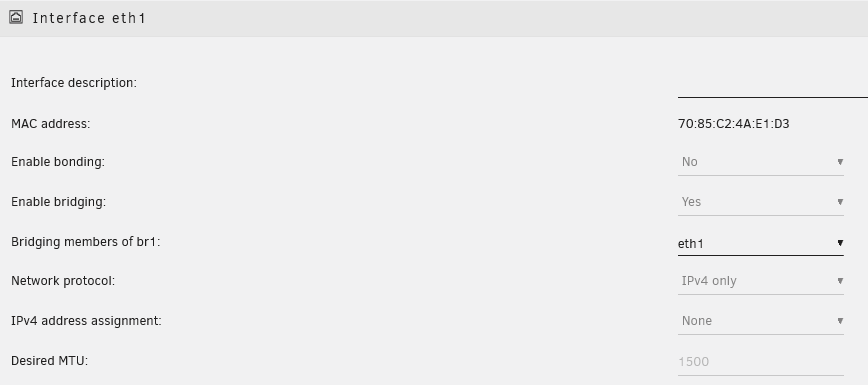
Best solution I can think of that uses base level network devices (ie plain switches and router) Configure eth1 as follows (you can opt not to turn on bridging) Then with the array stopped enable it in docker settings configure the network interface br1 (eth1 if you don't enable bridging) make sure to use the same subnet as your main LAN (where you want Plex to be) ie Subnet is 192.168.50.0/24 Gateway is 192.168.50.1 DHCP pool should be something like 192.168.50.0/24 Ensure the DHCP pool is a range that your DHCP server will never assign (try to prevent collisions now to avoid headaches later on) - again the Docker DHCP pool is not a real DHCP pool and has no connection to the network's actual DHCP server/ nor will it communicate with the network's DHCP server 192.168.50.0/24 is the easiest value to use but if you run any containers on this network, there is a non zero chance of IP address collision if you do not set them up statically use http://jodies.de/ipcalc to compute possible subnets the fit your use case When the docker service is enabled, configure/create your plex dockers with the following info Change the IP to whatever you want it to be This will make your Plex servers accessible at that specified IP address instead of the Unraid IP and as a bonus, all Plex traffic will use that 2nd network connection without sharing with the rest of Unraid.


-
Docker containers don't actually get their IP from the network DHCP server. the docker engine assigns them in order based on the pool you've set in the network config. Its your job to configure it so that the range will be outside of your DHCP pool (or have a way to ensure they will never conflict) Here's my docker networks (w/VLAN): The network is constrained to get IPs from 192.168.2.128-192.168.2.255 (my DHCP range is outside that range) If you want each container to have a static IP, you can use just set the desired IP in the container settings You can connect as many containers or VMs as you want to the network interface, just take care to avoid dynamic IP assignment collision between the containers and the DHCP server.


-
Yeah, it seems the headless version is not getting as much love from the team. Have you considered enabling LanSync (I think it is by default), and ensuring the container is on its own IP address (or using host networking). This should help it to sync very fast against your PC (if you have any) However, mine will pickup right away except for some odd corner cases where rebooting Unraid will cause the container to think its on a new PC and require linking again. I don't have a lot of data as I only have a free account, and have moved most of stuff to One Drive, being 1TB storage is part of the family package for Office, and shared files don't eat into your quota unless you make copies of the shared files. I'm still supporting this container, but am considering a different solution using rclone given my current use case.. Sorry I can't be much help.
-
I can't replicate it so maybe you have filenames with non-latin characters? the dropbox.py in this container still runs on python 2.7 which is known to have some issues with string encoding But I think that shouldn't cause any issue as the dropbox.py script is for interacting with with the headless client.
-
@editedweb I've built a new image with the latest client (though my account auto updates the client to the latest beta) and I've had it running for a while without any noticeable issues. I have not seen the error message about Rust panic though.
-
Its probably related to the current state of the official dropbox headless client I'm building a new version of the package and having the client update to the latest to see what's going on.
-
Spending a little time reveals that the bash script is doing exactly the same thing as the WebUI the webUI triggers this event toggle_state(up) which is a function that invokes this since it has no other parameters filled out $.post('/webGui/include/ToggleState.php',{device:device,name:name,action:action,state:'STARTED',csrf:'REDACTED'},function(){resumeEvents(event,500);if (button) $(button).prop('disabled',false);}); which then invokes a curl to http://127.0.0.1/update function emhttpd($cmd) { global $state, $csrf; $ch = curl_init("http://127.0.0.1/update"); $options = array(CURLOPT_UNIX_SOCKET_PATH => '/var/run/emhttpd.socket', CURLOPT_POST => 1, CURLOPT_POSTFIELDS => "$cmd&startState=$state&csrf_token=$csrf"); curl_setopt_array($ch, $options); curl_exec($ch); curl_close($ch); } the important point here is the cmd parameter which is set using the device query param as "up" thus triggering the same spin up all drives default: if (!$name) { // spin up/down all devices emhttpd("cmdSpin{$device}All=true"); break; } And I double checked. Clicking the button spins up all my drives at the same time, versus when I try to access my data in the share which is spread out across all my drives.
-
I understand your point, but to provide a counterpoint. those people are running their server dangerously since you should never spec a system with such marginal power capacity - even if your Bios says drive spin up is staggered. That said, my script spinning everything up at once might be why its giving me issues with performance during parity tests... I'll look into this and add a bash snippet when I've figured this out.
-
come to think of it... the bash code is based on the php script earlier in the discussion. maybe its not quite the same for current Unraid versions...
-
The bash code does exactly what clicking on the webui button does. the parameters are all taken from that. Its been the same as far as i can tell.
-
Issue: Mover keeps moving files from cache to disk1 (the one with the least amount of space) even if manually copying files from cache -> user0 locates it disk5 (the one with the most amount of disk space) So I have the this structure /mnt/user/Media/Anime/... spnning all the disks with the share config above I tried to manually simulate the mover (by reading the mover script and executing the move command with debug level 2 find /mnt/cache/Media/Anime -depth | move -d 2 the logs weren't helpful Jul 9 22:09:15 MediaStore move: debug: move: exclude ffffffffffffffff Jul 9 22:09:15 MediaStore move: debug: move: real_path: /mnt/cache/Media/Anime/I/Inuyasha Kanketsuhen/[Raizel] Inuyasha Kanketsuhen - EP01 [BD 720p 10Bit AAC][05C1EB14].mkv Jul 9 22:09:15 MediaStore move: move: file /mnt/cache/Media/Anime/I/Inuyasha Kanketsuhen/[Raizel] Inuyasha Kanketsuhen - EP01 [BD 720p 10Bit AAC][05C1EB14].mkv Jul 9 22:09:15 MediaStore move: debug: create_parent: exclude 1 real_path /mnt/cache/Media/Anime/I/Inuyasha Kanketsuhen Jul 9 22:09:15 MediaStore move: debug: move: real_path: /mnt/cache/Media/Anime/I/Inuyasha Kanketsuhen/[Raizel] Inuyasha Kanketsuhen - EP02 [BD 720p 10Bit AAC][D57FDB5D].mkv Jul 9 22:09:15 MediaStore move: move: file /mnt/cache/Media/Anime/I/Inuyasha Kanketsuhen/[Raizel] Inuyasha Kanketsuhen - EP02 [BD 720p 10Bit AAC][D57FDB5D].mkv ... Jul 9 22:11:39 MediaStore move: debug: move: real_path: /mnt/cache/Media/Anime/I/Inuyasha Kanketsuhen Jul 9 22:11:39 MediaStore move: debug: create_parent: exclude 1 real_path /mnt/cache/Media/Anime/I Jul 9 22:11:39 MediaStore move: debug: move: real_path: /mnt/cache/Media/Anime/I Jul 9 22:11:39 MediaStore move: debug: create_parent: exclude 1 real_path /mnt/cache/Media/Anime Jul 9 22:11:39 MediaStore move: debug: move: real_path: /mnt/cache/Media/Anime Jul 9 22:11:39 MediaStore move: debug: create_parent: exclude 1 real_path /mnt/cache/Media Which doesn't tell us much, but when I check disk1 the entire directory has been moved there. So I moved it back to cache disk using mc and move it from cache-> user0. The files now end up in disk5 (most free space) as directed by the High water setting mediastore-diagnostics-20210710-0957.zip
-
So I broke down the mover script and determined the following command for my dir structure /mnt/cache/Media/Anime/I/Inuyasha Kanketsuhen/*.mkv mover would construct the follwing command find /mnt/cache/Media/Anime -depth | move I manually ran this command for more debugging find /mnt/cache/Media/Anime -depth | move -d 2 but only got the following lines in the log Jul 9 22:09:15 MediaStore move: debug: move: exclude ffffffffffffffff Jul 9 22:09:15 MediaStore move: debug: move: real_path: /mnt/cache/Media/Anime/I/Inuyasha Kanketsuhen/[Raizel] Inuyasha Kanketsuhen - EP01 [BD 720p 10Bit AAC][05C1EB14].mkv Jul 9 22:09:15 MediaStore move: move: file /mnt/cache/Media/Anime/I/Inuyasha Kanketsuhen/[Raizel] Inuyasha Kanketsuhen - EP01 [BD 720p 10Bit AAC][05C1EB14].mkv Jul 9 22:09:15 MediaStore move: debug: create_parent: exclude 1 real_path /mnt/cache/Media/Anime/I/Inuyasha Kanketsuhen Jul 9 22:09:15 MediaStore move: debug: move: real_path: /mnt/cache/Media/Anime/I/Inuyasha Kanketsuhen/[Raizel] Inuyasha Kanketsuhen - EP02 [BD 720p 10Bit AAC][D57FDB5D].mkv Jul 9 22:09:15 MediaStore move: move: file /mnt/cache/Media/Anime/I/Inuyasha Kanketsuhen/[Raizel] Inuyasha Kanketsuhen - EP02 [BD 720p 10Bit AAC][D57FDB5D].mkv ... Jul 9 22:11:39 MediaStore move: debug: move: real_path: /mnt/cache/Media/Anime/I/Inuyasha Kanketsuhen Jul 9 22:11:39 MediaStore move: debug: create_parent: exclude 1 real_path /mnt/cache/Media/Anime/I Jul 9 22:11:39 MediaStore move: debug: move: real_path: /mnt/cache/Media/Anime/I Jul 9 22:11:39 MediaStore move: debug: create_parent: exclude 1 real_path /mnt/cache/Media/Anime Jul 9 22:11:39 MediaStore move: debug: move: real_path: /mnt/cache/Media/Anime Jul 9 22:11:39 MediaStore move: debug: create_parent: exclude 1 real_path /mnt/cache/Media Which doesn't tell us much, but when I check disk1 the entire directory has been moved there. So I moved it back to cache disk and manually copy it over using mc to move from cache-> user0 and the files end up in disk5 (most free space) as directed by the High water setting I'm starting to think there might be a bug in the move binary logic ...
-
Pretty sure the share config is okay since I've tested changing the min free space, which should have caused the config to be rewritten. Weekend's coming up so I can probably do a few more tests
-
Hmm. I haven't observed it with any other shares as this is the most used one (and its the only share on Disk1 right now)
-
Can anyone take a look - Its really getting annoying - my only work around now is to either exclude Disk1 or manually migrate stuff off Disk1
-
You can probably run root@MediaStore:~# docker network inspect br1 [ { "Name": "br1", "Id": "dd6c416d2efd0344bfd6f0bb0c3336dbd9e9f0ca3063f5afd599e083fb334f79", "Created": "2021-05-20T08:02:01.315812887+08:00", "Scope": "local", "Driver": "macvlan", "EnableIPv6": false, "IPAM": { "Driver": "default", "Options": {}, "Config": [ { "Subnet": "192.168.2.0/24", "IPRange": "192.168.2.128/27", "Gateway": "192.168.2.1" } ] }, "Internal": false, "Attachable": false, "Ingress": false, "ConfigFrom": { "Network": "" }, "ConfigOnly": false, "Containers": { "ed5c7c0711940e2afa7475732a0af723a6c1e18ef176762e300c398cd3511bb4": { "Name": "EmbyServer", "EndpointID": "aab01aaffad69b23bfa9719083fd9b14a6ba2d9eb16f54ea9786ef469d083253", "MacAddress": "02:42:c0:a8:02:46", "IPv4Address": "192.168.2.70/24", "IPv6Address": "" } }, "Options": { "parent": "br1" }, "Labels": {} } ] And pay attention to the Containers object as its a dict of the various containers plugged into that docker network. My sample is IPV4 only since I'm using the SLAAC method to distribute IPv6 addresses (which does not require any adjustments to the Unraid networking if the delegated prefix changes) And as long as the container mac address doesn't change, the SLAAC IPv6 address won't either
-
Anybody?
-
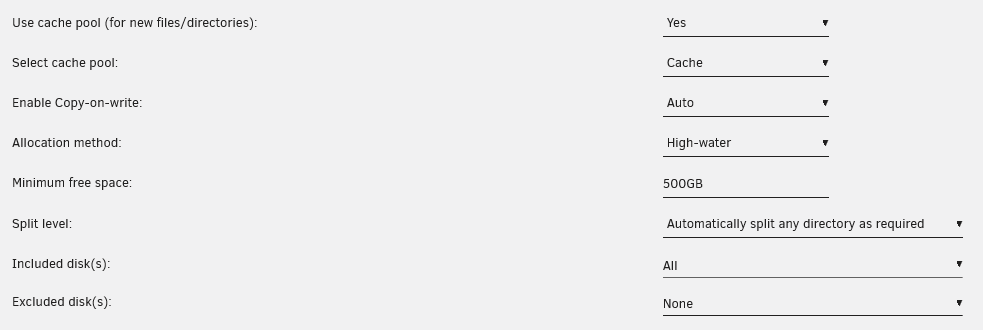
Hi I've been having a weird issue lately, it seems when mover runs it insists on sticking all my files to disk1 even with the following share settings only yesterday I invoked mover and it decided to stuff about 32G worth of files into disk1 when the high water allocation should move them to disk5 But moving files from my cache disk to user0 manually using mc or mv command moves the files correctly. Any ideas where I've got it configured wrong? mediastore-diagnostics-20210703-0643.zip

-
@bonienl I think I've pointed this out before, but some fun points. Containers can use SLAAC (as advertised by a router) instead of DHCPv6 since some routers (Mikrotik ones in particular) do not support DHCPv6 completely - only SLAAC This approach is extremely useful when your ISP doesn't even consider assigning you a static prefix and just delegates an entire /56 to you dynamically and you can configure your router to dynamically advertise the prefix Docker networking in IPv6 wants a static prefix or you will be restarting the docker network whenever you need the prefix to change In order to use SLAAC, the docker custom network does not need to have IPv6 enabled (or the interface for that matter) To configure a container to enable SLAAC, you then need to pass the extra parameters specified --sysctl net.ipv6.conf.all.disable_ipv6=0 The container will then have its own IP address based on what the network is advertising (again SLAAC) root@MediaStore:~# docker exec nginx ip addr 1: lo: <LOOPBACK,UP,LOWER_UP> mtu 65536 qdisc noqueue state UNKNOWN qlen 1000 link/loopback 00:00:00:00:00:00 brd 00:00:00:00:00:00 inet 127.0.0.1/8 scope host lo valid_lft forever preferred_lft forever inet6 ::1/128 scope host valid_lft forever preferred_lft forever 2: tunl0@NONE: <NOARP> mtu 1480 qdisc noop state DOWN qlen 1000 link/ipip 0.0.0.0 brd 0.0.0.0 3: gre0@NONE: <NOARP> mtu 1476 qdisc noop state DOWN qlen 1000 link/gre 0.0.0.0 brd 0.0.0.0 4: gretap0@NONE: <BROADCAST,MULTICAST> mtu 1476 qdisc noop state DOWN qlen 1000 link/ether 00:00:00:00:00:00 brd ff:ff:ff:ff:ff:ff 5: erspan0@NONE: <BROADCAST,MULTICAST> mtu 1464 qdisc noop state DOWN qlen 1000 link/ether 00:00:00:00:00:00 brd ff:ff:ff:ff:ff:ff 6: ip_vti0@NONE: <NOARP> mtu 1480 qdisc noop state DOWN qlen 1000 link/ipip 0.0.0.0 brd 0.0.0.0 7: sit0@NONE: <NOARP> mtu 1480 qdisc noop state DOWN qlen 1000 link/sit 0.0.0.0 brd 0.0.0.0 75: eth0@if33: <BROADCAST,MULTICAST,UP,LOWER_UP,M-DOWN> mtu 1500 qdisc noqueue state UP link/ether 02:42:c0:a8:5f:0a brd ff:ff:ff:ff:ff:ff inet 192.168.95.10/24 brd 192.168.95.255 scope global eth0 valid_lft forever preferred_lft forever inet6 fd6f:3908:ee39:4001:a170:6031:f3df:e8b/64 scope global secondary dynamic valid_lft 3296sec preferred_lft 1496sec inet6 fd6f:3908:ee39:4001:42:c0ff:fea8:5f0a/64 scope global dynamic valid_lft 3296sec preferred_lft 1496sec inet6 fe80::42:c0ff:fea8:5f0a/64 scope link valid_lft forever preferred_lft forever root@MediaStore:~# docker exec nginx ip -6 route fd6f:3908:ee39:4001::/64 dev eth0 metric 256 expires 0sec fe80::/64 dev eth0 metric 256 multicast ff00::/8 dev eth0 metric 256 default via fe80::ce2d:e0ff:fe50:e7b0 dev eth0 metric 1024 expires 0sec As I don't have DHCPv6, I think this approach will work for DHCPv6, but only if the container is designed to do DHCPv6, otherwise docker will not do DCHPv6 (it doesn't do DHCPv4 either) and instead has an internal IPAM (IP address management) which will simply assign addresses from the configured pool in the docker network.


-
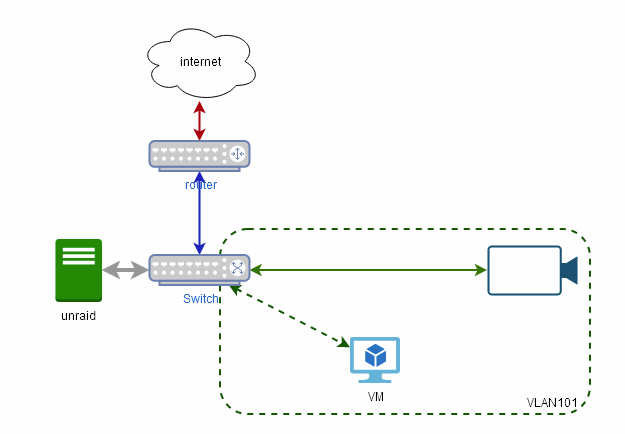
Ok, we need to make some stuff clear first. @stev067 you just replaced the switch connecting your Unraid server with the VLAN enabled switch, (POE not important here) so I assume your network looks like And I think your config looks good - save for using VLAN 102 as the general purpose (stick to VLAN1 unless your router and stuff need this level of control) so your goal is to limit access between the cameras and blue iris PC vs unraid and and the rest of the network. Judging from your setup, you already cannot reach the cameras and the VM from the rest of the network. and if the BR0.101 interface does not have an IP address, Unraid will also be unable to reach the VM. You seem to want to access the VM also from the rest of the network and the easiest way (not the securest) is to simply add another NIC to the VM and connect it to BR0 Alternatively if you have a router with VLAN support is simply to put the camera in their own VLAN, then program the router to deny access from the cameras to your network, and allow the VM to connect to the cameras
-
I'd like to add my 2bits here that the issue seems to be present when doing parity checks, so it might not be a problem of the Diskspeed docker, but of the mpt3sas driver interacting with the LSI SAS2 controllers. When I don't spin up my disks, my parity check gets capped to about 77MB/s ave vs the usual 140MB/s I'm still looking into making tweaks to work around this as I don't see anything anywhere about this spinup issue.
-
There seems to be a really odd performance issue with LSI-2308 based controllers When all the drives on the controller are spun down (I only have eight) and you attempt to access them for parity checking, benchmarking a single drive We get the following speed results from Parity tests: 2021-04-27, 03:06:09 1 day, 4 hr, 36 min, 29 sec 77.7 MB/s OK 0 2021-03-15, 14:44:59 15 hr, 14 min, 58 sec 145.8 MB/s OK 0 2021-02-15, 15:16:28 15 hr, 46 min, 27 sec 140.9 MB/s OK 0 2021-01-11, 15:39:25 16 hr, 9 min, 24 sec 137.6 MB/s OK 0 2020-12-14, 15:40:07 16 hr, 10 min, 5 sec 137.5 MB/s OK 0 2020-11-09, 14:42:48 15 hr, 12 min, 47 sec 146.1 MB/s OK 0 2020-10-12, 14:54:37 14 hr, 57 min, 53 sec 148.5 MB/s OK 0 As you can see my typical speed for parity tests should be about 140MB/s on average Drive benchmarks: The benchmarks are also weird in that I got the second results by simplying spinning down and spinning up all the drives prior to just blindly benchmarking all my drives. Testing this condition with the parity check also produces the same result - starting the parity check while the drives are spun down results in a prity check that runs at 777MB/s max, whereas spinning up all the drives first allows them hit the max speed of about 200MB/s Also it seems only my Toshiba N300 drives are affected, and none of my Seagate Archive drives or drives on the onboard SATA controller seems to be affected (or I haven't noticed) Any suggestions or ideas? mediastore-diagnostics-20210424-1011.zip
-
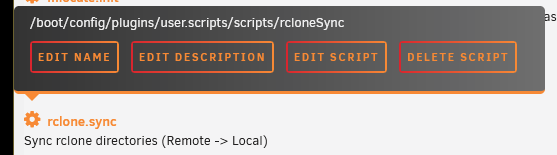
just invoke it like this bash /boot/config/plugins/user.scripts/scripts/rcloneSync/script where rcloneSync is the name given to the user script. However, this name might be different from the current name because renaming a user script doesn't change the directory the script is in in which case you need to mouse over the gear icon in the User Script settings until the settings menu opens
-
@ionred maybe posting your diagnostics will shed some light on this issue... but it really is weird that something is recreating the authorized keys file with that old time stamp.



