





Warrentheo
Members
-
Joined
-
Last visited
Everything posted by Warrentheo
-
Wow, that is quite the changelog! Awesome! Will begin testing immediately...
-
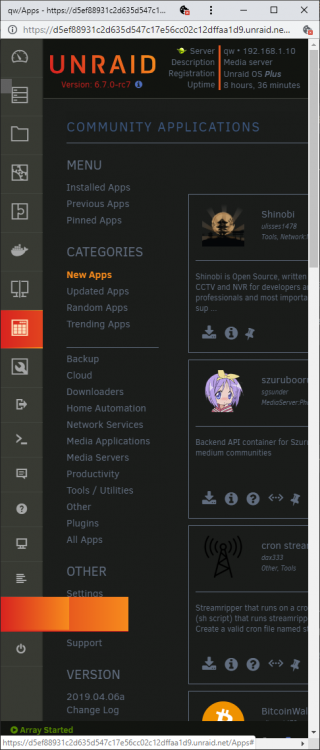
Just installed 6.7.0-rc7... It has a blank button right next to the power button on the webui... When pressed, this adds a "flyout" effect with nothing in it... Removing the System Buttons plugin removes the button...
-
I have a USB bluetooth key (BCM20702A0 Bluetooth 4.0) passed into my VM by USB ID... Under 6.6.6 and prior, this worked fine, but starting in 6.7.0-rc3 through 6.7.0-rc5 this now seems to get a driver from the host kernel, which causes aberrant behavior on both the host and VM... Symptoms include: Full system reboot then boot into Win10 VM with device passed through by ID: Device manager boots with the USB device listed, but now shows "This device can not start (Code 10), profiling not started" First time I got this, I attempted to use WebUI to detach the device, this acted like it worked, but Windows now showed the device attached and working(???)... Re-attaching the device Win10 went back to "(Code 10)"... Detaching the device a second time removed the device from Windows entirely, but when Re-attaching a second time, the VM locked up for 2 minutes... Performed a second full reboot and boot into Win10 VM has different behavior: Device again shows as (Code 10) in Windows, but the host WebUI no longer shows either the USB adapter, and now seems to have removed the other USB device I was passing through (a Synaptics USB Finger Print Reader), and the only device now showing is a pair of headphones hooked to the PC to charge, even though the Windows VM does show the device attached but in (Code 10)... I assume to fix this I would need to go down the road of disabling the USB driver for this device in the Syslinux config, but do we really want to go down the road of having devices like these having to have special rules that have to be remembered? Perhaps we can add the driver, but disable it by default? Or is there a driver like VFIO-PCI for usb devices? I am willing to test solutions since I rarely use Bluetooth (Only noticed this problem when I went into device manager for other reasons), and will be remaining on 6.7.0-rc5 for now... qw-diagnostics-20190223-1603.zip lsusb -v for BCM20702A0 Bluetooth 4.0.txt Win10VM.XML
-
I don't know if this is mentioned somewhere else in this thread (I don't use MacOS), but saw this and thought I would mention it... Apparently Qemu 3.1 (Used in the UnRaid 6.7.0-rc) has issues with Mojave... https://wiki.qemu.org/Planning/3.1
-
https://fedorapeople.org/groups/virt/virtio-win/CHANGELOG * Mon Feb 04 2019 Cole Robinson <[email protected]> - 0.1.164-1 - Update to virtio-win-prewhql-0.1-164 - Update to qemu-ga-win-100.0.0.0-3.el7ev - Add win10 arm64 experimental drivers Driver is still considered "Latest", since the "Stable" branch is still on 0.1.141-1 https://fedorapeople.org/groups/virt/virtio-win/direct-downloads/latest-virtio/virtio-win.iso
-
I have 6.6.6 with Win10 VM and passthrough 50GB out of my 64GB to it... Have not noticed an issue with boot times once I finished tweaking the XML and Windows... I may have accidentally fixed this issue with the tweaks I have applied, but don't think so...
-
SeaBios should be avoided at this point, Legacy OS's only, and causes issues with GPU passthrough... Don't have an AMD myself so can't help further, looks like you have done everything I would have tried...
-
This has to do with "IOMMU Groups", everything in the group has to be passed together... You will find that Intel sound is usually grouped with several other devices that you don't want to passthough... I have heard of some people able to get it to work, but by far the easiest way is to just get a USB sound card to use instead... Edit: This is a clip from my system, my sound card is in IOMMU group 11 with SMBus controller as well which you don't want to passthrough... Also see how my video card is listed as "[RESET]"? That means that KVM can reset it... Notice how the sound card doesn't list it can be reset? That is why it works once, but can't be reset with the reset of the VM when it is rebooted... Only way to reset it after that is to reboot the host... IOMMU group 11 00:1f.0 ISA bridge [0601]: Intel Corporation 200 Series PCH LPC Controller (Z270) [8086:a2c5] 00:1f.2 Memory controller [0580]: Intel Corporation 200 Series/Z370 Chipset Family Power Management Controller [8086:a2a1] 00:1f.4 SMBus [0c05]: Intel Corporation 200 Series/Z370 Chipset Family SMBus Controller [8086:a2a3] IOMMU group 1 00:01.0 PCI bridge [0604]: Intel Corporation Xeon E3-1200 v5/E3-1500 v5/6th Gen Core Processor PCIe Controller (x16) [8086:1901] (rev 05) [RESET] 01:00.0 VGA compatible controller [0300]: NVIDIA Corporation GP104 [GeForce GTX 1070] [10de:1b81] (rev a1)
-
Something else to consider, try changeing the CPU's passed through to the VM, especially leaving CPU-0 and its hyper-thread out if it has one, just to test... If that changes anything, consider adding: <emulatorpin cpuset='0,4'/> so it looks something like this: <cputune> <vcpupin vcpu='0' cpuset='4'/> <vcpupin vcpu='1' cpuset='1'/> <vcpupin vcpu='2' cpuset='5'/> <vcpupin vcpu='3' cpuset='2'/> <vcpupin vcpu='4' cpuset='6'/> <vcpupin vcpu='5' cpuset='3'/> <vcpupin vcpu='6' cpuset='7'/> <emulatorpin cpuset='0,4'/> </cputune> Make sure to edit the line so it matches the 2 CPU's for CPU-0 and its Hyper-thread if it has one...
-
Sounds like you need to watch some videos from Space Invader, they helped me a lot... He has some other updated videos after this one if it doesn't fully solve your issue... Some key points though, change you VM machine type from the default that UnRaid gives (i440fx) and change it to Q35... If you can reinstall the VM with that, that is best, but if you have to keep your current VM than make sure to do some backups, then create a new VM but point it at the old image file (Don't skip the backups)... If you have an nVidia card that you are trying to passthrough, you will also need a video BIOS file for/from your card... The videos will help with that...
-
This sounds like Message Signaled Interrupts (MSI) issues to me, there is a tool for that fixes the Windows registry for these issues, but I don't know if OSx VM's have an equivalent or if it is even necessary... Edit: Here is the Windows version of that tool if anyone needs it... MSI_util.exe
-
My system after updating to 6.6.2 now shows a new error message during the long pause between the start of winbindd and the display of the network info/login prompt. Not sure what this error message affects, but it survived the rollback to 6.6.1 as well... This is the current bottom of my main terminal after bootup: Starting Samba: /usr/sbin/nmbd -D /usr/sbin/smbd -D /usr/sbin/winbindd -D cat: write error: Broken pipe unRAID Server OS version: 6.6.1 IPv4 address: <*> IPv6 address: <*> server login: Still investigating the issue on my end... qw-diagnostics-20181018-2058.zip
-
My system currently seems to ignore the currently scheduler settings for Parity check, and runs more frequently than set... Currently it is set with the following settings under Settings-->Scheduler: PARITY CHECK Scheduled parity check: Weekly Day of the week: Sunday Day of the month: {------------} Time of the day: 23:00 Month of the year: {------------} Write corrections to parity disk: Yes However, it has run every day for the last three days, and currently has this info on the main Dashboard page: PARITY STATUS Parity is valid Last check incomplete on Fri 28 Sep 2018 08:47:20 AM CDT (today), finding 0 errors. Error code: aborted Next check scheduled on Sun 30 Sep 2018 11:00:00 PM CDT Due in: 2 days, 13 hours, 13 minutes This shows that it is scheduled for the currently correct settings, and gives the correct time for the next one to be due... I have been running with this issue for a while since it is just a minor annoyance when discovered, however the latest versions of UnRaid didn't seem to fix it, and changing the settings repeatedly with the WebGui doesn't seem to affect the issue, though it will always show the correct time on the dashboard for when it is due... Just updated to 6.6.1 this morning, was running 6.6.0 when the latest check tried to run last night...
-
I have 2x 512gb 960 Evo's in Raid-0 Cache for Unraid, then I run the VM's with Raw image, SCSI driver, and have them set to Unmap... This keeps the files as small as possible. This in turn allows you to have quite a few images on the same drive, and only becomes an issue if you have multiple drives reading/writing to the images at the same time... Mostly an issue during VM bootup... Windows also has to have the drivers installed for the SCSI drivers during install... <disk type='file' device='disk'> <driver name='qemu' type='raw' cache='writethrough' discard='unmap'/> <source file='MainDrvWin10.SCSI.raw.img'/> <target dev='hdc' bus='scsi'/> </disk>
-
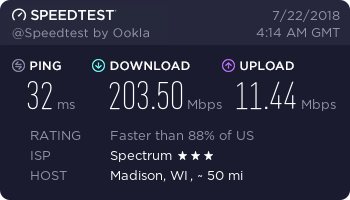
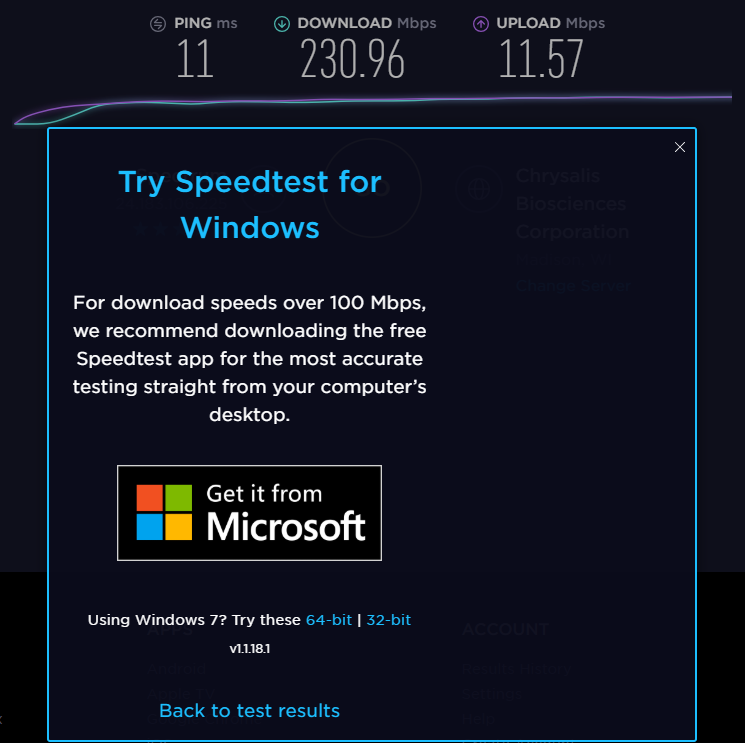
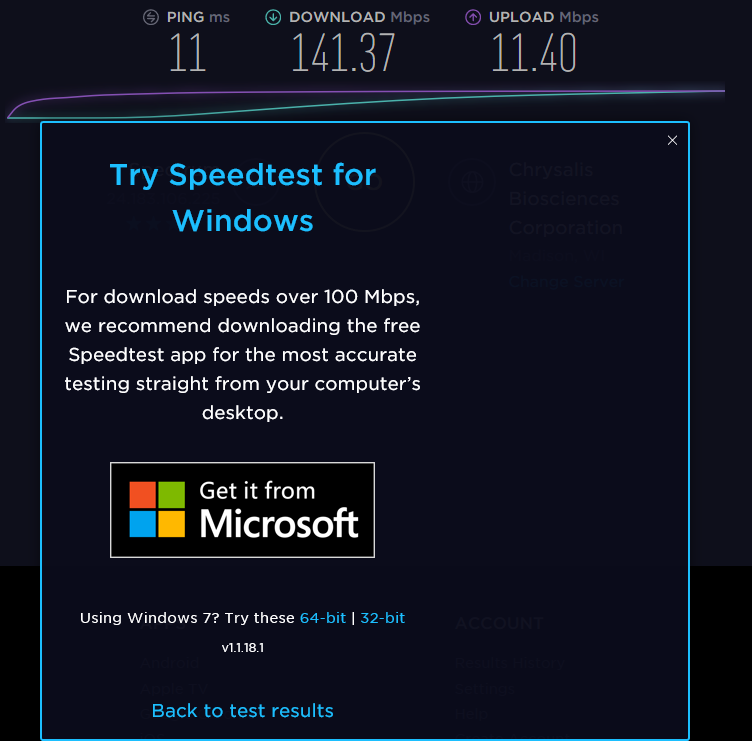
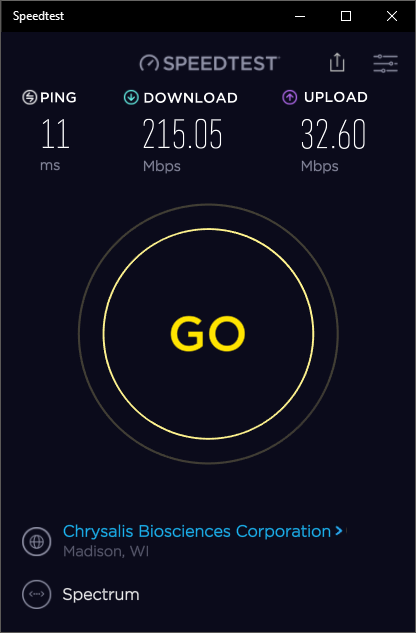
Regarding your Speedtest.net script, I love it, and it has already helped me to troubleshoot some issues with my ISP... This report doesn't really fall under the heading of "Bug Report", since the script appears to be working very well... I just wanted to let you know of a possible issue for some... The results generated by your script, or running SpeedTest.net in either Chrome or Edge all show similar results for my speed, so I suspect they are all running similar versions of the testing script... However when run in either Chrome or MS Edge it suggests that I download and install the Windows 10 UWP version of the SpeedTest App... Once installed and run from there, it consistently gets much higher results that are much closer to the speeds told to me by my ISP... Also for some reason the digiblur script is consistently reporting around 30ms-35ms ping instead of the 11ms ping everything else shows, when they all report they are connecting to the same server... Minor, just not able to explain it... Unfortunately my GoogleFu has come up short as to what exactly the difference is between them, and so I am not sure what if anything you can do to adjust the script to be more in line with the way the UWP app does it... All tests were from the same machine, with digiblur's Script running from the UnRaid Host, and all other results from a Windows 10 VM on the same host... It is mainly the Upload speed that changes in the app... I am available for questions or testing if needed ?
-
May be relevant to this thread: https://wiki.qemu.org/ChangeLog/2.12#VFIO
-
After update to 6.5.2-rc1, when attempting to create Windows 10 VM, vDisk creation defaults to "None", and the only location listed as an available vDisk location is "Manual"... Rollback to 6.5.1 Stable corrected the issue... qw-diagnostics-20180507-2251.zip
-
@steve1977 This is where I got most of that info: (Love his videos in general, helped me a lot) MSI_util.exe
-
6.51-rc3 New default of VirtIO for RC3 causes VM SCSI disks to be changed from listing as " " to now listing as VirtIO even though they are SCSI... Minor cosmetic issue, just listing as FYI... Related Post I added over in Feature Requests:
-
I think what I am about to say is becoming less of a concern, which is why nVidia SLI now works with some cards with different BIOS versions, however using a BIOS that didn't come from the card itself can have some pretty big consequences... Some of the things a BIOS does is regulate fan speeds before windows, and before you think that is not an issue, I would point you here: https://www.evga.com/thermalmod/ This is a recall and BIOS update EVGA did for my card, because without them the card was cooking itself to death... I am sure there are other examples of Bios updates being more than cosmetic or minor... I personally would only EVER use Latest Current Bios written directly for my card, and since that should be the one installed on the card, I would only use a Bios dumped directly off the card in question... That said, it is very unlikely that you will come across a card frying issue from using the wrong Bios... But because the possibility is there, I would always recommend dumping the Bios from the card itself...
-
I have an EVGA GTX 1070 with current driver... Still working... I have the boot menu blacklisting the opensource driver, and then passed the device ID to the vfio-pci driver instead... I then have a ROM file I dumped from the actual card in unRaid listed in the XML file for the domain... This seams to be working with no issues... I have OVMF BIOS, i440fx-2.11, and Hyper-V extensions turned off...
-
For some reason ever since 6.51-rc1, and now also with -rc2, I have on the dashboard page for my server a listing "sdb", but have no "/dev/sdb" device... The drive that would normally be the "sdb" drive is now "sdc" and so on, with everything shifted on down the device letters... As you can see from the screenshot, it doesn't have any info or statistics with it... 6.50 was the last time I didn't have this issue... System seams to be running fine otherwise...
-
I am fairly new to this stuff... Now you have me wondering if I have to look forward to nVidia randomly killing off my setup
-
I was having this issue, all I needed to do was dump the rom for the card from the local command line, then edit the VM xml to include the <rom file='/mnt/user/.....'/> code for it... Card has worked perfectly for me ever since... Does this solution resolve some issue I am unaware of?
-
64gb




