





kri kri
Members
-
Joined
-
Last visited
Everything posted by kri kri
-
Thanks so much for your help
-
I am struggling with this as well, would appreciate any help!
-
Whenever I try to enter in a custom path, it just adds my custom path to the default path, it doesn't replace it.
-
Would like to know as well, if I try to enter in a custom path it doesn't replace the default path it just adds to it which defeats the purpose.
-
I did that.
-
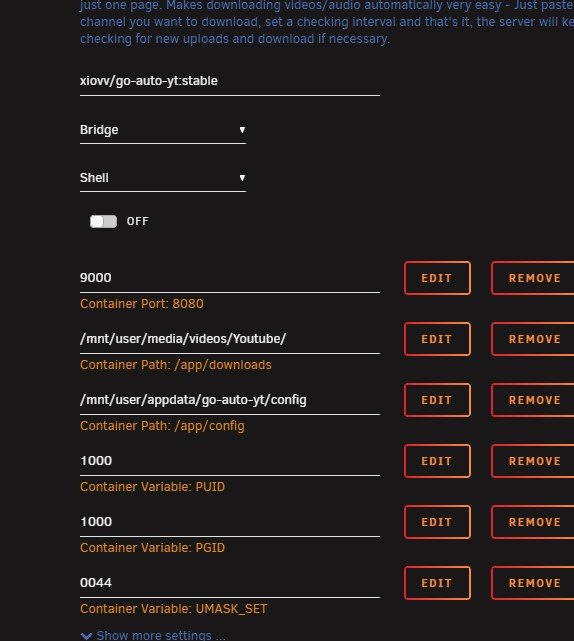
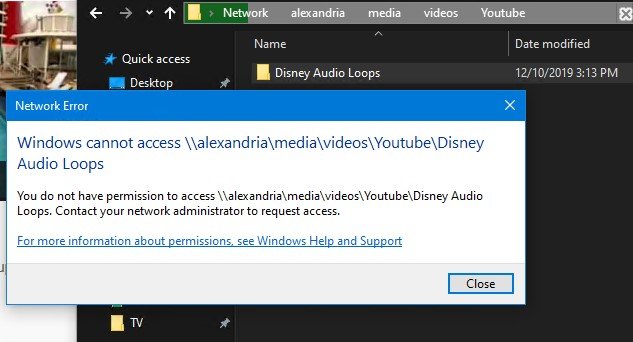
What I don't understand - I deleted the download folder. For me that is /mnt/user/media/videos/Youtube The docker obviously re-created it upon relaunch. I started a playlist download. I navigated to the Youtube folder from my windows VM and am getting a permission error.
-
I am trying to navigate into the playlist folder in my download folder and am getting a permission error - do I need to use krusader to move the files out?
-
Getting a permission error when trying to navigate folders this docker has created. I have: Downloaded new container Deleted appdata folder deleted download folder. I changed the download folder to my media share on my array.
-
Maybe try disabling audio conversion? THat is what I do, and I still get a much smaller file size.
-
Any ETA on nvenc support? 🦌
-
Anyone with a P2000? Wondering how many transcodes and workers people are running. I know its unlimited transcodes, I am mostly curious. I asked in discord but I am still not clear. Is hardware encording via nvenc supported in this docker? I know it will take CPU cycles, but someone else in discord said handbrake and nvenc is not supported.
-
This is badass! Thanks a bunch.
-
I think themoviedb has been having issues, could be it?
-
Anyone running radarr v3? I am using v3 sonarr but wanted to get impressions first before trying.
-
This sounds good! https://www.zerotier.com/zerotier-2-0-status/
-
Plus one for GPU support, I have a p2000 as well and would love to see this.
-
I am certainly not a developer, just noticed some linux fixes on this page - https://github.com/zerotier/ZeroTierOne/blob/master/RELEASE-NOTES.md Would it be possible to update the docker? Seems like 1.2.4 to 1.4.0 might be worth it. Really nice docker, thanks so much for making it.
-
Yes
-
I believe this docker has a failsafe so it will not even work without being connected to VPN. Binhex I assume can confirm.
-
Set up one of binhex's dockers that supports privoxy, and then just use the jdownloaer proxy settings.
-
I left my v2 docker alone, stopped it and created a new docker with the v3 preview with its own appdata folder. I started fresh and everything is working fine so far. I imagine you can copy the DB folders into the new appdata folder but I don't know that exact process. I have only been running v3 for a couple days but I have not come across any issues yet.
-
Nope I just workaround the issue by logging in via my.jdownloader
-
I am trying a clean install, and I am getting this error. I have check and the port 58846 is not used in another docker. Any ideas? /usr/bin/docker: Error response from daemon: driver failed programming external connectivity on endpoint binhex-delugevpn (e36aed7be5b7ce9dc2dce4098c79fb65a479d4f9cc40e3f925977d8d07571430): Error starting userland proxy: listen tcp 0.0.0.0:58846: bind: address already in use. I was running binhex-privoxy but I disabled that for the time being and getting the same error. EDIT: a reboot seems to have cleared it up.
-
I am seeing this as well. Is there a way to check the status of the proxy aside from the logs?
-
All of your questions can be answered by looking at their website. https://github.com/theotherp/nzbhydra2 It supports music fine, there is no subscription.


