





nerbonne
Members
-
Joined
-
Last visited
Everything posted by nerbonne
-
Marking solved, was able to rebuild disk on top of itself by following the procedure to remove disk, start array, stop array, put disk back into array.
-
Ok, ty. Rebuild is in progress, will report back. Hoping it's just a one off, as the computer is at a remote location that I can't easily get to (it's my backup server).
-
Disk 2 in my array got disabled, it showed about 500 errors. I started the array in maintenance mode and ran xfs_repair which found no errors. After reading other posts, I know this won't re-enable the disk. There are no smart errors. Seems like it was just an anomaly, and I should be able to rebuild the disk back onto itself? Can someone weigh in on that? Note: The attribute 199 errors for Disk 3 & 4 can be ignored, they are caused by the sata to usb header that the disks are plugged into. nas-diagnostics-20230617-1214.zip
-
I am having this same issue on an Asus ROG STRIX X570-I GAMING motherboard. Sad you didn't get an answer.
-
Curious why you think this is a container issue and not a NAT issue with your firewall?
-
Ok got it. I didn't look at the switch, I assumed it was the autostart switch.
-
Guess I'm the only dumbass, but how do I put my containers into the folder I made? I don't seem to see any option to do that.
-
Not an expert by any means, but i'd imagine that we'd need info on the motherboard/nic model to help. Posting the diagnostics is what JorgeB is gonnna say anyways, just saving him the trouble.
-
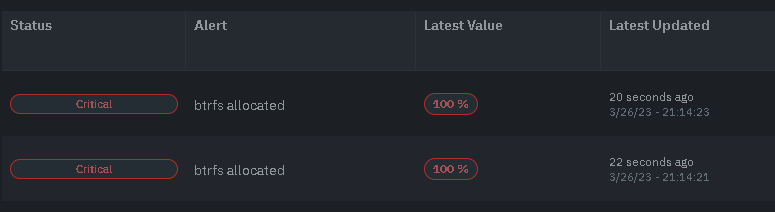
Did you ever get an answer to this? I'm getting btrfs 100% on 2/4 servers...?
-
That's weird that it worked for you. When I tried it, my template wouldn't save, but I did end up getting it to work by editing the config.yaml inside the container (per Storj documentation, either way is fine). This is the line needed for the config.yaml: operator.wallet-features: ["zksync"]
-
Can anyone tell me how to get a command to run when ubuntu playground starts? I've messed around with it a bit, but it's pretty frustrating because every time you change the config it reloads and wipes all the data. I'm trying to execute this command on container start: /hpool-miner-chia-linux-amd64 > /dev/null 2>&1 &
-
@runraid can you make a support thread in the Docker Container forum? I'm having trouble getting your "ddns" container to start. Log: time="2023-03-12T07:26:55Z" level=fatal msg="yaml: unmarshal errors: line 22: cannot unmarshal !!map into []string" yml line 22: # DDNS configuration file. # Mandatory, DigitalOcean API token. # It can be also set using environment variable DDNS_TOKEN. token: "dop_v1_realkey" # By default, IP check occurs every 5 minutes. # It can be also set using environment variable DDNS_CHECKPERIOD. checkPeriod: "5m" # By default, timeout to external resources is set to 10 seconds. # It can be also set using environment variable DDNS_REQUESTTIMEOUT. requestTimeout: "10s" # By default, IPv6 address is not requested. # IPv6 address can be forced by setting it to `true`. # It can be also set using environment variable DDNS_IPV6. ipv6: false # List of domains and their records to update. domains: wan1.realdomain.com: # More details about the fields can be found here: # https://developers.digitalocean.com/documentation/v2/#create-a-new-domain-record - type: "A" name: "www" - type: "TXT" name: "demo" # By default, is set to "{{.IP}}" (key .IP is reserved). # Supports Go template engine. # Additional keys can be set in "params" block below. data: "My IP is {{.IP}} and I am {{.mood}}" # By default, 1800 seconds (5 minutes). ttl: 1800 # By default, params is empty. params:
-
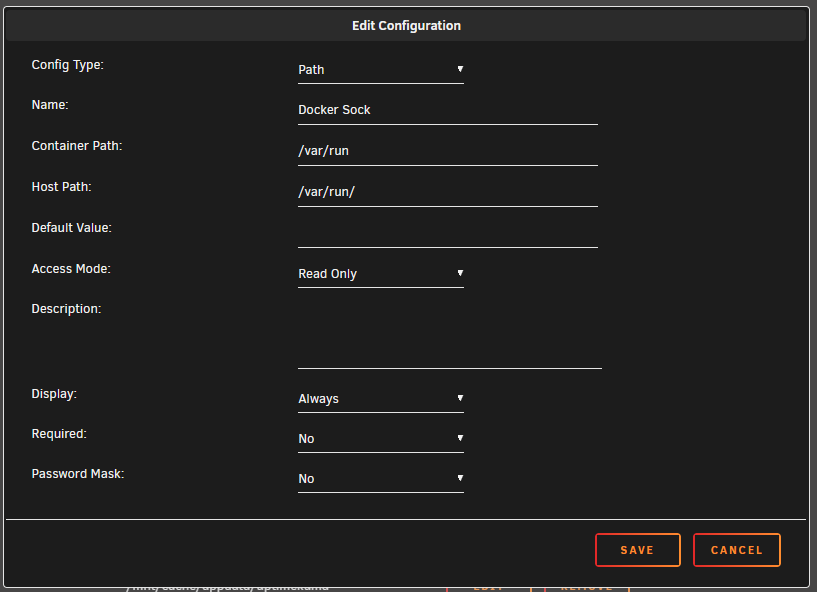
@CorneliousJD any chance you can add read only Path "/var/run" to the template so you can natively check docker containers.
-
Does anyone know how to configure ZkSync Payments? Also, for the developer, the support url is wrong. It should be: https://forums.unraid.net/topic/69422-support-qdirstat-jcloud-cryptocoin-templates/ Not: https://lime-technology.com/forums/topic/69422-support-qdirstat-jcloud-cryptocoin-templates/
-
I think you are mistaken that the docker container did not update. I think the container updated, and the new code allowed it to pull the 1.71.2 update. Reason i'm saying this is that I had an update, I did it, then I watched the log and it pulled the update after I ran the unraid update. Also, mine stopped many times due to github timeouts. I'm guessing thats why your container stopped as well. I have two storj, one in the US and one in Korea. The one in the US update automatically and restarted with no issues and the one in Korea is set to manual and gave me alot of timeouts when trying to restart the container, so maybe the update servers were just overloaded/down.
-
Did anyone ever solve enabling zksync?
-
I just updated the container from version 1.19.7 to 1.19.8 and the logs have returned to normal size.
-
Anyone know why this container is using 11gb of logs in my docker.img file? There seems to be no setting for where logs are saved, or for log rotation. Additionally, by watching the container log, it seems that the log level is set to "debug", which seems unecessary?
-
I was using Mobaxterm over Tailscale. I hope it's not RAM, thats what I get for not going the ECC route...
-
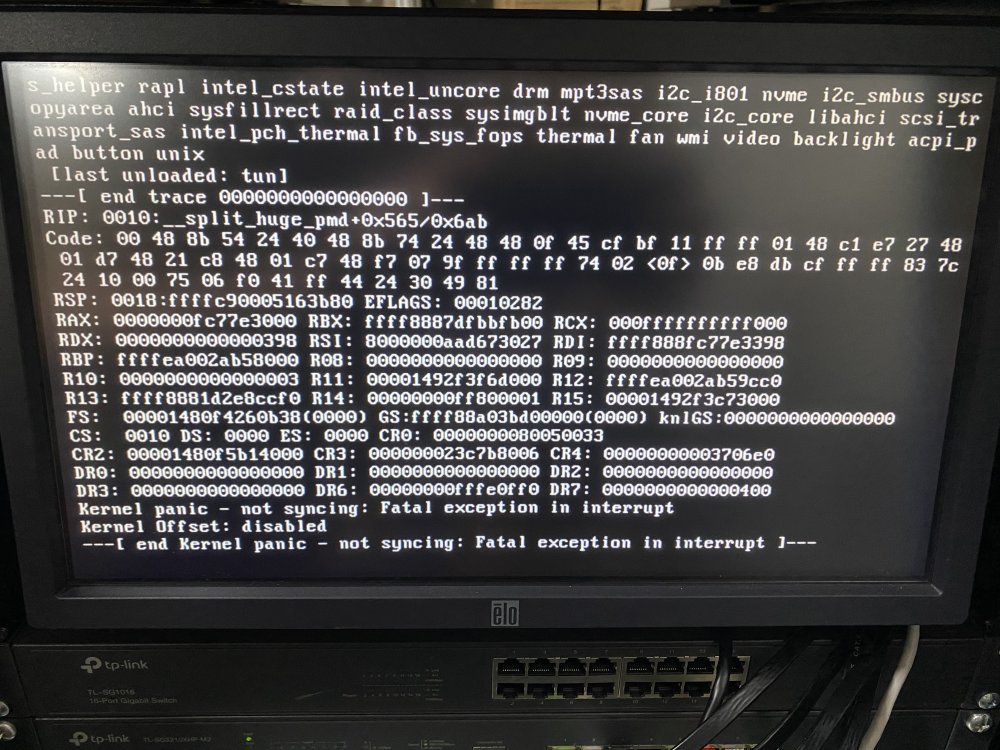
Woke up to server crashed with kernel panic error on the screen. Does anyone know what this means?
-
If I try to restart nginx, it just sits like this forever: root@Server:/var/run# /etc/rc.d/rc.nginx restart Checking configuration for correct syntax and then trying to open files referenced in configuration... nginx: the configuration file /etc/nginx/nginx.conf syntax is ok nginx: configuration file /etc/nginx/nginx.conf test is successful Shutdown Nginx gracefully...
-
I've tried restarting nginx and php, nginx will not restart. Tried killing all the nginx processes, and was able to do that then then start nginx but still no luck. All dockers seem to be running fine, and I can get to the management pages for any that have it, as well as ping all dockers that have IPs and I can ping the server on all three NICs. I can SSH into the server, currently using tailscale although I'm on the same private network so there is no reason for that... Logs attached, please help. This was after I tried to kill nginx manually, this is most likely my fault and not the root cause: Jan 2 18:11:27 Server nginx: 2023/01/02 18:11:27 [emerg] 22919#22919: bind() to 0.0.0.0:80 failed (98: Address already in use) Jan 2 18:11:27 Server nginx: 2023/01/02 18:11:27 [emerg] 22919#22919: bind() to [::]:80 failed (98: Address already in use) This is concerning but I'm not sure it's related? Jan 2 16:01:06 Server kernel: ------------[ cut here ]------------ Jan 2 16:01:06 Server kernel: kernel BUG at mm/huge_memory.c:2154! Jan 2 16:01:06 Server kernel: invalid opcode: 0000 [#1] PREEMPT SMP NOPTI Jan 2 16:01:06 Server kernel: CPU: 14 PID: 13614 Comm: .NET ThreadPool Tainted: P B W O 5.19.17-Unraid #2 Jan 2 16:01:06 Server kernel: Hardware name: Gigabyte Technology Co., Ltd. C246M-WU4/C246M-WU4-CF, BIOS F4 02/03/2021 Jan 2 16:01:06 Server kernel: RIP: 0010:__split_huge_pmd+0x565/0x6ab server-diagnostics-20230102-1816.zip
-
I'm having the exact same issue, look forward to seeing the answer.
-
I see this error in the backup log, do I need to be worried? [02.01.2023 03:04:11] Backing Up: plex /usr/bin/tar: plex/Library/Application Support/Plex Media Server/Metadata/TV Shows/2/dda44c3d9d5fbcdb1430163f3b065d69ee1c05b.bundle/Contents/_combined/posters/tv.plex.agents.series_6df5348f0d915ece24d522cf4d45bbbc9560468e: File shrank by 117449 bytes; padding with zeros [02.01.2023 03:35:52] tar creation/extraction failed!
-
I have a layer 3 switch. I bought a third NIC, so I feel like that's the simplest way to solve this issue, as having 3 NICs will just allow me to connect to all three routers simultaneously, as I already have dual NICs and I can talk to two routers. Thanks for taking the time to reply.

