




(Small).png.20e01e54adf9a0993af949e43e312763.png)
CorneliousJD
Members
-
Joined
-
Last visited
Everything posted by CorneliousJD
-
You need to turn on communication between docker host and macvlan networks to allow the to communicate. Try turning off docker engine in settings then the option to turn that on should be there, then enable docker engine again.
-
Currently (info gotten from GitHub) is that it only passes on a VALID SSL cert, and if it's a self-signed or epxired cert it will fail the check, so for now it's checking validity. The dev did mention he plans to add a toggle to ignore invalid certs though in the future too.
-
Uptime Kuma is a status monitor, similar to Uptime Robot that supports multiple notifications systems. Docker is based off official container, very simple and easy to use! If you have issues with the software, please contact dev on his github page here https://github.com/louislam/uptime-kuma Post here if your issue is specific to unraid setup/docker implementation for Uptime Kuma.
-
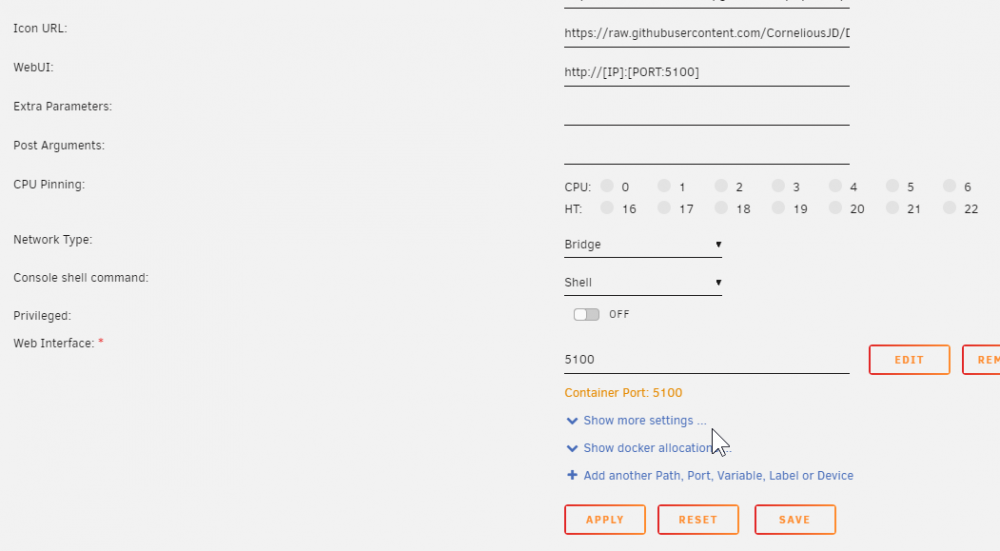
So it looks like they changed the port number for some reason from 5000 to 5100... try changing these manually. I'll edit my templates and push updates to CA After I edited everything to 5100 it works. REMINDER: Toggle advanced on and edit the WebUI port as well to 5100
-
Can you describe what you mean about the path before installing? Perhapsd a screenshot will help? Also, if you're interested in another container, I personally run OneTimePassword istead of Password Pusher now, both are good options though!
-
Perfect, was waiting for this. I'm going to migrate over to the official docker container this weekend (time permitting) Appreciate you putting this together for us.
-
So I would actually strongly recommend against using SQLite. SQLite in photo apps like this scales HORRIBLY and is bound to cause you all sorts of slowness, issues, and headaches. You would probably need to specify sqlite as a db driver tho. see here: PHOTOVIEW_DATABASE_DRIVER=mysql is the default. I would really just suggest spinning up MariaDB though, it's not difficult to do.
-
You can, or you can just create multiple databases inside of one MariaDB container. Choice is yours
-
It's case sensitive, try /photos in the container, no capital.
-
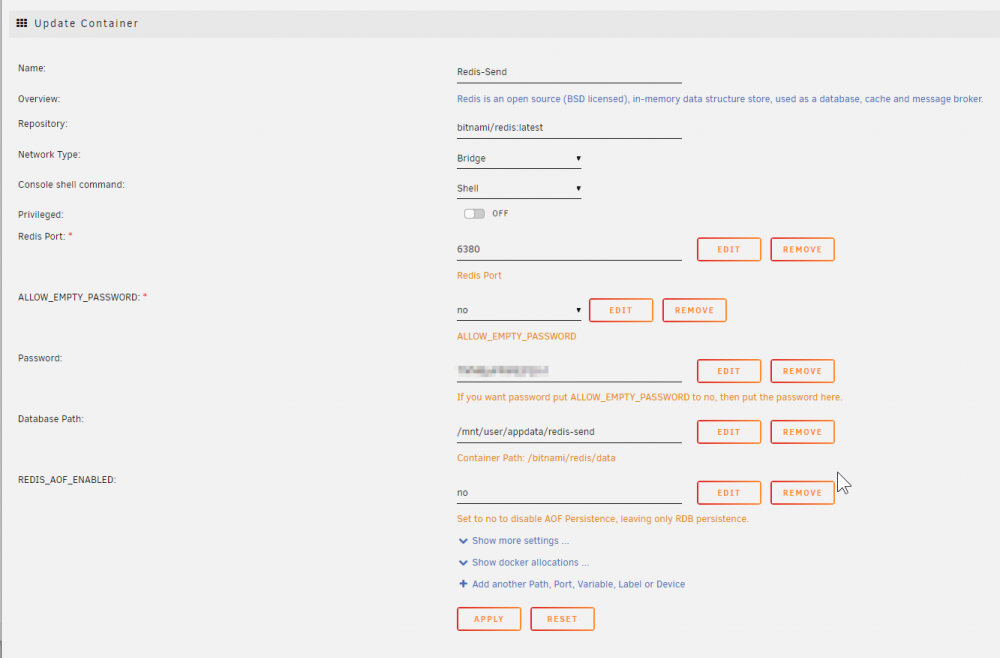
New send container is working, however I cannot seem to get passwords to work, I enter something easy like "test" or "test123" as a password and it then tells me later the password is incorrect. EDIT - Disregard, once I actually set it all up via reverse proxy, it seems to be accepting passwords now. PS you do need some Redis persistence. I have mine setup like this, databse saved to appdata, and AOF disabled, to keep the Redis database extremly small (given it's expiring nature)
-
Sorry, I'm not using custom scrapers, but is there a config page that you have to tell it where the scrapers live? Would need to make sure that it matches up with what the container expects so the container path and your appdata for scrapers line up. Maybe someone else with Scrapers enabled can chime in here?
-
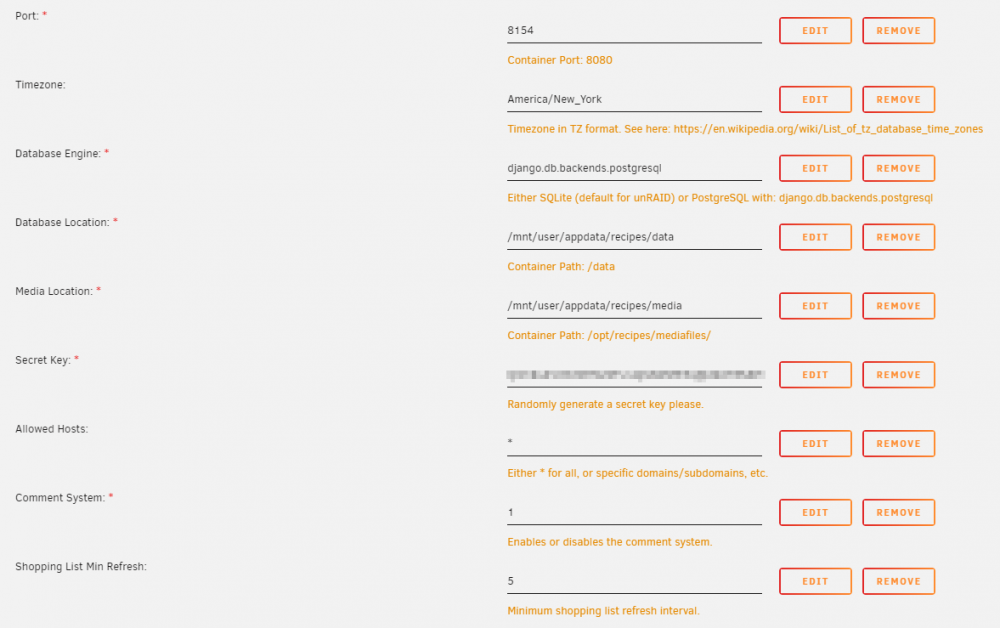
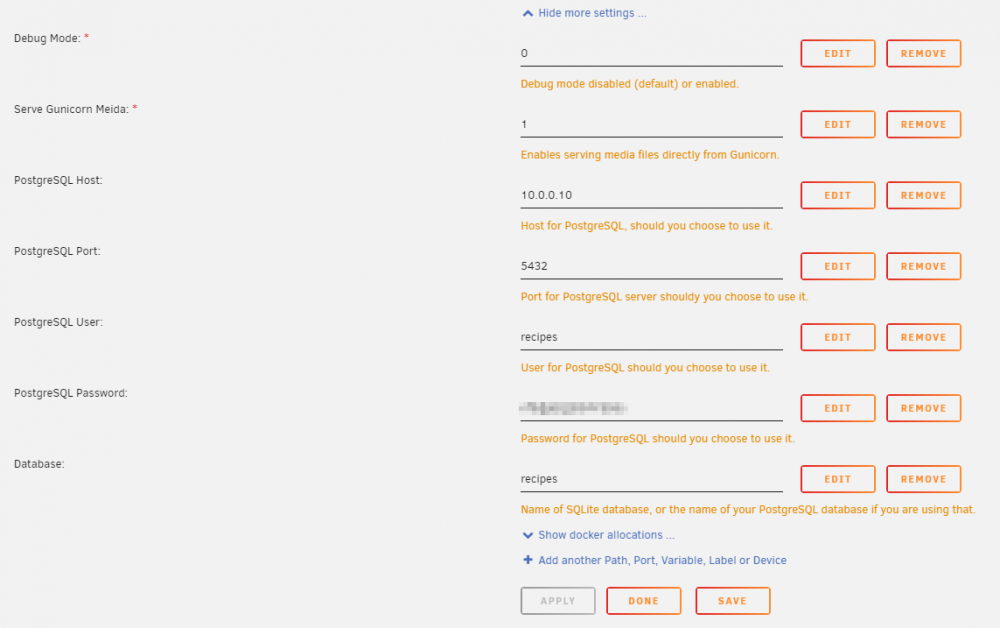
In the container template you need to pick "Show more settings ..." at the bottom and configure all your Postgres stuff there. the /data/recipes.db is the default location of the SQLite database. If you're using postgres that should just be a database name like "tandoorrecipes" Here's my config as an example, with password redacted
-
https://cubecoders.com/AMP#buyAMP Bottom right, you don't need a business email. Just use your personal email account when you pay.
-
This is likely a question suited for their github page or more direct contact w/ the developers, this thread should be used for unraid-specific releated issues/support.
-
I don't beleive so, this container would have no way of communicating with that file.
-
Unraid-specific support for Pastey, please post here. For Pastey-related issues, it's best to contact the dev on GitHub https://github.com/Cesura/pastey
-
You still need to have something automatically checking for upates. I would definately suggest using CA Auto Update for this. Yes, I am on Current Version: 0.15.1 There has been updates the past 2 days.
-
Do you have ca auto update installed? It will check for updates and install per your config.
-
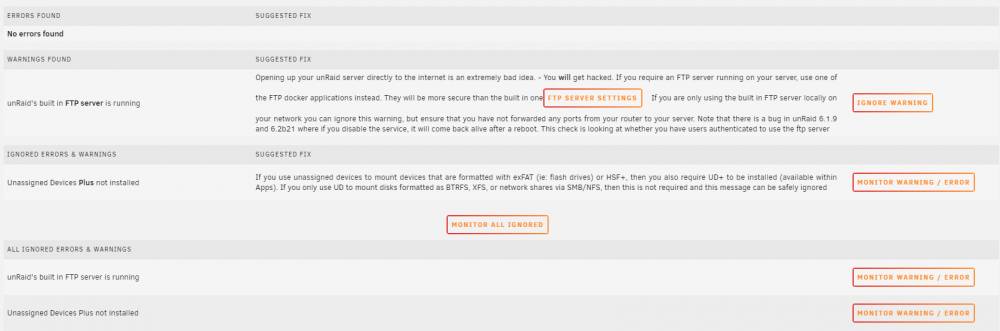
Ok, so I came to post about this (FTP server running). I deleted the /boot/config/plugins/fix.common.problems/ignoreList.json file completely, rescanned and saw that error, ignored it, resacnned again and it's still showing up like this (listed both as an active one, and an ignored one) Version: 2021.03.30a
-
It should stay like that now that you've manually activated, you should be able to stop/restart the docker, and do "force update" and verify that it still works after that.
-
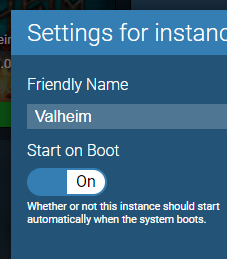
In settings - amp core, make sure startup mode is "start the application" This actually causes it to start the instance AND startup the server. Also make sure your instance itself is set to start on boot too.

-
I was able to get pings to work by chaning --user 99:100 to --user 0:0 in advanced config of the template. this lets ping work it seems. EDIT: Then it was stuck in setup mode, but I fixed that too. Went to console on unraid, and did the following commands. cd /mnt/user/appdata/statping sudo chown root:users . Restarted container and it's running as root now, reads/accepts the config, and ping tests work in StatPing as expected. PS - For what it's wroth, it seems the SQLite database gets corrupted all the freaking time. Haven't had the issue (yet) since setting up with MaridaDB.
-
I can't provide support for the software itself, this is more-so just for docker-specific/unraid-specific support. You'll probably have better luck asking the author on the github page for how to do this. sorry!
-
You should reach out in the nextcloud container support thread instead of here actually. But you need to create a database too, not just a user. Also I would *not* recommend to not have a password. You may want to look up a tutorial or video on setting up nextcloud on unRAID. It should walk you thru everything.
-
SQLite's performance is awufl too, would recommend swapping that out right away. If you're having trouble w/ Postgres, I'd install the Linuxserver MariaDB docker container and use either Adminer or PHPMyAdmin (probalby easier of the 2) so you can get a GUI-based managemetn interface for your MariaDB to easily add a user/database.
(Small).thumb.png.b884b0484e848c502a315fc27b995f59.png)






