





Tucubanito07
Members
-
Joined
-
Last visited
Everything posted by Tucubanito07
-
Hello @limetech, Are there any updates on this issue? I am on 6.10.3 and when I look under "/var/log/nginx/error.log" there are plenty of errors. The same as the user @BoHiCa above. Any input is greatly appreciated. Thank you.
-
Is there any instructions on how to setup Graylog in unraid? I can't seem to find anything and I see some users are having issues with getting it installed.
-
I had to specify 1.24.0 to fix my issue. the 1.25.0 does not work for me.
-
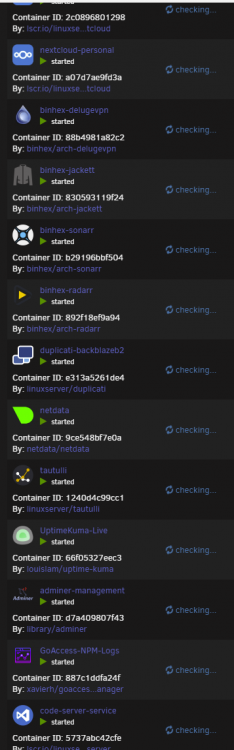
Hello Unraid Community, Every time I click on check for updates on Docker Tab or Plugins Tab. It keeps spinning and nothing comes up on 6.10.2 and this never happened in 6.9.x series. I have attached the support file on here. @Squid Thank you. eleanor-diagnostics-20220605-2036.zip
-
When I tell Docker to check for updates. The checking on the screenshot will keep spinning and spinning. I will create a post now with my Support file. Thanks @Squid
-
Bumping this thread to see if anyone has run into this issue.
-
Hello guys, If I open Plugins or Docker, it sometimes says there are Plugins and Dockers that need update but once I click on check for updates it just keeps spinning. If anyone can point to me to the right directions would be great. This never happened on 6.9 versions. Thank you.
-
I ran into the same issue. Does anyone know how to fix this?
-
Good afternoon, all. Does anyone know how to fix this error? I have searched in google and cannot find anyone with a resolution. Someone just resolve it by not using linuxserver/nextcloud and using the nextcloud container. 2022/04/03 18:29:17 [error] 454#454: *57 upstream timed out (110: Operation timed out) while reading response header from upstream, client: 172.70.54.43, server: _, request: "GET /settings/ajax/checksetup HTTP/1.1", upstream: "fastcgi://127.0.0.1:9000", host: "your domain here.com"
-
This is awesome thanks you.
-
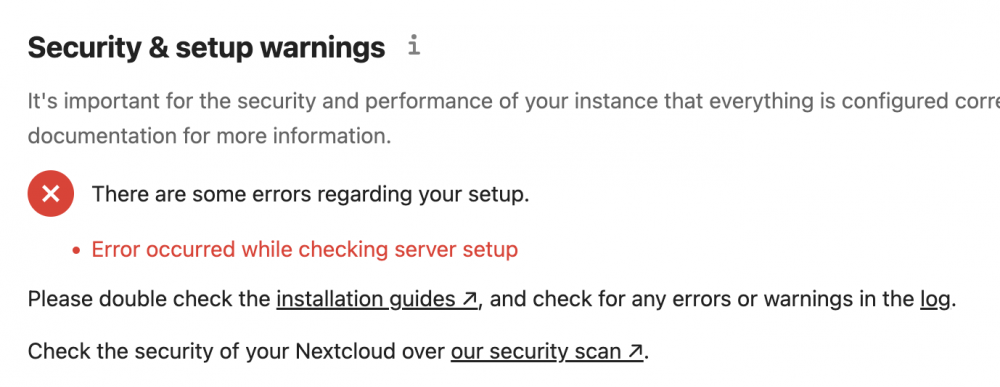
Hello, Has anyone encounter this issue or does anyone know how to resolve this? I dont see anything on the logs.
-
Anyone has this issue on their Nextcloud instance? I have searched multiple times everywhere and nothing. I also checked the logging screen in nextcloud and nothing comes up. I am on version 23.0.2. Any help is greatly appreciated.
-
Nextcloud developers ran into problems with 23.0.1 and fixed it in 23.0.2, hence the reason why they released .2 instead of .1.
-
That is what I thought. Thank you.
-
Hello. Does anyone know if this container is able to display html websites? I know it has nginx and it can be used to making your own website. i tried placing the index.html in the nginx/default_www folder but it did not work. Has anyone tried it before? i don’t want to use Wordpress. I want to learn html and making website and I have been searching and I don’t see anything. All I see is how to use Wordpress with it and I already have that. i want to drop the files in a folder location inside nginx and makes changes to the file to update my own website. thanks in advance.
-
If you are using NginxProxyManager, you don't port forward 444 on the UDM Pro. You port forward the port for NginxProxyManager. That is the reason why you are not getting a certificate. Forward the port for NginxProxyManager and try again.
-
In order to show up you will need to do the following command in the container console. sudo -u abc php config/www/nextcloud/occ files:scan -all or sudo -u abc php config/www/nextcloud/occ files:scan <Username You Want To Scan> Make sure you take the brackets off and just place the username you want to scan so the items moved with Kruzader show up. Spaceinvander also did a video on this not to long ago if you want to follow a video.
-
This error has to do with you not having the right permissions on the folder where it places the photos and videos.
-
You will want to go to the config file and change the maintenance to this -> 'maintenance' => false, This is located in /mnt/user/appdata/nextcloud/www/nextcloud/config/config.php
-
I hope someone can help me with this error. When I go to settings and I click on overview under administration. I get the below error. This is a fresh install on 23.0.0. I have been searching around and can't seem to find the answer. I does not happen to me on the other container I have but on a version 21.0.x. There are some errors regarding your setup. Error occurred while checking server setup
-
I tried doing it the manual way and got an error "Exception: Database error when running migration latest for app notifications" and after some research i see that mariadb 10.6 is not compatible. So i checked my mariadb and its on "MySQL version: 5.5.5-10.5.13-MariaDB-log" so i have no idea why. Welp, ill try another version when its release and see. Thank you @tazire
-
I am on release candidate 2 for Unraid and every time I update nextcloud I have errors. Could it be because no everything on the container is update to work on the new Unraid version 6.10 RC2? I tried to update to 21.0.7 just now and it kept telling me "The server was unable to complete your request. If this happens again, please send the technical details below to the server administrator. More details can be found in the server log. Technical details Remote Address: 10.10.x.x" However, when I checked the logs on "cat /mnt/user/appdata/nextcloud/www/nextcloud/data/nextcloud.log" and there was nothing. Has anyone ran into this problem?
-
I am experiencing the same. My Nextcloud gui instance is slow. Hopefully, this gets fixed with a Unraid update or a docker update.
-
Awesome thank you. I will update the go file with this.
-
Ok awesome thank you so much. I can see it now.


