Everything posted by casperse
-
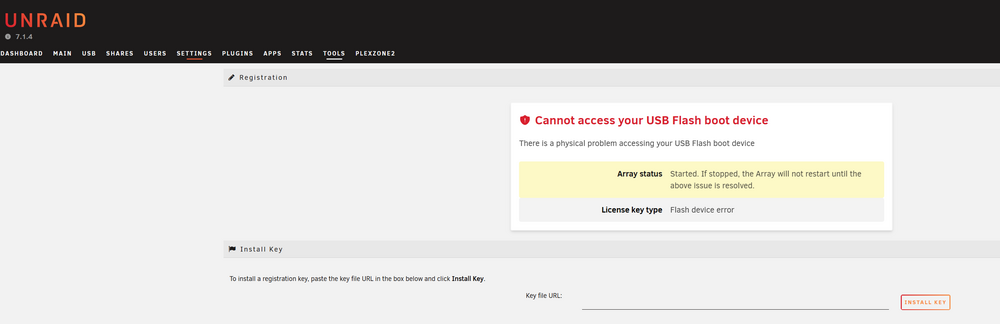
Refresh of Unraid UI and now I get this?
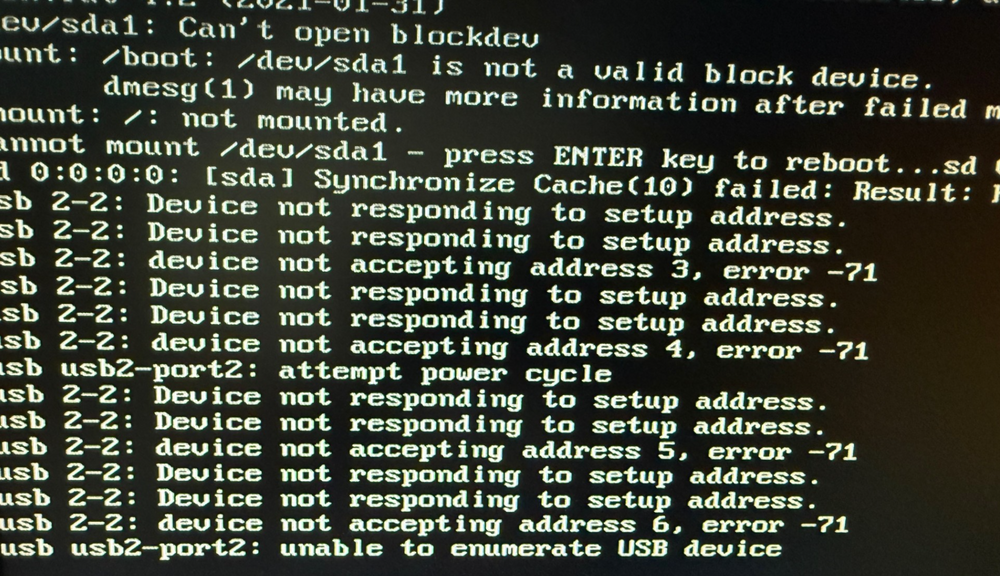
Ok SSH into server and after running: dmesg | grep -i sda I can see the USB is faulty: [507936.087098] FAT-fs (sda1): Directory bread(block 30623) failed [507936.087100] FAT-fs (sda1): Directory bread(block 30624) failed [507936.087102] FAT-fs (sda1): Directory bread(block 30625) failed [507936.087104] FAT-fs (sda1): Directory bread(block 30626) failed ...... The bacup Download works now (didnt last night) so I have a backup I can restore to a new USB. I do use the recommended Samsung USB drives but I guess everything breaks over time :-)
-
Refresh of Unraid UI and now I get this?
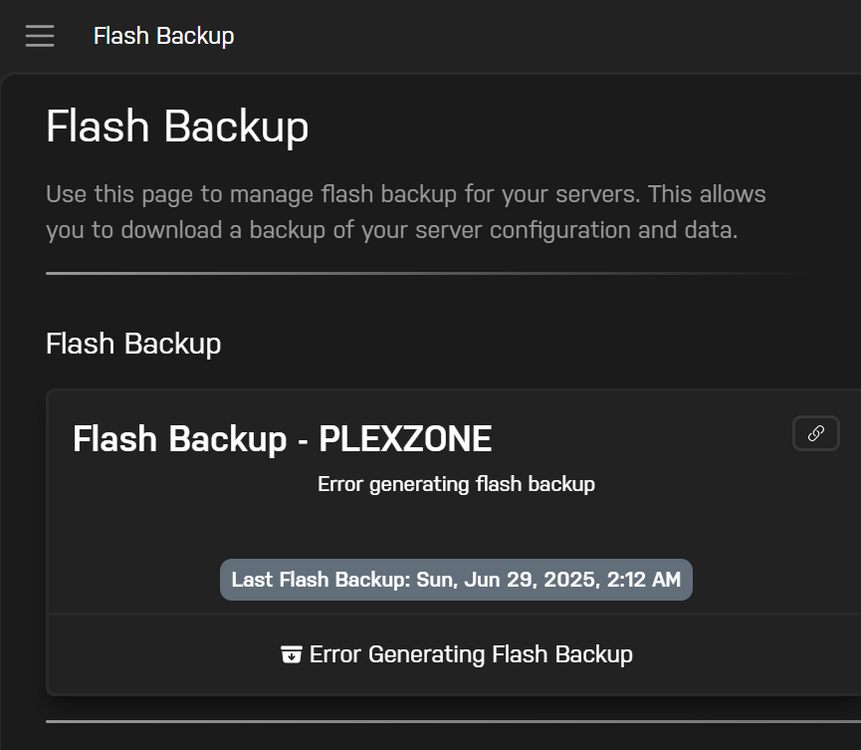
This is from coonnect my unraid webpage - When I select management and login I get this: From Connect I tried to create a USB revcovery but it fails when generating? What to do next? All applications is running/dockers /shares etc. Afraid to reboot? Please advice, Thanks
-
[PLUGIN] Disk Location
Sorry do you mean this (Didnt see it before): DEPRECATION INFO This plugin support now only Unraid 6.9 and onwards! Development build might be installed otherwise, but is not recommended or supported!
-
[PLUGIN] Disk Location
Any update on this issue: I am experiencing the same issue
-
[Support] IBRACORP - All images and files
Someone reported that you only have to add a missing folder? "is the /config/asset/ folder present? I had to create that myself over the weekend to get the container to start on v4.39.0" Can anyone confirm this?
-
**GUIDE** How to Install Authelia on unRAID
Another breaking change:
-
[Support] IBRACORP - All images and files
Hi All Just want to say that if you have the Authelia docker and its not running/starting then there is a breaking change in the last update. I fixed it by rolling back on the DB (it made some changes) and rolled back to the older version. Everything is running again now 🙂 Is anyone experiencing the same issue? UPDATE: i ROLLED BACK TO: authelia/authelia:4.38.18 and remember to restore the DB back to when this was running the old version. Must be some breaking changes that does not work with the new version: https://www.authelia.com/blog/4.39-release-notes/ If anyone have a work around for the new version then please let me know (My setup is the one Ibracorp have in there guide)
-
[Plugin] FolderView
Same problem here! - Any solution to this? (Uisng the scolcipitato)
-
Mover not running & Mem Error?
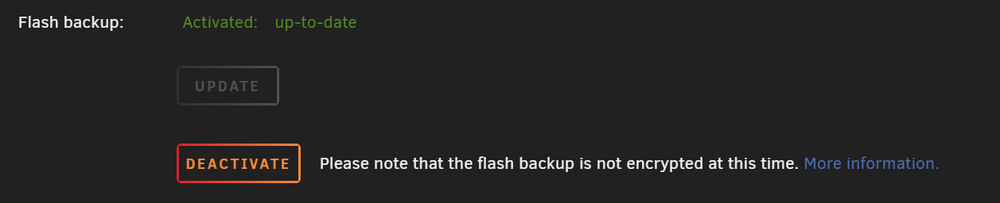
Yes update buttom more than once just keep turning the "time" icon for a day Seems its working now. Maybe some connectivity problems to connect?
-
Mover not running & Mem Error?
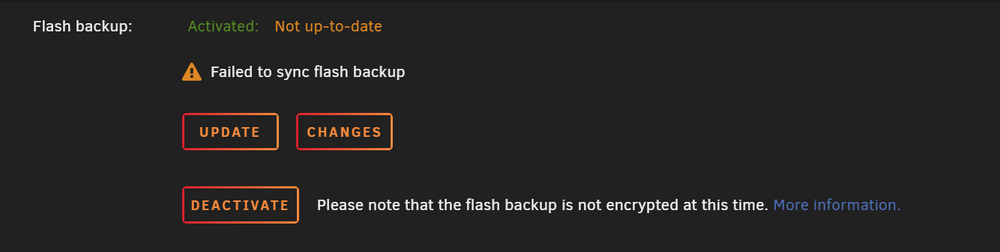
Yes it seems that v7.0.1 helped, but after update I keep getting this: Any idea why the Flash backup stopped working everything else looks fine 🙂
-
Mover not running & Mem Error?
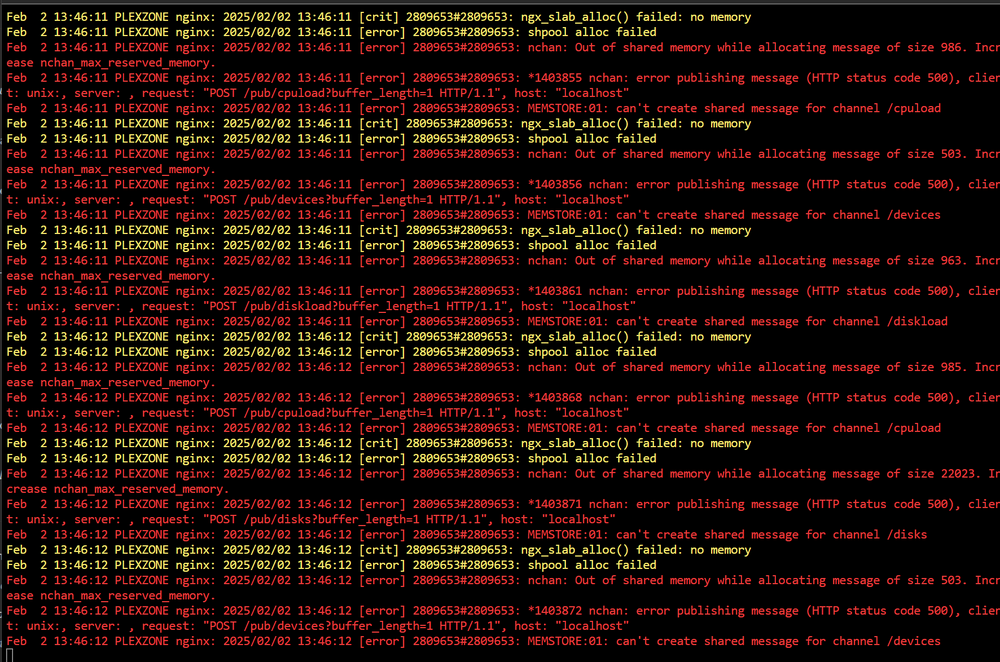
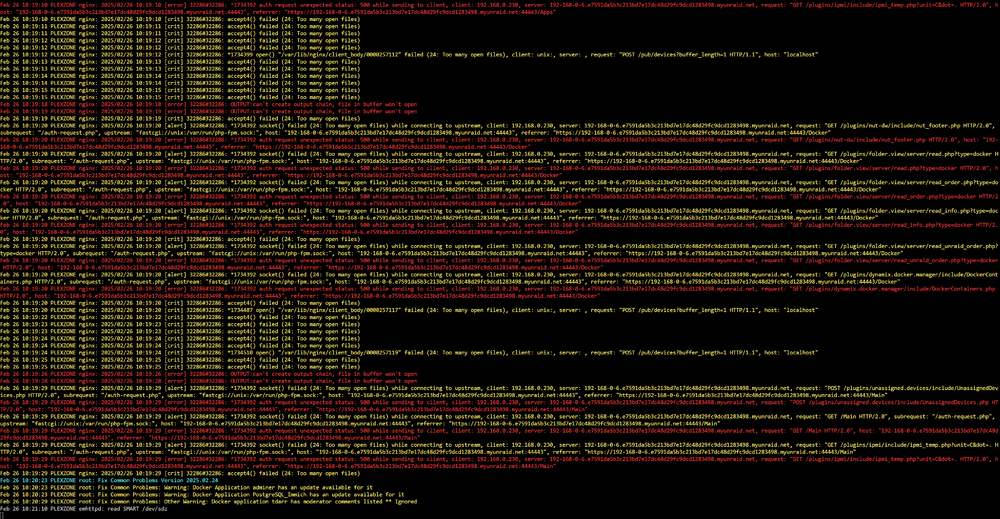
There wasn't any update so I just deleted the plugin and the mover works again. But the error below is back and the UI for the Docker section is unresponsive? I have included a new diagnostic file below (I haven't installed any new dockers! but maybe some update have broken something? or the mover running is generating these errors?) diagnostics-20250226-1020.zip
-
Mover not running & Mem Error?
I removed the "CA Mover Tuning" and the mover works agaon now! Thanks Any input to fixing the error reported by e-mail from UNRAID? : warning: Potentially dangerous mode on unraid-api: 0666 error: Ignoring unraid-api because it is writable by group or others. error: found error in file unraid-api, skipping warning: Potentially dangerous mode on unraid-api.patch: 0666 error: Ignoring unraid-api.patch because it is writable by group or others. error: found error in file unraid-api.patch, skipping
-
Mover not running & Mem Error?
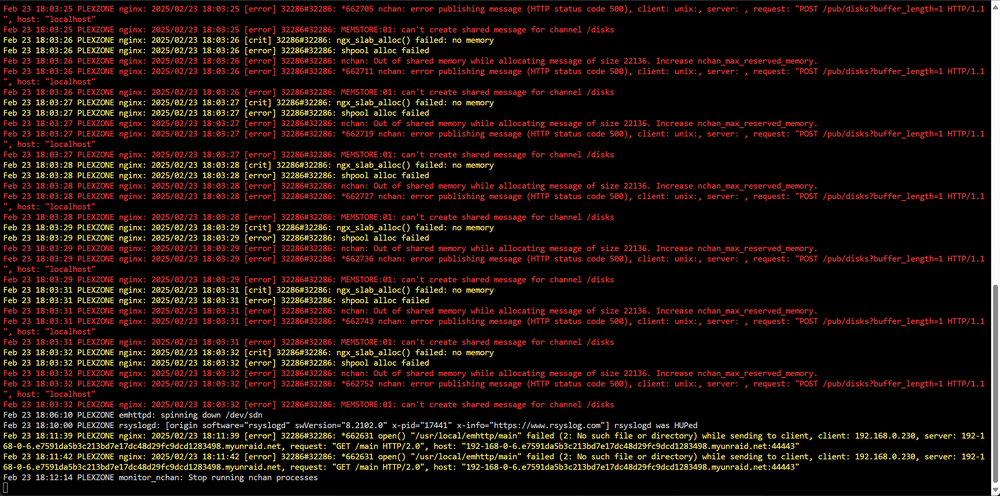
Hi All I seem to have problem with the mover again (I did remove the old plugin ad that solved the problem, but after upgrading to v7.0.0 I have problem again) prsssing the Mover button and nothing happens? If I do a mover.old start I can force it to run, just not running by itself, my cache runs full. Se Diagnostic below. And some memory problem? (I have the cache plugin installed and I have 128G of RAM with a load of 50-60%): nginx: 2025/02/23 18:03:13 [error] 32286#32286: MEMSTORE:01: can't create shared message for channel /disks And a new error in my e-mail from the Unraid server: Its allot of problems all at once, a reboot and its running for 3 days again. Attached my logs. Hope some one can help me? 🙂 Br Casperse diagnostics-20250223-1823.zip
-
All Hell is happing to my log file after a reboot (I just enabled the new patch plugin?)
Update: After 3 reboots I don't get the fill logs anymore and the server is running as before? Very strange, I still get the out of memory but that takes a month or more. I have not been able to identify what is running the memory full, I have stopped and started multiple dockers. Kept restrain on logging size and Mem allocation in each docker but no matter what it end up requiring a reboot of the server every month. having 128G MEM delays it. from the old server having only 64G (This is not related to this log file going crazy.) I keep updating to the latest version of Unraid 🙂
-
All Hell is happing to my log file after a reboot (I just enabled the new patch plugin?)
Hi All This might just be a coinsident or a updated docker but I am crashing after reboot. Can anyone see what is causing this? Thanks Casperse diagnostics-20250202-1338.zip

-
[Support] Josh5 - Unmanic - Library Optimiser
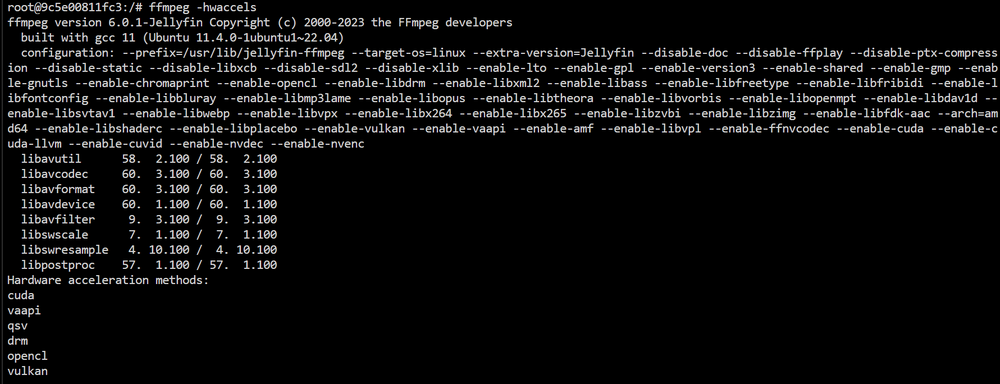
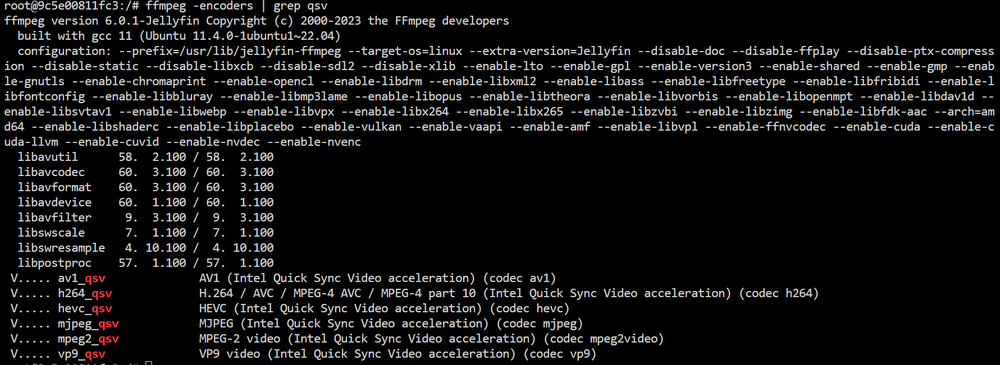
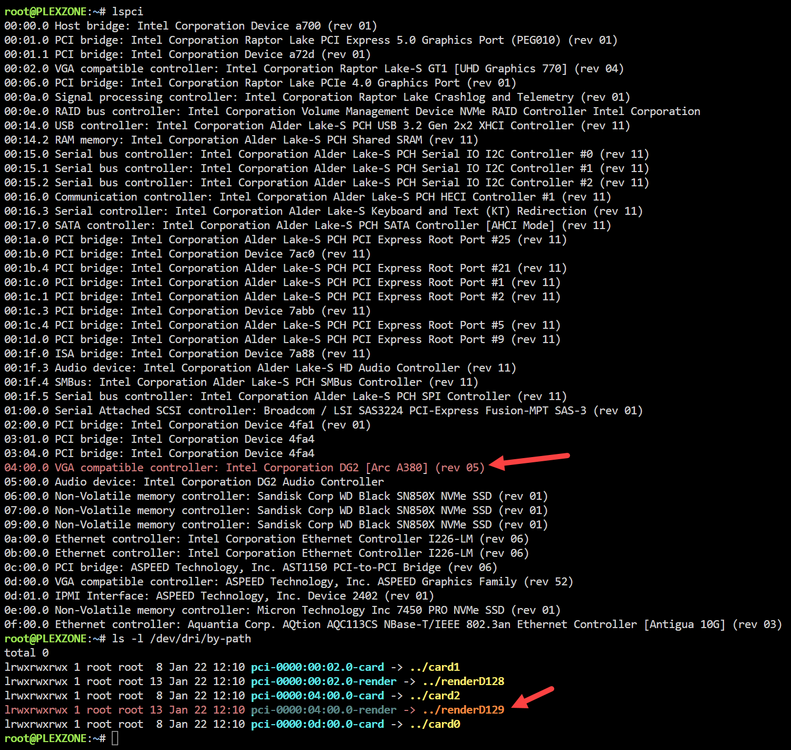
This is Great I have just removed the Nvida card (Had given up on AV1 and the ARC card) and inserted it again. I am seeing this: Which gives me the configuration: --device=/dev/dri/card2:/dev/dri/card0 --device=/dev/dri/renderD129:/dev/dri/renderD128 Unmanic: Docker terminal: And: And: So am I missing some codec? and if I am how to go about this? I have done the encoder config, but it does not utllize the card. Again thanks for your help !!! BTW: the 3 card listed is the built in IPMI card on the MB
-
No IPMI netcad after update to v.7.0.0
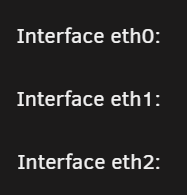
Hi All I am creating a new thread on this.... A virtual NIC is being assigned to eth0 on certain systems On some systems with IPMI KVM, a virtual NIC is being assigned to eth0 instead of the expected NIC. See this forum post for options. So following the post here: I tried the: echo "blacklist cdc_ether" > /boot/config/modprobe.d/cdc_ether.conf But my problem seem different I dont have the IPMI eth listed in my LAN setup? I only have 3 listed LAN's 2 on the MB + 1 10Gb card and missing the IPMI card? MB: SUS Pro WS W680-ACE IPMI Please let me know what files or config you might need? diagnostics-20250120-1453.zip
-
Upgrade v.7.0.0 - Cache pools gone and server named Tower
Another error for a shared folder? rpc.mountd[50162]: No host name given with /mnt/user/backups (ro,async,wdelay,hide,nocrossmnt,secure,root_squash,no_all_squash,no_subtree_check,secure_locks,acl,no_pnfs,fsid=106,anonuid=65534,anongid=65534,sec=sys,ro,secure,root_squash,no_all_squash), suggest *(ro,async,wdelay,hide,nocrossmnt,secure,root_squash,no_all_squash,no_subtree_check,secure_locks,acl,no_pnfs,fsid=106,anonuid=65534,anongid=65534,sec=sys,ro,secure,root_squash,no_all_squash) to avoid warning Not sure what to do, I have NFS and SMB share enabled on this backup folder

-
Upgrade v.7.0.0 - Cache pools gone and server named Tower
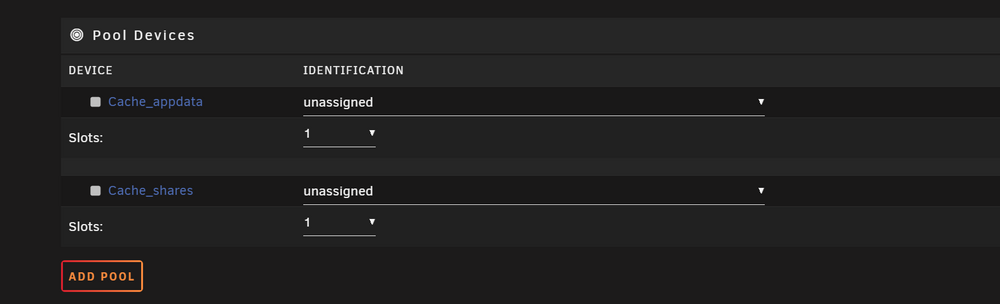
Hi All After a successfull upgrade and one more reboot I got the "Tower" in my welcome prompt as the server name And I have missing cache pools If I just stop the VM and docker service can I just try each cache pool to find the right one? (I cant remember the ID and the nvme size is the same tower-diagnostics-20250119-1744.zip
-
[Support] Josh5 - Unmanic - Library Optimiser
Hi All I still cant use my A380 card in Unmanic to transcode to AV1. I can confirm that the card works with Unraid and Plex/Emby/Jellyfin But Unmanic to AV1 does not work (The card is selected correctly I asked in the Unmanic forum) Have enyone her gotten it working in the new Unraid 7.0 release candidate?
-
VM setup custom xml code how to?
Hi All I think there was a new feature to add XML changes so GUI changes didn't change them when editing here? I am running the latest release candidate but I cant write in the custom field? I would like to somehow add the following settings: (Not sure on how to go about this) icon path: <metadata> <vmtemplate xmlns="unraid" name="CentOS" icon="/mnt/cache_appdata/domains/XPEnology_DSM_X/synology.png" os="centos" webui="" storage="default"/> </metadata> And the controller to "1" </disk> <disk type='file' device='disk'> <driver name='qemu' type='qcow2' cache='writeback' discard='ignore'/> <source file='/mnt/cache_appdata/domains/XPEnology_DSM_X/vdisk2.qcow2'/> <target dev='hdd' bus='sata'/> <serial>vdisk2</serial> <address type='drive' controller='1' bus='0' target='0' unit='3'/> </disk> <disk type='file' device='disk'> <driver name='qemu' type='qcow2' cache='writeback' discard='ignore'/> <source file='/mnt/user/Photos_backup/vdisk_photo.qcow2'/> <target dev='hde' bus='sata'/> <serial>vdisk3</serial> <address type='drive' controller='1' bus='0' target='0' unit='4'/> </disk> Is it possible to add them as above? Or do I need some special format only for the part I dont want the UI to change? Thanks /Casperse
-
Mover not working/running? v7.0.0 Beta 4
Yes I can confirm that after removing the CA Mover tuning plugin the mover works again. Funny thing the command Mover status - dosent work after removing the plugin. And I miss the Turbo mode enabling during mover runs....
-
Mover not working/running? v7.0.0 Beta 4
Hi All I got an alarm that the cache was full. (First time, the mover always make sure this dosen't happen) I pushed the Mover and it didn't grey out? And if I did a "mover stop" in the terminal I got the mover isnt running? I have the "CA Mover tuning" plugin installed. But I didnt use it, the move button is not set to use the plugin! Can anyone share some light on why the mover stopped working? I just tried to do a "mover start" in the terminal and that works. I am running Beta 7.0.0 - beta 4 Attached diagnostic. Thanks for any input you can provide. diagnostics-20241107-1111.zip

-
Update to v.7.0.0.0 Beta 2 broke my VM?
Please let me know how to help you help me 🙂 I have created this on another Unraid server so I now have two one where its working on the old Unraid and a copy on another server running v.7 If I look at the log for the old server where the VM is booting and working I get this output. -netdev tap,fd=41,id=hostnet3 \ -device '{"driver":"e1000","netdev":"hostnet3","id":"net3","mac":"00:11:32:8b:b0:4c","bus":"pci.2","addr":"0x5"}' \ -chardev pty,id=charserial0 \ -device '{"driver":"isa-serial","chardev":"charserial0","id":"serial0","index":0}' \ -chardev socket,id=charchannel0,fd=34,server=on,wait=off \ -device '{"driver":"virtserialport","bus":"virtio-serial0.0","nr":1,"chardev":"charchannel0","id":"channel0","name":"org.qemu.guest_agent.0"}' \ -device '{"driver":"usb-tablet","id":"input0","bus":"usb.0","port":"2"}' \ -audiodev '{"id":"audio1","driver":"none"}' \ -vnc 0.0.0.0:0,websocket=5700,audiodev=audio1 \ -k en-us \ -device '{"driver":"qxl-vga","id":"video0","max_outputs":1,"ram_size":67108864,"vram_size":67108864,"vram64_size_mb":0,"vgamem_mb":16,"bus":"pcie.0","addr":"0x1"}' \ -device '{"driver":"virtio-balloon-pci","id":"balloon0","bus":"pci.5","addr":"0x0"}' \ -sandbox on,obsolete=deny,elevateprivileges=deny,spawn=deny,resourcecontrol=deny \ -msg timestamp=on char device redirected to /dev/pts/0 (label charserial0) qxl_send_events: spice-server bug: guest stopped, ignoring 2024-09-30T10:28:16.906802Z qemu-system-x86_64: terminating on signal 15 from pid 5024 (/usr/sbin/libvirtd) 2024-09-30 10:28:18.446+0000: shutting down, reason=destroyed 2024-09-30 10:45:44.039+0000: starting up libvirt version: 8.7.0, qemu version: 7.2.0, kernel: 6.1.106-Unraid, hostname: PLEXZONE2 LC_ALL=C \ PATH=/bin:/sbin:/usr/bin:/usr/sbin \ HOME='/var/lib/libvirt/qemu/domain-5-XPEnology_DS3617xs D' \ XDG_DATA_HOME='/var/lib/libvirt/qemu/domain-5-XPEnology_DS3617xs D/.local/share' \ XDG_CACHE_HOME='/var/lib/libvirt/qemu/domain-5-XPEnology_DS3617xs D/.cache' \ XDG_CONFIG_HOME='/var/lib/libvirt/qemu/domain-5-XPEnology_DS3617xs D/.config' \ /usr/local/sbin/qemu \ -name 'guest=XPEnology_DS3617xs DSM7,debug-threads=on' \ -S \ -object '{"qom-type":"secret","id":"masterKey0","format":"raw","file":"/var/lib/libvirt/qemu/domain-5-XPEnology_DS3617xs D/master-key.aes"}' \ -blockdev '{"driver":"file","filename":"/usr/share/qemu/ovmf-x64/OVMF_CODE-pure-efi.fd","node-name":"libvirt-pflash0-storage","auto-read-only":true,"discard":"unmap"}' \ -blockdev '{"node-name":"libvirt-pflash0-format","read-only":true,"driver":"raw","file":"libvirt-pflash0-storage"}' \ -blockdev '{"driver":"file","filename":"/etc/libvirt/qemu/nvram/5a171383-32e9-29c2-76a8-a1db0dc77baf_VARS-pure-efi.fd","node-name":"libvirt-pflash1-storage","auto-read-only":true,"discard":"unmap"}' \ -blockdev '{"node-name":"libvirt-pflash1-format","read-only":false,"driver":"raw","file":"libvirt-pflash1-storage"}' \ -machine pc-q35-6.1,usb=off,dump-guest-core=off,mem-merge=off,memory-backend=pc.ram,pflash0=libvirt-pflash0-format,pflash1=libvirt-pflash1-format \ -accel kvm \ -cpu host,migratable=on,host-cache-info=on,l3-cache=off \ -m 4096 \ -object '{"qom-type":"memory-backend-ram","id":"pc.ram","size":4294967296}' \ -overcommit mem-lock=off \ -smp 4,sockets=1,dies=1,cores=2,threads=2 \ -uuid 5a171383-32e9-29c2-76a8-a1db0dc77baf \ -no-user-config \ -nodefaults \ -chardev socket,id=charmonitor,fd=35,server=on,wait=off \ -mon chardev=charmonitor,id=monitor,mode=control \ -rtc base=utc,driftfix=slew \ -global kvm-pit.lost_tick_policy=delay \ -no-hpet \ -no-shutdown \ -boot strict=on \ -device '{"driver":"pcie-root-port","port":16,"chassis":1,"id":"pci.1","bus":"pcie.0","multifunction":true,"addr":"0x2"}' \ -device '{"driver":"pcie-pci-bridge","id":"pci.2","bus":"pci.1","addr":"0x0"}' \ -device '{"driver":"pcie-root-port","port":17,"chassis":3,"id":"pci.3","bus":"pcie.0","addr":"0x2.0x1"}' \ -device '{"driver":"pcie-root-port","port":18,"chassis":4,"id":"pci.4","bus":"pcie.0","addr":"0x2.0x2"}' \ -device '{"driver":"pcie-root-port","port":19,"chassis":5,"id":"pci.5","bus":"pcie.0","addr":"0x2.0x3"}' \ -device '{"driver":"pcie-root-port","port":20,"chassis":6,"id":"pci.6","bus":"pcie.0","addr":"0x2.0x4"}' \ -device '{"driver":"qemu-xhci","p2":15,"p3":15,"id":"usb","bus":"pcie.0","addr":"0x7"}' \ -device '{"driver":"ahci","id":"sata1","bus":"pci.2","addr":"0x2"}' \ -device '{"driver":"virtio-serial-pci","id":"virtio-serial0","bus":"pci.3","addr":"0x0"}' \ -blockdev '{"driver":"file","filename":"/mnt/user/domains/XPEnology_DS3617xs_DSM_7/tinycore-redpill.v0.8.0.0.img","node-name":"libvirt-3-storage","cache":{"direct":false,"no-flush":false},"auto-read-only":true,"discard":"unmap"}' \ -blockdev '{"node-name":"libvirt-3-format","read-only":false,"cache":{"direct":false,"no-flush":false},"driver":"raw","file":"libvirt-3-storage"}' \ -device '{"driver":"usb-storage","bus":"usb.0","port":"1","drive":"libvirt-3-format","id":"usb-disk2","bootindex":1,"removable":false,"write-cache":"on"}' \ -blockdev '{"driver":"file","filename":"/mnt/user/domains/XPEnology_DS3617xs_DSM_7/vdisk1.qcow2","node-name":"libvirt-2-storage","cache":{"direct":false,"no-flush":false},"auto-read-only":true,"discard":"unmap"}' \ -blockdev '{"node-name":"libvirt-2-format","read-only":false,"cache":{"direct":false,"no-flush":false},"driver":"qcow2","file":"libvirt-2-storage","backing":null}' \ -device '{"driver":"ide-hd","bus":"sata1.3","drive":"libvirt-2-format","id":"sata1-0-3","bootindex":2,"write-cache":"on"}' \ -blockdev '{"driver":"file","filename":"/mnt/user/Photos_backup/vdisk_photo.qcow2","node-name":"libvirt-1-storage","cache":{"direct":false,"no-flush":false},"auto-read-only":true,"discard":"unmap"}' \ -blockdev '{"node-name":"libvirt-1-format","read-only":false,"cache":{"direct":false,"no-flush":false},"driver":"qcow2","file":"libvirt-1-storage","backing":null}' \ -device '{"driver":"ide-hd","bus":"sata1.4","drive":"libvirt-1-format","id":"sata1-0-4","bootindex":3,"write-cache":"on"}' \ -netdev tap,fd=36,id=hostnet0 \ -device '{"driver":"e1000","netdev":"hostnet0","id":"net0","mac":"","bus":"pci.2","addr":"0x1"}' \ -netdev tap,fd=38,id=hostnet1 \ -device '{"driver":"e1000","netdev":"hostnet1","id":"net1","mac":"","bus":"pci.2","addr":"0x3"}' \ -netdev tap,fd=39,id=hostnet2 \ -device '{"driver":"e1000","netdev":"hostnet2","id":"net2","mac":"","bus":"pci.2","addr":"0x4"}' \ -netdev tap,fd=41,id=hostnet3 \ -device '{"driver":"e1000","netdev":"hostnet3","id":"net3","mac":"","bus":"pci.2","addr":"0x5"}' \ -chardev pty,id=charserial0 \ -device '{"driver":"isa-serial","chardev":"charserial0","id":"serial0","index":0}' \ -chardev socket,id=charchannel0,fd=34,server=on,wait=off \ -device '{"driver":"virtserialport","bus":"virtio-serial0.0","nr":1,"chardev":"charchannel0","id":"channel0","name":"org.qemu.guest_agent.0"}' \ -device '{"driver":"usb-tablet","id":"input0","bus":"usb.0","port":"2"}' \ -audiodev '{"id":"audio1","driver":"none"}' \ -vnc 0.0.0.0:0,websocket=5700,audiodev=audio1 \ -k en-us \ -device '{"driver":"qxl-vga","id":"video0","max_outputs":1,"ram_size":67108864,"vram_size":67108864,"vram64_size_mb":0,"vgamem_mb":16,"bus":"pcie.0","addr":"0x1"}' \ -device '{"driver":"virtio-balloon-pci","id":"balloon0","bus":"pci.5","addr":"0x0"}' \ -sandbox on,obsolete=deny,elevateprivileges=deny,spawn=deny,resourcecontrol=deny \ -msg timestamp=on char device redirected to /dev/pts/0 (label charserial0) qxl_send_events: spice-server bug: guest stopped, ignoring This is very old VM and lived through many upgrades, but the bootloader is old. Maybe the solution is to get it working with a new bootloader and migrate from the old to the new (If that's even possible). https://github.com/AuxXxilium/AuxXxilium HAS anyone XPENOLOGY running in a VM on Unraid v. 7.0.0.0 ? If you have please share what you had to do to the VM configuration ? 🙂 I might solve it by implementing the same changes.
-
Update to v.7.0.0.0 Beta 2 broke my VM?
Upgrading again to v. 7 and running the VM I get: text error warn system array login 2024-09-30 10:31:04.916+0000: starting up libvirt version: 10.5.0, qemu version: 9.0.1, kernel: 6.8.12-Unraid, hostname: PLEXZONE LC_ALL=C \ PATH=/bin:/sbin:/usr/bin:/usr/sbin \ HOME='/var/lib/libvirt/qemu/domain-5-XPEnology_DS3617xs D' \ XDG_DATA_HOME='/var/lib/libvirt/qemu/domain-5-XPEnology_DS3617xs D/.local/share' \ XDG_CACHE_HOME='/var/lib/libvirt/qemu/domain-5-XPEnology_DS3617xs D/.cache' \ XDG_CONFIG_HOME='/var/lib/libvirt/qemu/domain-5-XPEnology_DS3617xs D/.config' \ /usr/local/sbin/qemu \ -name 'guest=XPEnology_DS3617xs DSM7,debug-threads=on' \ -S \ -object '{"qom-type":"secret","id":"masterKey0","format":"raw","file":"/var/lib/libvirt/qemu/domain-5-XPEnology_DS3617xs D/master-key.aes"}' \ -blockdev '{"driver":"file","filename":"/usr/share/qemu/ovmf-x64/OVMF_CODE-pure-efi.fd","node-name":"libvirt-pflash0-storage","auto-read-only":true,"discard":"unmap"}' \ -blockdev '{"node-name":"libvirt-pflash0-format","read-only":true,"driver":"raw","file":"libvirt-pflash0-storage"}' \ -blockdev '{"driver":"file","filename":"/etc/libvirt/qemu/nvram/5a171383-32e9-29c2-76a8-a1db0dc77baf_VARS-pure-efi.fd","node-name":"libvirt-pflash1-storage","read-only":false}' \ -machine pc-q35-6.1,usb=off,dump-guest-core=off,mem-merge=off,memory-backend=pc.ram,pflash0=libvirt-pflash0-format,pflash1=libvirt-pflash1-storage,hpet=off,acpi=on \ -accel kvm \ -cpu host,migratable=on,host-cache-info=on,l3-cache=off \ -m size=4194304k \ -object '{"qom-type":"memory-backend-ram","id":"pc.ram","size":4294967296}' \ -overcommit mem-lock=off \ -smp 4,sockets=1,dies=1,clusters=1,cores=2,threads=2 \ -uuid 5a171383-32e9-29c2-76a8-a1db0dc77baf \ -no-user-config \ -nodefaults \ -chardev socket,id=charmonitor,fd=46,server=on,wait=off \ -mon chardev=charmonitor,id=monitor,mode=control \ -rtc base=utc,driftfix=slew \ -global kvm-pit.lost_tick_policy=delay \ -no-shutdown \ -boot strict=on \ -device '{"driver":"pcie-root-port","port":16,"chassis":1,"id":"pci.1","bus":"pcie.0","multifunction":true,"addr":"0x2"}' \ -device '{"driver":"pcie-pci-bridge","id":"pci.2","bus":"pci.1","addr":"0x0"}' \ -device '{"driver":"pcie-root-port","port":17,"chassis":3,"id":"pci.3","bus":"pcie.0","addr":"0x2.0x1"}' \ -device '{"driver":"pcie-root-port","port":18,"chassis":4,"id":"pci.4","bus":"pcie.0","addr":"0x2.0x2"}' \ -device '{"driver":"pcie-root-port","port":19,"chassis":5,"id":"pci.5","bus":"pcie.0","addr":"0x2.0x3"}' \ -device '{"driver":"pcie-root-port","port":20,"chassis":6,"id":"pci.6","bus":"pcie.0","addr":"0x2.0x4"}' \ -device '{"driver":"qemu-xhci","p2":15,"p3":15,"id":"usb","bus":"pcie.0","addr":"0x7"}' \ -device '{"driver":"ahci","id":"sata1","bus":"pci.2","addr":"0x2"}' \ -device '{"driver":"virtio-serial-pci","id":"virtio-serial0","bus":"pci.3","addr":"0x0"}' \ -blockdev '{"driver":"file","filename":"/mnt/user/domains/XPEnology_DS3617xs_DSM_7/tinycore-redpill.v0.8.0.0.img","node-name":"libvirt-3-storage","read-only":false,"cache":{"direct":false,"no-flush":false}}' \ -device '{"driver":"usb-storage","bus":"usb.0","port":"1","drive":"libvirt-3-storage","id":"usb-disk2","bootindex":1,"removable":false,"write-cache":"on"}' \ -blockdev '{"driver":"file","filename":"/mnt/user/domains/XPEnology_DS3617xs_DSM_7/vdisk1.qcow2","node-name":"libvirt-2-storage","auto-read-only":true,"discard":"unmap","cache":{"direct":false,"no-flush":false}}' \ -blockdev '{"node-name":"libvirt-2-format","read-only":false,"cache":{"direct":false,"no-flush":false},"driver":"qcow2","file":"libvirt-2-storage","backing":null}' \ -device '{"driver":"ide-hd","bus":"sata1.3","drive":"libvirt-2-format","id":"sata1-0-3","bootindex":2,"write-cache":"on"}' \ -blockdev '{"driver":"file","filename":"/mnt/user/Photos_backup/vdisk_photo.qcow2","node-name":"libvirt-1-storage","auto-read-only":true,"discard":"unmap","cache":{"direct":false,"no-flush":false}}' \ -blockdev '{"node-name":"libvirt-1-format","read-only":false,"cache":{"direct":false,"no-flush":false},"driver":"qcow2","file":"libvirt-1-storage","backing":null}' \ -device '{"driver":"ide-hd","bus":"sata1.4","drive":"libvirt-1-format","id":"sata1-0-4","bootindex":3,"write-cache":"on"}' \ -netdev '{"type":"tap","fd":"48","id":"hostnet0"}' \ -device '{"driver":"e1000","netdev":"hostnet0","id":"net0","mac":":::::","bus":"pci.2","addr":"0x1"}' \ -netdev '{"type":"tap","fd":"50","id":"hostnet1"}' \ -device '{"driver":"e1000","netdev":"hostnet1","id":"net1","mac":":::::","bus":"pci.2","addr":"0x3"}' \ -netdev '{"type":"tap","fd":"51","id":"hostnet2"}' \ -device '{"driver":"e1000","netdev":"hostnet2","id":"net2","mac":":::::","bus":"pci.2","addr":"0x4"}' \ -netdev '{"type":"tap","fd":"52","id":"hostnet3"}' \ -device '{"driver":"e1000","netdev":"hostnet3","id":"net3","mac":":::::","bus":"pci.2","addr":"0x5"}' \ -chardev pty,id=charserial0 \ -device '{"driver":"isa-serial","chardev":"charserial0","id":"serial0","index":0}' \ -chardev socket,id=charchannel0,fd=43,server=on,wait=off \ -device '{"driver":"virtserialport","bus":"virtio-serial0.0","nr":1,"chardev":"charchannel0","id":"channel0","name":"org.qemu.guest_agent.0"}' \ -device '{"driver":"usb-tablet","id":"input0","bus":"usb.0","port":"2"}' \ -audiodev '{"id":"audio1","driver":"none"}' \ -vnc 0.0.0.0:2,websocket=5702,audiodev=audio1 \ -k en-us \ -device '{"driver":"qxl-vga","id":"video0","max_outputs":1,"ram_size":67108864,"vram_size":67108864,"vram64_size_mb":0,"vgamem_mb":16,"bus":"pcie.0","addr":"0x1"}' \ -global ICH9-LPC.noreboot=off \ -watchdog-action reset \ -device '{"driver":"virtio-balloon-pci","id":"balloon0","bus":"pci.5","addr":"0x0"}' \ -sandbox on,obsolete=deny,elevateprivileges=deny,spawn=deny,resourcecontrol=deny \ -msg timestamp=on 2024-09-30 10:31:04.916+0000: Domain id=5 is tainted: high-privileges char device redirected to /dev/pts/2 (label charserial0) 2024-09-30T10:31:05.555985Z qemu-system-x86_64: warning: Deprecated CPU topology (considered invalid): Unsupported clusters parameter mustn't be specified as 1 qxl_send_events: spice-server bug: guest stopped, ignoring The VM shows as started but its not running. Short background about this VM. I bought this Synology station and it broke down. I managed to run it as a VM on Unraid and that saved the day for my family that uses all the apps on their phones for this. And the money I spent on a broken Synology was saved 🙂 Also since I bought the NAS I have a license for DSM. It has been running solid for years through many Unraid updates, this is the first one that breaks it.