





dalben
Members
-
Joined
-
Last visited
Everything posted by dalben
-
Just a little piddly thing. 6.8 seems to force case on the Dashboard. My server name is tdm but it's displaying as Tdm.
-
I loved the idea of PiHole but after a server issue this week while I was out of the country, the family were without internet access due to the DNS setting pointing to the pihole docker which was down. I may need to build a Pi with POE to get the small, single cable pihole device I need. Unless anyone can suggest how to configure things so that the family isn't left in the 20th Century if the container doesn't come up.
-
I had it both. Seems to have settled down now so I'll keep my fingers crossed
-
I moved from 5.6 to 5.10 over the weekend as some of the device firmware updates kicked off a major flood of alerts. Known issue that would be fixed by 5.10. So now I don't get alert spamming but I'm dealing with a DHCP issue where some devices just can't get an IP, some need to wait an hour or so to get one, and others get it first time every time. Unifi certainly stops you being bored
-
I ran another set of tests, near 10 hours but I had to abort as I lost a disk during the test (no idea if related or not). I wanted to try and recover rather than keep thrashing the array. The anomaly at Test #43 is when I lost the disk I think, the timing lines up. Files from this aborted run attached. In case it's useful, here's my CPU/RAM specs. Motherboard: ASUSTeK Computer INC. - P8H67-M EVO Processor: Intel® Core™ i5-2500 CPU @ 3.30GHz HVM: Enabled IOMMU: Enabled Cache: L1-Cache = 256 kB (max. capacity 256 kB) L2-Cache = 1024 kB (max. capacity 1024 kB) L3-Cache = 6144 kB (max. capacity 6144 kB) Memory: 16 GB (max. installable capacity 32 GB) ChannelA-DIMM0 = 4096 MB, 1333 MT/s ChannelA-DIMM1 = 4096 MB, 1333 MT/s ChannelB-DIMM0 = 4096 MB, 1333 MT/s ChannelB-DIMM1 = 4096 MB, 1333 MT/s LongSyncTestReport_2019_08_26_0710.csv LongSyncTestReport_2019_08_26_0710.txt
-
A basic observium question. Should observium be able to go out on the LAN and discovery devices on it's own, or are we meant to add all the devices manually?
-
I'm about to give this a shot. I'd like to avoid putting the unraid webgui on a different port so I was wondering g what are the pros and cons of putting this container on its own custom IP? If it means the unraid server, and containers within it can't use pihole, that's fine as there's no real surfing done from there. But if all the clients still have access then that would be my preferred. Are there any other cons to doing it this way? Also having pihole act as the LANs dhcp. I currently have a UniFi set up with 4 different subnets. Any pros or cons with moving to the pihole dhcp?
-
Here's a short test report when I know the servers disk activity was very low. Also added the aborted Long Test results in case that is of interest. I'll run the Long when I know I have a 10 hour window when no one needs the server. ShortSyncTestReport_2019_08_24_1630.csv ShortSyncTestReport_2019_08_24_1630.txt ShortSyncTestReport_2019_08_25_0649.csv ShortSyncTestReport_2019_08_25_0649.txt LongSyncTestReport_2019_08_24_1638.csv LongSyncTestReport_2019_08_24_1638.txt
-
Might be a good time to mention that I'm having some real bad concurrent array performance issues with 6.7 (thread in stable bug report forum) as are others. It's what has got me hunting all over in an attempt to solve it. So my results might be impacted by that. I also had to stop the test right now. With it running my wife couldn't watch a movie as it stuttering and stalling continuously. I'll run the long one when I know the server should be idle.
-
Thanks for that. I went and ran the short test earlier and the results seemed to imply I should run the Long one. It's now at sample point 17 so I'll see what it says in the morning. FWIW, here are my short test results --- INITIAL BASELINE TEST OF CURRENT VALUES (1 Sample Point @ 10sec Duration)--- Tst | RAM | stri | win | req | thresh | MB/s ---------------------------------------------- 1 | 138 | 4096 | 2048 | 128 | 2000 | 115.2 --- BASELINE TEST OF UNRAID DEFAULT VALUES (1 Sample Point @ 10sec Duration)--- Tst | RAM | stri | win | req | thresh | MB/s ---------------------------------------------- 1 | 43 | 1280 | 384 | 128 | 192 | 15.5 --- TEST PASS 1 (2 Min - 12 Sample Points @ 10sec Duration) --- Tst | RAM | stri | win | req | thresh | MB/s | thresh | MB/s | thresh | MB/s -------------------------------------------------------------------------------- 1 | 25 | 768 | 384 | 128 | 376 | 22.2 | 320 | 23.7 | 192 | 15.7 2 | 51 | 1536 | 768 | 128 | 760 | 54.7 | 704 | 44.7 | 384 | 26.0 3 | 103 | 3072 | 1536 | 128 | 1528 | 122.0 | 1472 | 92.9 | 768 | 48.3 4 | 207 | 6144 | 3072 | 128 | 3064 | 129.7 | 3008 | 123.2 | 1536 | 97.2 --- TEST PASS 1_HIGH (30 Sec - 3 Sample Points @ 10sec Duration)--- Tst | RAM | stri | win | req | thresh | MB/s | thresh | MB/s | thresh | MB/s -------------------------------------------------------------------------------- 1 | 414 |12288 | 6144 | 128 | 6136 | 127.9 | 6080 | 130.2 | 3072 | 130.7 --- TEST PASS 1_VERYHIGH (30 Sec - 3 Sample Points @ 10sec Duration)--- Tst | RAM | stri | win | req | thresh | MB/s | thresh | MB/s | thresh | MB/s -------------------------------------------------------------------------------- 1 | 622 |18432 | 9216 | 128 | 9208 | 129.0 | 9152 | 128.7 | 4608 | 130.4
-
I've just downloaded that latest script to give it a run. Tried following the instructions but I don't have a FULLAUTO option. I gets that's for the old script. Where can I find the guidelines to how how should run this script. I ran the short test already without any issues.
-
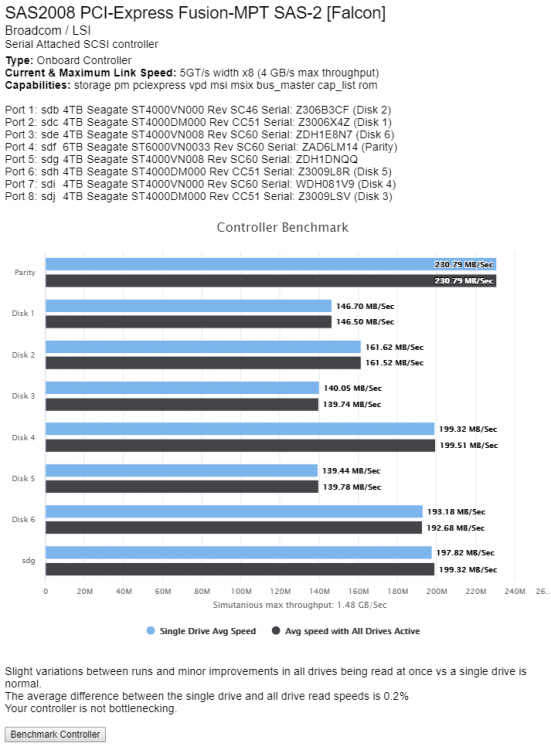
OK, Here's another run in a more controlled environment. The weirdness has gone and the disk models seem to give the same performance.
-
OK, I moved the unifi container into bridge mode. Set everything up. I get to the unfi login prompt. enter login and password, that gets in but I end up with a 400 error when it tries to load the controller. Has anyone got this working and if so, what are your settings ? EDIT: All sorted now. Needed to set the Force SSL option on

-
OK, thanks.
-
I guess you mean this bit... All a bit over my head and I'd need to read up a fair bit to work that out, which is fine. But I simply want to know if other containers with a different IP address is possible. The current nginx/le docker I use doen't support that. In the readme above I see no mention of differing IP addresses one way or another so I'm still unclear.
-
Does this Docker handle assigning certs on a container that has it's own IP? I have my unifi controller on custom and a dedicated IP and I'm hopig I can get LE to issue a cert. I tried the other nginx/LE docker but it seems a different IP isn't supported
-
OK, after more reading I see because I have unifi on its own IP address that this won't work. After that more reading this is answered as well.
-
I'm sure this is a very basic question but I can't seem to find the answerr. Is the nginx install of this docker geared/configured purely for remote proxy, or can it be used as a webserver as well?
-
This has been working fine for me from the first release. A few re-installs or rebuilds when some of things happened but each time it's pretty straight foward. What's important is that you run the first library scan from a pc that has a kodi client install that also uses the MySQL backend. In fact, after creating the DB, it might be easier to confifure everything on a PC and get the client working there. Then you know your settings, paths etc work. The headless kodi is just another kodi client but running on a server. The config to use MySql is the same. It's worth the effort of getting it working
-
OK, let me do another test in a more controlled manner (making sure I don't surf out to another page etc.) and I'll fire up system stats in another window. I'll send it through once done. Thanks
-
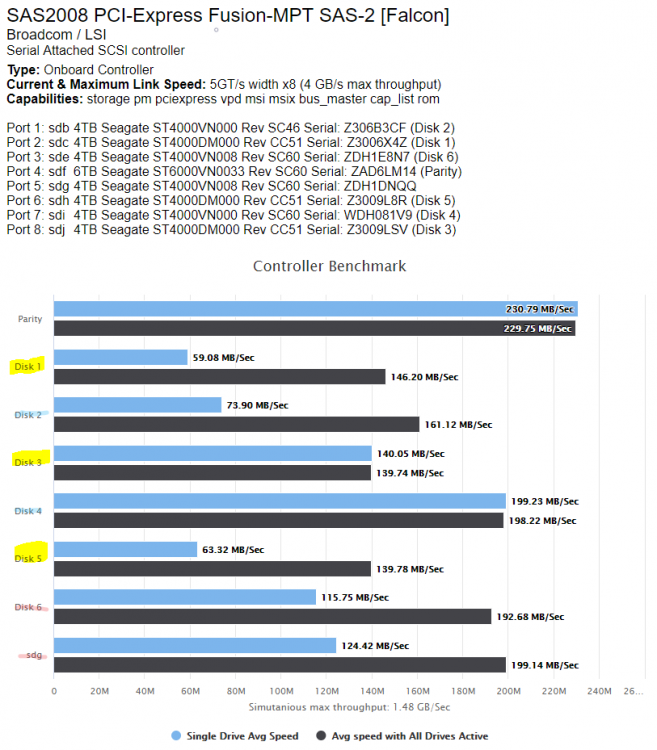
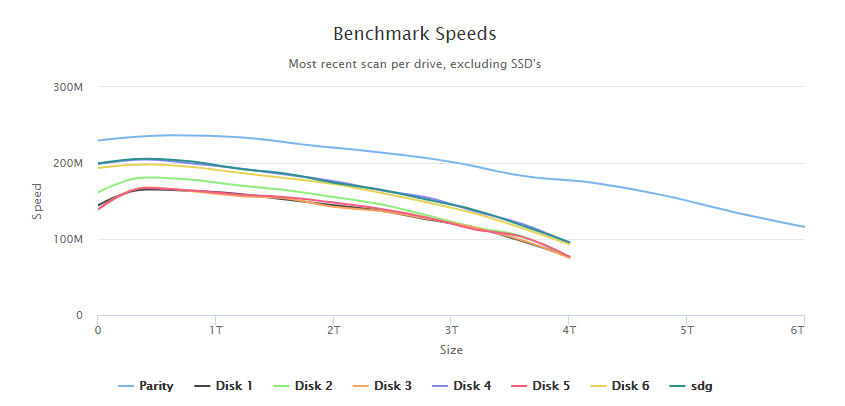
I've got some weird results that I'm hoping to get some explanation too. Here's the controller benchmark followed by the disk benchmark. I've colour coded the matching disk models in the benchmark test. I'm surprised the same model drive on the same controller can show such wild results.
-
This was a couple of years ago. Might be worth hunting down others with your board to see if they have senior issues before buying a new one.
-
I bought an ASROCK for my UnRAID a while back. Due to the senors chip not being supported I ended up using it as my desk top. In my case it used a Nuvoton NCT6683D eSIO chip which only ASROCK seem to use and wasn't supported very well. When I contacted ASROCK they were very firm and clear that they don't support Linux so they wouldn't help.
-
Got this up an running easily. Great plugin. I just hope my i5-2500 doesn't self-combust. Is there a way of limiting the load on the cores? I know I can pin cores but I'd feel better knowing I can max out on 80%. Probably more for emotional reasons than technical ones. Came across an error today. I dropped a few big files in, 17gb and a 10gg before work (~07:00)00. Came home (~19:30) and the two threads were showing 30% and 39% complete. That didn't make much sense 12 hours after kicking them. Checked the log and I see ffmpeg threw an error early in the piece and stopped the conversion. Every hour unmanic checked for files, saw they were already in the queue so did nothing after that. It's been sitting there doing nothing. Here's the log. Not sure if it's a known thing or not. I would have expected that the file gets tagged as failed, and the next in queue get processed. The Log: tdm-unmanic-20190849.txt
-
OK. Thanks for the update.




