





ramblinreck47
Members
-
Joined
-
Last visited
Everything posted by ramblinreck47
-
If anyone that comes across this thread and is looking for something similar, I have a E-2278G and Supermicro X11SCA-F combo that I’m selling in the Selling Forum: The X11SCA-F has the same iGPU passthrough as these ASRock Rack motherboards but it’s a stable BIOS and not a beta one. It has zero trouble with CPU boost clock performance. It also is a full ATX size so you can get adequate distance between PCIE slots which is perfect if you’re trying to use a dual slot GPU. If anyone has any questions, please let me know. I’m trying to sell the CPU, motherboard, heatsink, and RAM all together, but I’m definitely open to just a CPU/motherboard combo if that’s what it takes.
-
From what I read on the Level1 Forum, it looks like @cybrnook has one. You could ask him.
-
If you review the earlier posts and do what is required, you should be able to have both active without issue. iKVM and QuickSync can work simultaneously if the right adjustments are made.
-
I haven't been able to get them working together at the same time. I have onboard graphics enabled and am doing a Legacy boot. As soon as the i915 loads, the iKVM cuts out. Adding i915.disable_display=1 doesn't help much. The screen freezes instead of goes away when i915 loads, but that's about it. The BIOS for the X11SCH-F is considerably different than the X11SCA-F, and the options are very different. I'm sure there is a setting that I'm not seeing but I don't know what it is. If I can't figure it out sometime soon, I'll just make a script to load the iGPU when the array starts so that way the iKVM works all the way through the boot process. I think that might work best and would be perfectly acceptable for me since that is the only time I'll really want the iKVM working. At the very worst, I could just manually load the iGPU whenever I reset the server after it's already booted and the web GUI is back up. Overall, it's not as straight forward as I would have liked, but at least it's not that big of a deal. The boot process makes it nearly 80% done before the iKVM cuts out.
-
I'm trying to get the PASTA plugin up and running but I have no idea what to put for the "WebUI" section. There is zero info on github or instructions with the docker container for what needs to go there.
-
Just had something go wrong on Community Apps while searching for music type plugins. Came here to post this because the message said to do so... Something really wrong went on during display_content Post the ENTIRE contents of this message in the Community Applications Support Thread <!DOCTYPE html> <html lang="en"> <head> <meta charset="utf-8"> <meta http-equiv="content-type" content="text/html; charset=UTF-8"> <meta http-equiv="Cache-Control" content="no-cache"> <meta http-equiv="Pragma" content="no-cache"> <meta http-equiv="Expires" content="0"> <meta http-equiv="X-UA-Compatible" content="IE=edge"> <meta name="viewport" content="width=device-width, initial-scale=1"> <meta name="robots" content="noindex, nofollow"> <meta http-equiv="Content-Security-Policy" content="block-all-mixed-content"> <meta name="referrer" content="same-origin"> <title>Baymax/Login</title> <style> /************************ / / Fonts / /************************/ @font-face { font-family: 'ClearSans'; src: url('/webGui/styles/clear-sans-bold-italic.eot'); src: url('/webGui/styles/clear-sans-bold-italic.eot?#iefix') format('embedded-opentype'), url('/webGui/styles/clear-sans-bold-italic.woff') format('woff'), url('/webGui/styles/clear-sans-bold-italic.ttf') format('truetype'), url('/webGui/styles/clear-sans-bold-italic.svg#clear_sansbold_italic') format('svg'); font-weight: bold; font-style: italic; } @font-face { font-family: 'ClearSans'; src: url('/webGui/styles/clear-sans-bold.eot'); src: url('/webGui/styles/clear-sans-bold.eot?#iefix') format('embedded-opentype'), url('/webGui/styles/clear-sans-bold.woff') format('woff'), url('/webGui/styles/clear-sans-bold.ttf') format('truetype'), url('/webGui/styles/clear-sans-bold.svg#clear_sansbold') format('svg'); font-weight: bold; font-style: normal; } @font-face { font-family: 'ClearSans'; src: url('/webGui/styles/clear-sans-italic.eot'); src: url('/webGui/styles/clear-sans-italic.eot?#iefix') format('embedded-opentype'), url('/webGui/styles/clear-sans-italic.woff') format('woff'), url('/webGui/styles/clear-sans-italic.ttf') format('truetype'), url('/webGui/styles/clear-sans-italic.svg#clear_sansitalic') format('svg'); font-weight: normal; font-style: italic; } @font-face { font-family: 'ClearSans'; src: url('/webGui/styles/clear-sans.eot'); src: url('/webGui/styles/clear-sans.eot?#iefix') format('embedded-opentype'), url('/webGui/styles/clear-sans.woff') format('woff'), url('/webGui/styles/clear-sans.ttf') format('truetype'), url('/webGui/styles/clear-sans.svg#clear_sansregular') format('svg'); font-weight: normal; font-style: normal; } /************************ / / General styling / /************************/ body { background: #F2F2F2; color: #1c1b1b; font-family: ClearSans, sans-serif; font-size: .875rem; padding: 0; margin: 0; } a { text-transform: uppercase; font-weight: bold; letter-spacing: 2px; color: #FF8C2F; text-decoration: none; } a:hover { color: #f15a2c; } h1 { font-size: 1.8em; margin: 0; } h2 { font-size: 0.8em; margin-top: 0; margin-bottom: 1.8em; } .button { color: #ff8c2f; font-family: ClearSans, sans-serif; background: -webkit-gradient(linear,left top,right top,from(#e03237),to(#fd8c3c)) 0 0 no-repeat,-webkit-gradient(linear,left top,right top,from(#e03237),to(#fd8c3c)) 0 100% no-repeat,-webkit-gradient(linear,left bottom,left top,from(#e03237),to(#e03237)) 0 100% no-repeat,-webkit-gradient(linear,left bottom,left top,from(#fd8c3c),to(#fd8c3c)) 100% 100% no-repeat; background: linear-gradient(90deg,#e03237 0,#fd8c3c) 0 0 no-repeat,linear-gradient(90deg,#e03237 0,#fd8c3c) 0 100% no-repeat,linear-gradient(0deg,#e03237 0,#e03237) 0 100% no-repeat,linear-gradient(0deg,#fd8c3c 0,#fd8c3c) 100% 100% no-repeat; background-size: 100% 2px,100% 2px,2px 100%,2px 100%; } .button:hover { color: #fff; background-color: #f15a2c; background: -webkit-gradient(linear,left top,right top,from(#e22828),to(#ff8c2f)); background: linear-gradient(90deg,#e22828 0,#ff8c2f); -webkit-box-shadow: 0; box-shadow: 0; cursor: pointer; } .button--small { font-size: .875rem; font-weight: 600; line-height: 1; text-transform: uppercase; letter-spacing: 2px; text-align: center; text-decoration: none; display: inline-block; background-color: transparent; border-radius: .125rem; border: 0; -webkit-transition: none; transition: none; padding: .75rem 1.5rem; } [type=email], [type=number], [type=password], [type=search], [type=tel], [type=text], [type=url], textarea { font-family: ClearSans, sans-serif; font-size: .875rem; background-color: #F2F2F2; width: 100%; margin-bottom: 1rem; border: 2px solid #ccc; padding: .75rem 1rem; -webkit-box-sizing: border-box; box-sizing: border-box; border-radius: 0; -webkit-appearance: none; } [type=email]:active, [type=email]:focus, [type=number]:active, [type=number]:focus, [type=password]:active, [type=password]:focus, [type=search]:active, [type=search]:focus, [type=tel]:active, [type=tel]:focus, [type=text]:active, [type=text]:focus, [type=url]:active, [type=url]:focus, textarea:active, textarea:focus { border-color: #ff8c2f; outline: none; } /************************ / / Login spesific styling / /************************/ #login { width: 500px; margin: 6rem auto; border-radius: 10px; background: #fff; } #login .logo { position: relative; overflow: hidden; height: 120px; border-radius: 10px 10px 0 0; } #login .wordmark { z-index: 1; position: relative; padding: 2rem; } #login .wordmark svg { width: 100px; } #login .case { float: right; width: 30%; font-size: 6rem; text-align: center; } #login .case img { max-width: 96px; max-height: 96px; } #login .error { color: red; margin-top: -20px; } #login .content { padding: 2rem; } #login .form { width: 65%; } .angle:after { content: ""; position: absolute; top: 0; left: 0; width: 100%; height: 120px; background-color: #f15a2c; background: -webkit-gradient(linear,left top,right top,from(#e22828),to(#ff8c2f)); background: linear-gradient(90deg,#e22828 0,#ff8c2f); -webkit-transform-origin: bottom left; transform-origin: bottom left; -webkit-transform: skewY(-6deg); transform: skewY(-6deg); -webkit-transition: -webkit-transform .15s linear; transition: -webkit-transform .15s linear; transition: transform .15s linear; transition: transform .15s linear,-webkit-transform .15s linear; } .shadow { -webkit-box-shadow: 0 2px 8px 0 rgba(0,0,0,.12); box-shadow: 0 2px 8px 0 rgba(0,0,0,.12); } /************************ / / Cases / /************************/ [class^="case-"], [class*=" case-"] { /* use !important to prevent issues with browser extensions that change fonts */ font-family: 'cases' !important; speak: none; font-style: normal; font-weight: normal; font-variant: normal; text-transform: none; line-height: 1; /* Better Font Rendering =========== */ -webkit-font-smoothing: antialiased; -moz-osx-font-smoothing: grayscale; } /************************ / / Media queries for mobile responsive / /************************/ @media (max-width: 500px) { body { background: #fff; } [type=email], [type=number], [type=password], [type=search], [type=tel], [type=text], [type=url], textarea { font-size: 16px; /* This prevents the mobile browser from zooming in on the input-field. */ } #login { margin: 0; border-radius: 0; width: 100%; } #login .logo { border-radius: 0; } .shadow { box-shadow: none; } } </style> <link type="text/css" rel="stylesheet" href="/webGui/styles/default-cases.css?v=1583697979"> <link type="image/png" rel="shortcut icon" href="/webGui/images/green-on.png"> </head> <body> <section id="login" class="shadow"> <div class="logo angle"> <div class="wordmark"><svg xmlns="http://www.w3.org/2000/svg" viewBox="0 0 222.4 39" class="Nav__logo--white"><path fill="#ffffff" d="M146.70000000000002 29.5H135l-3 9h-6.5L138.9 0h8l13.4 38.5h-7.1L142.6 6.9l-5.8 16.9h8.2l1.7 5.7zM29.7 0v25.4c0 8.9-5.8 13.6-14.9 13.6C5.8 39 0 34.3 0 25.4V0h6.5v25.4c0 5.2 3.2 7.9 8.2 7.9 5.2 0 8.4-2.7 8.4-7.9V0h6.6zM50.9 12v26.5h-6.5V0h6.1l17 26.5V0H74v38.5h-6.1L50.9 12zM171.3 0h6.5v38.5h-6.5V0zM222.4 24.7c0 9-5.9 13.8-15.2 13.8h-14.5V0h14.6c9.2 0 15.1 4.8 15.1 13.8v10.9zm-6.6-10.9c0-5.3-3.3-8.1-8.5-8.1h-8.1v27.1h8c5.3 0 8.6-2.8 8.6-8.1V13.8zM108.3 23.9c4.3-1.6 6.9-5.3 6.9-11.5 0-8.7-5.1-12.4-12.8-12.4H88.8v38.5h6.5V5.7h6.9c3.8 0 6.2 1.8 6.2 6.7s-2.4 6.8-6.2 6.8h-3.4l9.2 19.4h7.5l-7.2-14.7z"></path></svg></div> </div> <div class="content"> <h1> Baymax </h1> <h2> Media server </h2> <div class="case"> <img src='/webGui/images/case-model.png?v=1585834400'> </div> <div class="form"> <form action="/login" method="POST"> <p> <input name="username" type="text" placeholder="Username" autocapitalize="none" autofocus required> <input name="password" type="password" placeholder="Password" required> </p> <script type="text/javascript"> document.cookie = "cookietest=1"; cookieEnabled = document.cookie.indexOf("cookietest=")!=-1; document.cookie = "cookietest=1; expires=Thu, 01-Jan-1970 00:00:01 GMT"; if (!cookieEnabled) { document.write('<p class="error">Browser cookie support required for login</p>'); } </script> <p> <button type="submit" class="button button--small">Login</button> </p> </form> </div> <p><a href="https://wiki.unraid.net/Unraid_6/Troubleshooting#Lost_root_Password" target="_blank">Password recovery</a></p> </div> </section> </body> </html>
-
Don't go with the X11SCL-F if you plan to use your iGPU for transcoding. The C242 chipset doesn't support QuickSync. If you want a Supermicro C246 motherboard (does support QuickSync), the X11SCA-F or X11SCH-F (or X11SCH-LN4F) are fantastic options. I've had no trouble with my X11SCH-F since I got it.
-
@johnnie.black I might have a similar problem. I just added a 4TB HGST SAS drive to my server and it's not showing up. The rest of the drives are SATA and attached to my Supermicro CSE-836BE16-R920B's backplane with a single link running to my 9211-8i. The 4TB SAS drive is attached the same way but it's not showing up in the LSI BIOS or Unraid. How can you tell if it's formatted correctly?...or the guy on Craigslist sold me a dead drive baymax-diagnostics-20200506-2315.zip
-
I’m really glad I went with Intel Xeon and Supermicro over AMD Ryzen and ASRock. There’s just so many quirks with this motherboard.
-
Oh, man! These are awesome! Thanks a ton!
-
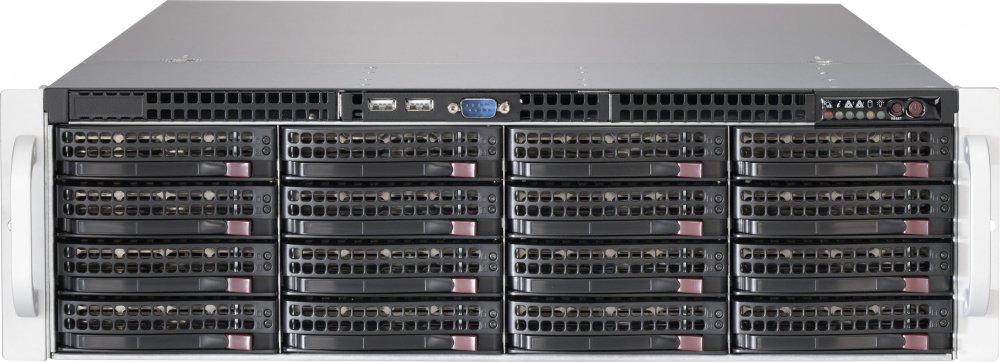
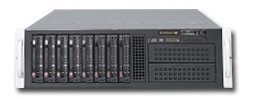
Can you please do the Supermicro 835 and 836? Thanks a ton for all your work!
-
I just got my system up and running with my Supermicro X11SCH-F, E-2278G, and Supermicro CSE-836BE16-R920B. Everything is looking good but I've noticed that my CPU fan is stuck at 400 RPM and just isn't responding to any increases in percentage. I think it has a lot to do with how I currently have things laid out: FAN1: FAN-0074L4 (on fan wall) FAN2: FAN-0074L4 (on fan wall) FAN3: N/A (hopefully will be 3rd 0074L4 that's currently on FANB once I get a extension cable) FAN4: 2 x FAN-0104L4's (on back of case) that are bound together with a cable splitter FANA: Noctua NH-9DL with NF-A9 (already lowered the thresholds to 300rpm) FANB: FAN-0074L4 (on fan wall) Right now, FAN1234 are tied to HDD Temps and FANA is tied to CPU Temp. I'm sure I have the CPU fan plugged into the wrong fan slot but I'm open to suggestions on how to configure this.
-
Also, search for the BPN-DE3500HD, it's the newer version of the same thing.
-
Any chance you could upload a picture? I'm getting closer to doing a build and the X11SCH-F is just really hard to find at the moment. I'll probably have to go with a X11SCA-F simply because it's easier to find.
-
Very cool. Please let us know if you’re able to get QuickSync and Plex working with that Beta BIOS and 6.8.2 (I know it’s on 4.19.x but some people have reported 9th Gen QuickSync working).
-
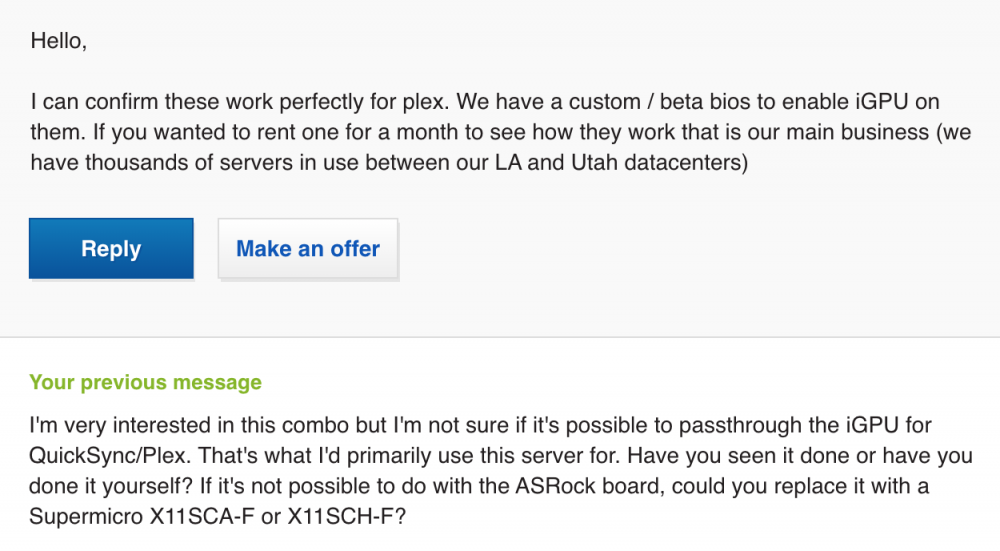
Based upon my contact with the seller of this item: https://www.ebay.com/itm/ASrock-E3C246D4U-Server-Xeon-E-MB-w-2288G-CPU-64GB-ECC-RAM-256GB-NVMe-SSD-WOW/193237315094?ssPageName=STRK%3AMEBIDX%3AIT&_trksid=p2060353.m1438.l2649 This is my conversation with him:
-
I forget how much work y'all did this past year. There were a lot solid changes from 6.6.7 to 6.8. Can't wait till 6.9 and beyond! EDIT* Almost forgot to say I really like the new dashboard layout and login page. For 2020, I'm excited to see what the newer linux kernels can do for Ryzen and hopefully we see multiple arrays.
-
So, you’re recommending to not use this motherboard with a LSI 9211-8i? I don’t want to change my HBA card and I definitely don’t want to modify the motherboard in a way that would hurt the warranty. Can someone who has this motherboard and a LSI HBA inserted in one of the top two PCIE slots comment on this subject? If it’s too risky, I’ll just get the X11SCH-F and hopefully passthrough the iGPU for Plex and pray it works similarly to this board.
-
It's the Norco SS-500 hard drive cage...https://www.newegg.com/norco-ss-500-hot-swap-rack-module/p/N82E16816133030 **Mind you, I would never buy anything from Norco. Their customer service has gone from awful to non-existent. If you have issues with these, good luck ever getting in contact with them (they don't have an answering machine setup, they don't answer the phone, and they don't respond to emails). I ordered a part from their online store and they never delivered the item that was said to be in-stock. PayPal reimbursed me because they couldn't even get in contact with Norco. I'm about 98% sure they've actually gone out of business. ****If you want decent hard drive cages, go with Supermicro CSE-M35T-1B's. If those are too expensive get either the iStarUSA BPU-350SATA (BPU-350HD) or BPN-DE350SS (BPN-DE350HD). The iStarUSA cages are a little less solid than the Supermicro ones but they seem to have an active customer service and they come in trayless varieties.Anyone have issues with putting HBA's (LSI 9211-8i's) in the PCIE slots? I got a little spooked looking at this thread: I'm wondering if it's possible to happen to this motherboard because it has very similar metal shielding over the PCIE lanes. Maybe I'm just being overcautious but I thought it was worth asking. I could always go with the X11SCH-F and get a dedicated IPMI LAN port, no special configuration for IPMI and QuickSync at the same time (at least that's what's been reported in this thread) and no metal shielding but it's a lot harder right now to find in-stock.I’m not the OP but here is a link to Provantage where it is In-stock at the moment... https://www.provantage.com/intel-cm8068404225303~7ITEP6KU.htmFor those that have this is board, did you have to use two Ethernet cables (one to LAN1 and one to LAN2)? Or did you just funnel everything through LAN1 (IPMI and regular internet access)? I see in the manual that LAN1 is shared with IPMI but I wasn’t sure if you should also just use the other LAN port for regular operation as well at the same time. I’d rather go with the X11SCH-F which has a dedicated LAN for IPMI but that board seems to be out of stock everywhere.I've begun to recommend this very thing to people that want a case that can hold a lot of hot-swap drives. Buy a Supermicro CSE-846, put it on its side, then put it on two of these: https://www.amazon.com/HumanCentric-PC-Stand-Computer-Adjustable/dp/B07RGRV1VX/ref=sr_1_7?keywords=desktop+computer+cart&qid=1578443780&sr=8-7 . Problem solved.Audio transcoding takes up so little CPU power most people don’t end up doing anything with it. Ideally if you wanted to make sure audio is not transcoding, you could either get a different sound system/media player or just pre-encode all your media to AAC Stereo (which will Direct Play on practically everything).




