





sonic6
Members
-
Joined
-
Last visited
Everything posted by sonic6
-
Hey, i saw your overseerr release in CA. Can you tell me what the difference is between your and @diamkil release?
-
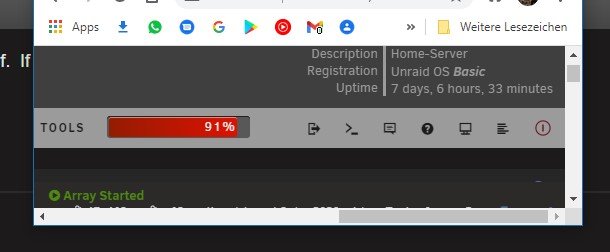
if i delete all custom tabs, i can shrink the window and all icon are still displayed. maybe there is a way that custom tabs are like the "normal" unraid tabs?
-
hi, i've got a problem, when i shrink the browser windows. the buttons on the right disappears, while i am using custom tabs


-
Danke erst einmal für den Link, werde mir das mal die nächsten Tage genauer ansehen. Die APC werde ich mir auch mal anschauen. Auf den ersten Blick passt die Eaton aber besser von den Einbaumaßen. Eine Ersatzbatterie stellt für mich kein Problem da, die Eaton hat Standart 12V Bleiakku, ich arbeite direkt an der Quelle.
-
EDIT1: Lösung im Post 944728 (klick mich) EDIT2: Sollte es Probleme geben, dass der Server zwar runterfährt, aber nicht wieder hoch kommt, hier die Lösung (klick mich). Moin, zum Ende diese Jahres würde ich mir gerne etwas neues für mein kleines Server Setup gönnen. Da dachte ich mir, dass es eine USV werden soll. Das Setup, welches darüber laufen soll ist folgendes: -Fritzbox 7590 -HPE ProLiant MicroServer Gen10 mit Unraid -Ubuntu Plex Server -VIELLEICHT meinen Desktop PC Alles zusammen (abgesehen vom Desktop) ist im Idle bei knapp 45-50W und unter Last ca 100W. Das System soll eine Unterbrechung der Energiezufuhr kurz überbrücken und/oder die Systeme runterfahren. Sollte ich den Desktop mit darüber laufen lassen, soll dieser einfach nur geregelt Runterfahren. Als erstes ist mir die Eaton Ellipse ECO mit USB Reihe ins Auge gefallen. Meiner Recherche nach funktionieren die USB Modelle mit Unraid und fahren diese auch geregelt Runter. Außerdem sind die Eaton USVs recht kompakt und würden von der Größe her gut bei mir unter kommen. Hierzu hatte ich das 650VA Modell oder 800VA Modell in der näheren Auswahl. Vielleicht habt Ihr ja noch einen Tipp oder eine Alternative für mich. Abgesehen davon: Da ich per USB ja nur ein Endgerät zum Runterfahren von der USV ansteuern kann. Gibt es eine Möglichkeit vom Unraid-Server per Netzwerk ein Shutdown Signal an Ubuntu und Windows per Netzwerk zu senden?
-
@S3ppo please try deactivating the subtitles
-
I knew that kind of mail. Got those once every few month, but i forgot to ask for a solution.
-
So, @ich777 heard my wish: https://hub.docker.com/r/ich777/ferdi-client/ Also on CA.
-
Ab hier müsste sich jemand einschalten, der etwas mehr Ahnung hat. Mit meinem gefährlichen Halbwissen, würde ich dir nur mehr Probleme machen. Sorry
-
Schau mal hier wurde dein Problem schon behandelt. Wenn du danach noch fragen hast, immer raus damit: Vielleicht Postet du auch noch welchen Router du genau hast. Die Leute im Chat haben auch nicht immer das richtige Wissen.
-
Wenn du weißt welcher Typ das ist vielleicht. Es wird wohl am Rebind-Schutz liegen. Dein Router muss NAT Loopback beherschen.
-
Also, ich komme von mir aus auf deinen Nextcloud Container, d.H. dass dein SWAG und Nextcloud Setup an sich richtig scheint. Was macht dein Browser, wenn du deine https://testhomenas.duckdns.org aufrufst? Welchen Router hast du?
-
'trusted_proxies' => array ( 0 => 'swag', ), habe ich auch noch, steht auch in der "nextcloud.subdomain.conf" 'trusted_domains' => array ( 0 => 1 => bei dir steht 0=> und 0=> , keine Ahnung ob das ne Auswirkung hat.
-
Könnte es vielleicht am DNS-Rebind-Schutz des Routers liegen? Wenn ich die IP:Port meines Nextcloud Container aufrufe, dann wird diese automatisch durch meine URL ersetzt. Funktionieren denn andere Container mit SWAG?
-
schau mal unter appdata\nextcloud\www\nextcloud\config\config.php " 'overwrite.cli.url' => " ich habe hinter der Domain noch den Port ":444", das ist der einzige Unterschied zu meinem Setup, der mir auffällt. und Ports sind auch alle weitergeleitet?
-
Die IP deines Unraid-Server ist 10.0.0.2?
-
hm, i don't understand anything, but maybe this will help you? https://github.com/getferdi/server/issues/40#issuecomment-719511938 sidequestion: is there a docker version of Ferdi-Client?
-
Hey, does Ferdi Server write a Log or log failed logins? I want to try adding Fail2Ban.
-
hey, can someone tell me, if this is normal? the SABnzbd.py has the highes CPU usage the most of the time.

-
i created the passwd before, the lines for 'Debian.sh' was what i am looking for. now it works, thank you very much.
-
I want to use the x11vnc task which one starts up with the docker. So i mapped in the Docker template container-port 5900 to host-port 1337 (just an example). Can i set a passwd for that task? if i use your guide, it will start a second instance of x11vnc with port 5901. Or is it better to map the port 5901 to 1337 and setting up a second x11vnc with the passwd?
-
Hey, i was playing around with the DebianBuster Docker. The thing i tried is the VNC. So i mapped 5900 to a port i choose (lets say 5901) If i forward this port on my router to my unraid server with port 5901, i can instant connect to the docker. Without a password. I there a way setting a password up?
-
DebainBuster sounds like a good all-in-one solution for my usecase. I will give it a try.
-
Apache Guacamole with Firefox/Chrome gives me the benefit accessing my Unraid GUI, VMs or other http services inside my network from every device without installing anything.
-
So you say, if i am doing it like following, i am safe?: -link unraid GUI through SWAG like gui.mydomain.de -only access while using organizr auth (organizr2 docker) with F2B and 2FA (like google auth app)



