sonic6
Members
-
Joined
-
Last visited
Everything posted by sonic6
-
Sorry, i wasn't at home. So, if i start the "working" xml i can see in the unraid dashbaord that Thread "1" goes up to 100% for a few second. Then the load from Thread "1" goes down and Thread "7" goes up to 100%. After that both are beetween 20%-30%. With "your" xml only Thread "1" goes up to 100% for a few seconds and then nothing. Both Threads goes down to 5% and i can't connect to the VM with ssh. I don't have any error or messeages in the logs, so i don't know where or for what i can take a look.
-
Does not work... I don't understand this... maybe it is the image?
-
I never change this, and it works without problems for two month. Thank you very much, I will try your recommend xml and report later.
-
I don't know why, but i copied the wrong XML. Hi used multifunction on all GPUs but the main difference between the Q35 and i440 template is, that the CPU uses diffent "bus" on Q35 and "slot" on i440. If i change it to bus='0x00' on all GPUs and use slot='0x01', '0x02', '0x03' then the VM starts. But i don't understad why this will not startup: <?xml version='1.0' encoding='UTF-8'?> <domain type='kvm' id='2'> <name>hiveos</name> <uuid>76c45fbe-5d5b-13bd-b6bf-5360db4c5437</uuid> <metadata> <vmtemplate xmlns="unraid" name="Ubuntu" icon="ubuntu.png" os="ubuntu"/> </metadata> <memory unit='KiB'>4194304</memory> <currentMemory unit='KiB'>4194304</currentMemory> <memoryBacking> <nosharepages/> </memoryBacking> <vcpu placement='static'>2</vcpu> <cputune> <vcpupin vcpu='0' cpuset='1'/> <vcpupin vcpu='1' cpuset='7'/> </cputune> <resource> <partition>/machine</partition> </resource> <os> <type arch='x86_64' machine='pc-q35-6.1'>hvm</type> <loader readonly='yes' type='pflash'>/usr/share/qemu/ovmf-x64/OVMF_CODE-pure-efi.fd</loader> <nvram>/etc/libvirt/qemu/nvram/76c45fbe-5d5b-13bd-b6bf-5360db4c5437_VARS-pure-efi.fd</nvram> </os> <features> <acpi/> <apic/> </features> <cpu mode='host-passthrough' check='none' migratable='on'> <topology sockets='1' dies='1' cores='1' threads='2'/> <cache mode='passthrough'/> </cpu> <clock offset='utc'> <timer name='rtc' tickpolicy='catchup'/> <timer name='pit' tickpolicy='delay'/> <timer name='hpet' present='no'/> </clock> <on_poweroff>destroy</on_poweroff> <on_reboot>restart</on_reboot> <on_crash>restart</on_crash> <devices> <emulator>/usr/local/sbin/qemu</emulator> <disk type='file' device='disk'> <driver name='qemu' type='raw' cache='writeback'/> <source file='/mnt/cache_vm/domains/hiveos/vdisk1.img' index='1'/> <backingStore/> <target dev='hdc' bus='sata'/> <boot order='1'/> <alias name='sata0-0-2'/> <address type='drive' controller='0' bus='0' target='0' unit='2'/> </disk> <controller type='pci' index='0' model='pcie-root'> <alias name='pcie.0'/> </controller> <controller type='pci' index='1' model='pcie-root-port'> <model name='pcie-root-port'/> <target chassis='1' port='0x8'/> <alias name='pci.1'/> <address type='pci' domain='0x0000' bus='0x00' slot='0x01' function='0x0' multifunction='on'/> </controller> <controller type='pci' index='2' model='pcie-root-port'> <model name='pcie-root-port'/> <target chassis='2' port='0x9'/> <alias name='pci.2'/> <address type='pci' domain='0x0000' bus='0x00' slot='0x01' function='0x1'/> </controller> <controller type='pci' index='3' model='pcie-root-port'> <model name='pcie-root-port'/> <target chassis='3' port='0xa'/> <alias name='pci.3'/> <address type='pci' domain='0x0000' bus='0x00' slot='0x01' function='0x2'/> </controller> <controller type='pci' index='4' model='pcie-root-port'> <model name='pcie-root-port'/> <target chassis='4' port='0xb'/> <alias name='pci.4'/> <address type='pci' domain='0x0000' bus='0x00' slot='0x01' function='0x3'/> </controller> <controller type='pci' index='5' model='pcie-root-port'> <model name='pcie-root-port'/> <target chassis='5' port='0xc'/> <alias name='pci.5'/> <address type='pci' domain='0x0000' bus='0x00' slot='0x01' function='0x4'/> </controller> <controller type='pci' index='6' model='pcie-root-port'> <model name='pcie-root-port'/> <target chassis='6' port='0xd'/> <alias name='pci.6'/> <address type='pci' domain='0x0000' bus='0x00' slot='0x01' function='0x5'/> </controller> <controller type='pci' index='7' model='pcie-root-port'> <model name='pcie-root-port'/> <target chassis='7' port='0xe'/> <alias name='pci.7'/> <address type='pci' domain='0x0000' bus='0x00' slot='0x01' function='0x6'/> </controller> <controller type='pci' index='8' model='pcie-root-port'> <model name='pcie-root-port'/> <target chassis='8' port='0xf'/> <alias name='pci.8'/> <address type='pci' domain='0x0000' bus='0x00' slot='0x01' function='0x7'/> </controller> <controller type='pci' index='9' model='pcie-to-pci-bridge'> <model name='pcie-pci-bridge'/> <alias name='pci.9'/> <address type='pci' domain='0x0000' bus='0x01' slot='0x00' function='0x0'/> </controller> <controller type='virtio-serial' index='0'> <alias name='virtio-serial0'/> <address type='pci' domain='0x0000' bus='0x02' slot='0x00' function='0x0'/> </controller> <controller type='sata' index='0'> <alias name='ide'/> <address type='pci' domain='0x0000' bus='0x00' slot='0x1f' function='0x2'/> </controller> <controller type='usb' index='0' model='ich9-ehci1'> <alias name='usb'/> <address type='pci' domain='0x0000' bus='0x00' slot='0x07' function='0x7'/> </controller> <controller type='usb' index='0' model='ich9-uhci1'> <alias name='usb'/> <master startport='0'/> <address type='pci' domain='0x0000' bus='0x00' slot='0x07' function='0x0' multifunction='on'/> </controller> <controller type='usb' index='0' model='ich9-uhci2'> <alias name='usb'/> <master startport='2'/> <address type='pci' domain='0x0000' bus='0x00' slot='0x07' function='0x1'/> </controller> <controller type='usb' index='0' model='ich9-uhci3'> <alias name='usb'/> <master startport='4'/> <address type='pci' domain='0x0000' bus='0x00' slot='0x07' function='0x2'/> </controller> <interface type='bridge'> <mac address='52:54:00:da:1a:0e'/> <source bridge='br0'/> <target dev='vnet1'/> <model type='e1000'/> <alias name='net0'/> <address type='pci' domain='0x0000' bus='0x09' slot='0x01' function='0x0'/> </interface> <serial type='pty'> <source path='/dev/pts/0'/> <target type='isa-serial' port='0'> <model name='isa-serial'/> </target> <alias name='serial0'/> </serial> <console type='pty' tty='/dev/pts/0'> <source path='/dev/pts/0'/> <target type='serial' port='0'/> <alias name='serial0'/> </console> <channel type='unix'> <source mode='bind' path='/var/lib/libvirt/qemu/channel/target/domain-2-hiveos/org.qemu.guest_agent.0'/> <target type='virtio' name='org.qemu.guest_agent.0' state='disconnected'/> <alias name='channel0'/> <address type='virtio-serial' controller='0' bus='0' port='1'/> </channel> <input type='tablet' bus='usb'> <alias name='input0'/> <address type='usb' bus='0' port='1'/> </input> <input type='mouse' bus='ps2'> <alias name='input1'/> </input> <input type='keyboard' bus='ps2'> <alias name='input2'/> </input> <audio id='1' type='none'/> <hostdev mode='subsystem' type='pci' managed='yes'> <driver name='vfio'/> <source> <address domain='0x0000' bus='0x0a' slot='0x00' function='0x0'/> </source> <alias name='hostdev0'/> <address type='pci' domain='0x0000' bus='0x04' slot='0x00' function='0x0' multifunction='on'/> </hostdev> <hostdev mode='subsystem' type='pci' managed='yes'> <driver name='vfio'/> <source> <address domain='0x0000' bus='0x06' slot='0x00' function='0x0'/> </source> <alias name='hostdev1'/> <address type='pci' domain='0x0000' bus='0x05' slot='0x00' function='0x0' multifunction='on'/> </hostdev> <hostdev mode='subsystem' type='pci' managed='yes'> <driver name='vfio'/> <source> <address domain='0x0000' bus='0x0d' slot='0x00' function='0x0'/> </source> <alias name='hostdev2'/> <address type='pci' domain='0x0000' bus='0x06' slot='0x00' function='0x0' multifunction='on'/> </hostdev> <hostdev mode='subsystem' type='pci' managed='yes'> <driver name='vfio'/> <source> <address domain='0x0000' bus='0x0a' slot='0x00' function='0x1'/> </source> <alias name='hostdev3'/> <address type='pci' domain='0x0000' bus='0x04' slot='0x00' function='0x1'/> </hostdev> <hostdev mode='subsystem' type='pci' managed='yes'> <driver name='vfio'/> <source> <address domain='0x0000' bus='0x06' slot='0x00' function='0x1'/> </source> <alias name='hostdev4'/> <address type='pci' domain='0x0000' bus='0x05' slot='0x00' function='0x1'/> </hostdev> <hostdev mode='subsystem' type='pci' managed='yes'> <driver name='vfio'/> <source> <address domain='0x0000' bus='0x0d' slot='0x00' function='0x1'/> </source> <alias name='hostdev5'/> <address type='pci' domain='0x0000' bus='0x06' slot='0x00' function='0x1'/> </hostdev> <memballoon model='none'/> </devices> <seclabel type='dynamic' model='dac' relabel='yes'> <label>+0:+100</label> <imagelabel>+0:+100</imagelabel> </seclabel> </domain> If i delete one of the Cards(+multifunction) the VM will start. Doen't matter which one. (I also don't need the multifunction as well, for a VM startup) Or isn't it possible to start a VM with 3 GPU on Bus? (I need the Card on "bus", because the card values on "slot" are all the same (temperatures, hashrate, etc) *edit* and thank you @ghost82 ! i saw you post post and try to understand how the adressing fpr passthroug works. but i dont get it.
-
ca 40W im Spinup ca 25W im Spindown
-
Also ich habe den Energieverbrauch jetzt nochmal ein wenig beobachtet. Mein Gesamtsystem ist schwer zu beurteilen, da jetzt GPUs verbaut und ne VM dauerhaft am laufen habe. Was ich aber definitiv beurteilen kann, ist dass meine WD Reds (2x10TB, 1x4TB) im Spinup ca 15W Mehrverbrauch verursachen. Persönlich bin ich vom Spindown wieder abgerückt, da ich mehr als 10 Spinup/Downs pro Tag habe. Das sind 30€/Jahr an Mehrkosten, die zumindest in meinen Augen, in keinem Verhältnis mit einem potenziellen Ersatz stehen. Hier ist sicherlich auch noch mehr sparpotenzial, wenn man den SATA Controller vom Board nutzt, statt eines HBA, da die CPU dann einen höheren C-State erreichen kann. Wie das letztendlich in Zahlen aussieht, können aber anderen besser beurteilen.
-
Hey @ab5g did you found a solution?
-
Hi, i had running HiveOS as a VM for over two month without problems. Last weekend i try adding a third GPU, but the VM won't start. I had to switch over to i440fx. (With i400fx i had some other problem with the WebUI, but this is another story.) So, i created a new VM, added the image and my GPUs with i440fx. Now i am trying why Q35 will not work, or what i do wrong? Here is my XML: Maybe someone can take a look and can give me a hind?
-
@eatoff @Kam
-
Gut, erstere wäre tatsächlich eine Schnapps-Idee, hatte diese Fall noch nicht. aber von mnt/user zu /mnt/user0 ist eine option um den Cache zu umgehen.
-
Warum hat es bei mir geklappt? Weil "temp" ein Cache:prefer Share ist und die Daten auf dem Cache, statt auf dem Array lagen? Ware vielleicht von /mnt/user/... -> /mnt/disk/... oder /mnt/user/... -> /mnt/user0/... eine "lösung"?
-
Ich habe damals 25€ bei eBay gezahlt, zur Zeit gehen die so bei 50€ los.
-
Es gab einen Grund, wieso ich mich gerade für dieses Board entschieden habe, aber es war nicht WIFI. Ich brauchte ein miniITX Board, für das Gehäuse, welches ich nutzen wollte (DS380). Die Auswahl war nicht besonders groß, aber die zwei m.2 Slots waren dann letztendlich Ausschlag gebend für mich um am Ende bei dem kompakten Board die "möglichst viele" Slots rauszuholen. Zur Zeit nutze ich beide m.2 Slots sogar mit m.2 zu PCIe Risern. Der SATA Controller ist gar nicht so speziell. Habe ich vor ein paar Jahren günstig auf Ebay gekauft. Letztendlich stellt sich raus, dass es einer der sparsameren HBAs auf dem Markt ist und für HDDs mit ein paar SATA-SSDs vollkommen ausreichend ist. Wie es mit anderen "SATA-Erweiterungen" aussieht kann ich gar nicht genau sagen. Habe nur oft gelesen, dass einige Probleme machen und einige Karten ja einfach nur SATA "aufteilen", welche mit Unraid im Array nicht kompatible sind. Die ca 25W sind aber mit Vorsicht zu genießen. Unraid hat nur 4 Threads der CPU zugeteilt bekommen, Boost ist deaktiviert und so weiter. Wenn alle Platten (4xHDD,3xSSD) am laufen sind, war ich bei 35-40W. Mit Unraid 6.10 habe ich den Server etwas umgebaut, seitdem kam ich nicht mehr unter die 40W. Woran das liegt, konnte ich bisher noch nicht rausfinden. Ps: Mein Board ist nur noch sehr schwer zu bekommen. Es gibt zwar einen Nachfolger, dort sind aber in einigen CPU Kombinationen nicht mehr beide m.2 Slots gleichzeitig nutzbar.
-
@Reptar yes. So i have to downgrade the OnlyOffice Plugin. This helped me: https://help.nextcloud.com/t/error-after-upgrading-app/126540/17 only the command on Step 5 isn't right. Maybe this is the right one: find ./onlyoffice -type d -exec chmod 0750 {} \; find ./onlyoffice -type f -exec chmod 0640 {} \;
-
@chvb Is an upgrade to 6.4.2.6 with your OnlyOfficeDocumentServer possible? With the latest Plugin Version you container will not open Files.
-
Also ich habe meinen Fehler gefunden: Es war der GeoBlock in SWAG. Mit 6.10 hatte ich mal SWAG bei mir aufgeräumt und auch den GeoBlock eingerichtet. Folgende Änderung machte nun wieder alles Erreichbar bei mir:

-
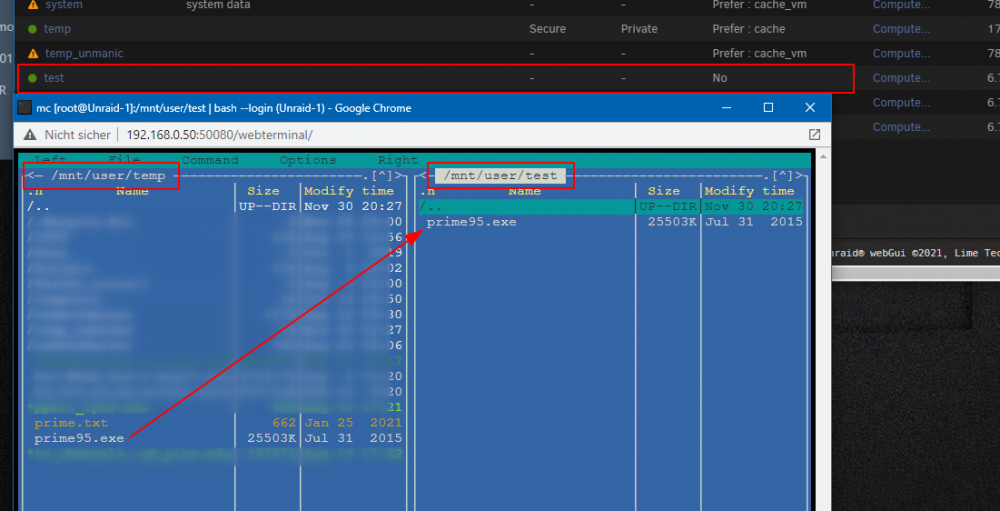
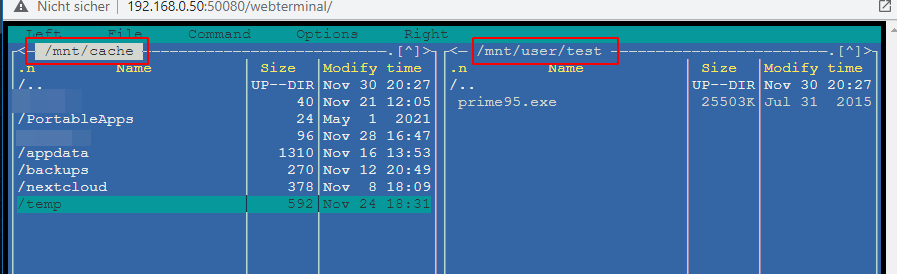
habe es mal versucht nachzustellen: Und hier mein Cache Inhalt: Die Datei "prime95.exe" wurde direkt auf das Array kopiert.
-
Ich weiß nicht genau was du mit "mc" meinst, aber wenn du manuell kopierst hast du folgende optionen: *edit* okay, Midnight Commander im Terminal. quelle -> /mnt/user/share_name hier wird die Datei in den Share kopiert, wobei deine "cache einstellungen" beachtet werden. Wenn es auf "yes" steht, landen die daten erst im cache und werden dann vom mover verschoben. Bei "prefer" verbleiben die Daten auf dem Cache, bis kein Platz mehr ist. Sobald wieder Platz ist, wird der mover alle Daten auf den Cache verschieben. Bei "no" landen die Daten direkt auf dem Array quelle -> /mnt/user0/share_name hier landen die Daten direkt auf dem Array. Wenn der mover jedoch einsetzt, bei "prefer" auf den Cache verschoben. quelle -> /mnt/disk/disk_name hier wählst du explizit das Ziel Laufwerk für deine Daten. Die Frage ist jetzt, wie du genau "verschoben" hast?
-
Ich bin kein Experte, aber ich vermute einfach mal, dass es daran liegt, das man als root ja schon "root" ist und man sich selbst nicht mehr als Superuser identifizieren muss? Ich muss ja als "normaler" Nutzer (mit root Rechten) sudo nur für Befehle verwenden, die Root oder Superuser Privilegien erfordern und mich auch dabei authentifizieren. Danke auf jeden Fall für die Zusammenfassung, werde diese morgen im Tutorial ergänzen.
-
Seit (gefühlt) Unraid 6.10. ist mir auch aufgefallen, dass ich diverse (aber nicht alle) Container über Wireguard nicht mehr erreichen kann. Da wären unter anderem Nextcloud im "proxynet" custom bridge (bekannt aus den Spaceinverdaeone Video). Jedoch sind alle anderen Container aus dieser Custom Bridge zu erreichen. Zusätzlich ist ein Container welcher über einen VPN Container zu erreichen ist, nicht über WireGuard zu erreichen, jedoch über seine URL vom RevereProxy.
-
Gibt mal wieder 25% auf Plex Lifetime https://www.reddit.com/r/PleX/comments/qzlpzl/25_off_lifetime_pass
-
interesting. i did this, bevor i posted this here. now i did it again and it should work. looks good now. thanks
-
Ich hatte die "Download"-Funktion vor/im Urlaub getestet, damit ich im Flieger und am Pool offline was auf meinem Handy (Pixel 5) schauen kann. Hat natürlich nicht geklappt. -Transcoded wurde ein Film, der nicht "kompatibel" war. Ok -Da im Hotel hier und da mal die Verbindung abbrach, konnte kein Film runtergeladen werden. Das "Fortsetzten" von Downloads ist mit der neuen "Download"-Funktion nämlich nicht mehr möglich. -Ein Film was augenscheinlich kommt "gedownloaded". Im Flieger musste ich dann feststellen, dass der Film nicht 1:37, sondern 2:05 lang ist. Letztendlich konnte ich nicht einen Filme/Folge per "Download" schauen.
-
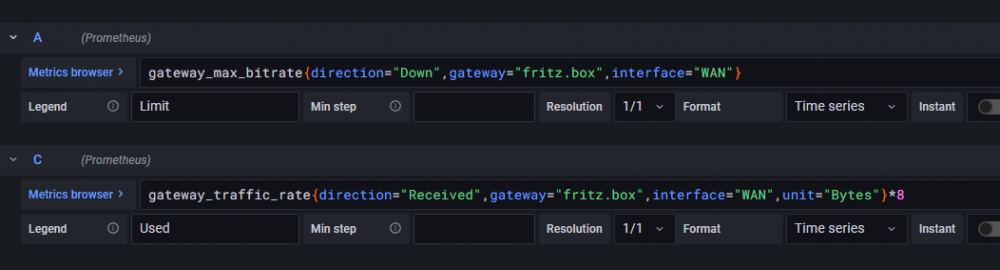
Das kann ich so bestätigen. Für meine 7590 musste ich unter anderem die richtige metric für die verfügbare Bandbreite im Up/Downstream raussuchen und eintragen: Kann mir vorstellen, dass es bei anderen Modellen auch Abweichungen geben kann.
-
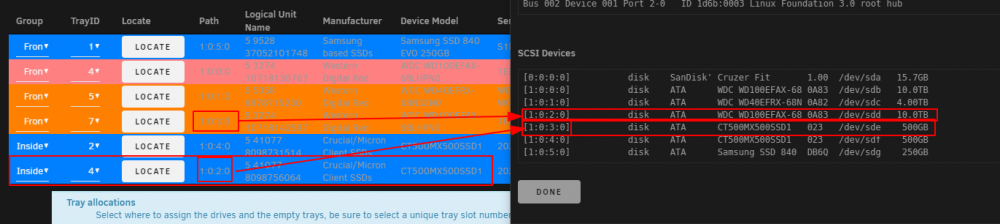
What can i do, when Drives has the wrong Path? The WD Red 10TB and one of my MX500 are swapped.