





CS01-HS
Members
-
Joined
-
Last visited
Everything posted by CS01-HS
-
Ha! Well that explains it, thanks.
-
Unraid seems to be logging scheduled checks as manual (I'm running 6.10.0-rc4.) I noticed it because my scheduled check, which should have paused in the morning, was still running. (I don't have it set to pause manual checks.) Debug log from scheduled check: Apr 7 00:05:01 NAS Parity Check Tuning: DEBUG: Manual Non-Correcting Parity Check running Apr 7 00:05:01 NAS Parity Check Tuning: DEBUG: Resume request Apr 7 00:05:01 NAS Parity Check Tuning: DEBUG: ... Manual Non-Correcting Parity Check already running Apr 7 00:07:01 NAS Parity Check Tuning: DEBUG: Manual Non-Correcting Parity Check running Apr 7 00:07:01 NAS Parity Check Tuning: DEBUG: array drives=4, hot=0, warm=0, cool=4 Apr 7 00:07:01 NAS Parity Check Tuning: DEBUG: All array drives below temperature threshold for a Pause The plugin's reporting matches unraid's history: so I doubt it's a plugin problem, but I'm posting here because unless you're using it you probably won't notice. Anyone else seeing this?

-
Many updates so you might experience some issues but it's available: But if you'd like to try it back up your flash then go to Tools -> Update OS and change the branch from stable to next. Note: Even with this version if I have a folder open in Finder and another process or user moves those files, they often appear in the original folder in my Finder window until I force a refresh by navigating to a different folder then navigating back (as I described in my first reply.)
-
I've had similar issues on MacOS. Try this: Create a folder and drag and drop a file in it Navigate to the folder's parent directory, then back to the folder You should see the new file. MacOS doesn't work well with the version of samba in 6.9.2. Another issue: search doesn't work. 6.10.0-rc4, which includes a later samba version, seems better but I haven't had much time to test.
-
Ah, I assumed shfs intercepted and translated the command. I can see how that wouldn't bite me if I were only dealing with a single cache pool. Thanks, looking forward to the plugin!
-
Running 6.10.0-rc2 I have two shares, call them A and B and two cache pools, call them A' and B' Share A is set to Cache: Yes, with Cache Pool A' Share B is set to Cache: Only, with Cache Pool B' I wanted to move files from Share A to Share B All files resided in Share A's cache. I opened Krusader (Host Path: /mnt -> Container Path: /unraid) With two panels: 1. /unraid/user/A/x/ 2. /unraid/user/B/y/ and moved files from Panel 1 to Panel 2 (Share A to Share B) But instead of placing them in share B's cache, unRAID created /B/y/ in share A's cache and placed them there. Is that a bug, misconfiguration, user error?
-
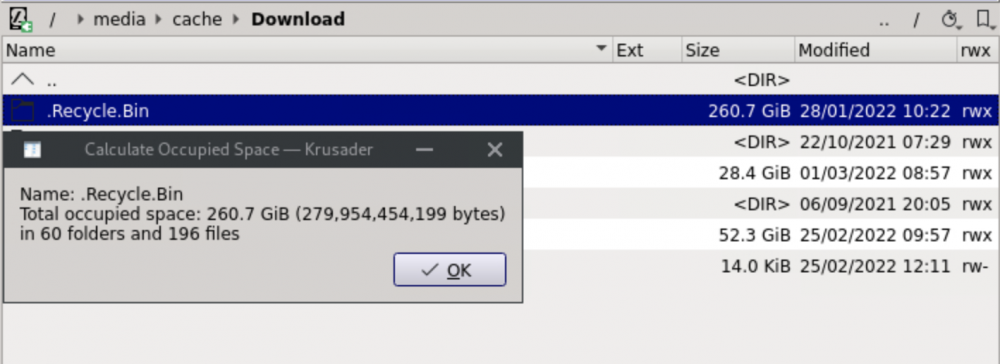
I wish I'd investigated more before "fixing" it but I noticed my cache was much fuller than it should be. Recycle Bin reported 11GB used on my (cache-enabled) Download share but according Krusader it was actually 260GB: Emptying the share's Recycle Bin from the settings page got it down to 0. Anyone else seen that? (I have mover tuning setup to exclude .Recycle.Bin dirs but I don't think that would affect it.)
-
I've been running v1.23.2 because H265 QSV encoding fails in the later versions. Comparing the conversion logs I see the later versions attempt to use the (newly-added) LowPower option: v1.23.2 [11:17:13] hb_display_init: using VA driver 'iHD' libva info: VA-API version 1.10.0 libva info: User environment variable requested driver 'iHD' libva info: Trying to open /opt/intel/mediasdk/lib64/iHD_drv_video.so libva info: Found init function __vaDriverInit_1_10 libva info: va_openDriver() returns 0 [11:17:13] encqsvInit: using encode-only path latest [11:07:46] hb_display_init: using VA driver 'iHD' libva info: VA-API version 1.12.0 libva info: User environment variable requested driver 'iHD' libva info: Trying to open /opt/intel/mediasdk/lib64/iHD_drv_video.so libva info: Found init function __vaDriverInit_1_12 libva info: va_openDriver() returns 0 [11:07:46] encqsvInit: MFXVideoENCODE_Init failed (-3) [11:07:46] encqsvInit: using encode-only (LowPower) path ... [11:07:46] Failure to initialise thread 'Quick Sync Video encoder (Intel Media SDK)' I saw a suggestion here to disable it: https://github.com/HandBrake/HandBrake/issues/3270#issuecomment-744087448 which I believe I should be able to do by passing -x lowpower=0 to the container template variable AUTOMATED_CONVERSION_HANDBRAKE_CUSTOM_ARGS But it doesn't seem to have an effect, I see the same reference to encode-only (LowPower) path in the conversion log. Any suggestions? Is there a way to get the CLI equivalent of the GUI command so I could run it manually and experiment?
-
My unraid server uses shucked Seagate 2.5" drives (ST5000LM000.) Next to it I have another device with a 3.5" Seagate Ironwolf. When the 3.5" is spinning (and when it's reading and writing) I can hear it. With the 2.5" I can't tell, silent.
-
It runs once and exits. I run it on a different system. On unraid you'd add it as a User Script and set it to run weekly or daily. No it doesn't. For that you'd use the commands I mentioned above, either notice or error:
-
Maybe a better solution but this is what I use for Emby which exhibits the same behavior:
-
I have emby transcode to RAM (/dev/shm/) which works well except for garbage collection – temporary transcode files accumulate. To solve that I wrote a script (run by the container) to delete temporary files and a user-script to launch it when the container's restarted or if it's not running for any other reason. Assumptions: /transcode is the container's path to /dev/shm/ (or wherever you're transcoding to) /transcode/transcoding-temp is the container's path to the directory holding temp transcoding files (emby creates this subdirectory) /system-share/transcoding-temp-fix.sh is the container's path to the following script (make the script executable) transcoding-temp-fix.sh #!/bin/sh TRANSCODE_DIR="/transcode/transcoding-temp" # Delete old files when used space is above this % PERCENT_LIMIT=50 # Delete this many files at a time BATCH_SIZE=10 if [ -d "${TRANSCODE_DIR}" ]; then percent_full=$(df "${TRANSCODE_DIR}" | awk '{print $5}' | tail -1 | tr -dc '0-9') printf "Directory size: \t %3s%%\n" ${percent_full} printf "Directory limit:\t %3s%%\n" ${PERCENT_LIMIT} echo "" while [ $percent_full -gt $PERCENT_LIMIT ]; do if [ $(find ${TRANSCODE_DIR} -type f -name "*.ts" | wc -l) -gt 0 ]; then echo "(${percent_full}%) exceeds limit (${PERCENT_LIMIT}%), deleting oldest (${BATCH_SIZE}) files" find ${TRANSCODE_DIR} -type f -name "*.ts" -exec ls -1t "{}" + | tail -${BATCH_SIZE} | xargs rm else echo "*WARNING* (${percent_full}%) exceeds limit (${PERCENT_LIMIT}%) but files are not transcoding fragments" exit 1 fi percent_full=$(df "${TRANSCODE_DIR}" | awk '{print $5}' | tail -1 | tr -dc '0-9') done else echo "${TRANSCODE_DIR} (TRANSCODE_DIR): directory doesn't exist" fi Now the user script to launch it, set to run every 10 minutes (*/10 * * * *) NOTE: Update EmbyServer name and system-share (if necessary) to match your system #!/bin/bash #arrayStarted=true #clearLog=true # Verify EmbyServer's running running=$(docker container ls | grep EmbyServer | wc -l) if [ "${running}" != "0" ]; then # verify watch command that calls clearing script is running watch_running=$(docker exec -i EmbyServer ps | grep 'watch ' | wc -l) # make sure the detection command ran properly otherwise # we might end up running multiple instances of the script if [ $? -eq 0 ]; then if [ "${watch_running}" == "0" ]; then echo "Clearing script is not running. Re-starting..." docker exec EmbyServer sh -c 'watch -n30 "/system-share/transcoding-temp-fix.sh 2>&1" > /transcode/transcoding-temp-fix.log &' fi else echo "ERROR: Command to detect script run status failed" /usr/local/emhttp/webGui/scripts/notify -e "emby-ClearTranscodingTmp" -s "Command to detect script status failed" -d "" -i "alert" fi fi Monitor the script's activity: tail -f /dev/shm/transcoding-temp-fix.log Sample output: Every 30.0s: /system-share/transcoding-temp-fix.sh 2>&1 2022-10-10 14:45:19 Directory size: 5% Directory limit: 50% NOTES: Script can probably be tweaked to work for Plex If a better solution exists let me know, this was quick and dirty.
-
I think there's a minor bug in the abort logic. With 2 scripts running in the background: myTest and myTestAlternate Aborting myTest aborts both (even though the display shows the latter as still running.) I figure the pattern-matching catches both. Not a big deal but FYI. I was trying to figure out why a script I wrote wasn't working, turns out it wasn't running because of the above.
-
Okay but keep in mind if it ever gets filled (100%) especially if you're running dockers and VMs it'll cause all kinds of problems. So make sure that never happens.
-
Could be your cache went from 30 to 70 between mover runs triggering "move all."
-
Huh, seems to work for me. Are you sure you have this: set higher than this: and mover set to run frequently enough that it triggers at the lower % ?



-
You can minimize it by: caching .DS_Store (which you want to do anyway to avoid waking parity) excluding each share from spotlight disabling calculate all sizes and show icon preview in folders and subfolders (probably easiest to set it as default then clear out .DS_Stores) And after all that Finder will still occasionally wake the drives. I decided it wasn't worth it.
-
Huh, I didn't realize the built-in apcupsd was compatible with a NUT master. I have a similar setup and use the NUT plugin instead. (Detailed description of my setup here.)
-
Thanks, I should have searched. Looks like it goes all the way back to 6.8.3 I triggered it over an SMB connection. This particular share doesn't have NFS enabled unless you meant system-wide. I can imagine SMB bugs triggering the underlying fuse "bug" (which is marked as won't fix) so I'll wait for a version with SMB fixes before digging deeper. I think in my particular case a stale directory listing resulted in the attempted move of non-existent file.
-
The SMB bugs? Sure, but it shouldn't break shfs.
-
I was moving a file from one folder to another within a share (on Mac) when an error occurred and the share disconnected. Checking the terminal I saw /mnt/user/ was inaccessible. Sorry I don't have a full syslog or diagnostics to share but this (coincident with the SMB disconnection) seemed relevant: Dec 4 09:05:21 NAS shfs: shfs: ../lib/fuse.c:1451: unlink_node: Assertion `node->nlookup > 1' failed.
-
And you're sure they sleep with the container stopped? Maybe you have USE_HDDTEMP set to yes? If not I don't know what could be causing it.

-
Apple began AFP deprecation in 2013 and still haven't removed it I assume because they realize their SMB implementation's lacking. I wish unRAID would re-add AFP support but admittedly I don't know how much work's required to maintain it.
-
Did you restart the container after (and verify your commenting out the block persisted through restart) ? Can't imagine with no calls to the drives how it would keep them awake.
-
It's probably the smartctl call in telegraf. Check your config: vi /mnt/user/appdata/Grafana-Unraid-Stack/telegraf/telegraf.conf Do you have nocheck = "standby" in inputs.smart? [[inputs.smart]] # ## Optionally specify the path to the smartctl executable path = "/usr/sbin/smartctl" # # ## On most platforms smartctl requires root access. # ## Setting 'use_sudo' to true will make use of sudo to run smartctl. # ## Sudo must be configured to to allow the telegraf user to run smartctl # ## without a password. # # use_sudo = false # # ## Skip checking disks in this power mode. Defaults to # ## "standby" to not wake up disks that have stoped rotating. # ## See --nocheck in the man pages for smartctl. # ## smartctl version 5.41 and 5.42 have faulty detection of # ## power mode and might require changing this value to # ## "never" depending on your disks. nocheck = "standby" # Otherwise I don't know SAS but I remember some forum discussions of SAS and spindown, maybe you have to customize the call. Worst case you can comment out the whole block which should resolve spindown but will disable SMART stats in grafana.





